


If you've been building with React for a while, you've probably felt it: the framework is at a turning point. Hooks were the last big leap, but today we're witnessing another shift. React is moving away from its old "hydrate everything at once" philosophy and embracing smarter, performance-first rendering patterns, adaptive hydration, islands architecture, and modular rendering.
This isn't just about squeezing milliseconds from your Lighthouse score. It's about React evolving to meet the modern web's demand: fast by default, interactive by design, and adaptive by nature.
The Hydration Problem Nobody Likes to Talk About
Server-side rendering (SSR) was once React's superpower. You got faster initial page loads, better SEO, and content that appeared immediately. But there was a catch: hydration.
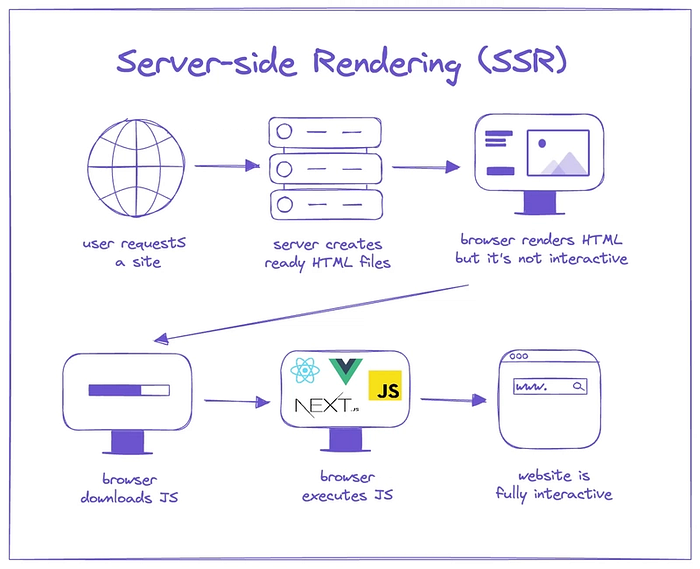
Hydration is the process by which React takes the static HTML sent from the server and "attaches" client-side React code to it. Sounds neat, but here's the dark side:
- React hydrates everything at once, blocking the main thread.
- The page appears to be alive, but it isn't clickable until JavaScript finishes loading.
- Larger apps ship bloated bundles, leaving users tapping dead buttons.
One dev summed it up perfectly: "The page looked ready, but I couldn't click anything for two seconds. That's an eternity on the web."
This is what I call the uncanny valley of performance: users see something that looks real but can't interact with it. In 2025, that's unacceptable.
Enter Islands Architecture: Breaking the Monolith
Think of traditional hydration like trying to light up an entire city block by flipping one giant switch. Island's architecture says, "Why not just turn on the lamps people actually need?"
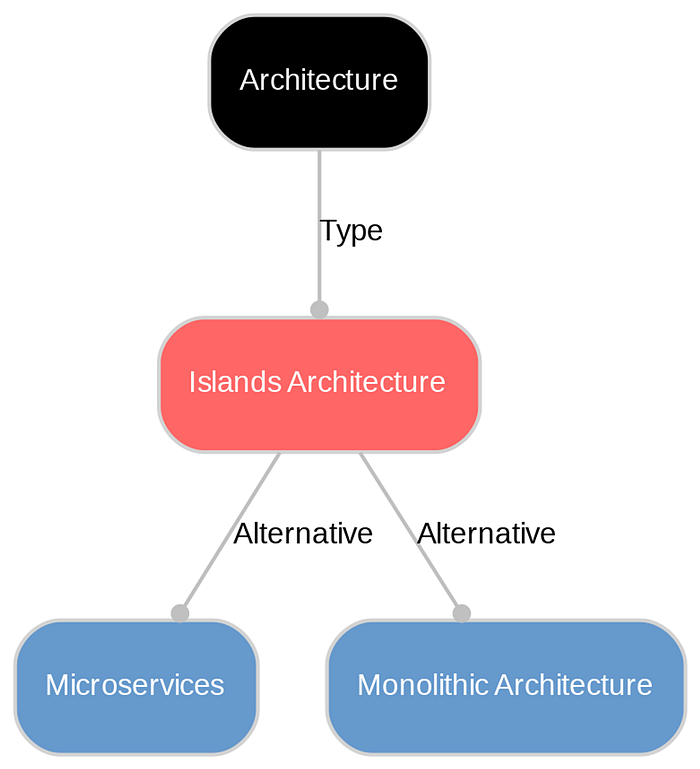
Instead of treating the whole page as a React app, the islands architecture creates small, independent zones of interactivity in a mostly static page.
Core principles:
- Static-first mindset: Most content is just fast HTML.
- Selective hydration: Only the interactive parts (comments, forms, search bars) use JavaScript.
- Independence: Each island hydrates on its own timeline.
- Framework agnosticism: React, Vue, Svelte islands can live on the same page.
Real-world example: A blog post page.
- The title, article body, and footer? Static HTML.
- The comment box and newsletter signup? React islands that hydrate independently.
This shift alone has been shown to cut JavaScript bundles by 60% and improve initial load times by 37%. That's not a tweak — that's a paradigm shift.
Adaptive Hydration: Smarter, Not Harder
If islands decide what to hydrate, adaptive hydration decides when.
Imagine a comment section at the bottom of your page. Why waste CPU cycles hydrating it immediately when the user hasn't even scrolled halfway down?
Adaptive hydration uses conditions like:
- Visibility: Hydrate only when the component enters the viewport.
- Network speed: Skip fancy widgets on a 2G connection.
- Device power: Don't choke a low-end Android phone with heavy hydration.
- User intent: Only hydrate a dropdown when someone clicks it.
- Idle time: Use the browser's free moments (
requestIdleCallback) to prep hydration silently.
It's like having a personal trainer for your React app: don't waste energy until it's needed.
The Secret Sauce: React 18's Concurrent Features
None of this would be possible without React 18's concurrent rendering. Three features matter most here:
- Selective Hydration: If a user clicks before hydration finishes, React prioritizes that component. No more rage-clicks on frozen buttons.
- Streaming SSR: Instead of sending the whole page at once, the server streams HTML as components are ready. Users see and use parts of the page faster.
- Interruptible Rendering: React can pause heavy rendering to handle urgent user interactions. Think: scrolling stays smooth even while data is loading.
Together, these features make React feel alive.
Modular Rendering: Scaling Responsibly
Now combine islands + adaptive hydration + concurrent rendering, and you get modular rendering.
Each module (header, sidebar, comments) has its own hydration strategy. Some hydrate immediately, some only on scroll, and others never. It's performance that scales linearly with user needs — not developer hopes.
I like to call this the MRAH pattern: Modular Rendering + Adaptive Hydration.
Real-world example:
- Hero and navigation: hydrate instantly.
- Content: static forever.
- Sidebar: hydrate on interaction.
- Comments: hydrate on visibility.
Suddenly, your 3-second time-to-interactive is now under 2 seconds. And your FID (First Input Delay) drops from 100ms to less than 16ms.
What This Means for You
Let's put numbers on it. Sites that have embraced these patterns are reporting:
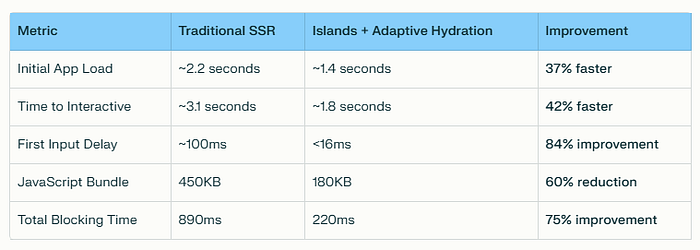
That's not marketing fluff, that's real-world UX impact.
How to Start Implementing
- Leverage Server Components: Keep static content static. Don't waste hydration.
- Progressive Enhancement: Build with HTML first, layer interactivity later.
- Set Performance Budgets: Impose strict limits on JS delivery. Example: no single island >15KB.
- Experiment in Your Existing App: Start by isolating one heavy component (like comments or chat) into an island.
The Future of React Performance
React's evolution isn't just about optimizing milliseconds; it's about making performance a first-class citizen.
We're moving from:
- "Ship it and optimize later" → "Design for performance from the start."
- "Hydrate everything" → "Hydrate intelligently."
- "One giant app" → "Modular, adaptive rendering."
The next wave of React will be defined by apps that feel instant, even as they grow more complex. Apps that respect user devices, networks, and time. Apps that are fast by default, interactive by design, and adaptive by nature.
The web doesn't need more shiny features; it needs sustainable performance. And React is finally growing up to deliver exactly that.
👉 What do you think: Is React's future modular, or are we just overengineering hydration?