

As a retail manager, I constantly faced challenges keeping customers informed about new promotions, special discounts, or their order statuses. It became clear that email marketing, while effective, wasn't immediate enough for time-sensitive offers. That's when I realized the potential of SMS automation to boost customer engagement. With just a few lines of Python code and the power of Twilio's API, I transformed our customer communications, enhancing both customer satisfaction and sales.
This article will show you how you can achieve the same using Python and Twilio to send automated SMS notifications. Whether you're managing a retail business or any other customer-centric operation, this solution is a game-changer.
Why Automate SMS Notifications?
SMS notifications offer several benefits:
- Instant delivery: Reach your customers within seconds, perfect for flash sales or urgent updates.
- High engagement rates: SMS has a much higher open rate than emails.
- Personalization: Each SMS can be tailored to the recipient, making your message more engaging and relevant.
- Customer satisfaction: Timely updates on order status or promotional offers build trust and improve the customer experience.
Automating these messages ensures that your team can focus on more critical tasks while customers stay informed.
Twilio: The Platform Behind the Magic
Before diving into the code, let's talk about Twilio. Twilio is a cloud communications platform that allows you to send and receive SMS messages, make voice calls, and even send emails using APIs. The setup is straightforward, and with Python, you can seamlessly integrate Twilio into your projects.
You'll first need to create a Twilio account, which gives you access to your own virtual phone number and some free credits to get started. Once set up, you can start sending SMS messages using Twilio's API with just a few lines of code.
Step-by-Step Guide to Automating SMS with Python
Step 1: Install the Required Libraries
Before we start, ensure you have the necessary libraries installed. You'll need Twilio's Python library to interact with their API. Use the following command to install it:
pip install twilioStep 2: Set Up Your Twilio Account
- Head over to Twilio's signup page and create an account.
- Once signed in, you'll see a dashboard that gives you access to your Account SID, Auth Token, and a Twilio phone number. These are crucial for sending SMS.
- Store these credentials securely, ideally as environment variables, to prevent exposing sensitive information in your code.
Step 3: Writing the Python Code to Send SMS
Now let's write the Python script that will send SMS messages using Twilio. Here's a simple example
import os
from twilio.rest import Client

# Load environment variables for Twilio credentials
account_sid = os.getenv('TWILIO_ACCOUNT_SID')
auth_token = os.getenv('TWILIO_AUTH_TOKEN')
twilio_phone_number = os.getenv('TWILIO_PHONE_NUMBER')

# Initialize Twilio client
client = Client(account_sid, auth_token)

def send_sms(to, message):
    try:
        # Sending the SMS
        message = client.messages.create(
            body=message,
            from_=twilio_phone_number,
            to=to
        )
        print(f"Message sent successfully with SID: {message.sid}")
    except Exception as e:
        print(f"Failed to send message: {e}")

# Example usage
if __name__ == "__main__":
    customer_phone = "+1234567890"
    notification_message = "Your order has been shipped! Track your package at [link]"
    send_sms(customer_phone, notification_message)
Step 4: Explanation of the Code
- Environment variables: The
TWILIO_ACCOUNT_SID,TWILIO_AUTH_TOKEN, andTWILIO_PHONE_NUMBERare stored as environment variables to keep your credentials secure. - Twilio client: The
Clientobject from Twilio's Python library is used to communicate with their API. - Sending the SMS: The
client.messages.create()method sends the message. You need to specify the message body, the sender's phone number (your Twilio number), and the recipient's phone number.
Step 5: Testing the Script
Once your script is ready, run it in your terminal. If everything is configured correctly, you should receive an SMS on the specified number.
python send_sms.pyTwilio provides a unique message SID for each SMS sent, allowing you to track the delivery status or any issues that arise.
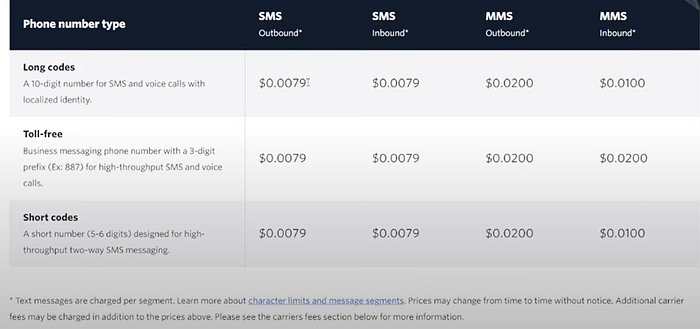
SMS Twilio Pricing
To implement the solution, you should consider the cost of it. here you will find the prices
The Power of Automation for Retail Businesses
Automating SMS notifications can have a massive impact on your retail business:
- Increase Sales: Send time-sensitive promotions or flash sale notifications, prompting immediate action from your customers.
- Improve Customer Satisfaction: Notify customers instantly about their order status, delivery updates, or any issues, keeping them in the loop at all times.
- Save Time: Instead of manually sending updates, this automation ensures your customers are kept informed without extra effort from your team.
Twilio makes this process incredibly easy and scalable. From a small retail business sending a few messages to a larger company sending thousands daily, Twilio's platform scales with your needs.
Conclusion
In today's fast-paced world, communication is key, and SMS provides one of the quickest ways to reach your customers. By automating SMS notifications with Python and Twilio, you not only save time but also significantly enhance your customer service and drive sales.
Remember, technology should work for you, not against you. Automating simple but essential tasks like customer notifications allows you to focus on what truly matters — growing your business.
Follow me on Linkedin https://www.linkedin.com/in/kevin-meneses-897a28127/ and Medium https://medium.com/@kevinmenesesgonzalez/subscribe Subscribe to the Data Pulse Newsletter https://www.linkedin.com/newsletters/datapulse-python-finance-7208914833608478720
Join my Patreon Community https://patreon.com/user?u=29567141&utm_medium=unknown&utm_source=join_link&utm_campaign=creatorshare_creator&utm_content=copyLink
Visit us at DataDrivenInvestor.com
Subscribe to DDIntel here.
Join our creator ecosystem here.
DDI Official Telegram Channel: https://t.me/+tafUp6ecEys4YjQ1