

By Shalini Saravanan — "Tech Savant"
In today's digital landscape, users often switch between different applications and web pages to fulfill their needs. However, transitioning between these platforms can sometimes disrupt the user experience. Example: The user needs to log in again on navigating from the app to the web to retain the same session. To address this challenge, session stitching with Webview provides a solution by seamlessly merging app and web experiences. In this blog, we will explore a detailed approach to session stitching, including authentication, and security considerations.
Initiating Session Stitching
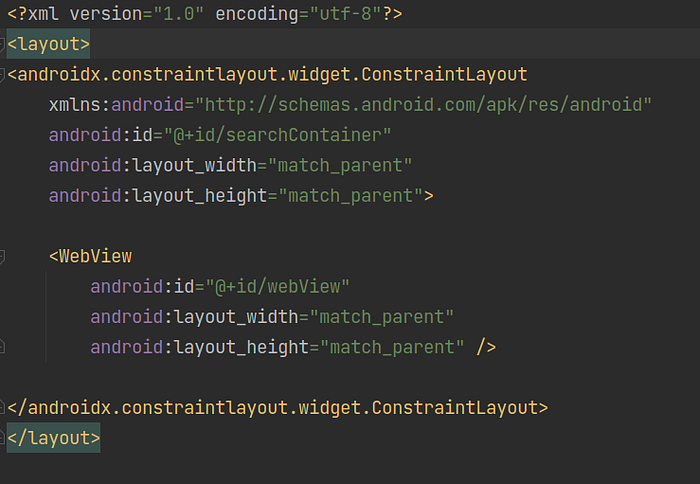
Setting up Webview in XML Layout
When working with Webview in Android, you can define it within an XML layout file to visually structure and position it within your app's user interface.
Generating a JSON Web Token (JWT) for Webview Authentication
When a user opens a Webview within the app, the first step is to generate a short-lived JSON Web Token (JWT). This JWT acts as a bearer token, encapsulating important session information. Specifically, the JWT includes an encrypted AuthToken, which serves as an identifier for the user.
To generate the JWT, the app interacts with Mobile API, a service that securely creates the JWT with the required payload, including the encrypted AuthToken. The JWT is designed to have a limited lifespan, ensuring its validity and security.
Setting a Cookie to Webview
Once the JWT is generated, the app attaches it to the WebView request as a cookie. Cookies are a standard mechanism for passing session-related data between the client (app) and the server (webview). Setting cookies in a WebView can be achieved by utilizing the CookieManager class provided by the Android framework.
Step 1: Get the WebView instance
WebView webView = findViewById(R.id.webView); // Assuming you have defined a WebView in your layout XML with the id "webView"
Step 2: Obtain the CookieManager instance
Next, obtain the instance of the CookieManager using the getInstance() method.
val cookieManager: CookieManager = CookieManager.getInstance()Step 3: Setting the cookie to WebView
val cookieString = "cookie_name = cookie_value ; path=/"
   val url = getUrl()
        cookieManager.setCookie(url, cookieString)
You can also check if the cookie is set to webview or not by using the ValueCallback which is Boolean. This can be done by
val valueCallback: ValueCallback<Boolean?> =
    ValueCallback<Boolean?> { valueCallback ->
        if (valueCallback != null) {
            Log.d("shalini", "Success cookie---->$valueCallback")
        } else {
            Log.d("shalini", "Failure cookie ----> $valueCallback")
        }
    }
cookieManager.setCookie(url, cookieString, valueCallback)
Step 4: Load the URL in the WebView
Finally, load the desired URL in the WebView using the loadUrl() method.
webView.run {
    if (url != null) {
        loadUrl(url)
    }
    settings.javaScriptEnabled = true
    webView.settings.domStorageEnabled = true
    webView.settings.databaseEnabled = true
}
Removing Session-Related Cookies When Logging Out and Navigating to the Web
There are two ways to remove these session related cookies. They are
1. Clearing WebView Cookies
2. Clearing WebView Cache
1. Clearing WebView Cookies:
By utilizing the CookieManager class, you can effectively remove all cookies. This ensures that any session-related information stored as cookies is deleted. Implement the following code:
CookieManager.getInstance().removeAllCookies();
CookieManager.getInstance().flush();
2. Clearing WebView Cache:
In addition to removing cookies, it's important to clear the WebView's cache to eliminate any stored session data. Use the clearCache(true) method on the WebView instance to clear both the memory cache and the disk cache:
webView.clearCache(true);Navigating Back Through Webview Pages
To navigate back through each page within the WebView, you can use the goBack() method of the WebView. This method loads the previous URL in the WebView's history stack, effectively navigating back to the previous page. Check if the WebView can go back by calling the canGoBack() method before invoking goBack().
if (webView.canGoBack()) {
    webView.goBack()
}
In Conclusion, session stitching between apps and the web using WebView is a valuable technique that brings together the best of both platforms. It allows for a smooth and continuous user experience, eliminating session disruptions and enhancing convenience. As the digital landscape continues to evolve, session stitching will play a pivotal role in delivering cohesive and integrated user journeys.
Refrences :
Meet The Team!
Author
Reviewer
Editor
We at CaratLane are solving some of the most intriguing challenges to make our mark in the relatively uncharted omnichannel jewellery industry. If you are interested in tackling such obstacles, feel free to drop your updated resume/CV to careers@caratlane.com!