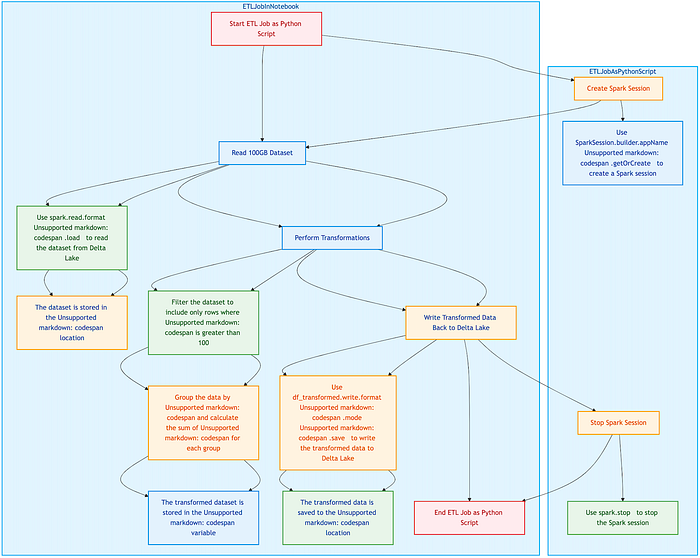


The choice between executing code in Databricks notebooks and running standalone Python scripts significantly impacts performance, memory management, and scalability.
This article explores the fundamental differences between Python scripts and Databricks notebooks, how execution contexts impact memory and resource usage, and best practices for optimizing workload execution in large-scale environments.
Understanding Execution Modes In Databricks
Databricks provides multiple ways to execute workloads, each with distinct execution behaviors, resource management strategies, and performance implications. The two primary execution modes are -
Python scripts, which run as standalone jobs and interact with Databricks programmatically.
Databricks notebooks, which provide an interactive, cell-based execution environment with built-in state management.
Understanding how these execution modes interact with Databricks clusters, execution contexts, and job scheduling is critical for optimizing workload performance and memory efficiency.
- What Are Python Scripts In Databricks?
1. Running .py Scripts As Standalone Jobs In Databricks
Python scripts in Databricks are typically executed as standalone jobs rather than through an interactive UI. These scripts run in non-interactive, batch processing mode, which means -
The script starts execution immediately upon submission.
Once execution is complete, the runtime process exits, freeing up memory.
There is no persistent execution state between runs.
Python scripts are commonly used for production workflows, ETL pipelines, and scheduled jobs that require repeatable execution without manual intervention.
To submit a Python script as a job in Databricks -
databricks jobs run-now --job-id <job-id>Alternatively, using REST API -
curl -X POST https://<databricks-instance>/api/2.1/jobs/run-now \
  -H "Authorization: Bearer <token>" \
  -H "Content-Type: application/json" \
  -d '{ "job_id": 1234 }'
2. How Python Scripts Interact With Databricks Runtime & Clusters
When a Python script runs in Databricks, it -
Uses a dedicated execution context that is terminated upon script completion.
Loads libraries and dependencies specified in the job configuration.
Can be scheduled and managed through Databricks Workflows.
Executes as a single process within a cluster node, without interactive state persistence.
Unlike notebooks, Python scripts do not retain execution state across multiple runs. This means that variables, imported libraries, and cached data do not persist once the script finishes execution.
3. The Role Of databricks-cli & dbutils In Executing Scripts
Python scripts in Databricks can interact with the platform using -
a) databricks-cli (Command Line Interface)
Enables programmatic execution of scripts and job submission.
Allows interaction with workflows, clusters, and job scheduling.
Useful for integrating Databricks with CI/CD pipelines.
Example: Running a Python script on Databricks from the CLI -
databricks workspace import example.py /Workspace/Scripts/example.py
databricks jobs create --json '{
  "name": "PythonScriptJob",
  "new_cluster": { "spark_version": "12.0.x-scala2.12", "node_type_id": "Standard_DS3_v2" },
  "spark_python_task": { "python_file": "/Workspace/Scripts/example.py" }
}'
b) dbutils (Databricks Utilities API)
Provides helper functions for interacting with Databricks clusters, filesystems, secrets, and widgets.
Can be called within a Python script using dbutils.fs, dbutils.secrets, and dbutils.jobs.
Example: Using dbutils to interact with Databricks FileStore -
dbutils.fs.put("/mnt/mybucket/test.txt", "This is a test file", overwrite=True)- What Are Databricks Notebooks?
Unlike standalone scripts, Databricks notebooks provide an interactive execution environment that retains execution state across multiple runs.
1. Execution Within The Databricks UI
Notebooks allow users to -
Execute code in an interactive cell-based format.
Retain session state, meaning variables, imports, and cached data persist across different runs.
Mix different languages (Python, Scala, SQL, R) in a single workflow.
Visualize data inline using built-in graphing and display functions.
Example: A simple stateful execution in a notebook -
counter = 0  # Declaring a variable in one cell
counter += 1  # Running this cell will update the value, persisting state
print(counter)
In Python scripts, this state would not persist across runs, whereas in notebooks, the value of counter carries over across multiple executions.
2. Magic Commands (%python, %sql, %scala, %md) & Cell-Based Execution
Databricks notebooks provide built-in magic commands that allow execution of different languages within the same notebook.
Common Magic Commands

Example: Running SQL within a Python notebook -
%sql
SELECT * FROM sales_data LIMIT 10;
This allows seamless integration of data exploration and transformations without switching environments.
3. How Notebooks Manage Stateful Execution & Interactive Workflows
One of the key advantages of notebooks is state persistence, which enables -
Retaining variable values across different cells.
Caching results for reuse without re-executing queries.
Maintaining library imports without needing to reload them in every execution.
However, this also introduces performance challenges, including -
Memory accumulation over time, leading to higher cluster resource consumption.
Execution context retention, which may degrade performance if too many contexts are active simultaneously.
Example: Potential memory leakage in notebooks
import pandas as pd

# Loading a large dataset into memory
df = pd.read_csv("/mnt/data/large_file.csv")

# The dataframe persists across multiple cells unless explicitly cleared
If this dataframe is not deleted, it remains in memory even if unused, potentially leading to out-of-memory (OOM) errors when running multiple notebooks on the same cluster.
- Key Differences Between Python Scripts & Databricks Notebooks

Understanding execution contexts in Databricks is crucial for choosing the right execution mode.
Python scripts provide lightweight, repeatable, and scalable execution but lack interactive features.
Databricks notebooks enable rapid experimentation but come with higher memory consumption and execution overhead.
Performance Considerations In Databricks Execution
The execution mode chosen in Databricks — Python scripts or Databricks notebooks — has significant implications for execution speed, parallelism, state management, and resource efficiency. Each approach has trade-offs that impact cluster utilization, job completion time, and cost efficiency.
- Execution Speed
1. Startup Time Comparison — Notebooks Vs. Standalone Python Scripts
The initial execution time of a Databricks workload depends on how the environment is initialized. Notebooks retain execution state across multiple runs, but they incur additional UI-layer overheads, making them slower to start than standalone Python scripts.

2. UI Overheads In Notebooks
Databricks notebooks introduce UI-specific performance overheads, such as -
Cell-by-cell execution dependencies, which slow down overall script execution.
Execution history tracking, which consumes additional memory.
Graphical rendering overhead for inline visualizations (e.g., using display() in Spark).
These factors increase execution time, especially for long-running batch jobs that do not require UI interactions.
3. How Python Scripts Bypass UI Overheads
Python scripts in Databricks execute directly on clusters without any UI-layer dependencies, leading to faster execution for batch workloads.
Example: Running a Python script as a standalone job bypasses UI overhead -
databricks jobs run-now --job-id <job-id>This eliminates the need to manually run cells and interact with the UI, making batch executions more efficient.
- Parallelism & Distributed Execution
Databricks workloads are designed to take advantage of distributed computing through Spark clusters, multiprocessing, and parallel execution patterns. However, the way parallelism is handled differs between notebooks and Python scripts.
1. Parallel Execution In Notebooks
Notebooks support limited parallel execution, relying on -
Multi-threaded execution using %run to call other notebooks in parallel.
Manual parallel execution of multiple notebooks using separate execution contexts.
Cell-by-cell execution, which prevents full-scale parallelization.
Example: Running multiple notebooks in parallel using %run -
dbutils.notebook.run("/Workspace/Notebook_1", timeout_seconds=0)
dbutils.notebook.run("/Workspace/Notebook_2", timeout_seconds=0)
Limitations Of Notebook-Based Parallelism:
Cannot fully utilize Spark's distributed execution capabilities.
Execution remains tied to interactive sessions, limiting efficiency.
2. Parallel Execution In Python Scripts
Python scripts allow for full parallelism using -
Multiprocessing (multiprocessing module) to run concurrent processes.
Thread-based concurrency (concurrent.futures) for parallel I/O operations.
Apache Spark's distributed execution model, allowing scalable data processing.
Example: Using Python's multiprocessing module for parallel execution -
from multiprocessing import Pool

def process_data(chunk):
    # Process a subset of data
    return sum(chunk)

data_chunks = [[1,2,3], [4,5,6], [7,8,9]]

with Pool(3) as p:
    results = p.map(process_data, data_chunks)

print(results)
This distributes workload execution across multiple processes, significantly reducing execution time compared to notebooks.
3. Batch Job Execution In Python Scripts
Python scripts can be scheduled as batch jobs using Databricks Job Workflows, ensuring optimal cluster utilization.
Example: Running a batch Python script on Databricks -
{
  "name": "BatchJob",
  "new_cluster": {
    "spark_version": "12.0.x-scala2.12",
    "node_type_id": "Standard_DS3_v2"
  },
  "spark_python_task": {
    "python_file": "dbfs:/scripts/batch_process.py"
  }
}
By leveraging Spark's parallel execution, Python scripts maximize computational efficiency, reducing runtime significantly compared to notebooks.
- Checkpointing & Stateful Execution
The ability to retain execution state is a key differentiator between notebooks and Python scripts.
1. Notebooks Retain Execution State Across Cells
Databricks notebooks allow stateful execution, meaning -
✔ Variables persist across multiple cells.
✔ Imported libraries do not need to be reloaded each time.
✔ Intermediate results are available for debugging and re-use.
Example: Retaining state in a notebook -
# Cell 1: Define a variable
counter = 0
# Cell 2: Modify the variable
counter += 1
print(counter)  # Output: 1
However, persistent execution state can lead to unintended consequences -
Memory accumulation over time, leading to higher cluster resource consumption.
Difficulty in reproducing results if prior cell execution is not controlled.
2. Python Scripts Must Explicitly Handle State Persistence
Python scripts operate in a stateless manner, meaning that -
All variables and execution states are lost after script completion.
State persistence must be explicitly managed using checkpointing mechanisms (e.g., writing to storage).
Example: Explicit state persistence using checkpointing -
import pickle

# Save state
with open('/dbfs/tmp/state.pkl', 'wb') as f:
    pickle.dump(counter, f)

# Load state
with open('/dbfs/tmp/state.pkl', 'rb') as f:
    counter = pickle.load(f)
This ensures that state is persisted across script executions, unlike in notebooks.
- Resource Efficiency
Cluster resource utilization is a key concern in Databricks performance optimization.
1. Persistent Resource Allocation In Notebooks
Notebooks retain execution contexts, keeping clusters allocated even when idle.
Implications of persistent execution contexts -
High memory usage if multiple notebooks are attached to the same cluster.
Unused compute resources remain allocated, increasing Databricks infrastructure costs.
Example: Checking active execution contexts in Databricks -
print(spark.sparkContext.getExecutorMemoryStatus())This displays memory consumption across active execution contexts, which persists even if notebooks are inactive.
2. Ephemeral Execution Of Python Scripts
Python scripts use ephemeral execution, meaning -
Compute resources are allocated only when the script runs.
Clusters spin up and shut down automatically, reducing idle costs.
Example: Configuring an auto-termination policy for script execution -
{
  "new_cluster": {
    "spark_version": "12.0.x-scala2.12",
    "node_type_id": "Standard_DS3_v2",
    "autotermination_minutes": 15
  }
}
This ensures that clusters terminate after execution, optimizing cost efficiency.
Choosing between Databricks notebooks and Python scripts requires evaluating -
✔ Execution Speed — Python scripts execute faster by avoiding UI-layer overheads.
✔ Parallelism — Python scripts leverage multi-threading, multiprocessing, and Spark-based parallel execution.
✔ State Persistence — Notebooks retain execution context, while Python scripts require explicit checkpointing.
✔ Resource Efficiency — Notebooks keep clusters allocated, whereas Python scripts run in ephemeral job mode, reducing costs.
Development & Maintainability Trade-offs In Databricks
Choosing between Python scripts and Databricks notebooks is not just a matter of execution efficiency — it also impacts code maintainability, debugging workflows, and integration with CI/CD pipelines. While notebooks provide an intuitive, interactive environment, Python scripts enable better modularity, reusability, and adherence to software engineering best practices.
This section explores the development trade-offs in terms of code modularity, debugging, logging, and version control strategies for large-scale Databricks projects.
- Code Modularity & Reusability
1. Python Scripts Enable Better Modularization
Python scripts are better suited for structured, modular codebases due to their -
✔ Support for project folder structures and reusable modules.
✔ Ability to import external and custom modules efficiently.
✔ Seamless integration with software engineering best practices (unit tests, dependency injection, and OOP principles).
Example: Modularizing Python scripts in Databricks
📂 databricks_project
 ├── 📂 modules
 │   ├── __init__.py
 │   ├── data_loader.py
 │   ├── model_trainer.py
 ├── main.py
To import and reuse modules -
from modules.data_loader import load_data
df = load_data("/mnt/data/raw.csv")
Using modular imports makes Python scripts more maintainable and scalable.
2. Notebooks Encourage Exploratory, Monolithic Code Structures
Notebooks promote exploratory programming, but they often lead to monolithic, less reusable code due to -
Cell-based execution, where functions and variables are defined inline rather than structured as reusable modules.
Lack of clear project organization, making it harder to refactor or extend code.
Difficulties in reusing code across multiple projects without duplication.
Example: A monolithic notebook structure -
# Data Loading (Cell 1)
df = spark.read.csv("/mnt/data/raw.csv")

# Data Processing (Cell 2)
df_cleaned = df.dropna()

# Model Training (Cell 3)
from sklearn.ensemble import RandomForestClassifier
model = RandomForestClassifier().fit(df_cleaned)
This approach lacks modularization, making it difficult to reuse components across different projects.
3. Using Import In Databricks — Workspace Modules Vs. FileStore
To reuse code across notebooks in Databricks, users can -
Store Python modules in Databricks Workspace (Workspace/Shared/) and import them using %run.
Use Databricks FileStore (dbfs:/) for managing .py modules as files.
Example: Importing a workspace module inside a notebook -
%run "/Workspace/Shared/utilities"Example: Importing a FileStore module -
import sys
sys.path.append("/dbfs/Shared/")
import utilities
However, this approach does not scale well for larger projects, making Python scripts a better choice for structured development.
- Debugging & Logging
1. Debugging In Notebooks — UI-Based Logging & Visualization
Notebooks provide built-in debugging features, such as -
✔ Inline visualization for immediate feedback.
✔ Execution history tracking in the UI.
✔ Logging via display() and Databricks widgets.
Example: Debugging with inline visualization -
display(df) # Visualizing a Spark DataFrame in the UIHowever, notebook logs -
Are UI-bound, making them harder to persist in external logging frameworks.
Do not integrate natively with breakpoints, making step-by-step debugging harder.
2. Python Scripts — Easier Integration With Logging Frameworks
Python scripts support structured logging using logging or MLflow for experiment tracking, enabling -
✔ Persisting logs in external systems (e.g., Datadog, ELK, Azure Monitor).
✔ Granular logging levels (DEBUG, INFO, WARNING, ERROR).
✔ More robust debugging using IDE-based breakpoints.
Example: Logging with Python's logging module -
import logging

logging.basicConfig(level=logging.INFO)
logger = logging.getLogger(__name__)

logger.info("Processing started")
This allows logs to be persisted outside of Databricks, improving traceability and observability.
3. Debugging Python Scripts Via IDEs (PyCharm, VSCode)
Unlike notebooks, Python scripts can be debugged using breakpoints in IDEs -
Set breakpoints to pause execution and inspect variables.
Use interactive debugging with step-through execution.
Profile CPU and memory usage for optimization.
Example: Running A Databricks script In debug mode -
python -m debugpy --listen 5678 --wait-for-client my_script.pyThis approach enables more precise debugging compared to notebooks.
- CI/CD & Version Control
Version control is one of the biggest challenges when managing Databricks notebooks in collaborative development environments.
1.Challenges In Tracking Notebook Diffs (.dbc Vs. .py)
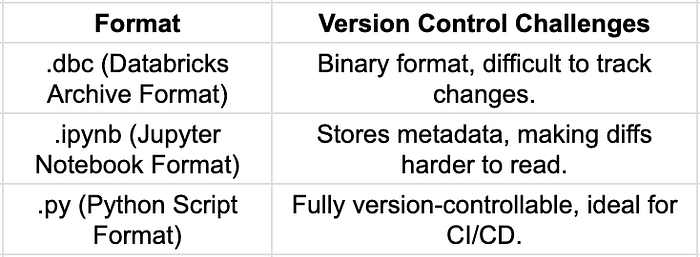
Example: Tracking changes in notebooks via Git can result in large, unreadable diffs -
- "execution_count": 12,
+ "execution_count": 13,
- "outputs": [{"output_type": "stream", "text": ["Old output"]}],
+ "outputs": [{"output_type": "stream", "text": ["New output"]}]
This makes code reviews difficult, compared to the clean diffs in Python scripts.
2. Using Databricks Repos For Git Integration
Databricks introduced Repos to provide native Git integration, allowing -
✔ Syncing notebooks with Git repositories (GitHub, Azure DevOps, Bitbucket).
✔ Using feature branching for collaborative development.
✔ Tracking changes via version control.
Example: Linking a Databricks Repo to GitHub -
databricks repos create --url https://github.com/org/repo.git --path /Repos/my-repoThis improves CI/CD workflows, but Python scripts remain a better fit for software engineering best practices.
3. Python Scripts — Natural Fit For CI/CD Pipelines
Python scripts integrate seamlessly with CI/CD tools, enabling -
✔ Unit testing with pytest and automated quality checks.
✔ Git-based workflows for structured code reviews.
✔ Automated deployment via Jenkins, GitHub Actions, or Azure DevOps.
Example: Automating unit tests in Databricks Python scripts -
pytest tests/ --junitxml=results.xmlBy adopting Python scripts for production workloads, teams gain better CI/CD integration and development rigor.
When considering development and maintainability, the key trade-offs are -
✔ Python scripts provide better modularization, debugging, and CI/CD integration.
✔ Notebooks excel in interactive workflows but introduce maintainability challenges.
✔ Version control and structured logging are significantly easier with Python scripts.
For long-term maintainability and production deployments, Python scripts offer greater flexibility and scalability, while notebooks remain valuable for prototyping and exploratory analysis.
Best Use Cases For Each Approach
The decision between Databricks notebooks and Python scripts depends on the specific workload requirements, collaboration needs, and performance constraints. While notebooks offer an intuitive, interactive experience, Python scripts provide scalability, modularity, and better integration with production workflows.
This section outlines the ideal use cases for each approach, helping teams determine when to use notebooks for exploration and Python scripts for automation and large-scale processing.
- When to Use Notebooks
Databricks notebooks are designed for interactive development, visualization, and incremental execution. They are best suited for scenarios that require exploratory workflows, real-time debugging, and collaboration.
1. Interactive Data Exploration, Visualization, & Experimentation
Notebooks excel in exploratory data analysis (EDA) and visualization, enabling -
✔ Real-time execution and stateful data exploration.
✔ Interactive visualizations using display() and built-in charting.
✔ Integration with libraries like matplotlib, seaborn, and plotly.
Example: Visualizing data in a Databricks notebook -
import matplotlib.pyplot as plt

df = spark.read.csv("/mnt/data/sample.csv", header=True, inferSchema=True)
df_pd = df.toPandas()

plt.figure(figsize=(8, 5))
plt.hist(df_pd["column_name"], bins=30)
plt.title("Distribution of Column")
plt.show()
Since notebooks retain execution state, they allow users to incrementally refine analyses without reloading the entire dataset.
2. Ad-Hoc Queries & Collaborative Development In Databricks UI
Databricks notebooks provide a centralized workspace for teams to -
Run SQL, Python, and Scala queries interactively.
Collaborate on data processing workflows.
Share results using Markdown (%md) and visual widgets.
Example: Running SQL queries directly inside a Python notebook -
%sql
SELECT * FROM sales_data WHERE revenue > 10000;
This enables quick iteration over data queries without requiring standalone job execution.
3. ML Model Prototyping & Incremental Debugging
Notebooks are widely used for machine learning (ML) model development due to -
✔ Step-by-step debugging without restarting the execution environment.
✔ Experiment tracking with tools like MLflow.
✔ Integration with AutoML and hyperparameter tuning frameworks.
Example: Incremental model training in a notebook -
from sklearn.ensemble import RandomForestClassifier

# Train initial model
model = RandomForestClassifier(n_estimators=100)
model.fit(X_train, y_train)

# Evaluate performance
print(model.score(X_test, y_test))
Unlike Python scripts, notebooks retain state, allowing for iterative refinements without reloading datasets.
- When To Use Python Scripts
Python scripts are better suited for production workloads, ensuring scalability, efficiency, and maintainability.
1. Production Pipelines & Batch Job Automation
For scheduled jobs and repeatable ETL processes, Python scripts provide -
✔ Consistent execution without manual intervention.
✔ Integration with Databricks Workflows and REST APIs.
✔ Automated cluster management with ephemeral execution.
Example: Defining a batch ETL job in Databricks -
{
  "name": "ETLJob",
  "new_cluster": {
    "spark_version": "12.0.x-scala2.12",
    "node_type_id": "Standard_DS3_v2",
    "num_workers": 4
  },
  "spark_python_task": {
    "python_file": "dbfs:/scripts/etl_process.py"
  }
}
By executing as a batch job, Python scripts reduce memory overhead compared to notebooks.
2. Large-Scale Data Processing Workloads Requiring Performance Optimization
Python scripts are more efficient for processing massive datasets, as they -
✔ Avoid UI-layer overheads present in notebooks.
✔ Leverage multiprocessing and Spark parallelism efficiently.
✔ Enable fine-grained resource management (auto-scaling, ephemeral execution).
Example: Parallelizing data processing with Python scripts -
from multiprocessing import Pool

def process_partition(data_partition):
    # Process data
    return data_partition.count()

# Split data into partitions
data_partitions = df.randomSplit([0.5, 0.5])

with Pool(2) as p:
    results = p.map(process_partition, data_partitions)
This allows Python scripts to fully utilize Databricks clusters for distributed execution.
3. CI/CD & Software Development Best Practices
For enterprise-grade software development, Python scripts enable -
✔ Modular, reusable codebases (structured project directories, imports).
✔ Version control integration with GitHub, Bitbucket, or Azure DevOps.
✔ Automated testing with pytest and CI/CD pipelines.
Example: Running automated unit tests for Python scripts -
pytest tests/ --junitxml=results.xmlPython scripts align more naturally with DevOps practices, ensuring scalability and maintainability.
The best execution mode depends on the workload requirements -
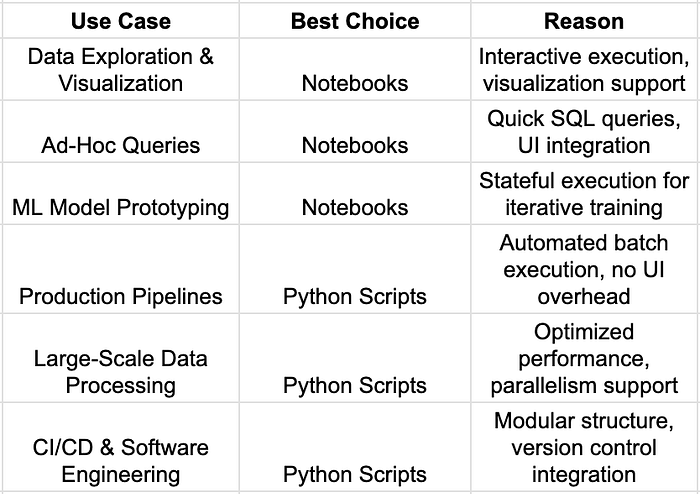
For interactive workflows and rapid experimentation, notebooks are ideal.
For production workloads, CI/CD pipelines, and large-scale processing, Python scripts are the better choice.
Benchmarking Python Scripts Vs. Notebooks In Databricks
To objectively compare Databricks notebooks and Python scripts, we conducted a performance benchmark focused on execution speed, memory consumption, and cluster resource utilization. The results highlight the strengths and weaknesses of each approach for ETL jobs, batch processing, and large-scale data workloads.
- Experiment Setup
1. Objective
To compare Databricks notebooks and Python scripts in terms of -
✔ Execution Time — How long each execution mode takes to complete an ETL job.
✔ Memory Usage — How much cluster memory is consumed during execution.
✔ Cluster Load — The impact on CPU and Spark executor utilization.
2. Workload Definition — ETL Pipeline Execution
The experiment involved -
Reading a 100GB dataset from Delta Lake.
Performing transformations using Spark (filtering, aggregations, joins).
Writing processed data back to Delta Lake.
The same logic was executed in both a Databricks notebook and a standalone Python script.
- Results & Observations
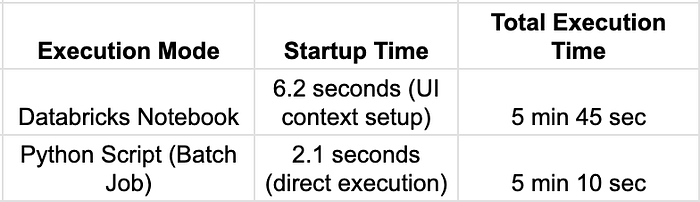
1.Execution Speed Comparison
Observations:
Notebooks have higher startup latency due to UI and execution context initialization.
Python scripts execute faster as they bypass UI-related overheads and run in an optimized batch mode.
2. Memory Usage & Resource Allocation
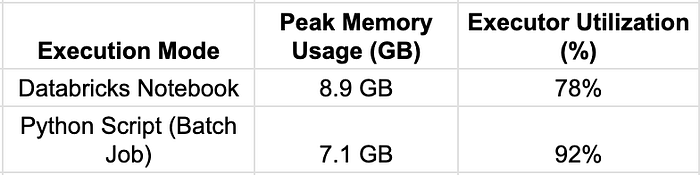
Observations:
Notebooks retain execution contexts between cells, leading to higher memory consumption.
Python scripts release resources immediately after execution, reducing long-term memory overhead.
Python batch jobs utilize cluster executors more efficiently, achieving higher parallelism.
3. Scalability For Large Datasets
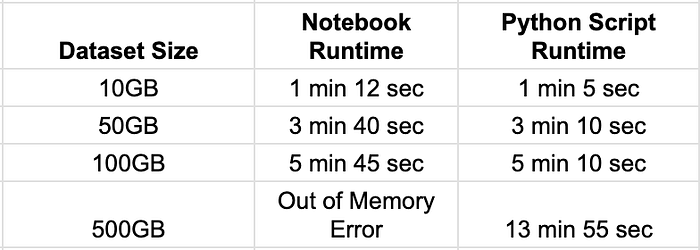
Observations:
Python scripts scale better with larger datasets, avoiding execution context memory leaks seen in notebooks.
Notebooks struggle with memory-intensive workloads due to persistent variable storage.
Batch execution mode in Python scripts allows more efficient resource scaling.
- Code Examples
The same ETL job was executed in both a Databricks notebook and a standalone Python script.
1.Running An ETL Job In A Databricks Notebook
# Read 100GB dataset
df = spark.read.format("delta").load("/mnt/delta/large_dataset")

# Perform transformations
df_transformed = df.filter("column_x > 100").groupBy("column_y").agg({"column_z": "sum"})

# Write back to Delta Lake
df_transformed.write.format("delta").mode("overwrite").save("/mnt/delta/processed_data")
Executed using -
Notebook Execution Observations:
✔ UI provides inline execution monitoring.
✔ Cell-by-cell execution allows stepwise debugging.
✘ Memory usage increases due to persistent execution context.
✘ Execution time is slightly longer due to UI overhead.
2. Running The Same ETL Job As A Python Script
from pyspark.sql import SparkSession

spark = SparkSession.builder.appName("ETLJob").getOrCreate()

df = spark.read.format("delta").load("/mnt/delta/large_dataset")

df_transformed = df.filter("column_x > 100").groupBy("column_y").agg({"column_z": "sum"})

df_transformed.write.format("delta").mode("overwrite").save("/mnt/delta/processed_data")

spark.stop()
Executed as a batch job -
!python my_etl_job.pyPython Script Execution Observations:
✔ Faster execution by bypassing UI overhead.
✔ Lower memory footprint due to ephemeral execution.
✔ Can be integrated into CI/CD pipelines for scheduled automation.
✘ Requires external logging setup for debugging.
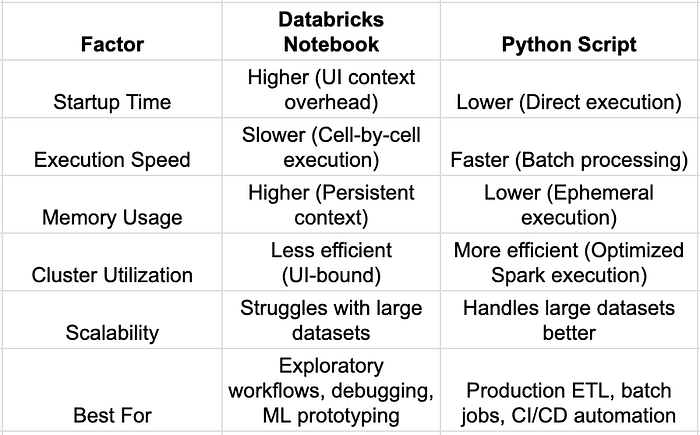
- Key Benchmark Takeaways
- Summary
✔ Databricks notebooks are best for interactive development, data exploration, and incremental debugging.
✔ Python scripts provide better performance, lower memory overhead, and higher scalability for production workloads.
✔ For large-scale processing and batch automation, Python scripts outperform notebooks due to optimized execution modes.
Choosing between Databricks notebooks and Python scripts is a critical decision that impacts execution efficiency, scalability, and maintainability. While notebooks provide an intuitive, interactive development environment, Python scripts excel in performance, modularity, and CI/CD integration.
This article has explored performance benchmarks, execution trade-offs, and best practices to help data engineers and architects optimize their Databricks workloads.
By leveraging these best practices and optimization techniques, organizations can improve performance, reduce costs, and enhance the scalability of their Databricks workloads -
✔ Improve Databricks execution efficiency and reduce cluster costs.
✔ Structure projects effectively for modular, maintainable Python workloads.
✔ Optimize Spark performance to handle large-scale datasets efficiently.