
- Request mapping & routing
- Serialization / deserialization of request & response
- Validation, exception handling, and HTTP status codes
- Integration with service layer (mocked or real)
Here's a comprehensive list of different approaches — from unit to full integration:
1️⃣ Unit Testing Controllers with @WebMvcTest (MockMvc + Mocked Services)
Purpose
This approach lets you test only the controller layer in isolation by mocking all dependencies (like services, repositories).
- You verify:
- ✅ URL mappings (e.g.,
GET /userscalls the right method) - ✅ Request/response handling (JSON/XML serialization)
- ✅ HTTP status codes & error responses
- ✅ Interaction with mocked services
Key Annotations & Tools
@WebMvcTest(YourController.class)→ Spring Boot sets up only the web layer (not the full app).MockMvc→ Simulates HTTP requests & checks responses.@MockBean→ Replaces real services (e.g.,UserService) with mocks.
Example Test
@WebMvcTest(UserController.class)  // Loads ONLY UserController + web layer
class UserControllerTest {

    @Autowired
    private MockMvc mockMvc;  // Used to simulate HTTP requests

    @MockBean
    private UserService userService;  // Mocked service (real one is ignored)

    @Test
    void shouldReturnUserList() throws Exception {
        // 1️⃣ Setup mock behavior
        when(userService.getUsers()).thenReturn(List.of(new User("John")));

        // 2️⃣ Simulate HTTP GET /users & verify response
        mockMvc.perform(get("/users"))
               .andExpect(status().isOk())  // Check status = 200
               .andExpect(jsonPath("$[0].name").value("John"));  // Check JSON response
    }

    @Test
    void shouldReturn404IfUserNotFound() throws Exception {
        when(userService.getUser(1L)).thenThrow(new UserNotFoundException());

        mockMvc.perform(get("/users/1"))
               .andExpect(status().isNotFound());  // Expect 404
    }
}
✅ Pros
✔ Fast execution (no database/network calls) ✔ Isolates controller logic (no interference from other layers) ✔ Good for checking request/response formats
⚠ Cons
❌ Does not test real service/repository integration (since services are mocked) ❌ Limited validation of Spring context (e.g., security filters may behave differently in real app)
When to Use @WebMvcTest?
- When you want fast, focused tests for controller logic.
- When you need to verify HTTP responses & error handling.
- When you don't need a full Spring context (DB, security, etc.).
2️⃣ Full Integration Testing with @SpringBootTest + MockMvc
Purpose
This approach tests the entire application stack, including:
- ✅ Controllers (HTTP request handling)
- ✅ Services (business logic)
- ✅ Repositories (database interactions)
- ✅ Configuration (security, filters, serialization, etc.)
Unlike @WebMvcTest, this does not mock services or repositories (unless explicitly done). Instead, it uses:
- A real (or in-memory) database (e.g., H2 for tests)
- Actual service layer (no mocking unless needed)
- Full Spring context (like in production)
Key Annotations & Tools
@SpringBootTest→ Bootstraps the full Spring application context.@AutoConfigureMockMvc→ EnablesMockMvcfor HTTP testing (without starting a real server).@Testcontainers/@DataJpaTest(optional) → If using real databases (PostgreSQL, MySQL) in tests.
Example Test
@SpringBootTest  // Loads the FULL application context
@AutoConfigureMockMvc  // Enables MockMvc for HTTP testing
class UserControllerIT {

    @Autowired
    private MockMvc mockMvc;  // Simulates HTTP requests

    @Autowired
    private UserRepository userRepository;  // Real repository (in-memory or test DB)

    @Test
    void shouldCreateUser() throws Exception {
        String json = "{\"name\":\"John\"}";

        // 1️⃣ Simulate POST /users with JSON body
        mockMvc.perform(post("/users")
                .contentType(MediaType.APPLICATION_JSON)
                .content(json))
               .andExpect(status().isCreated())  // Check HTTP 201
               .andExpect(jsonPath("$.name").value("John"));  // Verify response

        // 2️⃣ Verify the user was actually saved in DB
        Optional<User> savedUser = userRepository.findByName("John");
        assertTrue(savedUser.isPresent());
    }

    @Test
    void shouldRejectInvalidUser() throws Exception {
        String invalidJson = "{\"name\":\"\"}";  // Empty name (fails validation)

        mockMvc.perform(post("/users")
                .contentType(MediaType.APPLICATION_JSON)
                .content(invalidJson))
               .andExpect(status().isBadRequest());  // Expect 400
    }
}
✅ Pros
✔ Tests the full flow (controller → service → repository → DB) ✔ Catches integration issues (e.g., JSON parsing, DB constraints) ✔ Closer to real-world behavior (unlike mocked tests)
⚠ Cons
❌ Slower (starts the full Spring context + DB) ❌ Requires test DB setup (H2, Testcontainers, etc.) ❌ Harder to debug (failures may come from any layer)
When to Use @SpringBootTest?
- When you need end-to-end testing (API → DB).
- When mocks are not enough (e.g., testing transactions, security).
- When using real database constraints (e.g., unique fields, foreign keys).
3️⃣ Testing with WebTestClient (Reactive & Non-Reactive Controllers)
Purpose
WebTestClient is a modern, flexible alternative to MockMvc and TestRestTemplate that supports:
- ✅ Reactive applications (Spring WebFlux)
- ✅ Traditional blocking controllers (Spring MVC)
- ✅ Fluent, chainable API for easy request/response validation
It can test:
- HTTP endpoints (REST, GraphQL, etc.
- Response status codes, headers, and body
- Error handling and streaming responses
Key Features & Setup
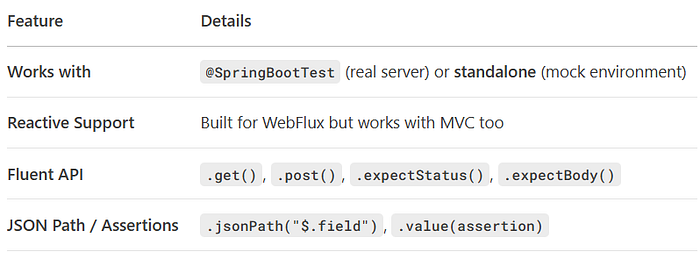
Setup Options
1️⃣ Real Server Mode (Full Integration Test)
@SpringBootTest(webEnvironment = WebEnvironment.RANDOM_PORT)
class UserControllerTest {
    @Autowired
    private WebTestClient webTestClient;  // Connects to a running server
}
2️⃣ Standalone (Mock) Mode (Faster, No Server)
@WebFluxTest(UserController.class)  // For WebFlux (reactive) apps
class UserControllerTest {
    @Autowired
    private WebTestClient webTestClient;  // Mock environment
}
Example Test (MVC & WebFlux Compatible)
@SpringBootTest(webEnvironment = WebEnvironment.RANDOM_PORT)
class UserControllerWebTestClientTest {

    @Autowired
    private WebTestClient webTestClient;

   @MockBean
    private UserService userService;  // Optional: Mock dependencies

   @Test
    void shouldReturnUsers() {
        // 1️⃣ Mock service (if needed)
        when(userService.getUsers()).thenReturn(List.of(new User("John")));

        // 2️⃣ Test GET /users
        webTestClient.get().uri("/users")
                     .exchange()  // Send request
                     .expectStatus().isOk()  // Assert status
                     .expectBody()
                     .jsonPath("$[0].name").isEqualTo("John");  // Assert JSON
    }

   @Test
    void shouldCreateUser() {
        // 3️⃣ Test POST /users
        webTestClient.post().uri("/users")
                     .contentType(MediaType.APPLICATION_JSON)
                     .bodyValue("{\"name\":\"John\"}")
                     .exchange()
                     .expectStatus().isCreated()
                     .expectBody(User.class)
                     .value(user -> assertEquals("John", user.getName()));
    }
}
✅ Pros
✔ Unified API for both MVC & WebFlux
✔ More readable than MockMvc (fluent style)
✔ Supports streaming (e.g., SSE, WebSocket)
✔ Works with real servers or mocks
⚠ Cons
❌ Less traditional (some teams prefer MockMvc)
❌ Slightly less granular control than MockMvc for MVC apps
When to Use WebTestClient?
- If your app is reactive (WebFlux) → Best choice.
- If you want a single tool for MVC + WebFlux tests.
- If you prefer fluent, modern assertions over
MockMvc's DSL.
4️⃣ Testing with TestRestTemplate (Real HTTP Calls)
Purpose
TestRestTemplate is a real HTTP client that sends actual requests to a running Spring Boot application. Unlike MockMvc (which simulates HTTP), it:
✅ Makes real network calls (like a browser or Postman)
✅ Tests full server behavior (including filters, security, and error handling)
✅ Works with any REST endpoint (not just Spring controllers)
Best for:
- End-to-end API testing
- Testing authentication (OAuth, JWT)
- Validating load balancers & proxies
🛠 Setup & Usage
Key Annotations
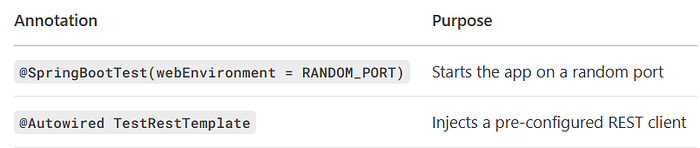
Example Test
@SpringBootTest(webEnvironment = SpringBootTest.WebEnvironment.RANDOM_PORT)
class UserControllerRestTemplateTest {

    @Autowired
    private TestRestTemplate restTemplate;  // Real HTTP client

    @Test
    void shouldReturnUsers() {
        // 1️⃣ Make GET request to /users
        ResponseEntity<User[]> response = restTemplate.getForEntity(
            "/users",
            User[].class  // Expects JSON array of Users
        );

       // 2️⃣ Verify HTTP status & response body
        assertEquals(HttpStatus.OK, response.getStatusCode());
        assertEquals("John", response.getBody()[0].getName());
    }

   @Test
    void shouldCreateUser() {
        // 3️⃣ POST a new user
        User newUser = new User("John");
        ResponseEntity<User> response = restTemplate.postForEntity(
            "/users",
            newUser,  // Request body
            User.class  // Expected response type
        );

       assertEquals(HttpStatus.CREATED, response.getStatusCode());
        assertEquals("John", response.getBody().getName());
    }
}
✅ Pros
✔ Tests real HTTP behavior (headers, cookies, SSL, etc.) ✔ Works with external APIs (not just Spring controllers) ✔ Good for integration tests with other services
⚠ Cons
❌ Slower (requires full server startup + network calls)
❌ Less control than MockMvc (no direct mocking)
❌ Harder to debug (fails may come from network issues)
🆚 Comparison with Other Tools
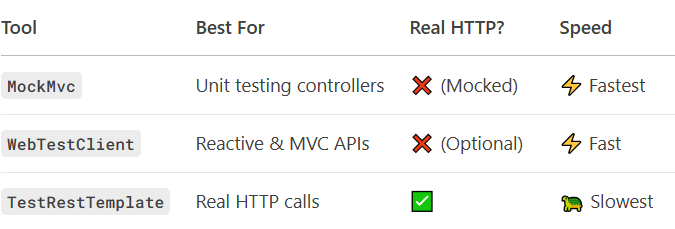
When to Use TestRestTemplate?
- Testing API gateways / proxies
- Validating HTTPS, CORS, or security filters
- End-to-end tests with external services
5️⃣ Standalone MockMvc (No Spring Context) — The Lightweight Option
Purpose
This approach lets you test a single controller in complete isolation without:
- Loading the Spring context
- Running auto-configuration
- Invoking filters, interceptors, or AOP advice
Instead, you:
✅ Manually create the controller (with mocked dependencies)
✅ Use MockMvcBuilders.standaloneSetup() (no @SpringBootTest)
✅ Get ultra-fast test execution (ideal for TDD)
🛠 How It Works
Key Components
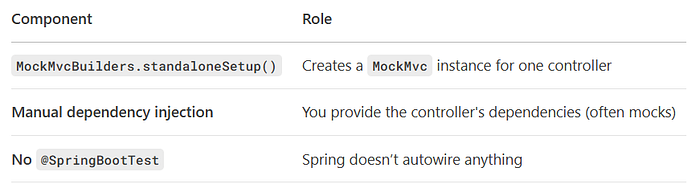
Example Test
class UserControllerStandaloneTest {

    private MockMvc mockMvc;
    private UserService userService = mock(UserService.class);  // Mock dependency

   @BeforeEach
    void setup() {
        // 1️⃣ Manually create the controller + dependencies
        UserController controller = new UserController(userService);

       // 2️⃣ Build MockMvc WITHOUT Spring
        mockMvc = MockMvcBuilders.standaloneSetup(controller)
                               .build();
    }

   @Test
    void shouldReturnUsers() throws Exception {
        // 3️⃣ Set up mock behavior
        when(userService.getUsers()).thenReturn(List.of(new User("John")));

       // 4️⃣ Test the endpoint
        mockMvc.perform(get("/users"))
               .andExpect(status().isOk())
               .andExpect(jsonPath("$[0].name").value("John"));
    }

   @Test
    void shouldRejectInvalidRequest() throws Exception {
        mockMvc.perform(post("/users")
                .contentType(MediaType.APPLICATION_JSON)
                .content("{}"))  // Empty body (invalid)
               .andExpect(status().isBadRequest());  // Expect 400
    }
}
✅ Pros
✔ Blazing fast (no Spring startup overhead)
✔ Full control over dependencies (no hidden @Autowired magic)
✔ Perfect for unit testing pure controller logic
⚠ Cons
❌ No Spring features (e.g., @Valid, @ControllerAdvice, security)
❌ Manual setup required (you must inject all dependencies)
❌ Not realistic (some behaviors differ from production)
🆚 Comparison with Other Methods
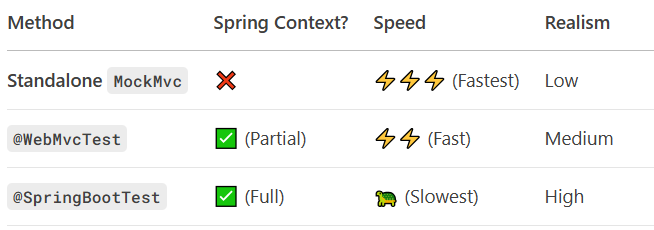
When to Use Standalone MockMvc?
- Testing controller logic in isolation
- Running ultra-fast unit tests (TDD)
- Avoiding Spring's overhead
6️⃣ REST Assured — Fluent API Testing (BDD Style)
Purpose
REST Assured is a Java DSL (Domain-Specific Language) for testing REST APIs in a fluent, behavior-driven (BDD) style. It: ✅ Makes tests more readable (like natural language) ✅ Supports complex validations (JSON Path, XML, schemas) ✅ Works with any HTTP server (Spring Boot, Node.js, etc.)
Best for:
- API contract testing
- Integration tests with external services
- Teams using BDD (Given-When-Then)
🛠 Setup & Usage
Key Features
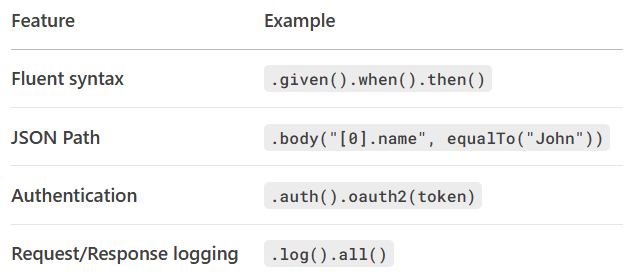
Example Test
@SpringBootTest(webEnvironment = SpringBootTest.WebEnvironment.RANDOM_PORT)
class UserControllerRestAssuredTest {

    @LocalServerPort
    int port;  // Inject the random port

   @Test
    void shouldReturnUsers() {
        // Given: API is running
        given()
            .port(port)  // Set the port
        // When: GET /users is called
        .when()
            .get("/users")
        // Then: Verify response
        .then()
            .statusCode(200)  // HTTP 200 OK
            .body("[0].name", equalTo("John"))  // Check JSON
            .body("size()", greaterThan(0));  // Additional assertions
    }

   @Test
    void shouldCreateUser() {
        given()
            .port(port)
            .contentType(ContentType.JSON)
            .body("{\"name\":\"John\"}")  // Request body
        .when()
            .post("/users")
        .then()
            .statusCode(201)  // HTTP 201 Created
            .body("name", equalTo("John"));
    }
}
✅ Pros
✔ Readable, BDD-style syntax (clear given-when-then structure)
✔ Powerful assertions (JSON Path, Hamcrest matchers)
✔ Supports authentication (OAuth2, Basic Auth)
✔ Works with any REST API (not just Spring Boot)
⚠ Cons
❌ Extra dependency (adds to your pom.xml/build.gradle)
❌ Slightly slower than MockMvc (real HTTP calls)
❌ Steeper learning curve (DSL quirks)
🆚 Comparison with Other Tools

When to Use REST Assured?
- Testing third-party APIs
- Writing human-readable integration tests
- Validating complex JSON/XML responses
Dependency Setup
For Maven:
<dependency>
    <groupId>io.rest-assured</groupId>
    <artifactId>rest-assured</artifactId>
    <version>5.4.0</version>
    <scope>test</scope>
</dependency>
For Gradle:
testImplementation("io.rest-assured:rest-assured:5.4.0")7️⃣ Testing Controller Advice & Exception Handling
Purpose
Validates that your:
✅ Global exception handlers (@ControllerAdvice) work correctly
✅ Custom error responses (JSON/XML) follow your API spec
✅ HTTP status codes match the error (404, 400, 500, etc.)
🛠 How to Test Exception Handling
Option 1: Using @WebMvcTest (Lightweight)
@WebMvcTest(UserController.class)
class UserControllerExceptionTest {

    @Autowired
    private MockMvc mockMvc;

   @MockBean
    private UserService userService;

   @Test
    void shouldReturn404WhenUserNotFound() throws Exception {
        // Simulate service throwing exception
        when(userService.getUser(999L)).thenThrow(new UserNotFoundException("User not found"));

        mockMvc.perform(get("/users/999"))
               .andExpect(status().isNotFound())  // Verify HTTP 404
               .andExpect(jsonPath("$.error").value("User not found"));  // Check error body
    }
}
Option 2: Full Integration (@ SpringBootTest)
@SpringBootTest
@AutoConfigureMockMvc
class UserControllerExceptionIT {

    @Autowired
    private MockMvc mockMvc;

   @Test
    void shouldRejectInvalidInput() throws Exception {
        mockMvc.perform(post("/users")
                .contentType(MediaType.APPLICATION_JSON)
                .content("{\"name\":\"\"}"))  // Empty name (invalid)
               .andExpect(status().isBadRequest())  // HTTP 400
               .andExpect(jsonPath("$.errors[0]").value("Name cannot be empty"));
    }
}
✅ Key Test Cases
- Custom exceptions → Correct HTTP status & body
.andExpect(status().isConflict())
.andExpect(jsonPath("$.message").value("User already exists"));
2. Validation errors (e.g., @NotNull, @Size)
.andExpect(status().isBadRequest())
.andExpect(jsonPath("$.fieldErrors[0].field").value("email"));
3. Spring default errors (e.g., MethodArgumentNotValidException)
⚠ Common Pitfalls
❌ Missing @ControllerAdvice in test context → Use @Import
❌ Over-mocking → In integration tests, let real validation trigger
❌ Ignoring error content-type → Ensure JSON/XML consistency
Best Practices
✔ Test both mocked and real error scenarios
✔ Verify error response structure (matches API docs)
✔ Include error logging in tests (.andDo(print()))
Example @ControllerAdvice
@ControllerAdvice
public class GlobalExceptionHandler {

   @ExceptionHandler(UserNotFoundException.class)
    public ResponseEntity<ErrorResponse> handleUserNotFound(UserNotFoundException ex) {
        return ResponseEntity
                .status(HttpStatus.NOT_FOUND)
                .body(new ErrorResponse("USER_NOT_FOUND", ex.getMessage()));
    }
}
This ensures your API fails gracefully and consistently!
8️⃣ Pure Unit Testing with Mockito (No HTTP Layer)
Purpose
This approach completely bypasses HTTP and Spring, testing only Java method calls. It's useful for:
✅ Isolating controller logic (e.g., request processing before calling services)
✅ Ultra-fast unit tests (no Spring, no HTTP overhead)
✅ Verifying interactions with dependencies (e.g., UserService)
🛠 How It Works
Key Components

Example Test
class UserControllerUnitTest {

    private UserService userService = mock(UserService.class);
    private UserController userController = new UserController(userService);

    @Test
    void shouldCallServiceToGetUsers() {
        // 1️⃣ Set up mock
        when(userService.getUsers()).thenReturn(List.of(new User("John")));

        // 2️⃣ Call controller method DIRECTLY (no HTTP)
        List<User> users = userController.getUsers();

       // 3️⃣ Verify:
        assertEquals("John", users.get(0).getName());  // Return value check
        verify(userService).getUsers();  // Verify service was called
    }

   @Test
    void shouldPassInputToService() {
        // Test request parameter handling
        userController.getUserById(123L);
        verify(userService).getUserById(123L);  // Verify correct ID passed
    }
}
✅ Pros
✔ Fastest possible tests (no framework overhead) ✔ Precise control over dependencies (all mocked) ✔ Good for complex business logic in controllers
⚠ Cons
❌ Doesn't test HTTP mappings (e.g., @GetMapping)
❌ Misses serialization/validation (no JSON conversion)
❌ No Spring features (@Valid, security, etc.)
🆚 Comparison with Other Methods

When to Use Pure Mockito Tests?
- Testing helper methods in controllers
- Validating complex business logic
- Running in TDD cycles (instant feedback)
Tip: Combine with 1–2 integration tests to cover HTTP behavior.
Example Controller
@RestController
public class UserController {

    private final UserService userService;

   public UserController(UserService userService) {
        this.userService = userService;
    }

   @GetMapping("/users")
    public List<User> getUsers() {
        return userService.getUsers();  // Logic you're testing
    }
}
This approach gives you laser-focused unit tests without distractions!
Conclusion
Testing the controller layer in Spring Boot isn't a one-size-fits-all process — the right method depends on your goal, speed requirements, and test coverage needs.
- If you need fast, isolated tests, go with
@WebMvcTestor standaloneMockMvcBuilders. - For realistic, end-to-end scenarios, use
@SpringBootTestwithMockMvc,WebTestClient, orTestRestTemplate. - If you want fluent API assertions, REST Assured is a great choice.
- For logic-only verification, Mockito can test without any HTTP overhead.
A balanced strategy often mixes unit, integration, and end-to-end testing to ensure both speed and reliability while covering mapping, serialization, validation, and exception handling.