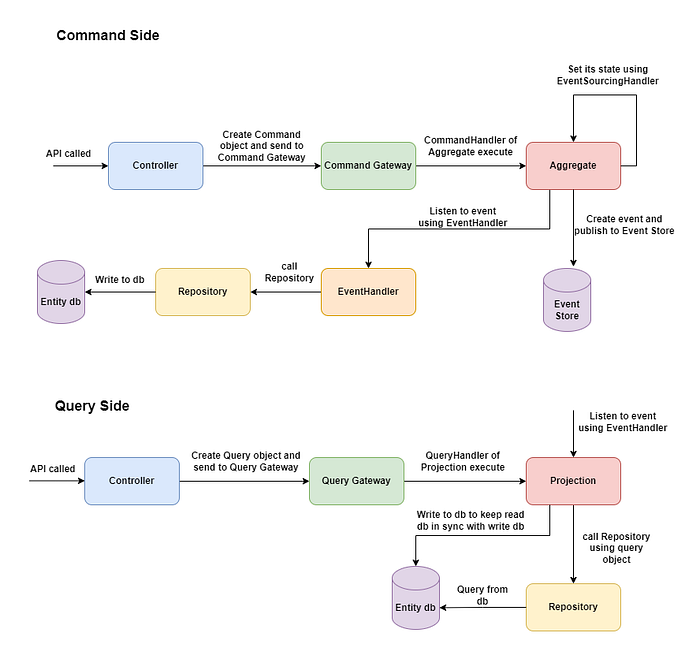

In modern software development, CQRS (Command Query Responsibility Segregation) is a design pattern that helps separate the logic for reading and writing data. It improves the scalability, performance, and maintainability of applications by using different models for reading and writing data. One of the most popular frameworks to implement CQRS in Java applications is Axon Framework.
In this blog post, we'll walk through the process of implementing CQRS in a Spring Boot application using Axon Framework. We will cover both the command side (write operations) and the query side (read operations) while also integrating a relational database to store and retrieve data.
Prerequisites
Before we dive into the code, here are the prerequisites:
- Java (version 11 or later)
- Spring Boot (version 2.x or later)
- Axon Framework (for CQRS implementation)
- A relational database (we'll use a simple
Productentity) - Maven or Gradle for dependency management
Step 1: Set up the Project
The first step is to set up the basic project structure using Spring Boot. You can generate a Spring Boot project using Spring Initializr or use your favorite IDE to create a Spring Boot project.
Dependencies:
To implement CQRS using Axon Framework, you need the following dependencies:
<?xml version="1.0" encoding="UTF-8"?>
<project xmlns="http://maven.apache.org/POM/4.0.0" xmlns:xsi="http://www.w3.org/2001/XMLSchema-instance"
   xsi:schemaLocation="http://maven.apache.org/POM/4.0.0 https://maven.apache.org/xsd/maven-4.0.0.xsd">
   <modelVersion>4.0.0</modelVersion>
   <parent>
      <groupId>org.springframework.boot</groupId>
      <artifactId>spring-boot-starter-parent</artifactId>
      <version>2.5.4</version>
      <relativePath/> <!-- lookup parent from repository -->
   </parent>
   <groupId>com.dailycodebuffer</groupId>
   <artifactId>ProductService</artifactId>
   <version>0.0.1-SNAPSHOT</version>
   <name>ProductService</name>
   <description>Demo project for Spring Boot</description>
   <properties>
      <java.version>11</java.version>
   </properties>
   <dependencies>
      <dependency>
         <groupId>org.springframework.boot</groupId>
         <artifactId>spring-boot-starter-data-jpa</artifactId>
      </dependency>
      <dependency>
         <groupId>org.springframework.boot</groupId>
         <artifactId>spring-boot-starter-web</artifactId>
      </dependency>

      <dependency>
         <groupId>com.h2database</groupId>
         <artifactId>h2</artifactId>
         <scope>runtime</scope>
      </dependency>
      <dependency>
         <groupId>org.projectlombok</groupId>
         <artifactId>lombok</artifactId>
         <optional>true</optional>
      </dependency>
      <dependency>
         <groupId>org.springframework.boot</groupId>
         <artifactId>spring-boot-starter-test</artifactId>
         <scope>test</scope>
      </dependency>

      <!-- https://mvnrepository.com/artifact/org.axonframework/axon-spring-boot-starter -->
      <dependency>
         <groupId>org.axonframework</groupId>
         <artifactId>axon-spring-boot-starter</artifactId>
         <version>4.5.3</version>
      </dependency>
      <!-- https://mvnrepository.com/artifact/com.google.guava/guava -->
      <dependency>
         <groupId>com.google.guava</groupId>
         <artifactId>guava</artifactId>
         <version>30.1.1-jre</version>
      </dependency>

   </dependencies>

   <build>
      <plugins>
         <plugin>
            <groupId>org.springframework.boot</groupId>
            <artifactId>spring-boot-maven-plugin</artifactId>
            <configuration>
               <excludes>
                  <exclude>
                     <groupId>org.projectlombok</groupId>
                     <artifactId>lombok</artifactId>
                  </exclude>
               </excludes>
            </configuration>
         </plugin>
      </plugins>
   </build>

</project>
Step 2: Create the Command Side
The Command Model
Commands are requests that trigger some form of action. In our case, we will define a CreateProductCommand that will instruct the system to create a new product.
package com.dailycodebuffer.ProductService.command.api.commands;

import lombok.Builder;
import lombok.Data;
import org.axonframework.modelling.command.TargetAggregateIdentifier;

import java.math.BigDecimal;

@Data
@Builder
public class CreateProductCommand {

    @TargetAggregateIdentifier
    private String productId;
    private String name;
    private BigDecimal price;
    private Integer quantity;
}
This command contains details about the product that we want to create: its ID, name, price, and quantity. The @TargetAggregateIdentifier annotation is used to specify the identifier of the aggregate (in our case, the ProductAggregate).
The Aggregate
An aggregate is the central concept in CQRS for managing the state of an entity. When a command is handled, the aggregate is responsible for applying events that modify its state. Here, we will define the ProductAggregate.
package com.dailycodebuffer.ProductService.command.api.aggregate;

import com.dailycodebuffer.ProductService.command.api.commands.CreateProductCommand;
import com.dailycodebuffer.ProductService.command.api.events.ProductCreatedEvent;
import org.axonframework.commandhandling.CommandHandler;
import org.axonframework.eventsourcing.EventSourcingHandler;
import org.axonframework.modelling.command.AggregateIdentifier;
import org.axonframework.modelling.command.AggregateLifecycle;
import org.axonframework.spring.stereotype.Aggregate;
import org.springframework.beans.BeanUtils;

import java.math.BigDecimal;

@Aggregate
public class ProductAggregate {

    @AggregateIdentifier
    private String productId;
    private String name;
    private BigDecimal price;
    private Integer quantity;

    @CommandHandler
    public ProductAggregate(CreateProductCommand createProductCommand) {
        //You can perform all the validations
        ProductCreatedEvent productCreatedEvent =
                new ProductCreatedEvent();

        BeanUtils.copyProperties(createProductCommand,productCreatedEvent);

        AggregateLifecycle.apply(productCreatedEvent);
    }

    public ProductAggregate() {
    }

    @EventSourcingHandler
    public void on(ProductCreatedEvent productCreatedEvent) {
        this.quantity = productCreatedEvent.getQuantity();
        this.productId = productCreatedEvent.getProductId();
        this.price = productCreatedEvent.getPrice();
        this.name = productCreatedEvent.getName();
    }
}
In the ProductAggregate, the command handler receives the CreateProductCommand and applies the ProductCreatedEvent to update the aggregate state. The event sourcing handler is then used to apply the event to the state when it is replayed during event sourcing.
Event
The event is a representation of the changes that have happened in the system. Here, we define the ProductCreatedEvent that will be published after a product is created.
package com.dailycodebuffer.ProductService.command.api.events;

import lombok.AllArgsConstructor;
import lombok.Builder;
import lombok.Data;
import lombok.NoArgsConstructor;

import java.math.BigDecimal;

@Data
@Builder
@AllArgsConstructor
@NoArgsConstructor
public class ProductCreatedEvent {

    private String productId;
    private String name;
    private BigDecimal price;
    private Integer quantity;
}
This event captures the state of the product when it is created and will be handled by the event handler to update the read model.
Step 3: Handling Events (Event Handlers)
In CQRS, events are used to propagate changes to the read side. We define the ProductEventsHandler to handle the ProductCreatedEvent and persist the product to the database.
package com.dailycodebuffer.ProductService.command.api.events;

import com.dailycodebuffer.ProductService.command.api.data.Product;
import com.dailycodebuffer.ProductService.command.api.data.ProductRepository;
import org.axonframework.config.ProcessingGroup;
import org.axonframework.eventhandling.EventHandler;
import org.axonframework.messaging.interceptors.ExceptionHandler;
import org.springframework.beans.BeanUtils;
import org.springframework.stereotype.Component;

import java.util.UUID;

@Component
@ProcessingGroup("product")
public class ProductEventsHandler {

    private ProductRepository productRepository;

    public ProductEventsHandler(ProductRepository productRepository) {
        this.productRepository = productRepository;
    }

    @EventHandler
    public void on(ProductCreatedEvent event) throws Exception {
        Product product =
                new Product();
        event.setProductId(UUID.randomUUID().toString());
        BeanUtils.copyProperties(event,product);
        productRepository.save(product);
        //throw new Exception("Exception Occurred");
    }

    @ExceptionHandler
    public void handle(Exception exception) throws Exception {
        throw exception;
    }
}
The ProductEventsHandler listens for the ProductCreatedEvent and saves the product to the database when the event occurs.
Step 4: Create the Query Side
The query side is responsible for reading the data. In CQRS, the query side is often optimized for read operations and can have a different data model than the command side. We create the ProductQueryController to handle queries.
Query Model
We use a ProductRestModel as the query model, which is different from the command model. This is a DTO (Data Transfer Object) used to expose the data through the API.
package com.dailycodebuffer.ProductService.command.api.model;

import lombok.Builder;
import lombok.Data;

import java.math.BigDecimal;

@Data
@Builder
public class ProductRestModel {
    private String name;
    private BigDecimal price;
    private Integer quantity;
}
package com.dailycodebuffer.ProductService.query.api.controller;

import com.dailycodebuffer.ProductService.command.api.model.ProductRestModel;
import com.dailycodebuffer.ProductService.query.api.queries.GetProductsQuery;
import org.axonframework.messaging.responsetypes.ResponseTypes;
import org.axonframework.queryhandling.QueryGateway;
import org.springframework.web.bind.annotation.GetMapping;
import org.springframework.web.bind.annotation.RequestMapping;
import org.springframework.web.bind.annotation.RestController;

import java.util.List;

@RestController
@RequestMapping("/products")
public class ProductQueryController {

    private QueryGateway queryGateway;

    public ProductQueryController(QueryGateway queryGateway) {
        this.queryGateway = queryGateway;
    }

    @GetMapping
    public List<ProductRestModel> getAllProducts() {
        GetProductsQuery getProductsQuery =
                new GetProductsQuery();

        List<ProductRestModel> productRestModels =
        queryGateway.query(getProductsQuery,
                ResponseTypes.multipleInstancesOf(ProductRestModel.class))
                .join();

        return productRestModels;
    }
}
package com.dailycodebuffer.ProductService.query.api.projection;

import com.dailycodebuffer.ProductService.command.api.data.Product;
import com.dailycodebuffer.ProductService.command.api.data.ProductRepository;
import com.dailycodebuffer.ProductService.command.api.events.ProductCreatedEvent;
import com.dailycodebuffer.ProductService.command.api.model.ProductRestModel;
import com.dailycodebuffer.ProductService.query.api.queries.GetProductsQuery;
import org.axonframework.eventhandling.EventHandler;
import org.axonframework.queryhandling.QueryHandler;
import org.springframework.beans.BeanUtils;
import org.springframework.stereotype.Component;

import java.util.List;
import java.util.stream.Collectors;

@Component
public class ProductProjection {

    private ProductRepository productRepository;

    public ProductProjection(ProductRepository productRepository) {
        this.productRepository = productRepository;
    }

    @EventHandler
    public void on(ProductCreatedEvent event) throws Exception {
        Product product =
                new Product();
        BeanUtils.copyProperties(event,product);
        System.out.println("inside query side");
        productRepository.save(product);
        //throw new Exception("Exception Occurred");
    }

    @QueryHandler
    public List<ProductRestModel> handle(GetProductsQuery getProductsQuery) {
        List<Product> products =
                productRepository.findAll();

        List<ProductRestModel> productRestModels =
                products.stream()
                        .map(product -> ProductRestModel
                                .builder()
                                .quantity(product.getQuantity())
                                .price(product.getPrice())
                                .name(product.getName())
                                .build())
                        .collect(Collectors.toList());

        return productRestModels;
    }
}
The Product Projection listens for the ProductCreatedEvent to update the read model (the Product entity in the database) and handles queries to retrieve products from the database.
Role of Aggregate State in CQRS
In Axon Framework, the aggregate acts as a transactional boundary and enforces consistency rules within the system.
The aggregate state is essential for ensuring business rules for example, if you are adding a product to inventory, you may need to check that the product's price is not negative or that the quantity does not exceed a certain limit.
The aggregate state allows the system to store the current state of the product and validate incoming commands against it. Aggregates in event-sourced systems don't retrieve their state from a traditional database. Instead, they are reconstructed (rehydrated) by replaying all the events associated with that aggregate from the event store. Setting the aggregate state ensures that when the aggregate is rehydrated, it reflects the correct state after all the past events are applied.
Aggregates help avoid duplicate or inconsistent state changes by tracking their state. If an event is processed twice by mistake, the aggregate state ensures the system's behavior remains consistent.
In event sourcing, the single source of truth is the event store, not a database. Aggregates are reconstructed from the event history to ensure they reflect all past changes accurately. This allows the system to:
- Avoid inconsistencies between state and events.
- Replay events for debugging, auditing, or recreating the state at any point in time.
Step 5: Conclusion
By using Axon Framework, we have successfully implemented the CQRS pattern in our Spring Boot application. We used Axon's CommandGateway and QueryGateway to separate the command and query sides of our application, optimizing both for write and read operations.
- The command side handles requests to create products, applying events that update the product data.
- The query side listens for events, updates the read model (a separate database for querying), and exposes data via a RESTful API.
This pattern improves the scalability and flexibility of the application. You can further extend this by adding event sourcing or integrating with more complex event handlers for real-time applications.
Hope this guide helps you in implementing CQRS using Axon Framework in your Spring Boot applications!