

How to create multiple network interfaces in a K8s pod using the Multus CNI plugin
This article covers the below-mentioned sections, feel free to skip the sections if you're already aware of them,
- What is Multus CNI?
- Prerequisites for installing Multus CNI.
- Installation of Multus CNI.
- Validating your Multus Plugin installation.
- Creating new interfaces inside the pod and testing them.
- Sources | References.
What is Multus CNI?
Multus CNI is a container network interface plugin for Kubernetes that enables attaching multiple network interfaces to pods. In Kubernetes, each pod has only one network interface by default, other than local loopback. With Multus, you can create multi-homed pods that have multiple interfaces.
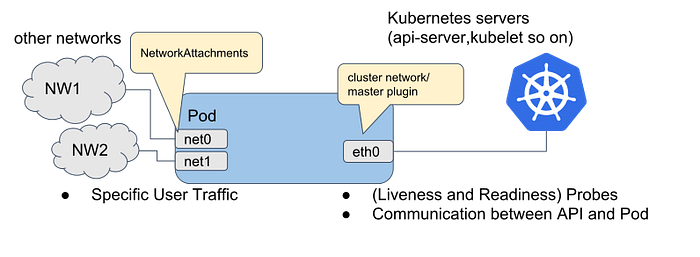
- Starts a Multus daemonset, this runs a pod on each node which places a Multus binary on each node in
/opt/cni/bin - Reads the lexicographically (alphabetically) first configuration file in
/etc/cni/net.d, and creates a new configuration file for Multus on each node as/etc/cni/net.d/00-multus.conf, this configuration is auto-generated and is based on the default network configuration (which is assumed to be the alphabetically first configuration) - Creates a
/etc/cni/net.d/multus.ddirectory on each node with authentication information for Multus to access the Kubernetes API.
Prerequisites for installing Multus CNI.
- You should have got the running Kubernetes cluster and it should be healthy.
- The CNI plugin should be configured for your pod-to-pod connectivity. (Ex: Calico, Flannel)
Installation of Multus CNI.
- Git Clone the Multus Repo:
git clone https://github.com/k8snetworkplumbingwg/multus-cni.git
cd multus-cni
2. Apply Multus DaemonSet:
cd ./deployments/
kubectl apply -f multus-daemonset.yml
Validating your Multus Plugin installation.
- Make sure your deployed Multus pods are running without any issues by using this command,
kubectl get pods -A | grep -i multus2. Check the /etc/cni/net.d/ directory and make generated config file /etc/cni/net.d/00-multus.conf present there.
Creating new interfaces inside the pod and testing them.
Multus uses K8s Custom Resource for defining the configuration for each interface that needs to be created inside the pod.
Command to create an example configuration:
cat <<EOF | kubectl create -f -
apiVersion: "k8s.cni.cncf.io/v1"
kind: NetworkAttachmentDefinition
metadata:
  name: macvlan-conf
spec:
  config: '{
      "cniVersion": "0.3.0",
      "type": "macvlan",
      "master": "eth0",
      "mode": "bridge",
      "ipam": {
        "type": "host-local",
        "subnet": "192.168.1.0/24",
        "rangeStart": "192.168.1.200",
        "rangeEnd": "192.168.1.216",
        "routes": [
          { "dst": "0.0.0.0/0" }
        ],
        "gateway": "192.168.1.1"
      }
    }'
EOFNOTE: This example uses eth0 as the master parameter, this master parameter should match the interface name of your host where you want to run the pod.
Verify your deployment of Custom Resource by running the command,
kubectl get network-attachment-definitionsLet's create a pod that uses the deployed NetAttachDef,
cat <<EOF | kubectl create -f -
apiVersion: v1
kind: Pod
metadata:
  name: samplepod
  annotations:
    k8s.v1.cni.cncf.io/networks: macvlan-conf
spec:
  containers:
  - name: samplepod
    command: ["/bin/ash", "-c", "trap : TERM INT; sleep infinity & wait"]
    image: alpine
EOF
Just a simple Alpine container that sleeps indefinitely. Do note that the annotations where macvlan-conf is the name we used above when we created our configuration.
Wait for the pod to get deployed successfully and the status to be running. Once it is up, run the below command to list the interfaces created inside the pod,
kubectl exec -it samplepod -- ip aYou should see that there are 3 interfaces:
loa loopback interfaceeth0our default networknet1the new interface we created with the macvlan configuration.
Let's say you want to create one more interface with the same configuration as "net1", the pod YAML should look like this,
cat <<EOF | kubectl create -f -
apiVersion: v1
kind: Pod
metadata:
  name: samplepod
  annotations:
    k8s.v1.cni.cncf.io/networks: macvlan-conf,macvlan-conf
spec:
  containers:
  - name: samplepod
    command: ["/bin/ash", "-c", "trap : TERM INT; sleep infinity & wait"]
    image: alpine
EOF
Do note that the annotations where macvlan-conf is used twice with comma-separated.
Sources | References.