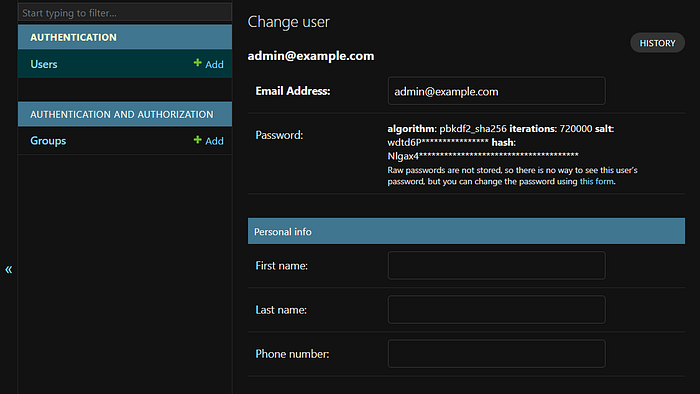
Introduction:
In the realm of Django development, the default User model lays the groundwork for authentication, yet many projects necessitate bespoke adjustments. One common requirement is augmenting the user model with a phone number field. This tutorial elucidates the process of forging a tailored User model in Django fortified with a phone number field.
Prerequisites:
Before embarking on this journey, ensure you possess the following prerequisites:
- A foundational understanding of Django
- Python installed on your system
- Django installed in your Python environment
Step 1: Initiating Your Django Project
If you haven't already, inaugurate a fresh Django project by executing the subsequent command within your terminal:
django-admin startproject myproject .Step 2: Create an Authentication App
Next, create an authentication app named "authentication" to house the custom user model:
python manage.py startapp authenticationEnsure the authentication app is added to the list of installed apps in your settings.py:
myproject/settings.py
INSTALLED_APPS = [
    ... # existing Django apps go here
    'authentication',
]
Step 3: Create a User Manager for the Custom User Model
A user manager in Django provides an interface for managing users within an application. It handles user creation, retrieval, updating, deletion, authentication, and session management.
Let's create a user manager by adding a managers.py file inside the authentication app:
authentication/managers.py
from django.contrib.auth.base_user import BaseUserManager

class UserManager(BaseUserManager):
    def create_user(self, email, password, **extra_fields):
        """
        Creates and saves a User with the given email and password.
        """
        if not email:
            raise ValueError('Users must have an email address')

        user = self.model(
            email=self.normalize_email(email),
            **extra_fields
        )

        user.set_password(password)
        user.save()
        return user

    def create_superuser(self, email, password, **extra_fields):
        """
        Creates and saves a superuser with the given email and password.
        """
        extra_fields.setdefault("is_staff", True)
        extra_fields.setdefault("is_superuser", True)
        extra_fields.setdefault("is_active", True)

        if extra_fields.get("is_staff") is not True:
            raise ValueError("Superuser must have is_staff=True.")
        if extra_fields.get("is_superuser") is not True:
            raise ValueError("Superuser must have is_superuser=True.")

        return self.create_user(
            email,
            password=password,
            **extra_fields
        )
Step 4: Create a Custom User Model
Now, let's create the custom User model by inheriting from Django's AbstractUser class:
authentication/models.py
from django.db import models
from .managers import UserManager
from django.contrib.auth.models import AbstractUser

class User(AbstractUser):
    username = None
    email = models.EmailField(
        "Email Address",
        unique=True,
    )

    USERNAME_FIELD = 'email'
    REQUIRED_FIELDS = []

    objects = UserManager()

    def __str__(self):
        return self.email
In the custom User model, we've replaced the username field with email as the main identifier.
Lastly, in your project's settings.py, update the setting to point to the custom User model:
myproject/settings.py
... # all existing django settings

AUTH_PROFILE_MODULE = 'authentication.User'
AUTH_USER_MODEL = 'authentication.User'
Step 5: Create Forms for admin
These forms will be used in admin to perform CRUD operations. Now, Create a new file named "forms.py" and add the following code to it.
authentication/forms.py
from .models import User
from django.contrib.auth.forms import UserChangeForm as BaseUserChangeForm
from django.contrib.auth.forms import UserCreationForm as BaseUserCreationForm


class UserCreationForm(BaseUserCreationForm):

    class Meta:
        model = User
        fields = ("email",)


class UserChangeForm(BaseUserChangeForm):

    class Meta:
        model = User
        fields = ("email",)
Step 6: Create and register User model in django admin
authentication/admin.py
from .models import User
from django.contrib import admin
from .forms import UserCreationForm, UserChangeForm
from django.contrib.auth.admin import UserAdmin as BaseUserAdmin


class UserAdmin(BaseUserAdmin):
    add_form = UserCreationForm
    form = UserChangeForm
    model = User
    list_display = (
        "email", "first_name", "last_name", "is_staff")
    list_filter = (
        "is_staff", "is_superuser", "is_active", "groups")
    fieldsets = (
        (None, {"fields": ("email", "password")}),
        ("Personal info", {"fields": (
            "first_name", "last_name")}),
        ("Permissions", {"fields": (
            "is_active", "is_staff", "is_superuser", "groups", "user_permissions")}),
        ("Important Dates", {"fields": (
            "last_login", "date_joined")})
    )
    add_fieldsets = (
        (None, {
            "classes": ("wide",),
            "fields": (
                "email", "password1", "password2"
            )}),
    )
    search_fields = ("email")
    ordering = ("email")


admin.site.register(User, UserAdmin)
Step 7: Add a Phone Number field
Now let's add the phone number field to the Django user model using the "django-phonenumber-field" library.
This is a Django library which interfaces with "python-phonenumbers" to validate, pretty print and convert phone numbers. The "python-phonenumbers" library is a port of Google's libphonenumber library, which powers Android's phone number handling.
Install it by running the following command in the terminal:
pip install "django-phonenumber-field[phonenumberslite]"Add "phonenumber_field" to the list of installed apps in your settings.py file:
myproject/settings.py
INSTALLED_APPS = [
    # Other apps…
    "phonenumber_field",
]
Also, add a default region for the phone numbers so that if the region is not specified, it will automatically detect:
... # Other django settings

PHONENUMBER_DEFAULT_REGION = 'IN' # Your Prefered Country
Modify the User model to store the phone number:
authentication/models.py
from django.db import models
from .managers import UserManager
from django.contrib.auth.models import AbstractUser
from phonenumber_field.modelfields import PhoneNumberField # import this


class User(AbstractUser):
    username = None
    email = models.EmailField(
        "Email Address",
        unique=True,
    )
    phone_number = PhoneNumberField(blank=True) # add this field

    USERNAME_FIELD = 'email'
    REQUIRED_FIELDS = []

    objects = UserManager()

    def __str__(self):
        return self.email
Also, modify the User admin to include the phone_number field in display, filter, search, and ordering:
authentication/admin.py
# Other imports

class UserAdmin(BaseUserAdmin):
    add_form = UserCreationForm
    form = UserChangeForm
    model = User
    list_display = (
        "email", "phone_number", "first_name", "last_name", "is_staff") # modified
    list_filter = (
        "is_staff", "is_superuser", "is_active", "groups")
    fieldsets = (
        (None, {"fields": ("email", "password")}),
        ("Personal info", {"fields": (
            "first_name", "last_name", "phone_number")}), # modified
        ("Permissions", {"fields": (
            "is_active", "is_staff", "is_superuser", "groups", "user_permissions")}),
        ("Important Dates", {"fields": (
            "last_login", "date_joined")})
    )
    add_fieldsets = (
        (None, {
            "classes": ("wide",),
            "fields": (
                "email", "phone_number", "password1", "password2" # modified
            )}),
    )
    search_fields = ("email", "phone_number") # modified
    ordering = ("email", "phone_number") # modified
Step 8: Migrate Models
Finally, migrate the User model to start working with it.
Run the following commands to complete the migration process.
python manage.py makemigrations
python manage.py makemigrations authentication
python manage.py migrate
Step 9: Conclusion
In this article, we looked at how to create a custom user model so that an email address can be used as the primary user identifier instead of a username for authentication and added a phone number field with validation to User model.
Check out this Repo for Source Code: