
Large Language Models (LLMs) like GPT-3 are known for their substantial computing resource requirements, particularly during training. Such models may be challenging to run outside of high-powered data centers. However, recent efforts have focused on making models more efficient and accessible. Some of the strategies and innovations being pursued to create LLMs that require fewer computing resources include:
1. Model Pruning: This involves removing parts of the neural network that contribute little to performance after the model has been trained. Pruning can reduce the model's size without significantly affecting its accuracy.
2. Knowledge Distillation: The process where a smaller "student" model is trained to replicate the behavior of a larger "teacher" model. The student learns from the outputs of the teacher, effectively distilling down knowledge without needing to be as large or complex.
3. Quantization: This is a technique that reduces the precision of the model's parameters from floating-point to lower-bit integers, which decreases memory usage and speeds up computation.
4. Sparse Models: Instead of dense matrices in neural networks, sparse models rely on connections only between select nodes, reducing computational complexity.
5. Efficient Architecture Design: New neural network architectures are being developed with efficiency in mind; for example, Google's EfficientNet or Facebook's Wav2Vec 2.0 have shown that it's possible to achieve high performance with fewer parameters.
6. Transfer Learning and Fine-tuning: Instead of training large models from scratch, researchers can adapt an already pre-trained model to new tasks with less data and compute power through fine-tuning.
7. Adaptive Computation: Techniques such as adaptive attention span in transformers allow the model to dynamically adjust how much computation is needed based on input complexity.
This has resulted in models that may be run on modern personal computers or even smartphones. This democratization of technological capability has allowed for a wider variety of individuals and organizations to experiment with and benefit from these models. Moreover, the accessibility of advanced models on everyday devices has opened up new avenues for innovation and entrepreneurship.
At the current time, I believe the easiest method of using LLMs locally is through the brilliant ollama application. Ollama is an advanced AI tool designed for running LLMs locally on your computer. It's an open-source command-line tool that allows you to run, create, and share large language models such as Llama 2 and Code Llama without any registration or waiting lists. Ollama is compatible with macOS and Linux, and it is expected to support Windows soon. A quick review of their current library reveals almost 60 LLMs of various types available for running locally.
The tool offers a user-friendly interface, enabling easy setup and use of various open-source models. You can select the model you wish to run from the Ollama library. After downloading and installing Ollama, you can start running models using simple terminal commands. For instance, to run the llama2 model, you would use the command ollama run llama2. If the model is not installed, Ollama will automatically download it first.
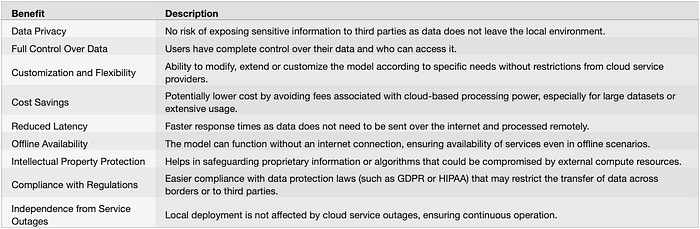
Ollama also provides an API, allowing users to interact with the model directly from their local machine. This setup is particularly advantageous for development, privacy and security, cost management, and having more control over the model.
In addition to running models as a command-line interface, Ollama can operate as a server. This mode includes an API for running and managing models, and you can start the Ollama server using the command ollama serve. Once the server is running, you can interact with it using REST API calls.
For those familiar with Docker, Ollama operates similarly. It provides an environment where you can pull, test, and tinker with machine learning models, akin to handling Docker images. This includes pulling models from a registry, listing available models, running models, and customization and adaptation of these models.
Ollama also supports GPU acceleration, which can significantly speed up model computations and executions. The models, which are the output or insights derived from running the models, are consumed by end-users or other systems.
The tool simplifies the process of running language models locally, providing users with greater control and flexibility in their AI projects. Whether you are a researcher, developer, or data scientist, Ollama enables you to harness the potential of advanced language models for various applications.
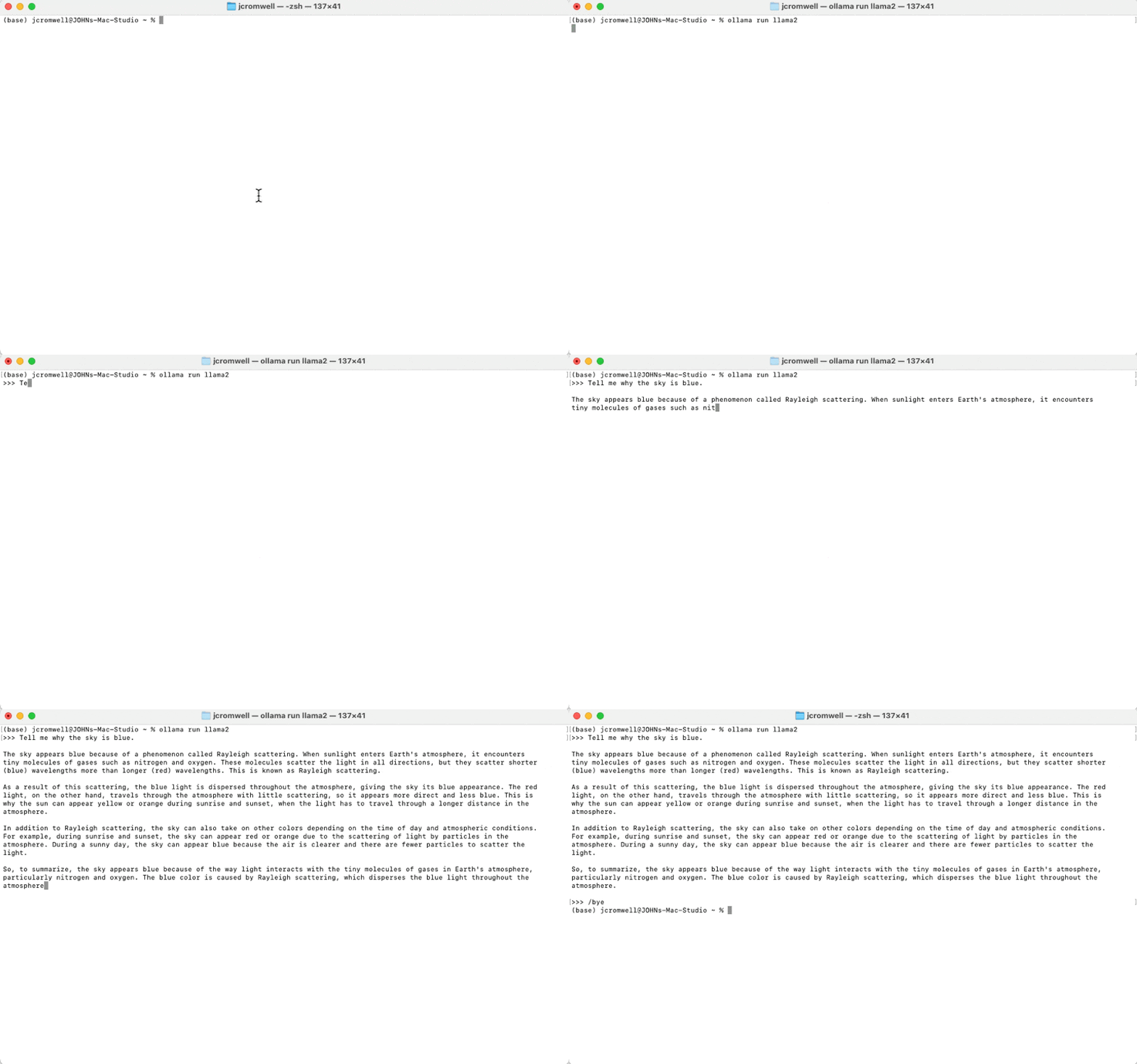
Here is an example of querying llama2 from the command line once ollama is installed:
ollama may also be accessed programmatically via the server once installed as above. From Mathematica, for example, the API (see the full API documentation here) may be queried using the ExternalEvaluate function on the shell. In this example I asked mistral LLM to get the vital signs from a progress note and format them in JSON in the output:
session = StartExternalSession["Shell"];
ExternalEvaluate[session,
 "curl
http://localhost:11434/api/generate -d '{
\"model\": \"mistral\",
\"prompt\": \"" <>
"Output vital signs only in JSON format: " <> xp <> "\",
\"stream\": false,
\"options\": {\"temperature\":0.3}
}'"]
In this case, the variable xp is an entire fictitious hospital progress note as a string and the query extracted the requested data and generated this properly formatted output:
{"vitals"->{"BP"->"153/71 mmHg","pulse"->"82 bpm","temperature"->{"source"->"tympanic","value"->"36.7 degrees C, 98.1 degrees F"},"respiratoryRate"->"20 bpm","height"->"1.651 m","weight"->"59.3 kg","BMI"->"21.76 kg/m2","oxygenSaturation"->"100%"}}
This represents an excellent way to work with sensitive data in a local environment. I'd love to hear the mileage you get with this workflow as well.