The AI Gold Rush is Here
We're living through the most exciting time in technology history. While everyone's talking about ChatGPT and generative AI, the real action is happening among AI builders and technical teams. Savvy creators are quietly assembling powerful AI toolkits that are transforming how applications get built, deployed, and scaled.
The difference between those who struggle with AI and those who thrive? It's not just about knowing the latest models — it's about having the right toolkit and understanding how these tools work together to create something greater than the sum of their parts.
The Four-Pillar Framework: How Pro Builders Think About AI
The most successful AI builders organize their toolkit around four core principles, inspired by enterprise AI strategies like Dell Technologies' comprehensive framework:
AI-In: Embedding intelligence directly into your applications
AI-On: Running AI applications efficiently across different environments
AI-For: Using AI to supercharge your own workflow
AI-With: Collaborating within the broader AI ecosystem
Let's dive into the top 10 tools that are defining the future of AI building.
🛠️ AI-In: Tools That Put Intelligence at Your Core
1. Hugging Face: The GitHub of AI
What it is: The world's largest repository of pre-trained AI models, datasets, and spaces for building AI applications.
Why it's essential:
- Over 500,000 models available instantly
- Easy integration with just a few lines of code
- Active community sharing cutting-edge models daily
- Free hosting for AI demos and prototypes

Perfect for: Anyone building AI applications who wants access to state-of-the-art models without training from scratch.
2. Ollama: Your Personal AI Runtime
What it is: Run powerful language models like Llama, CodeLlama, and Mistral directly on your local machine — no API calls, no rate limits, no internet required.
Why it's game-changing:
- Complete privacy and control over your AI models
- Lightning-fast responses (no network latency)
- Perfect for prototyping and development
- Free to use with any compatible model
Perfect for: Technical teams who want to experiment rapidly, build offline-capable AI apps, or maintain complete control over their AI pipeline.
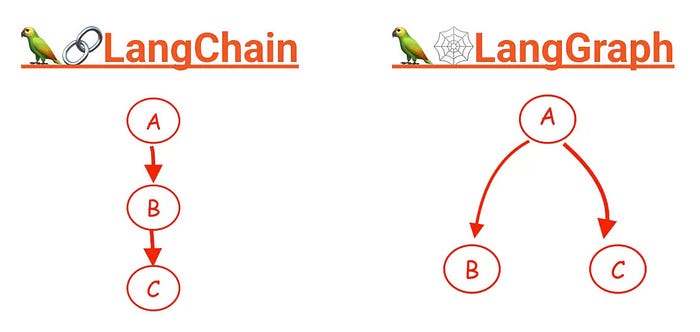
3. AI Workflow : Langchain + Langgraph
What they are: Langchain orchestrates complex AI workflows, while Langgraph provides advanced graph-based workflow capabilities for AI agents.
Why they matter:
- Transform unpredictable AI outputs into reliable data
- Build complex AI chains and multi-agent workflows that work consistently
- Essential for production AI applications
- Reduce debugging time by 80%
Perfect for: Builders building serious AI applications that need to work reliably in production.
⚡ AI-On: Tools for Scalable AI Workloads
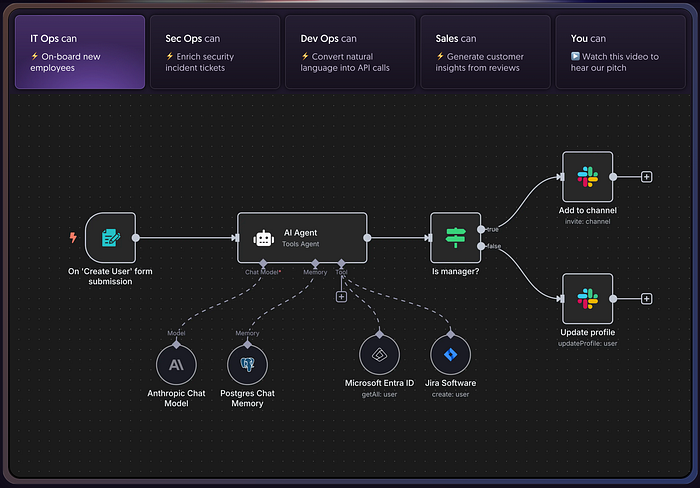
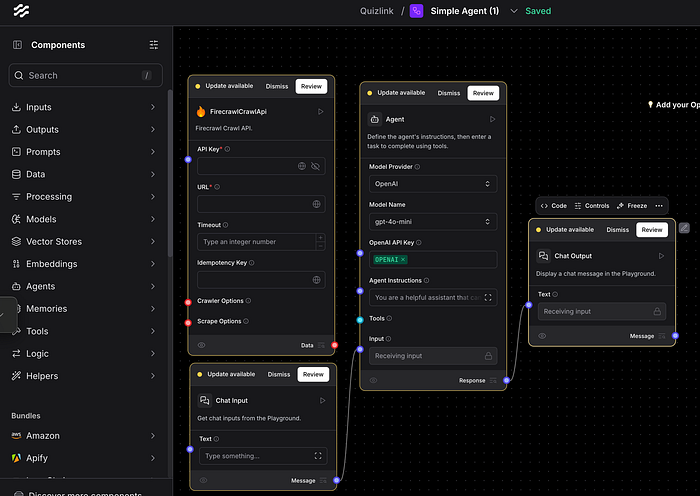
4. Langflow & n8n: Visual AI Workflow Builder
What it is: A drag-and-drop interface for building complex AI workflows without writing code.
Why it's revolutionary:
- Build AI applications 10x faster than traditional coding
- Visual debugging makes complex workflows manageable
- Perfect for rapid prototyping and experimentation
- Great for teams with mixed technical skills
N8N
Langflow
Perfect for: Product managers, designers, and developers who want to prototype AI features quickly.
5. Image Generation: Google Gemini, Imagen & OpenAI DALL-E
What they are: Cutting-edge AI models that transform text descriptions into stunning visual content, from concept art to production-ready graphics. Great at image editing — a poor man's photoshop.Why they're revolutionary:
- Generate custom visuals in seconds instead of hours
- Perfect for rapid prototyping and concept visualization
- Create unique assets without stock photo licensing
- Enable non-designers to produce professional-quality graphics
Google Gemini 2.0 Flash Preview: Conversational image generation with text — perfect for iterative editing and multimodal workflows Google Imagen 4 Ultra: Specialized for photorealistic quality and artistic detail — best-in-class image fidelity DALL-E 3 (OpenAI): Excellent prompt following and integration with ChatGPT Midjourney: Superior for artistic and stylized content creation
Perfect for: Product designers, marketers, content creators, and developers who need custom visual assets for applications and campaigns.
6. Video Generation: The Future of Visual Storytelling
Why it's revolutionary:
- Create professional videos in minutes instead of hours or days
- Generate custom footage without expensive cameras, actors, or sets
- Perfect for rapid prototyping, social media content, and marketing materials
- Enable non-technical creators to produce cinematic-quality content
Top Video Generation Tools:
Google Veo 3: Starting with just a prompt and delivering high-quality finished products. Now integrated into YouTube Shorts for millions of creators, generating videos with sound at 480p for free.
Runway ML: Targeted at filmmakers and professional creatives with improved speed, consistency, and visual fidelity. Features motion brush and camera controls for cinematic results.
HeyGen: Specialized in AI avatars with perfect lip sync, creating videos from text or audio clips with incredibly natural facial expressions and body movements.
Pika 2.1: Latest version introduces high-definition 1080p video generation and Pikadditions feature that allows seamless integration of any person or object into existing videos.
Kling AI: Offers the best value for price with video quality that rivals or surpasses Runway's, plus the most realistic lip-sync capability among generative AI tools. Trade-off: slower generation times (5–30 minutes).
Synthesia: Business-focused platform ideal for longer videos (up to four hours) with consistent AI characters and tight control, perfect for corporate training and presentations.
Perfect for: Content creators, marketers, filmmakers, educators, and businesses who need custom video content without traditional production costs and complexity. Essential for social media managers, product demos, and anyone looking to scale video content creation.
7. Revolutionary AI Presentation Tools: Transform Ideas into Stunning Visuals
AI-powered design tools are revolutionizing how we create presentations and visual content, eliminating design bottlenecks and transforming complex ideas into professional visuals in minutes instead of hours.
Why They're Game-Changing:
- Create professional presentations rapidly without design skills
- Transform complex concepts into clear, engaging visuals automatically
- Perfect for non-designers needing professional-quality content
- Enable rapid prototyping of visual concepts and eliminate blank-page syndrome
Gamma: The AI Presentation Revolution An AI design partner that creates complete presentations, websites, and documents from simple prompts. Features ChatGPT-4 integration for text and Flux for image generation, plus Gamma Agent for web searching and content refinement. Exports to PPT and Google Slides with consistent branding, interactive elements like live Q&As, and engagement analytics. https://gamma.app/
Napkin AI: Text-to-Visual Magic Transforms your text into relevant visuals instantly without complex prompting. Auto-generates infographics, diagrams, mind maps, flowcharts, and data charts from pasted text. Offers fully editable visuals with extensive icon databases, smart decorators, and exports to .ppt, .png, .pdf, or .svg formats. Supports 60+ languages. https://www.napkin.ai/
Perfect For: Content creators, marketers, educators, consultants, product managers, and anyone communicating complex ideas visually.
Powerful Combination: Use Gamma for complete presentation creation and Napkin AI for transforming existing content into compelling diagrams. Together, they eliminate traditional barriers between great ideas and beautiful presentations.
🚀 AI-For: Tools That Use AI to Make You Better
8. Claude & Claude Code: The Developer's AI Assistant
What it is: Anthropic's flagship AI model that excels at understanding context, generating code, and maintaining consistency across long conversations.
Why it's the developer favorite:
- Best-in-class for frontend and full-stack development
- Understands both technical requirements and user experience
- Excellent at refactoring and explaining complex code
- Superior safety and alignment compared to other models
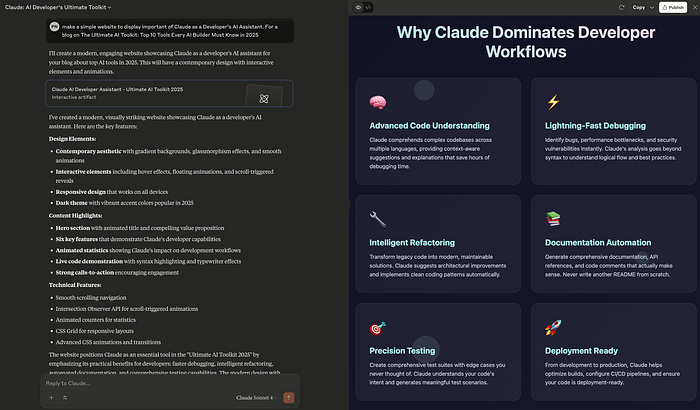
Perfect for: Developers who want an AI pair programmer that actually understands software engineering principles. Alternatives to consider: For developers exploring different AI coding tools, other options include Lovable (for rapid web app prototyping), Replit Ghostwriter (integrated within the Replit IDE), GitHub Copilot (for inline code suggestions), and Cursor (AI-powered code editor). Other AI-powered development tools include GitHub Copilot (inline suggestions in your existing editor), Claude Code (command-line AI coding assistant), Gemini Code Assist (Google's AI coding solution), Windsurf (AI-powered development environment), and traditional IDEs with AI extensions like VS Code with various AI plugins.
9. Langfuse: AI Observability Made Simple
What it is: The monitoring and debugging platform specifically designed for AI applications.
Why it's essential:
- Track AI performance in production
- Debug complex AI workflows
- Optimize AI costs and performance
- Understand how users interact with your AI features
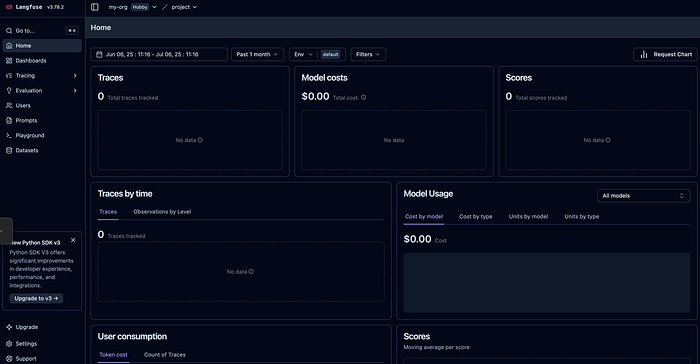
Perfect for: Anyone running AI applications in production who needs to monitor and optimize performance.
🤝 AI-With: Tools for Collaborative AI
10.OpenWebUI: Your AI Command Center
What it is: A beautiful, customizable interface for interacting with multiple AI models from one place.
Why teams love it:
- Works with dozens of different AI models
- Perfect for comparing model outputs
- Great for teams that need to share AI capabilities
- Fully customizable and self-hosted
Perfect for: Teams that want to democratize AI access across their organization.
The Secret Sauce: How These Tools Work Together
The magic happens when you combine these tools strategically:
For Rapid Prototyping:
- Start with Ollama for local model testing
- Use Langflow to build your AI workflow visually
- Deploy with OpenWebUI for team collaboration
- Monitor with Langfuse
For Production Applications:
- Hugging Face for model selection and fine-tuning
- Langchain + Pydantic for reliable AI pipelines
- Claude for ongoing development assistance
For Advanced AI Systems:
- Cursor for AI-assisted coding
- Multiple models via OpenWebUI for comparison
- Comprehensive monitoring with Langfuse
Choosing Your AI Stack: A Practical Guide
If you're just starting: Begin with Ollama + Cursor. These two tools alone will transform your development experience.
If you're building a product: Add Langchain + Pydantic for reliability, and Langfuse for monitoring.
If you're scaling a team: Implement OpenWebUI for collaboration and Temporal for orchestration.
If you're pushing boundaries: Explore ElizaOS for autonomous agents and experiment with multiple models via Hugging Face.
The AI Developer Advantage
Developers who master these tools aren't just building better applications — they're building them faster, more reliably, and with capabilities that seemed impossible just months ago.
The AI revolution isn't coming — it's here. And it's being built by developers who understand that the right toolkit can transform not just what they build, but how they build it.
Your Next Steps
- Start small: Pick one tool from the AI-For category to improve your daily workflow
- Think integration: Choose tools that work well together
- Join the community: Follow the communities around these tools for the latest updates
- Experiment boldly: The AI landscape changes rapidly — stay curious and keep experimenting
The future belongs to developers who embrace AI-native development. The tools are here, the community is thriving, and the opportunities are endless.
Which tool will you try first?
🔥 Hot Tip: Join the AI developer communities on Discord and Twitter. The best insights come from builders sharing their experiences in real-time.