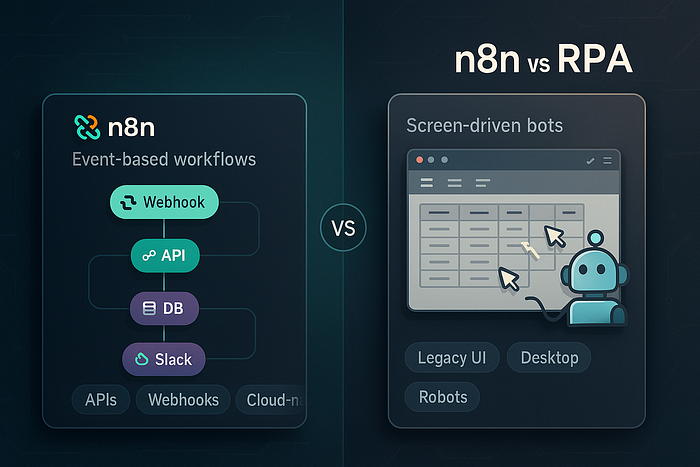

Compare n8n vs traditional RPA tools and learn when to use workflow automation instead of screen-driven bots for scalable, maintainable automation.
If you hang around ops, dev, or data teams long enough, you'll hear the same sentence in different accents:
"We should just automate this."
Sometimes that "automation" should be a snappy n8n workflow quietly gluing APIs together. Sometimes it really does need full-blown RPA, driving legacy desktop apps no one dares to refactor.
Confusing the two is how you end up with a fragile army of UI bots doing work that a single webhook could've handled.
Let's unpack the difference between n8n-style workflow automation and traditional RPA, and when each actually makes sense.
What n8n Really Is (and Isn't)
At a high level, n8n is a workflow automation and integration platform:
- Triggered by events (webhooks, schedules, queues, CRM updates).
- Primarily talks to APIs, databases, webhooks, and queues, not pixels.
- Runs server-side and is designed to be versioned, deployed, and monitored like software.
A simple mental picture:
[Trigger: New lead in HubSpot]
        |
        v
[Enrich via Clearbit API]
        |
        v
[Write to Postgres] --> [Send Slack message]
Think of n8n as a visual glue language for modern systems. It's happiest when the things you're automating already expose an API, webhook, or at least a database.
What it is not:
- A replacement for a human clicking through a Java desktop app on Citrix.
- A pixel-perfect bot that reads PDFs by OCR and types into SAP like a tiny intern.
For that, you're in RPA country.
What Traditional RPA Actually Does
Traditional RPA (UiPath, Automation Anywhere, Blue Prism, etc.) came from a different world:
- Heavily focused on UI automation: simulating keystrokes, mouse clicks, reading screens.
- Often used for legacy systems with no APIs: mainframes, old ERPs, thick clients.
- Runs as a robot user on virtual desktops, orchestrated by control servers.
RPA's mental picture looks more like:
Robot logs in as "bot_user"
   |
   v
Open SAP GUI → navigate menus → copy numbers
   |
   v
Paste into Excel → upload to another system
RPA shines when you literally cannot integrate any other way. It's the duct tape over the cracks of enterprise software.
But the way it works — screen-based, brittle, stateful — makes it a very different beast from n8n.
Architecture: Event Pipelines vs Screen Robots
To really see the difference, let's compare architectures side-by-side.
n8n: Event-Driven Workflow Engine
         ┌─────────────┐
Trigger ─► n8n Workflow ├─► API / DB / Queue
         └─────────────┘

• Stateless steps
• Data passed as JSON
• Deployed like a service
Characteristics:
- Event-driven: webhooks, cron, messaging systems.
- JSON-centric: inputs/outputs are data structures, not pixels.
- Composable: easy to call other services, functions, or LLMs.
RPA: Orchestrated Robots on Virtual Desktops
┌─────────────┐
Orchestrator│  Schedules │
           └─────┬───────┘
                 │
         ┌───────▼────────┐
         │ Robot VM        │
         │ - Screen driver │
         │ - Credential    │
         └─────────────────┘
Characteristics:
- Stateful desktops: each robot has a full OS session.
- Screen-driven: depends on UI positions, selectors, OCR.
- Heavier governance: access control, AD accounts, change windows.
Neither architecture is "better" universally — they just solve different kinds of problems.
Use Cases: Where n8n Wins vs Where RPA Wins
n8n is great when…
- You're connecting modern SaaS tools: CRMs, billing systems, ticketing, Slack.
- You need lightweight data pipelines: syncs between databases and APIs.
- You want developers and power users to iterate quickly without full microservice overhead.
Example:
Incoming Stripe charge → check Plan in billing DB → if high-value, create a HubSpot deal and send a personalized Slack alert to sales.
This is perfectly suited to n8n: API calls, light logic, straightforward error handling.
RPA is great when…
- Your critical process lives in a legacy desktop or mainframe.
- There's no API and no budget/time to modernize.
- Business users are already performing well-defined, repetitive click-paths.
Example:
A government agency has to copy data from a green-screen mainframe into a newer but still UI-only case management system.
You can't call POST /cases. There is no endpoint. RPA becomes the pragmatic choice.
Cost and Maintenance: YAML vs "Don't Touch the Screen"
Let's be honest: maintenance is where automation efforts live or die.
Maintaining n8n workflows
Pros:
- Workflows are versionable and can live in git.
- You can treat them as infrastructure-as-code: test changes, roll back, review diffs.
- Refactors often mean adding a node or changing a field, not rewriting everything.
Cons:
- Someone still has to own the workflows like real software.
- Badly-designed flows turn into spaghetti just as fast as bad code.
Maintaining RPA bots
Pros:
- Business users sometimes grasp them faster because they mirror step-by-step UI actions.
- For systems that never change, bots can run for years.
Cons (and they can be brutal):
- A tiny UI change (button text, location, new modal) can break the whole bot.
- You often need full regression testing across multiple environments.
- Licenses and robot VMs can be expensive, and scaling means more bots, more desktops.
Where n8n treats change as "update a workflow and redeploy", RPA treats change as "retire an old intern and train a new one from scratch".
Developer Experience: Low-Code, No-Code, and "Some-Code"
n8n and RPA both love to market themselves as "no-code" or "low-code". The reality is more nuanced.
n8n DX
- Visual workflows but very friendly to code: JavaScript function nodes, custom integrations, webhooks.
- Fits naturally into a DevOps mindset: containerize, deploy, monitor.
- Easier to pair with APM, logs, and observability you already have.
If your team has even a small dev presence, n8n feels like a logical extension of your stack.
RPA DX
- Heavy emphasis on recorders and drag-and-drop activities.
- Advanced work quickly drifts into script-like complexity (VB, C#, proprietary languages).
- Debugging often means watching a robot replay its clicks.
The UX is optimized for business analysts, but once bots multiply, you need engineers to treat them like critical systems anyway.
Performance and Reliability: APIs vs Pixels
n8n
- API-based flows are fast: network calls, not UI rendering.
- Resilience is easier: retries, backoffs, idempotency keys, dead-letter queues.
- Scaling is natural: horizontal scaling of the n8n instance or underlying workers.
If your Slack notification is 200ms slower today, no one panics.
RPA
- UI-driven actions are slow and fragile by nature. Robots wait for spinners to finish, deal with latency, random popups.
- Resilience requires careful element selection, timeouts, and exception handling.
- Scaling often means literally "more desktops, more robots".
You can absolutely build robust RPA, but you're always dancing on the edge of "UI changed, bot exploded".
How to Choose: A Practical Decision Lens
Here's a simple mental checklist I use with teams:
- Does the system expose an API, webhook, SQL access, or file export/import?
- Yes → default to n8n or a similar workflow platform.
- No → RPA becomes a candidate.
2. Is this primarily cross-tool glue or UI mimicry?
- Glue between SaaS tools → n8n.
- Mimicking a human operator in a legacy GUI → RPA.
3. Who will maintain this in 18 months?
- Dev/DevOps team → they'll be happier (and faster) with n8n.
- Business ops with minimal dev support → RPA might still be viable, but budget for engineering later.
4. How critical is correctness and auditability?
- Need clear logs, payloads, diffs, rollbacks → n8n-style, API-first automation wins.
- Already have a mature RPA governance setup → piggyback on that rather than inventing new processes.
Wrapping Up: It's Not n8n vs RPA Forever
The most useful way to think about this isn't "n8n versus RPA" in a cage match. It's "API-first automation vs screen-first automation."
- n8n represents the API-first, event-driven, infrastructure-friendly side of automation.
- Traditional RPA represents the screen-first, legacy-bridging side.
In a modern stack, you often need both:
- n8n to orchestrate cloud services, LLMs, CRMs, billing, and data pipelines.
- RPA to squeeze a few more years of value out of that one ancient system nobody can replace yet.
The real win is using each tool where it's strong, instead of forcing every workflow into whichever platform you happen to have licenses for.
If you're staring at a messy automation landscape and wondering where n8n fits — or how much RPA you really need — drop a comment with your current stack. I'm happy to break down a few real-world patterns and anti-patterns in a follow-up.