
TLDR
In this article, I detail how I've leveraged self-XSS vectors to increase the impact of regular XSS.
Self-XSS Vectors
There are many forms of Self-XSS, but the ones I like to focus on are Cookie based XSS and username XSS. These types of XSS are usually site-wide and have a bigger impact.
Cookie-Based XSS
This XSS vector relies on the web application reflecting the user's cookie in the web application, and you can set the cookie to an XSS payload. This type of XSS requires you to modify the cookies the web application sets for you and checking if the web application is reflecting your value.
Username XSS
In this, you simply modify your username, or full name, to an XSS vector.
Self-XSS has no impact. So what can we do?
These vectors mentioned on their own are not a security impact. However, by leveraging other XSS vulnerabilities, we can use these vectors to increase the impact of RXSS or DOM XSS. Here are some real-world examples from my recent bugs where I leveraged DOM XSS to modify the cookie and username fields in order to escalate DOM XSS to Stored XSS.
Cookie Scenario
I have already written an article for this scenario. You can take a look at it here: https://medium.com/@rodriguezjorgex/escalating-dom-xss-to-stored-xss-eb6f3a669af3. In this article, I go into details on the vulnerability, how I found it, and how I bypassed the Web Application Firewall in order to get the XSS. However, for cookie based XSS, there are other vectors aside from XSS. This can be accomplished by parameters which set cookies, or CRLF injections
DOM XSS to Username Stored XSS
Initial Recon
The initial recon for this particular bug was non-existent. It involved going to Hackerone, viewing which sites were in-scope, and opening the in-scope site.
Once in the web application, I like to play around with the search features. I normally search for something like "test". Then after I've searched for something, I like to search for the DOM Invader canary token.
I also like to make different changes, like doing: dominvadercanary"><b>test and seeing if it turns bold or if anything happens in DOM Invader. DOM Invader does turn red, but after inspecting the results, it seems to be an un-exploitable scenario

Not to be deterred, I continued playing with the search results. This time, I used the website's filter to filter out the search results. Whenever I click on filters, I like to see how the URL changes based on my filter. So I filter for "news", I look to see if news is anywhere in the URL bar.
I notice the filter I selected in the URL bar, and I change that specific word to the DOM Invader string.

The input is in the URL path and not in a parameter. Every XSS tutorial and lab has shown me that XSS is done on a parameter. So I guess there's absolutely no way this can be vulnerable to XSS.
DOM Invader turns red and after investigating, it seems the canary is being passed to an innerHTML. I add "> to the end of the canary token, and notice it's not being url encoded like before

Now that I've identified that special characters are not being sanitized, I try going for a simple payload that won't be blocked by the WAF. I try <b>p3axusnf. After checking DOM Invader again, the <b> tag was completely deleted. There must be some regex sanitizer deleting anything that has opening and closing tags
Bypassing Sanitizer and WAF
I tried numerous different payloads, but nothing would work. One WAF bypass technique that I employ is using multiple parameters to split up the payload. But this application is using the URL path, not parameters. So what would happen if I add additional filters?

It seems that a hyphen is what separates all the different filters. Looking at DOM Invader had a more interesting result.

It's backwards? Hmmm 🤔 so the sanitizer deletes anything in between <>, and each parameter adds a comma (,) sign to the innerHTML field. So we'll just need to work backwards.
WAF Bypass
It turns out that bypassing the WAF can be accomplished by the same sanitization bypass. The WAF (a well known WAF) in this web application seems to allow onerror="blablabla" but as soon as I type any opening and closing parenthesis (), they get blocked. However, if I do alert() without any opening < tag, it's allowed. So the WAF seems to check if we're within an opening tag in order to block parenthesis.
Crafting Payload
So I have two parameters that I can use, and I can use the onerror= on one side and alert() on the other. My parameters are getting rendered in reverse. So this payload should work
data-alert('XSS by Jorge')">-<img src onerror="No XSS, 😞
The comma is screwing it up. I started to think, and I figured I just need to isolate that comma. I can assign a variable to the comma, and then use semicolon to start another Javascript line and run alert()
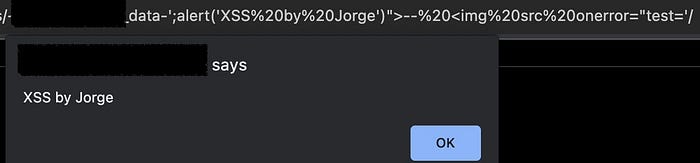
data-';alert('XSS by Jorge')">-<img src onerror="test='And we get the XSS
Finding Self-XSS in Username
If this was Synack, I would have reported the DOM XSS and move onto another target. But in other platforms, I don't like reporting a single issue. I like chaining vulnerabilities. This lowers the chances of the vulnerability getting duplicated.
Changing Username
The task is simple. Just find a way to change my username or name on the application to an XSS payload.
I registered to the web application and found the location where I can change my username. I found it and tried changing my username, but it didn't allow special characters. No worries, I'll just use Burp!
This next part, I'll admit, I found it by accident. My normal workflow, I like to start simple by inserting "> and seeing the response. If I had done that initially, this would have been the response.
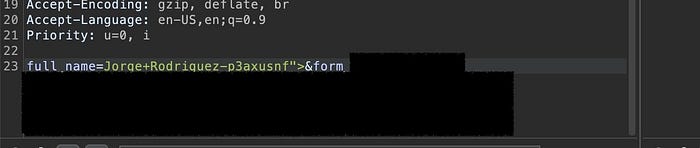

The first payload I actually tried was the following payload
<img/src=x>
If we examine the response, the payload seems to have been normalized in the backend (this is view-source response, not the DOM). Before we saw that "> were getting sanitized to \" and >, but this time, those characters weren't sanitized.
If I try to put quotes around the x, here's what happens

So it looks like there's some sanitizer being used in the backend. But this sanitizer would be the downfall in this particular case.
Quote Normalizer exploit
Looking at the second payload, the sanitizer is adding quotes around the x <img src="x">. We can leverage this to achieve XSS, due to the location of the injection. Here is a sample code of where the injection was taking place:
<script type="text/javascript">
d.push({"email":"myemail","username":"INJECTIONHERE"})
</script>
At first I tried to escape the function with a payload like this:
Jorge+Rodriguez-p3axusnf<img/src=});alert()//However forward slashes are being escaped.
The payload that ended up working, and probably the shortest payload, was:
<img/src=-alert(document.domain)->Let's see how that looks like in the source code

Why does this work? If you open up the chrome console and type the following into the console window, you will get an alert
{"test":"testing"-alert()-"123"}In our scenario, the src quotes acted as an escape, that allowed us to inject a Javascript object in between the string testing and 123
The browser will then try to evaluate "testing" minus the result of alert() minus "123". Other operators can be used in this instance. We can use *alert()*, +alert()+, /alert()/, ^alert()^, etc.
Report Time
Since this was for a VDP program, I didn't fully go into showing how these two exploits fit together. But the way to leverage these two is by using the DOM XSS to send an XHR request to the account editing endpoint, and modifying the full_name parameter into an XSS payload. We can then create a key logger that will be persistent throughout the site, and have the ability to capture credit card information
Final Thoughts
Path XSS
XSS doesn't have to be simply parameters. Anywhere in the URL bar an XSS could be possible. Don't limit yourself to parameters, test everything.
Look for quirks
The web application itself can have weird quirks that could allow you to bypass security measures and allow you to acheive your desired results. Look for weird behavior and think outside the box.
Try to escalate
Always try to escalate an XSS or a vulnerability. It will have a higher likelihood of getting accepted.