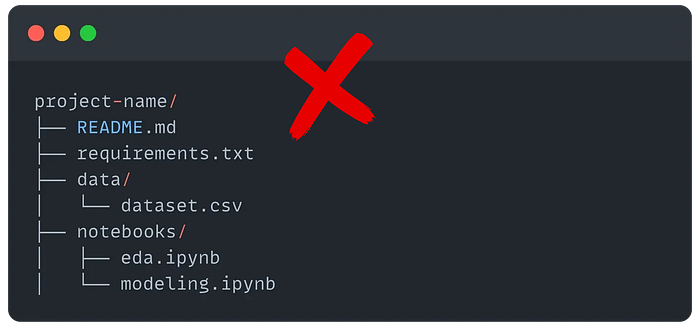

That's a big misconception!
Coding complexity isn't a sign of experience or skill.
You know what is?
Structure. Project design. Thinking ahead.
Experienced Data Scientists don't just write better code, they set up better projects.
Projects that scale, that teammates can jump into, that don't fall apart when it's time to ship.
If you want to build something collaborative, maintainable, and most importantly, deployment-ready, you have to think beyond notebooks or complex scripts.
So in this article, I want to show you how to start setting up your projects like an experienced Data Scientist, not just to impress but also to make life easier.
The "basics" can only get you so far…
I think we can all agree that, at the very least, a good project structure should look something like this:
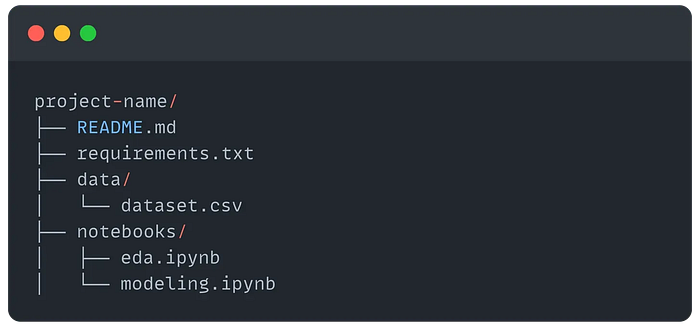
But this is only good for working with notebooks, and in the end, a notebook is not the final product, it's just a thinking space.
So as projects get larger and more complex, especially if you're working in teams or preparing for deployment, you'll need to go further.
You'll need to:
- Manage environments more reliably (e.g. with a
Dockerfile) - Separate logic into scripts and modules (
src/) - Add tests to avoid breaking things (
tests/) - Track and version data or models (e.g. using DVC or MLflow)
- Use configs to parameterize experiments (
config.yaml) - Set up lightweight automation (e.g.
Makefileor shell scripts) - Document decisions clearly (expand the
README, adddocs/)
This is why one of the best tools I've found for setting all of this up automatically is the library Cookiecutter.
Quick overview of Cookiecutter

Cookiecutter lets you generate a full project structure from a template by answering a few command-line interface (CLI) prompts.
The version of Cookiecutter I prefer is called Cookiecutter Data Science which is designed for organizing data science projects following best practices.
Installing it and running it is very easy:
pipx install cookiecutter-data-scienceThen you just run the command ccds from the parent directory where you want your project:

After that, you just follow the instructions to help you create a folder with everything set up — folders, config files, and boilerplate code included.
Great for getting started fast without setting up everything from scratch.
💡 By the way, using this tool doesn't require a specific language or framework. Cookiecutter is agnostic to your tooling.
I won't go into more detail since there is a lot of great documentation on this website.
Instead, let me give you a few more tips to help you improve your workflow!
🛠️ 3 pro tips for a smoother workflow
- Use a
.env.exampleAlways include a.env.examplefile to make it clear which environment variables are needed. It helps others get set up faster and reduces config errors. - Set up
pre-commithooks Add pre-commit early to auto-format code and catch simple issues before they make it into version control. It keeps your codebase clean from day one. - Add a simple CLI or Makefile
Whether it's a
traincommand ormake all, having a lightweight way to run key steps saves time and avoids confusion. Make your project runnable without guesswork.
Closing thoughts
I hope by now its clear that you don't need a massive tech stack to build better ML projects.
What you need is structure, a clear starting point, and a system that lets you stay focused when things get messy (because they will).
Remember, good habits compound!
And project design is one of those small things that quietly makes everything else easier: collaboration, iteration, scaling, even debugging.
Start with structure. Then let good habits do the rest.
A couple of great resources:
- 🤝 Want more articles like this? Join 13K+ Data Scientists already accelerating their career with weekly practical tips.
- 🤖 Struggling to keep up with AI/ML? Neural Pulse is a 5-minute, human-curated newsletter delivering the best in AI, ML, and data science.