


Loops are indispensable parts of programs and almost all programming languages provide support for writing different types of loops.
Bash also provides ways for writing loops. Some ways are similar to other languages, such as C and Python, but a few ways are very special even weird.
This article will dive into 5 ways of writing loops in bash with concise examples and provide you some tips to make your bash scripts bug-free.
1. While Loops
Like other languages, the structure of a while loop in bash is as follows:
while condition
do
  commands
done
As long as the "condition" can be satisfied, the commands will be executed again and again.
Let's see an example:
The above script can print the numbers from 1 to 10.
Tips: For the condition part, two spaces are required:
1. The space between
[and the first character
2. The space between the last character and
]
The above is required by the syntax of bash. It means if you write the condition incorrectly as follows, there will be a syntax error when executing the script:
Wrong way 1: [$number -le 10 ]
Wrong way 2: [ $number -le 10]
Wrong way 3: [$number -le 10]
2. Until Loops
A while loop means doing commands while the condition is met. An until loop, on the contrary, means doing commands until the condition is met.
If we just change the word while of example 1 to until, what will happen?
The execution of the above script will print nothing. Cause the condition (the variable number should be less than or equal to 10) is met already in the first place, the commands inside do...done structure will not be executed.
But how to change the above code a bit to print numbers from 1 to 10?
It's simple if you understand the logic of the until loop. Just change the condition to [ $number -ge 11 ].
Tips: The readability of your code is important no matter what programs you'll write. Always use
whileloops if possible, cause theuntilloops may seem strange if a programmer is from other languages that don't supportuntilloops.
3. C Style For Loops
Bash provides a syntax for writing for loops in a C/C++ style.
The style is as follows:
for (( expression1; expression2; expression3 ))
do
  commands
done
As the syntax of the C programming language, the expression1 is used to initialize the loop condition, expression2 is used to determine the end of the loop, and expression3 is executed at the end of each loop iteration to update the value.
Let's use this way to print numbers from 1 to 10:
4. Python Style For Loops
If you would like to go through all variables of an array or list, a more convenient way is using for..in loops, which is a Python (and many other languages also support this way) style for loop.
The structure of it is as follows:
for variable in list
do
  commands
done
In this case, we can print numbers from 1 to 10 with the help of brace expansions:
5. Select Loops
There is a special type of loop in bash — the select loops.
Basically, its structure is similar to the for..in loops:
select variable in list
do
  commands
done
But it can provide some special interactive features:
- It generates a menu on the terminal for users to choose.
- A user can choose the options on the menu through provided numbers.
- After every choice, bash will reprint the menu again and again until the user presses "Ctrl + C" to quit the execution.
Talk is cheap, let's see an example code:
Now, let's execute the above program on a terminal:
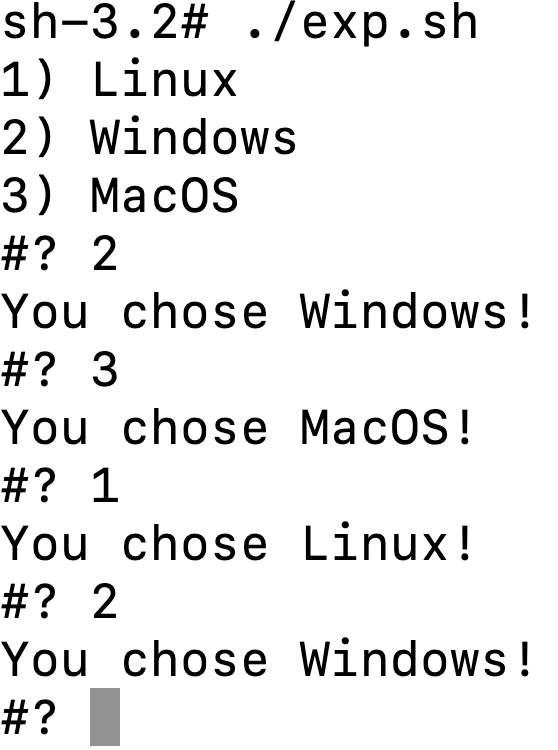
As the above screenshot shows, the terminal will give you the menu and wait for your choices again and again.
This is a very useful feature if you can leverage it properly. For example, we can add case statements within the do..done to execute different commands for different choices.
Thanks for reading. If you like it, please follow me and become a Medium member to enjoy more great articles. 🙂
Relative articles: