
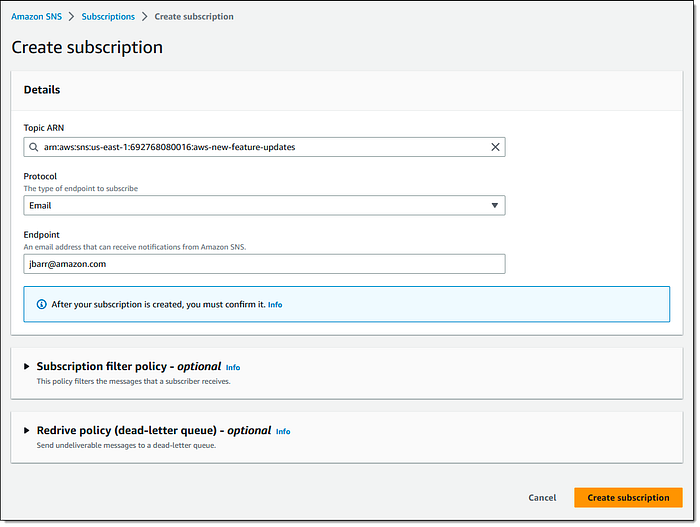
Today we are going to learn a behavioral pattern: The observer pattern. If you have used AWS SNS(Simple Notification Service), the idea is essentially the same. You create a topic, and other application can subscribe to this topic, once they become the subscriber, every time there is a new message from the topic, these subscriber will receive the update:
The same concept is common in every day life too, for example, when you are browsing on Youtube, and you stumble upon an interesting channel so you clicked the subscribe button, going forward you will see this channel's update till you unsubscribe.
The Observer Pattern defines a one-to-many dependency between objects so that when one object changes state, all of its dependents are notified and updated automatically
Let's look at an example where there is a popular news source, it allows people to subscribe to their news update in various ways, people can get news update with email, text message, in-app. In the future, people may also get news update in their VR devices.

We will apply the observer pattern with this example so that people get the news update in time. The publisher should be able to add or remove subscribers and notify the subscribers.
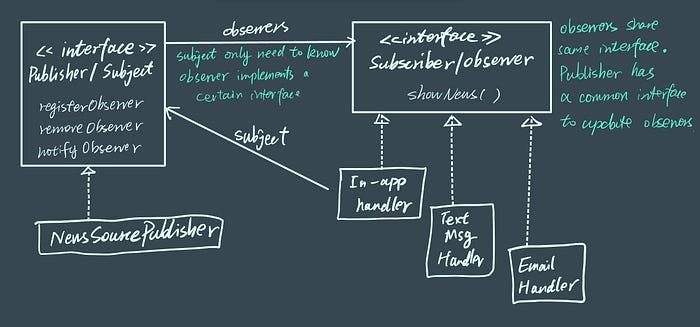
The code looks like this:
public interface Publisher {
  public void registerObserver(Observer o);
  public void removeObserver(Observer o);
  public void notifyObservers();
}

public interface Observer {
  public void showNews(String msg);
}

public class NewsSourcePublisher implements Publisher {
  private ArrayList<Observer> observers;
  private String message;

  public NewsSourcePublisher() {
    observers = new ArrayList<Observer>();
  }

  public void registerObserver(Observer o) {
    observers.add(o);
  }

  public void removeObserver(Observer o) {
    int i = observers.indexOf(o);
    if (i >= 0) {
      observers.remove(i);
    }
  }

  public void notifyObservers() {
    for (Observer observer: observers) {
      observer.showNews(message);
    }
  }

  public void somethingHappened() {
    notifyObservers();
  }

  //....
}

public class EmailHandler implements Observer {
  private Publisher newsSource;
  private String message;

  public EmailHandler(Publisher newsSource) {
    this.newsSource = newsSource;
    newsSource.registerObserver(this);
  }

  public void showNews(String msg) {
    // do something to trigger sending out the message via email
  }
}
You may have seen debates around pull vs push modes when it comes to the pub/sub pattern, that's another topic I will cover another day, since it does have some interesting points around the push mode and the pull mode. Here in this article so far, we have been using the push mode.
Actually Java has it's built-in support of this pattern in java.util (source code, API page), not only you can have the essential functionality out of the box, you can also implement a push or pull mode of update to observers, before we use this build-in support to implement the same example, a few things I want to point out is that:
- You must first call the
setChanged()method to signify that the state has changed in the object - it implements the
update()method(theshowNews()method in the example), but you can specify whether to push the data to observer via theargor let the observers to pull data from the subject:update(Observable o, Object arg)
import java.util.Observable;

public class NewsSourcePublisher extends Observable {
  private String message;

  public NewsSourcePublisher() {}

  public void somethingHappened() {
    setChanged(); // the flag to indicate state has changed
    notifyObservers();
  }

  public String getMessage() {
    return message;
  }

  //....
}

import java.util.Observable;
import java.util.Observer;

public class EmailHandler implements Observer {
  Observable observable;

  public EmailHandler(Observable observable) {
    this.observable = observable;
    observable.addObserver(this);
  }

  public void update(Observable obs, Object arg) {
    // do something with the data if the message is pushed
    // or get the data with getMessage if it's in pull mode
  }
}
A few things you need to know about java.util.Observable is that is it a class, not interface, this means you have to subclass it and as we've learn from other design patterns, it is not very flexible. Another thing is that the setChanged method is protected, which means you have to subclass Observable first to call the method. This again does not align the best practice of favour composition over inheritance.
Hope this helps you understanding the factory patterns! If you want to do more reading, I recommend this Head First Design Patterns book (it is definitely easier to grasp compare with the well known GoF design pattern book 😜).
All the other design pattern articles are included in this list if you are interested in learning more!
If you are a software developer with non-traditional background and want to build solid computer science foundations, check this Medium list with best learning resources and this free notion template.