

In the previous article, we covered multi-threading.
Here we will be covering another library provided by Python called multiprocessing. Likethreading, multiprocessing allows us to run code concurrently; however, this code runs on multiple processors. Let's start with a definition.
- Global Interpreter Lock (GIL) — used to ensure that Python bytecode only runs on one thread at a time when locked. If released, it allows using multiple cores for processing.
So far, we've been able to dodge this complexity, as we have only been dealing with single core computations. The GIL is vital to ensure the safety of concurrent access; in layman's terms, multiple tasks do not cause problems when running at the same time.
In our previous examples, we ended up having two lines printed to the console at the same time. The GIL could be used to clean this up by ensuring only one process can write to the console at a time.
While the GIL works to protect us, it limits us from the parallel processing that we get by using multiple cores, which in turn causes performance issues. It doesn't mean "never use the multiprocessing," it just means that we should only use multi-processing when we know exactly how we want our code to perform.
Multiprocessing
multiprocessing is best used when we are performing CPU-based calculations. CPU calculations might be Bitcoin mining (the slow way) or creating rainbow tables for some extreme examples. Some more practical examples are photo and video editing, music composition, or creating hash tables (data mining stuff).
Here's an example you'll recognize from the previous post slightly changed to work for multiprocessing.
Instead of importing threading and concurrent.futures, we only need to import multiprocessing. The next thing that has changed is that I used multiprocessing.current_process().pid instead of threading.active_count().name[-3:]. This gets the Process ID of the process that spun from our main process and reports it back to the console, so we know where to find our process if we ever need to terminate it later. Everything else in our task function is the same.
In main, we changed our executor, which once stood as an instance of ThreadPoolExecutor, but we changed it to multiprocessing.Pool(). Here, we specified only a single process should be used. If I left it blank, it would return the total number of CPUs available in my machine using os.cpu_count().
Like threading, I am using map to map each number to its own task. If I have more tasks than processes, they will queue up and wait for the previous task to complete. Finally, I added executor.close() because I had a runaway process. close() cleans up the pool and ensures it is properly stopped.
In if __name__ == "__main__", we removed the line current_threads = threading.active_count(). We did not replace it with the equivalent line for multiprocessing, which would becurrent_children = multiprocessing.active_children(), because our executor will block the main thread until it is completed. We could run this using a more true apply_async call (similar to start), but for our purposes, we won't need it here.
I also continue to use time to check our execution run time as we did previously.
Here are the results of testing multiple processes:
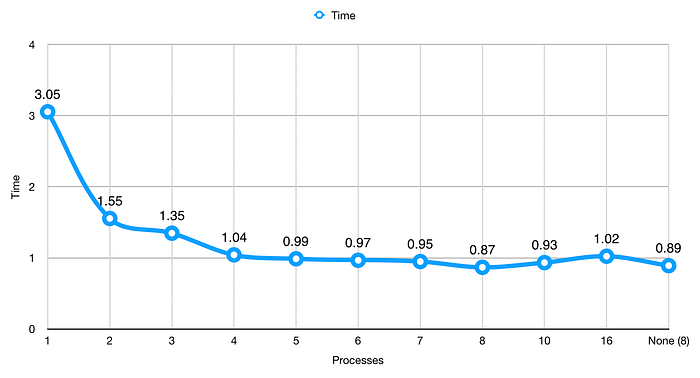
We get a better run time here than we did with threading. This isn't always the case, so be sure to run your own tests before you decide. Our time here is 3.05 seconds. Previously, we hit 3.09 with 50 threads. This must mean that multiprocessing knows how to take advantage of using multiple threads.
Like threading, we see our most significant jump when we use two processes. We also see other noticeable drops until we get to 4 cores. Between 4 and 7 processes, we don't see much of a difference; however, at 8 processes, we see another noticeable dip. This lack of difference was probably due to my computer doing other things (ahem, writing this article), which already used up CPU time through Chrome, Safari, PyCharm (for code quality), and Mail, not to mention all of that stuff that runs in the background.
I added 10 and 16 processes to show what happens when you use more processes than CPUs. We see that number creep back up, not an improvement.
You might want to add some code like this to combat putting code on a system where you may not know how many CPUs it will have.
I know there are other ways to do this, using elif or a ternary operator, but this is straightforward, and it works. os.cpu_count() might be expensive, which is why I stored it in a variable. This way, I'm not asking Python to look up the CPU count every time I need to do a comparison or an assignment.
Locks
Since we have an opportunity for two different processes to print to the console at one time, we might want to include locks in our program.
I'll use the same example from above to show how locks work.
What Lock does is it acquires a lock on the console process. While the lock is active, no other process can use this. A Lock is used when editing files, and I'm sure you've seen the warning, some user has some file opened, please ask them to close it or try again later. This is the same kind of lock we are talking about here. Lock prevents anyone else from accessing the console until the process has released the lock on the console.
Locks do cause our run time to increase but not by much. In this example, my run time increased from 0.87 to 1.01 seconds. I'll take ~0.2 seconds for more safety around data output.
Sharing
Sometimes we need to share data between processes. There are a few ways to do this, but it's not as straightforward. When I first started with multiprocessing, I saw a lot of new error messages that seemed cryptic because I wasn't familiar with socket programming. While that is out of the scope of this tutorial, I'll try to keep it simple enough so that you can share data between processes. It's up to you to learn the advanced stuff on your own.
Here we have a modified example from the previous threading article. We start with a few direct imports: Process, Queue, and current_process.
I modified our count function slightly. Before I get into the details, I want to cover multiprocessing queues. Queues also exist in the Threading library; however, there isn't as straightforward of a way to share values because processes run in separate memory spaces. This is where queues come into play. You attach queues to processes to allow transporting values from one process to another.
To insert values into a queue, we use queue.put(item). To retrieve values, we use queue.get(). The way that queues work is first-in-first-out or FIFO, meaning the first item you put into a queue is what you will get back the first time you call get().
Back to our example. count previously required four parameters. Because current_process().name returns "process-1", "process-2", etc., we can disregard passing the current process count. Everything else is the same until we get to the end where we put this result in the queue.
The first step of our program is to create a queue that we can use for sharing data between processes. Next, we create empty lists to hold our results and processes. Finally, we create a variable to hold the number of processes that we want to use for this calculation with process_count. We do this so that if we ever need to bump up or take out some processes, we can do it all in one place to makes updates easy down the road.
We updated how we create new processes by passing the queue instead of the results list. Starting each process in the second loop is still the same as before. In the third loop, we make a couple of changes. Before we can use process.join(), we need to get each value out of our queue and store it in our results list.
Finally, we use queue.close() to ensure we clean up after ourselves, then we finish by printing out the length of the first element in the results list.
Differences in Async Methods
Now that we've covered the different async options we have available, let's look at the most important aspect: when to use them.
Threading
- Data can be shared easily between threads.
- Best used when you are limited by I/O (e.g., disk read/write) but have many connections.
- Only uses one CPU core.
Multiprocessing
- Uses multiple CPU cores.
- Able to write to many disks at once.
- Best when you need to perform many calculations very quickly.
- Unless specified only uses one thread in additional cores. (Code can get messy quickly if you don't have a good design planned)
- Sharing data between processes is difficult.
Asyncio
- Relies on threading, but the thread delegates tasks to the system to perform work and results from the delegated tasks.
- When paired with multiprocessing, you can use all cores effectively with multiple threads delegating to the system.
- Best for when you have slow I/O but need many connections (e.g., web server or web crawler).
- Not suitable for CPU-based tasks because it relies on threading.
Summary
Today we learned about multiprocessing and how it can be used to perform calculations very quickly. We did a little more data science and saw that it cut the processing time down by a lot when we switched from threading to multiprocessing in the example, which was a CPU-based task.
We also looked at how we could share data between processes. While it may seem easy because the example is there for you, it took me a while to get it right the first time I tried using multiprocessing. As you write more multiprocessing code, it will get easier. So keep practicing.
Finally, we recapped all of the different ways to write async code and looked at a few tips to help us remember which tool is right for the job.
Suggested Reading and Viewing
Multiprocessing from the Python docs.
Global Interpreter Lock from the Python wiki.
Raymond Hettinger, Keynote on Concurrency — PyBay 2017
What's Next?
After all of that, we're running low on topics. We've covered most of the things in the Python tutorial and some things that are not included. I've decided that I don't want to cover the Standard Library. That happens naturally as you write code and would overload you if I did.
We do need to cover one critical aspect of all programming languages. Testing!
Yes, you can write a program without writing tests, and it will work (see previous examples here). Testing is by far the most important thing you will do for your application.
But let's face it, even if your app is designed to do some amazing things, it is utterly useless if it fails to do anything. So don't ship your app just yet. Test it.