How to Build Multimodal RAG with Chroma DB, OpenCLIP and GeminiAI
Hey everyone, it's Samar here! Recently, while browsing Chroma DB's website, I stumbled upon an exciting announcement — they've launched a multimodal feature! Naturally, I had to dive in and see what this was all about. Spoiler alert: it's super cool. In this article, I'm going to break down what this new functionality is, why it matters, and how you can leverage it to build powerful retrieval-augmented generation (RAG) pipelines using multiple modalities like text and images. Also we will use Gemini gemini-1.5-pro to generate description on the retrieved image.
What Is Multimodal RAG?
Traditionally, RAG pipelines have focused on text, where you input a query and the system retrieves relevant text from a database to generate a response. With Chroma DB's new multimodal feature, we're stepping into a new era where you can do the same with images. This means you can now create RAG pipelines that integrate both text and images, enabling more interactive and visually rich experiences.
The Magic Behind CLIP Models
Before diving into how you can set up a multimodal RAG pipeline, let's talk about CLIP models. CLIP, which stands for Contrastive Language-Image Pretraining, was introduced by OpenAI in January 2021. These models are designed to connect images and text by learning from vast amounts of internet data. Essentially, CLIP models predict which images and texts are related by contrasting correct pairs against incorrect ones. This helps create a shared embedding space where similar images and texts are close together.
What's really cool about CLIP models is their ability to perform zero-shot learning. This means they can generalize to new tasks or data without needing specific training for those tasks. For instance, they can classify images into categories they've never seen before by understanding textual descriptions. This capability is a game-changer for building retrieval systems that can match user queries with relevant images.
Step by Step Guide to Builda Multimodal RAG Pipeline
Let's get our hands dirty and build a multimodal RAG pipeline using Chroma DB, OpenCLIP and Gemini-1.5-pro.
1. Install the Dependencies.
!pip install datasets chromadb
!pip install open-clip-torch
!pip install -q -U google-generativeai- ChromaDB: chromadb is vector database which we are using to store the images.
- OpenCLIP-torch is an open-source implementation of the CLIP (Contrastive Language–Image Pretraining) model, originally developed by OpenAI. To use OpenCLIP-torch in a project, install the package, load a pretrained model, and then use it to encode images and texts into embeddings. These embeddings can then be used for tasks like similarity searches. We will see in below code.
- Google-generativeai: To access the gemini 1.5 pro model for generating description based on the image.
2. Choosing a Dataset
The first step is to choose a relevant dataset of images. In this tutorial, we will use a small subset of the COCO dataset, focusing on downloading a fraction of the images and using them to create a multimodal collection in Chroma. The COCO dataset is a well-known object detection dataset that contains over 200,000 labeled images. Each image is annotated with object labels, bounding boxes, and segmentation masks, making it an ideal dataset for training and testing object detection and image retrieval systems. You can choose the image dataset based on your need.
Here's how you can load the dataset using the Hugging Face dataset package:
import os
from datasets import load_dataset
from matplotlib import pyplot as plt

dataset = load_dataset(path="detection-datasets/coco", split="train", streaming=True)

IMAGE_FOLDER = "images"
N_IMAGES = 20

# For plotting
plot_cols = 5
plot_rows = N_IMAGES // plot_cols
fig, axes = plt.subplots(plot_rows, plot_cols, figsize=(plot_rows*2, plot_cols*2))
axes = axes.flatten()

# Write the images to a folder
dataset_iter = iter(dataset)
os.makedirs(IMAGE_FOLDER, exist_ok=True)
for i in range(N_IMAGES):
    item = next(dataset_iter)
    image = item['image']
    image.save(f"{IMAGE_FOLDER}/image_{i}.jpg")
    axes[i].imshow(image)
    axes[i].axis('off')
plt.show()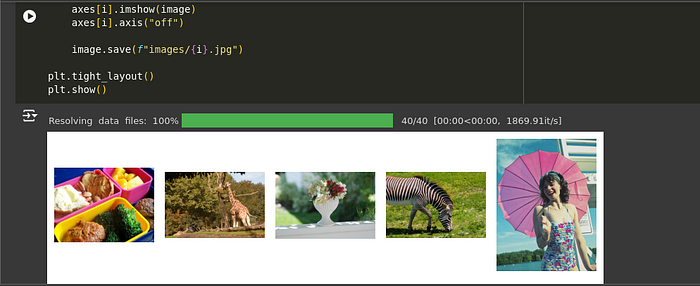
Explanation:
- Dataset Loading: The code uses the Hugging Face
datasetslibrary to load a subset of the COCO object detection dataset in a streaming mode, which is efficient for large datasets. - Image Saving: The images are saved to a local directory named "images".
- Plotting: A subset of the images is plotted using Matplotlib for visual inspection.
3. Create a Chroma database and store images.
import chromadb
client = chromadb.Client()- This block initializes a Chroma client, which is essential for interacting with the Chroma database.
from chromadb.utils.embedding_functions import OpenCLIPEmbeddingFunction
from chromadb.utils.data_loaders import ImageLoader

embedding_function = OpenCLIPEmbeddingFunction()
image_loader = ImageLoader()Explanation:
- Embedding Function: The
OpenCLIPEmbeddingFunctionis a built-in function in Chroma that can handle both text and image data, converting them into embeddings (vector representations). - Image Loader: The
ImageLoaderis used to load images from a specified directory.
collection = client.create_collection(
    name='multimodal_collection',
    embedding_function=embedding_function,
data_loader=image_loader)- A multimodal collection named "multimodal_collection" is created using the Chroma client. The collection is configured to use the specified embedding function and data loader.
# Get the uris to the images
image_uris = sorted([os.path.join(IMAGE_FOLDER, image_name) for image_name in os.listdir(IMAGE_FOLDER)])
ids = [str(i) for i in range(len(image_uris))]

collection.add(ids=ids, uris=image_uris)- We add image data to the collection using the image URIs. The data loader and embedding functions we specified earlier will ingest data from the provided URIs automatically.
4. Querying a multi-modal collection
We can query the collection using text as normal, since the OpenCLIPEmbeddingFunction works with both text and images.
Querying with text:
# Querying for "Animals"

retrieved = collection.query(query_texts=["animals"], include=['data'], n_results=3)
for img in retrieved['data'][0]:
    plt.imshow(img)
    plt.axis("off")
    plt.show()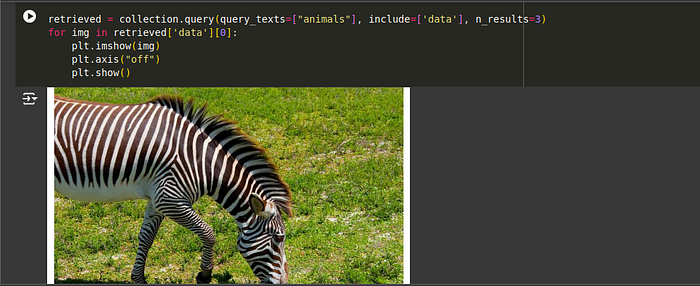
# Querying for "Vehicles"

retrieved = collection.query(query_texts=["vehicles"], include=['data'], n_results=3)
for img in retrieved['data'][0]:
    plt.imshow(img)
    plt.axis("off")
    plt.show()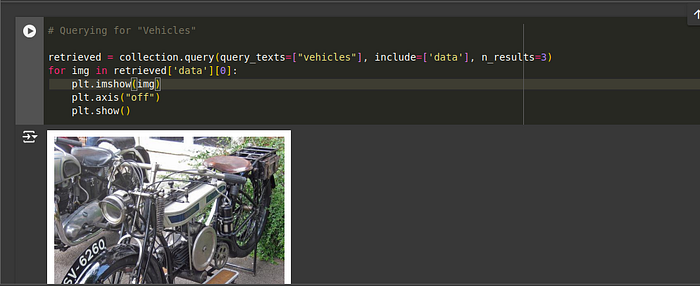
We can also query by images directly, by using the query_images field in the collection.query method.
from PIL import Image
import numpy as np

query_image = np.array(Image.open(f"{IMAGE_FOLDER}/1.jpg"))
print("Query Image")
plt.imshow(query_image)
plt.axis('off')
plt.show()

print("Results")
retrieved = collection.query(query_images=[query_image], include=['data'], n_results=5)
for img in retrieved['data'][0][1:]:
    plt.imshow(img)
    plt.axis("off")
    plt.show()
And we can query by URI too, by using the query_uris field in the collection.query method.
query_uri = image_uris[1]

query_result = collection.query(query_uris=query_uri, include=['data'], n_results=5)
for img in query_result['data'][0][1:]:
    plt.imshow(img)
    plt.axis("off")
    plt.show()

sample_img = query_result['data'][0][1]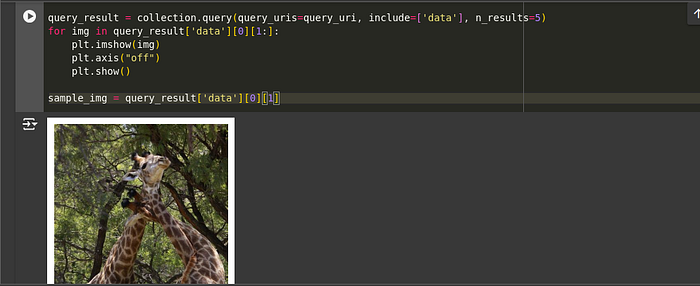
5. Choosing a Vision Model
To complete the RAG pipeline, we need to set up a vision-capable language model. I'm using Gemini 1.5 Pro with vision capabilities. This model can process both the text query and the retrieved images to generate a response. Click on this link and create api key. Copy and paste into the below code.
import google.generativeai as genai
from PIL import Image
genai.configure(api_key='api_key')

model = genai.GenerativeModel(model_name="gemini-1.5-pro")

prompt = "Write an description about the given image"
sample_img_pil = Image.fromarray(sample_img)
response = model.generate_content([prompt,sample_img_pil])

print(response.text)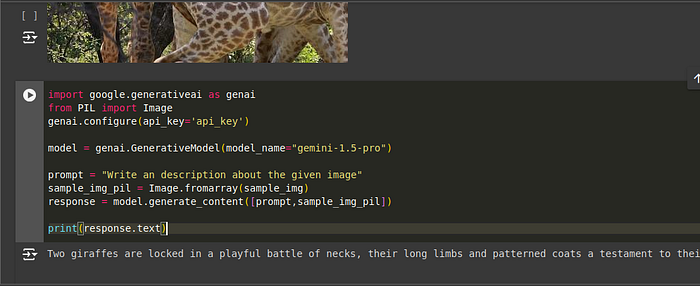
The Google Colab Notebook link . This Notebook is provided by ChromaDB. I have just modified for RAG Pipeline. You can also according to your needs.
Conclusion
And there you have it — a complete walkthrough on setting up a multimodal RAG pipeline using Chroma DB, OpenCLIP and Gemini vision model. This setup allows you to create powerful applications that integrate text and image data, enabling more dynamic and visually engaging user experiences. Whether you're building a fashion assistant, a visual search engine, or anything in between, this multimodal approach opens up a world of possibilities.