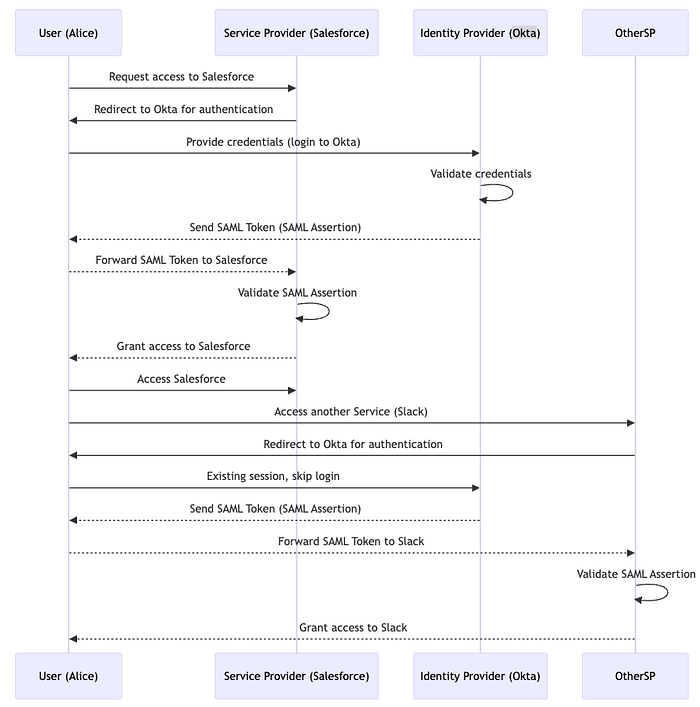

Single Sign-On (SSO) is an authentication process that allows users to access multiple applications or services with a single set of login credentials, typically a username and password. Here's how it works in detail:
1. SSO Using SAML
1. How Single Sign-On Works: A Detailed Flow
Imagine a scenario where a company uses several different services, such as:
- Google Workspace for email and documents,
- Salesforce for customer relationship management (CRM),
- Slack for communication.
Rather than requiring employees to log in separately to each of these services, they use a Single Sign-On (SSO) system where logging in once gives them access to all the apps.
Here's a detailed look at how the process works, often using SAML (Security Assertion Markup Language) as an example protocol:
1.1. User Requests Access to Service Provider
Let's say a user, Alice, wants to access the Salesforce CRM platform. She navigates to Salesforce's login page.
- Salesforce is configured to use SSO for authentication, so instead of prompting Alice for credentials, it redirects her to the Identity Provider (IdP). The IdP is responsible for verifying Alice's identity (e.g., this could be Okta, Microsoft Azure AD, or Google Identity).
1.2. Redirect to Identity Provider (IdP)
When redirected to the IdP, Alice sees a login page for the Identity Provider (e.g., Okta).
- If Alice has not logged in yet, she enters her credentials (username and password).
- If she is already authenticated with the IdP, she will skip this step due to an existing session.
1.3. Identity Provider Validates Credentials
Once Alice submits her credentials, the IdP checks if they are correct. If Alice's credentials are valid:
- The IdP generates a SAML authentication assertion (token), which contains details such as Alice's user ID, authentication time, and any permissions she has.
- The assertion is cryptographically signed by the IdP to ensure that the information has not been tampered with.
1.4. Redirect Back to the Service Provider with Assertion
The IdP redirects Alice's browser back to Salesforce, but this time it includes the SAML assertion in the HTTP request. Salesforce receives this assertion, which is essentially a token stating that the IdP has authenticated Alice.
1.5. Service Provider Validates the Assertion
Salesforce, the Service Provider (SP), checks the following:
- Signature Validation: It verifies the signature of the SAML assertion to ensure it really came from a trusted IdP (in this case, Okta).
- Token Expiry: Salesforce checks whether the assertion is still valid (not expired).
- Attributes Check: It ensures that the assertion contains all the necessary attributes, such as Alice's user role, permissions, or group memberships.
Once Salesforce validates the assertion, it creates a session for Alice and grants her access to the CRM system.
1.6. Alice Accesses Multiple Services
Since Alice is now authenticated with Okta (the IdP), she can access other services integrated with the same IdP without having to log in again. For instance, she can open Slack or Google Workspace and be automatically logged in because the SSO session is still valid with the Identity Provider.
2. SSO Using OAuth and OpenID Connect (OIDC)

Another common protocol used in SSO is OAuth 2.0 combined with OpenID Connect (OIDC). This is commonly used for modern web applications and APIs. Let's break down the flow in this case.
Example: SSO for Third-Party Apps (OAuth 2.0 with Google)
Imagine Alice is trying to log in to a third-party service called Trello using her Google account (which acts as the Identity Provider).
2.1. Alice Chooses Google to Log In
On Trello's login page, Alice clicks "Sign in with Google." Trello redirects Alice to Google for authentication, leveraging OAuth 2.0 and OpenID Connect.
2.2. Google Authentication
Alice is taken to Google's login page, where she may need to enter her credentials (if she's not already logged in). Once authenticated, Google generates an OAuth 2.0 access token along with an ID token (in OpenID Connect).
- Access Token: Allows Trello to access resources from Google APIs (like fetching user profile information).
- ID Token: Contains user information such as email, user ID, and other claims (in JWT format).
2.3. Redirect Back to Trello
Google sends Alice back to Trello along with the ID token (JWT). This token allows Trello to confirm Alice's identity.
2.4. Trello Validates the Token
Trello verifies the token by:
- Checking the signature to confirm it's from Google.
- Ensuring the token has not expired.
- Checking that Alice has the necessary permissions (if needed).
Once validated, Alice is granted access to Trello without having to create a separate account or log in again.
2.5. Re-using the Session
Now, Alice is authenticated not only in Trello but also in other apps that integrate with Google's authentication system (like YouTube, Google Drive, etc.). She does not need to re-enter her credentials for any other services that rely on Google as an IdP.
3. SSO Architecture Overview
In an SSO system, the key components are:
- Identity Provider (IdP): Responsible for authenticating the user and issuing tokens. Examples: Okta, Microsoft Azure AD, Google Identity.
- Service Provider (SP): The application or service that requires authentication. Examples: Salesforce, Slack, Trello.
- SAML Assertions or OAuth Tokens: The "proof" provided by the IdP to the SP that the user has been authenticated.
- Session Management: Once authenticated, the session is managed either through cookies or tokens that allow access without re-authentication.
4. SSO Examples
4.1. SAML Example (Corporate SSO with Okta)
- User: Employees of a company.
- Identity Provider: Okta.
- Service Providers: Salesforce, Slack, Jira.
- SSO Protocol: SAML.
- Employees access Salesforce and are redirected to Okta.
- Okta authenticates the employee and sends a SAML token back to Salesforce.
- The employee can then use other apps like Slack without additional login.
4.2. OAuth 2.0 Example (Third-Party Apps with Google Sign-In)
- User: Alice (personal user).
- Identity Provider: Google.
- Service Providers: Trello, YouTube.
- SSO Protocol: OAuth 2.0 + OpenID Connect.
- Alice logs into Trello using Google.
- Trello uses OAuth 2.0 to obtain an ID token from Google.
- The ID token (JWT) is validated, and Alice is logged in without needing separate credentials for Trello.
5. Security Considerations in SSO
SSO simplifies user authentication but also comes with security challenges:
- Single Point of Failure: If an attacker compromises the IdP (e.g., Okta or Google), they can potentially access all connected services.
- Session Hijacking: If tokens or sessions are not properly secured, an attacker can hijack the user's session and access multiple services.
- Multi-Factor Authentication (MFA): To mitigate risks, companies often enforce MFA during SSO, adding an extra layer of security.
Here are some common Service Providers (SPs) and Identity Providers (IdPs) to choose from. These are widely used in different industries and for various applications.
Service Providers (SPs)
- Salesforce — Customer Relationship Management (CRM) software.
- Slack — Team communication and collaboration platform.
- Google Workspace — Suite of productivity apps (Gmail, Docs, Sheets, etc.).
- Trello — Project management and collaboration tool.
- Dropbox — Cloud storage and file sharing service.
- Zoom — Video conferencing and online meetings platform.
- Jira — Issue and project tracking software (often used by developers).
- Confluence — Team workspace for collaboration and document sharing.
- GitHub — Version control and collaboration platform for software development.
- Zendesk — Customer support and help desk software.
Identity Providers (IdPs)
- Okta — Cloud-based identity management and authentication provider.
- Microsoft Azure Active Directory (Azure AD) — Enterprise identity service for authentication and authorization.
- Google Identity — Google's authentication service (used for OAuth).
- Auth0 — Identity management platform providing SSO and authentication.
- Ping Identity — Identity security provider offering SSO and multi-factor authentication (MFA).
- OneLogin — Cloud identity and access management platform.
- Amazon Cognito — Identity management service from AWS.
- IBM Security Identity Manager — Enterprise identity management solution.
- Oracle Identity Cloud Service — Cloud-based identity and access management service.
- Facebook Login — Social media authentication for third-party apps.
Summary
SSO enables users to authenticate once with an Identity Provider and gain access to multiple Service Providers without re-entering credentials. It uses protocols like SAML or OAuth 2.0/OpenID Connect to manage authentication securely across systems.