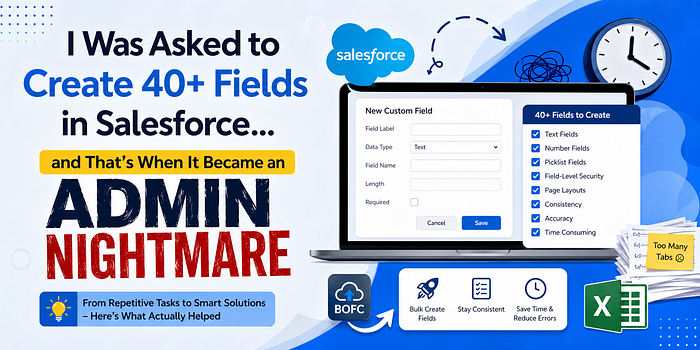

"We just need a few new fields."
Nothing unusual.
Until the final requirement came in.
"A Few Fields" Turned Into a Full List
When everything was compiled, here's what I had:
- 40+ custom fields
- Different field types (text, number, picklist)
- Picklists with multiple values
- Field-level security to configure
- Page layouts to update
At that point, I knew this wasn't going to be a quick task anymore.
Where It Started Getting Frustrating
I began the usual way:
- Go to Object Manager
- Click "New Field"
- Fill in details
- Save
- Repeat
And repeat… and repeat.
After a while:
- I had too many tabs open
- I wasn't sure which fields were done
- Some naming wasn't consistent
- I missed assigning a few fields to layouts
And the worst part?
I didn't fully trust that everything was done correctly.
The Real Problem (Admins Will Relate)
This wasn't just about creating fields.
It was about:
- Doing repetitive work without errors
- Maintaining consistency
- Not missing small configurations
- Finishing the task without burning hours
Because in admin work:
It's not the complexity that hurts — it's the repetition.
I Tried to Speed It Up (Didn't Really Work)
Like most admins, I tried to optimize manually:
- Copy-pasting field labels and API names
- Using multiple browser tabs
- Keeping an Excel sheet open for tracking
It helped… a little.
But:
- It was still slow
- Still tiring
- Still easy to mess up
At some point, it felt less like admin work and more like data entry.
What I Explored Next
I didn't want hacks — I wanted something reliable.
Here's what I tried (and how it actually felt from an admin perspective):
1. Manual Creation (Salesforce Setup)
This is what we all use.
It works fine… until the number grows.
After that:
- It becomes repetitive
- Easy to lose track
- Hard to stay consistent
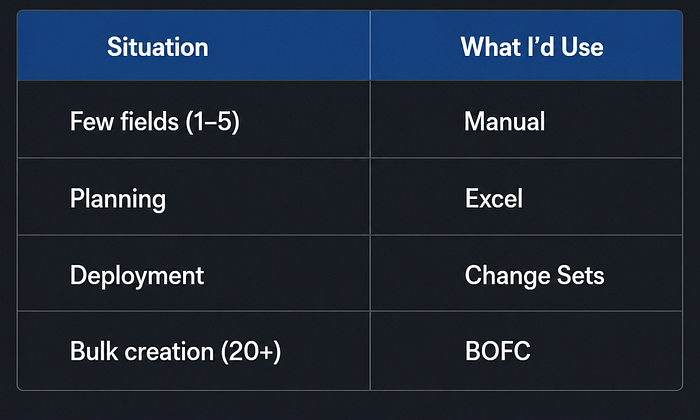
My take: Fine for 5–10 fields, painful beyond that
2. Excel for Planning
I created a structured sheet with:
- Field names
- Types
- Picklist values
This helped me stay organized.
But:
- I still had to manually create everything
- It didn't reduce effort — just confusion
My take: Good for planning, not execution
3. Change Sets
I tried creating fields in one org and deploying them.
It helped slightly, but:
- Still required manual creation somewhere
- Not ideal for large batches
- Hard to manage changes
My take: Useful for movement, not creation
4. BOFC (Bulk Object Field Creator)
This is where things finally started feeling easier.
Instead of repeating the same steps 40 times, I could:
- Create multiple fields in bulk
- Define everything in one place
- Maintain consistency across fields
And honestly, the biggest relief was:
I didn't have to keep double-checking everything.
My take: This is what actually solved the admin pain
What Actually Made Sense (For Me)
Here's how I think about it now:
The Biggest Mistake I Made
Looking back, the mistake wasn't doing it manually.
It was this:
Assuming "it's just field creation — it'll be quick."
Because when the number grows:
- Time increases
- Errors increase
- Frustration increases
What I Do Differently Now
Now when I see a request like:
"Create 30–40 fields"
I don't jump into setup immediately.
Instead:
- I plan everything first
- Structure the fields properly
- Avoid repetitive manual work where possible
Because fixing mistakes later takes way more time.
Final Thought
- Creating fields isn't hard.
- Creating a lot of fields accurately, consistently, and quickly — that's the real challenge.
- And if you've ever spent hours clicking "New Field" again and again…
- You already know what I'm talking about.
Curious
As an admin, how do you handle bulk field creation?
Still doing it manually… or found something that saves time?