

Non-Member Link.
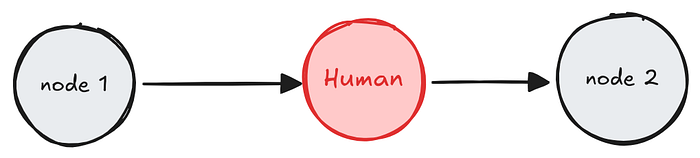
Human-in-the-loop (HITL) design patterns allow us to pause a workflow at specific points and wait for human input before continuing. This improves accuracy, flexibility, and control in AI-driven systems. LangGraph makes it easy to implement these patterns using interrupts and commands.
There are two ways to pause a graph:
- Dynamic interrupts: Use
interruptto pause a graph from inside a specific node, based on the current state of the graph. - Static interrupts: Use
interrupt_beforeandinterrupt_afterto pause the graph at defined points, either before or after a node executes.
There are seven common HITL design patterns that are widely used:
- Approve and Reject: Pause the workflow before a critical step and wait for a human decision. If approved, continue. If rejected, follow an alternate path.
- Edit Graph State: Pause to let a human review and update the internal state of the system.
- Review Tool Calls: Pause before executing a tool, allowing a human to inspect and optionally modify the tool call.
- Validate Human Input: Pause to review human-provided data before the workflow continues.
- Debug with Interrupts: Use breakpoints to pause execution at fixed steps. It is helpful to test or inspect the graph by pausing the graph flow at any given node.
- Subgraph Interrupts: Use interrupts within subgraphs that are invoked like functions. It allows nested HITL interactions.
- Multiple Interrupts: Use multiple interrupts within a single node. It can be helpful for patterns like validating human input.
In this blog post, I will focus on the second pattern: Edit Graph State.
It is important to note that Edit Graph State Pattern uses dynamic interrupt (also known as dynamic breakpoints) which is triggered based on the current state of the graph.
This pattern is useful when the system's internal state needs human review or corrections. Before continuing with the next step, the workflow pauses and allows a human to inspect and modify the state.
Why Use Edit Graph State
There are several reasons to use this pattern in AI workflows:
- To correct mistakes made by the system
- To improve the quality of generated outputs
- To add missing or contextual information
- To ensure human oversight in sensitive areas
- To combine automation with human expertise
LangGraph allows us to pause execution using dynamic interrupts and resume it with a human-edited state using the command primitive.
In this post, I will build a simple system that generates a customer service response. Before the response is sent, the system will pause and wait for a human to review and edit the response if needed. After editing, the system will continue and use the updated version.
The flow will look like this:
- The system generates a draft response to a customer question.
- The workflow pauses and asks a human to review and edit the draft.
- The human modifies the response if needed.
- The system continues using the updated response.
Before Proceeding to build this, I want to point out that when using human-in-the-loop, there are some considerations to keep in mind.
Any code that triggers external effects such as API calls, database writes, or logging should not be placed before the interrupt. Since LangGraph resumes by re-running the node where the interrupt occurred, placing side-effect code before the interrupt can result in duplicate execution.
To avoid this, there are two safe strategies:
1. Place Side Effects After the Interrupt
from langgraph.types import interrupt

def human_node(state: State):
    """Human node with validation."""
    answer = interrupt("Is the content suitable?")
    db.write(answer)  # Safe: Will run only after resume
2. Place Side Effects in a Separate Node
from langgraph.types import interrupt

def human_node(state: State):
    """Human node with validation."""
    answer = interrupt("Is the content suitable?")
    return {"answer": answer}
def db_write_node(state: State):
    db.write(state["answer"])  # Safe: Isolated in its own node
This ensures that side effects are never repeated unintentionally if a node is re-entered during a resume operation.
Let's Build This
Step 1: Setting up Python and uv
Our workflow will be a Python programs. First, check if Python 3.10+ is installed:
python3 --versionIf not, download Python 3.10 or higher from python.org.
Next, install uv, a fast dependency manager for Python:
curl -Ls https://astral.sh/uv/install.sh | bashIf you face any permission issue, run this:
sudo chown -R $(whoami) /usr/localThen confirm:
uv --versionStep 2: Create the Project Directory Structure
mkdir -p hitl_patterns
cd hitl_patterns
touch hitl_edit_graph_state.ipynb
Step 3: Initialize Python Project and Install Dependencies
uv init .
uv venv
source .venv/bin/activate
uv add langgraph
Step 4: Update .gitignore to Avoid .venv in Git Commits
echo ".venv" >> .gitignoreStep 5: Write the Workflow in hitl_edit_graph_state.ipynb
from typing import TypedDict
import uuid
from langgraph.graph import StateGraph
from langgraph.types import interrupt, Command
from langgraph.constants import START, END
from langgraph.checkpoint.memory import MemorySaver
Define the shared graph state.
class State(TypedDict):
    customer_response: str
    final_customer_response: str
Define a node to generate the initial draft.
def draft_response(state: State) -> State:
    return {
        "customer_response": "Thank you for your message. Your issue has been received and will be reviewed shortly."
    }
Define the human review and edit node. This is where the graph pauses.
def human_edit_response(state: State) -> State:
    edited = interrupt({
        "task": "Please review and edit the customer response if necessary.",
        "current_response": state["customer_response"]
    })
    return {
        "customer_response": edited["revised_response"]
    }
Define how the edited response is used.
def finalize_response(state: State) -> State:
    #write other logic if needed
    return state
Build the Graph
builder = StateGraph(State)
builder.add_node("draft_response", draft_response)
builder.add_node("human_edit_response", human_edit_response)
builder.add_node("finalize_response", finalize_response)

builder.set_entry_point("draft_response")
builder.add_edge("draft_response", "human_edit_response")
builder.add_edge("human_edit_response", "finalize_response")
builder.add_edge("finalize_response", END)
checkpointer = MemorySaver()
graph = builder.compile(checkpointer=checkpointer)
Visualize the Graph
from IPython.display import Image, display
display(Image(graph.get_graph().draw_mermaid_png()))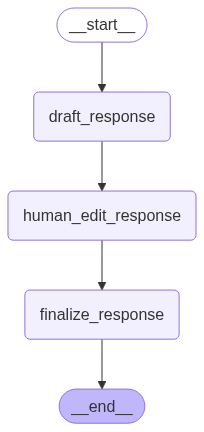
Run the Graph Until the Human Edit Step
config = {"configurable": {"thread_id": uuid.uuid4()}}
result = graph.invoke({}, config=config)

print(result["__interrupt__"])
Output:
[Interrupt(value={'task': 'Please review and edit the customer response if necessary.', 'current_response': 'Thank you for your message. Your issue has been received and will be reviewed shortly.'}, resumable=True, ns=['human_edit_response:1fd8404d-67e2-f157-21a2-96ecf8b9bd0d'])]Resume the Workflow With the Edited Response
revised_text = "Thank you for contacting support. We are reviewing your issue and will follow up shortly."

resumed = graph.invoke(
    Command(resume={"revised_response": revised_text}),
    config=config
)
print(resumed)
Output:
{'customer_response': 'Thank you for contacting support. We are reviewing your issue and will follow up shortly.'}The Edit Graph State pattern allows us to pause a workflow, inspect or revise the internal state, and continue execution using the updated state. This is helpful when we want to improve quality, fix mistakes, and incorporate human input into AI responses.
Download Code: Github
Thank you for reading this!