

Semantic versioning with Helm
In this article we're going to be covering how to setup a GitHub workflow to automatically release new versions of your Helm charts with semantic-release when you push to your main branch.
This workflow will help to keep your chart versions up to date when changes are merged into the main branch without requiring your development team to manually bump the version depending on the type of change that they are making to the chart.
I have included the workflow with an example Chart in the demo GitHub repo below:
As this is a demonstration repository, I have not included any helm templates — Only a valid Chart.yaml file is required for the workflow to complete.
Conventional commits
In order for this to work you'll need to ensure you are using conventional commits for your commits into your repository as these will be used by semantic-release to determine how to bump your project (major,minor or patch release).
See this article I wrote on using conventional commits in your project: Git conventional commits.
Setting up the repo
There are a few prerequisites to using semantic-release for Helm in your repository.
Configuring semantic-release
The first is a package.json file in the root of your project, required to install the npm dependencies for semantic-release. This should have the following contents:
{
  "devDependencies": {
    "@semantic-release/github": "^9.0.3",
    "semantic-release": "^21.0.5",
    "semantic-release-helm": "^2.2.0"
  }
}
This will ensure that the GitHub runner that takes your job has semantic-release, as well as the two additional packages require to publish the new version to Git and update your Helm charts.
The second file required by semantic-release is the .releaserc file which tells semantic-release details about your project.
Create this file in the root of your project with the following contents:
{
  "name": "<your-project-name>",
  "branches": ["main"],
  "plugins": [
    [
      "semantic-release-helm",
      {
        chartPath: '.',
      }
    ]
  ]
}
This will configure semantic-release to run on the main branch. If your Helm Chart.yaml file is not in the root of your project, update the chartPath key with the path to your Helm directory.
Chart.yaml
Including this for completeness of the article, but you will require a valid Chart.yaml file in your project (required by Helm to deploy).
As this is a fresh project we'll be using 1.0.0 as the version. This will mean that there will be no changes committed in our first workflow run — But we should at least see a release created.
Example Chart.yaml:
apiVersion: v2
name: demo-helm-semver-release
description: Demo repo for using semantic-release with helm
type: application
version: 1.0.0
appVersion: 1.0.0
Creating the workflow
Now that we have all of the prerequisites configured for Helm semantic-release, we will create the GitHub workflow for bumping the version using your conventional commits.
Create a new file in your .github/workflows directory with the name main-release.yaml and the following contents:
name: Bump version

on:
  push:
    branches:
      - main

permissions:
  contents: write
  pull-requests: write

jobs:
  semantic-release:
    runs-on: ubuntu-latest
    steps:
      # Checkout repo
      - name: Checkout
        uses: actions/checkout@v4

      - name: Setup Node.js
        uses: actions/setup-node@v3
        with:
          node-version: 'lts/*'
      - name: Install dependencies
        run: npm install
      - name: Release
        env:
          GITHUB_TOKEN: ${{ secrets.GITHUB_TOKEN }}
        run: npx semantic-release

      - name: Install yq
        run: |
          wget https://github.com/mikefarah/yq/releases/latest/download/yq_linux_amd64 -O yq &&\
          chmod +x yq

      - name: Get version
        id: get_version
        run: |
          echo "VERSION=$(cat Chart.yaml| ./yq -r  '.version')" >> $GITHUB_OUTPUT

      - name: Commit Chart.yaml
        uses: stefanzweifel/git-auto-commit-action@v4
        with:
          commit_message: 'chore(release) bump version to ${{ steps.get_version.outputs.VERSION }}'
          file_pattern: 'Chart.yaml'
To explain each step:
- First the repository is checked out
- Node.js and npm are configured and the dependencies from
package.jsonthat we wrote earlier are installed - Next,
npxis run to do the actual release and update your Helm charts - We then install yq to read the new Chart version value
- Finally the updated
Chart.yamlfile is written back to the repository with a commit detailing the new version from the previous step.
Repository settings
In order for semantic-release to have permissions to write to your repository, you will need to update the settings (if you have not done this for any other automation) to allow GitHub actions to write to your repo:
https://github.com/<owner>/<repo>/settings/actions
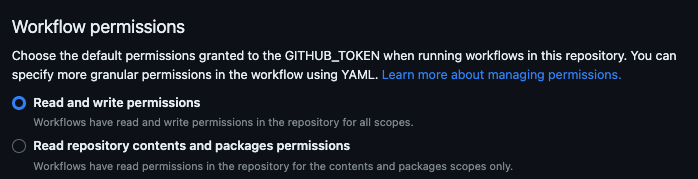
NOTE: We are restricting the permissions allowed by the GITHUB_TOKEN token in the Workflow.
Time to test
Now that we have setup the GitHub workflow, it's time to push a commit our repository and ensure that the Helm chart version is bumped correctly.
As this is a demo repo I am pushing straight to main but you should ensure to use pull requests with peer-review when this is it out of proof of concept!
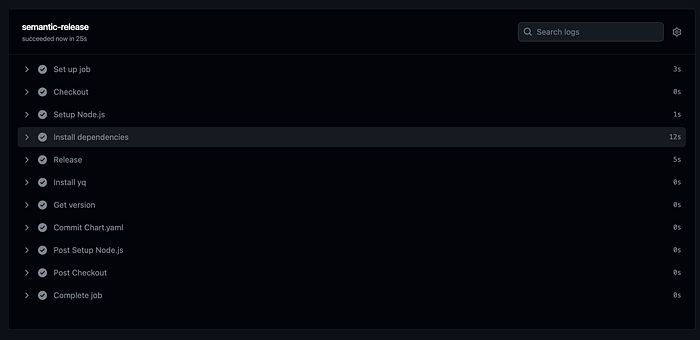
Once the workflow has run for the first time successfully, we can see that a new release has been created on the project:

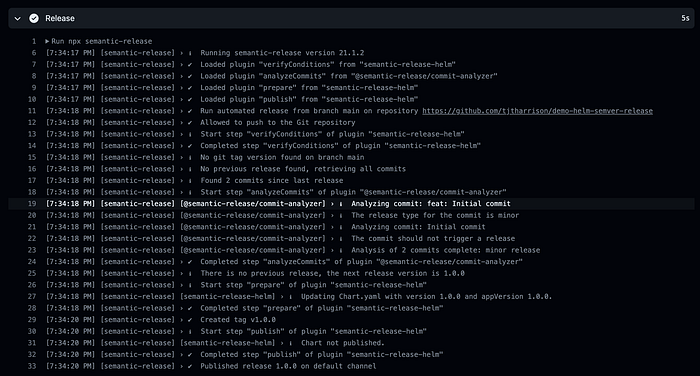
Looking at the workflow logs from the first run, we can see that it has detected that there were no previous releases on the project and the next release version should be 1.0.0.
Time to test.. Again!
Now that we have an initial release in GitHub, we should test the workflow again to ensure that it bumps successfully and updates the Chart.yaml file.
Create a new commit on your repository using conventional commit formatting and we'll check to make sure that semantic-release picks this up and bumps the project (and updates the Chart.yaml file with the new version).
You can see below, I have created a new fix: commit to test

Diving into the workflow logs again, you can see that the commit was picked up successfully and Chart.yaml was updated.

You can see from the tags page that we have a new release:
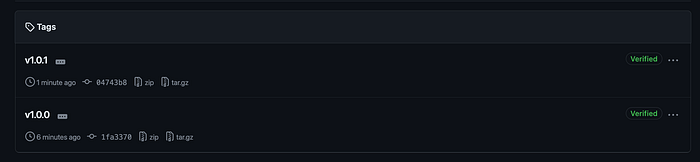
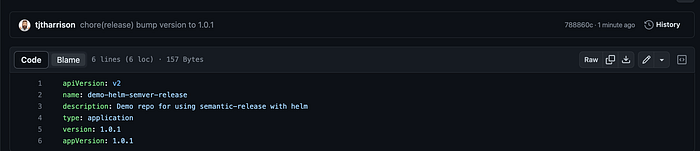
And finally, we can see that the Chart.yaml file has been updated successfully to show our new release number!
I hope you have found this a useful addition to your arsenal in automating your Helm deployments!