

Hello guys, welcome back to another exciting article on building multi-agent AI systems. In this article, we'll dive into how to implement a reflection agent from scratch in Python, all done in plain Python code.
From my last article post, I mentioned the different patterns we can implement in multi-agent systems. Most of these patterns have been pre-built into different packages like LangGraph, LangChain and other AI agent Python packages out there. From my experience working with agentic AI systems is that, sometimes you really need full control over the code or simply want to do something that existing packages do not give you the freedom to do so. Learning how to get your hands dirty and go in deep on your own is really a fundamental and vital skill set to have.
I wanted to use LangGraph to implement all the existing patterns we talked about in this article. Coming to think of it, no. I want to provide you with the essential skills to build your own custom classes and packages be it a need, for a use case that these packages do not currently support. Giving you fine-grained control over your code and implementations.
Let's jump into it!
What Is A Reflection Agent?
To begin with, I would first want us to understand what we want to build at a fundamental level. Let's answer the question on "what is a reflection agent?"
The reflection patterns is a pattern that allows an agent to reflect on its own actions and decisions. It consists of two main components:
1. The generator agent: This agent is responsible for generating the reflection prompt.
2. The reflection agent: This agent is responsible for reflecting on the agent's actions and decisions. The reflection prompt, this prompt is used to guide the reflection agent.
To make it much clearer, you know I LOVE visuals if you have been following me for abit while. Let's take a look at this visualization of a reflection agent:
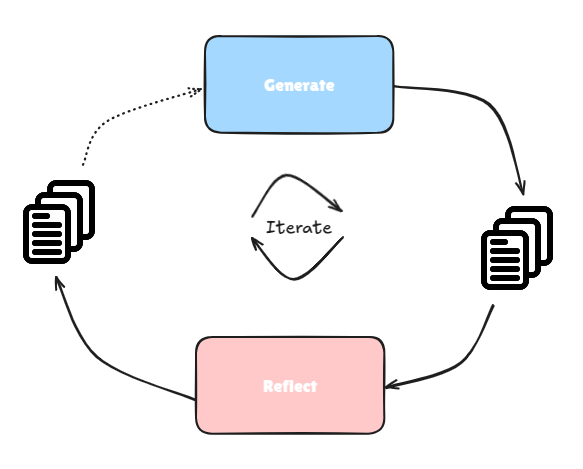
From the image above, a user prompt is sent over to the generator block, the generator block generates a response. This generator block could be an agent, I am not referring to it as an agent specifically in this case as I do not have any tools added to the LLM. Coming back, the generated response from the generator block is sent over to the reflection block (or agent if tools are provided to the LLM).
The reflection block reflects on the generated response and provides feedback. This feedback is then sent to the generator block again. The generator block takes the feedback or critiques and makes necessary updates as needed. This update is then sent back to the reflection agent which then examines it again, generates feedback or critiques.
The loop goes on and on for X number of iterations, after which the final response is returned. This way, we get the AI system to reflect on its own work and fine tune to some degree of perfection before returning the final response. This has been known to return better results as compared to a single prompt synthesis.
What To Except
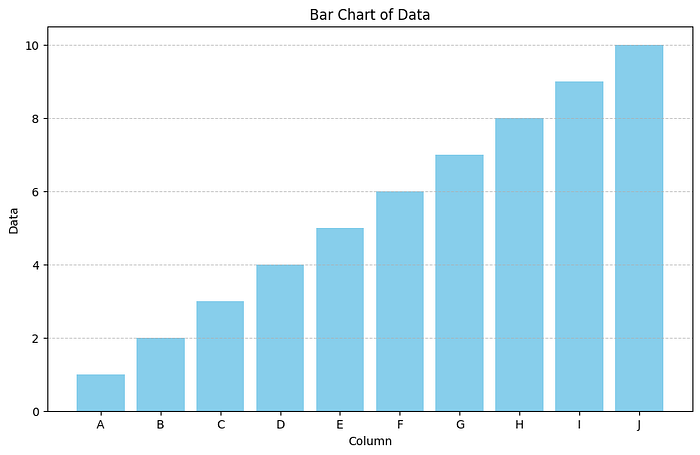
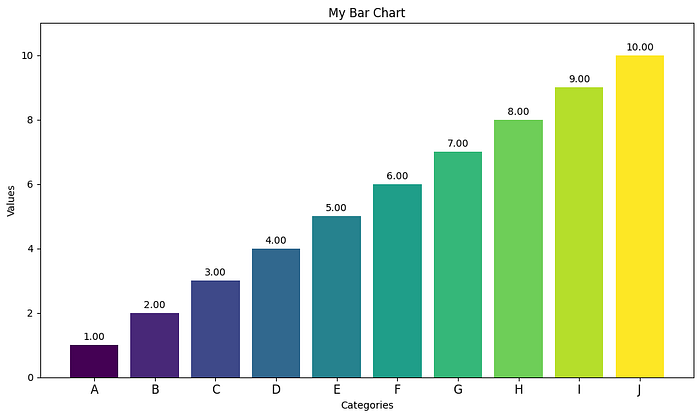
In this article, I aim to create a data analyst agent that I can use to analyze data. We'll implement a reflection agent to help us with this. This agent should be able to generate its own code, reflect on it and make improvements and corrections as needed.
Below are the images from:
- Without reflection:
- With Reflection:
Installations
To implement this, we'll start with a new folder and add in different code as we go along. We first begin by installing the necessary packages and dependencies.
Creating Virtual Environment
We'll begin by first creating a virtual environment, to start off, we'll create a folder called: multi-agent-patterns-from-scratch
mkdir multi-agent-patterns-from-scratch We'll then create the virtual environment with this same folder name, this is just the way I need environments to avoid forgetting their names.
conda create --name multi-agent-patterns-from-scratch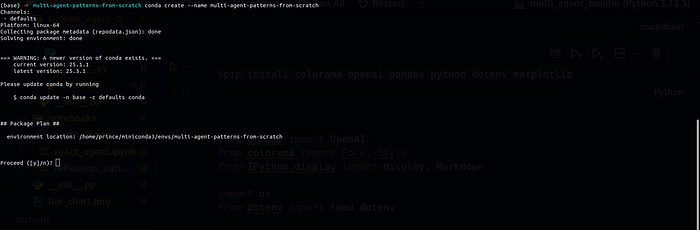
We can then activate this virtual environment using:
conda activate multi-agent-patterns-from-scratch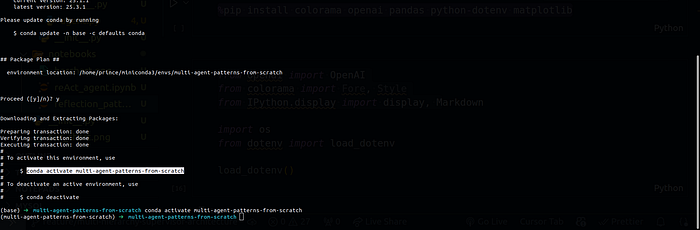
To have on time, now that you have seen how to create the folders. Follow the same steps to have this folder structure, we'll use it in the whole course.
.
└── agent-patterns
    └── reflection_agent
        └── notebooks
            └── lesson_01.ipynb

3 directories, 1 file
Now we can install all the needed packages and dependencies:
pip install colorama openai pandas python-dotenv matplotlib rich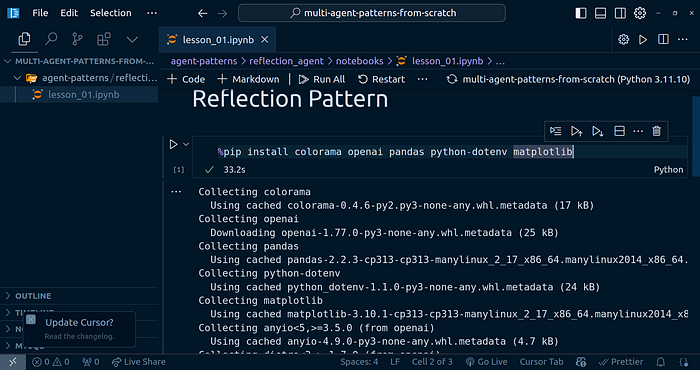
Implementing The Generator Block
To begin with the reflection agent implementation, we'll start off with the generator block. Open up the notebook (lesson_01.ipynb), we'll have our code implementation in there.
Let's first bring in the base imports:
from openai import OpenAI
from colorama import Fore, Style
from IPython.display import display, Markdown

import os
from dotenv import load_dotenv

load_dotenv()
For the next code, for creating the OpenAI model, you'll need to have the OpenAI API key in your .env file, once set, restart the notebook and run the cell above again.
OPENAI_API_KEY=xxxxxxxxxx
client = OpenAI(api_key=os.getenv("OPENAI_API_KEY"))
To thest out the model setup, you can run the code below:
response = client.chat.completions.create(
    model="gpt-4o",
    messages=[{"role": "user", "content": "Hello, how are you?"}],
)

print(response.choices[0].message.content)
Generator Block Prompts
I want to create a data analyst that will help me generate code to analyze some data. Here are the prompts I am going to use for the generator block:
generator_prompts = [
    {
        "role": "system",
        "content": "Data analyst good at visualizing data. Use Python Pandas to generate code to visualize user data. "
        "When provided with critiques, improve the code to make it more efficient and accurate. and response "
        "with a newly revised code based on the critiques improved code."
    }
]

generator_prompts.append({
    "role": "user",
    "content": """Write me code to visualize this data in a bar chart. Here is the data: {'data': [1, 2, 3, 4, 5, 6, 7, 8, 9, 10], 'column': ['A', 'B', 'C', 'D', 'E', 'F', 'G', 'H', 'I', 'J']}"""
})
Let's invoke this and see what we get:
generator_response = client.chat.completions.create(
    model="gpt-4o",
    messages=generator_prompts,
)

print(generator_response.choices[0].message.content)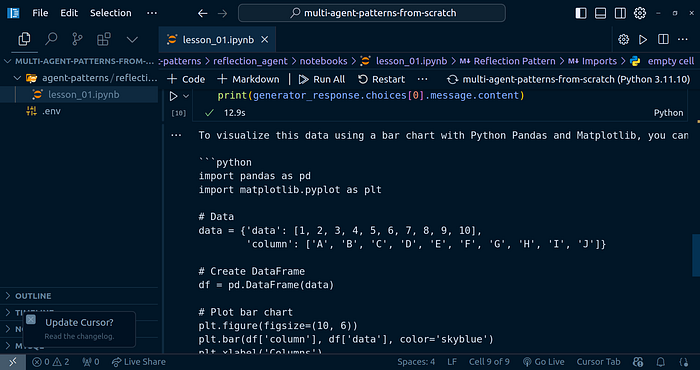
We can make this even look better as the output is Markdown text:
agent_code = generator_response.choices[0].message.content
display(Markdown(agent_code))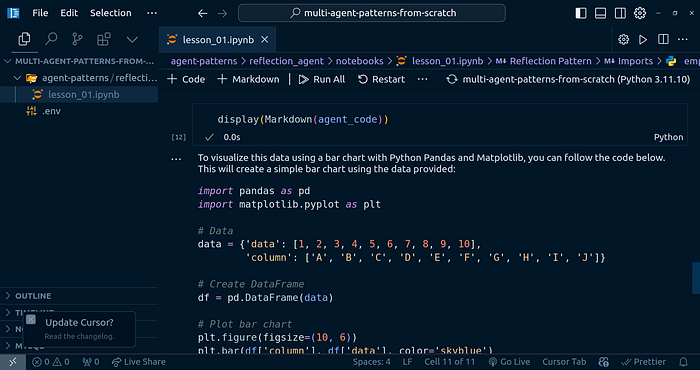
I copied the generated code and executed it, be carefull when doing this. Read through to make sure the is no malicious code:
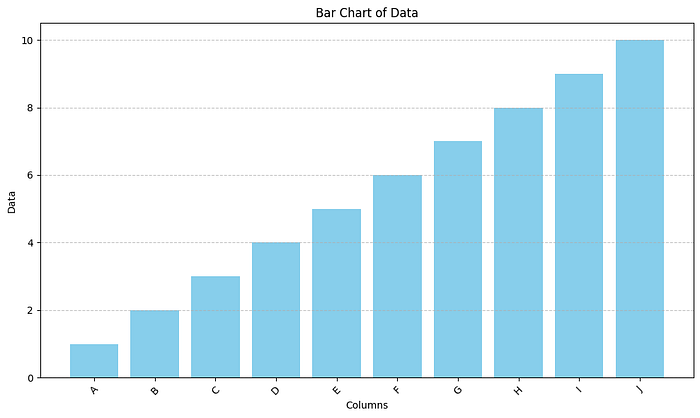
Implementing The Reflection Block
Now that we are able to generate the code for the reflection block, let's move on ahead and generate the reflection block, where the improvements come in.
Reflection Block Prompts:
reflection_prompts = [
    {
        "role": "system",
        "content": "You are a senior data analyst. Given the code generated by the generator block, provide feedback to the generator block. "
        "The feedback should be in the form of a critique of the code. The critique should be in the form of a list of improvements that can be made to the code. "
        "The feedback should be in the form of a list of improvements that can be made to the code. "
    }
]

reflection_prompts.append({
    "role": "user",
    "content": f"""Here is the code generated by the generator block: {agent_code}"""
})
We can then invoke the LLM with this prompts:
reflection_response = client.chat.completions.create(
    model="gpt-4o",
    messages=reflection_prompts,
)

reflection_feedback = reflection_response.choices[0].message.content
display(Markdown(reflection_feedback))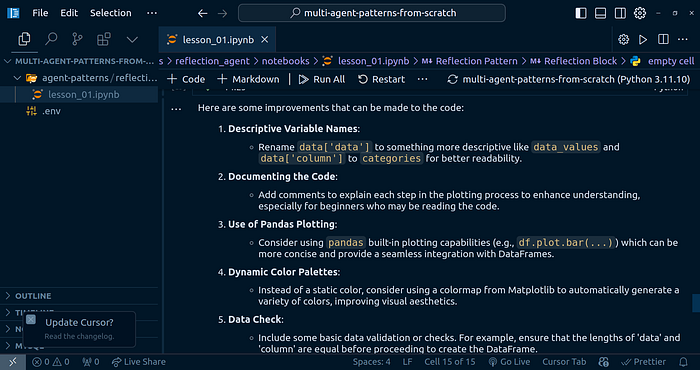
Passing the feedback to the generator
Now that we have the feedback, we need to pass it to the generator block.
generator_prompts.append({
    "role": "user",
    "content": f"""Here is the feedback from the reflection block: {reflection_feedback}"""
})
generator_response = client.chat.completions.create(
    model="gpt-4o",
    messages=generator_prompts,
)

improved_code = generator_response.choices[0].message.content
display(Markdown(improved_code))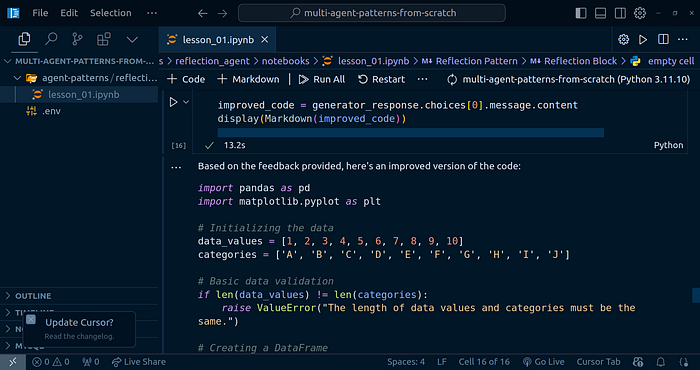
Let's execute the generated code after the reflection feedback:

This is the graph response I got back. We can see the labeling is improved, the color changed and so much more.
The good part is that this is just one iteration of this flow:
You can imaging the output after 3–4 iterations. Note the more iterations does not mean a better output all the time. Take your time to experiment.
Custom class Implementation
We'll implement out own custom classes to even help us to use this reflection agent in other parts of our projects. We'll include the X number of steps in here.
Here is the Python class for this. I created the following project structure:
.
├── agent-patterns
│   └── reflection_agent
│       └── notebooks
│           └── lesson_01.ipynb
├── python_classes
│   └── reflection_agent
│       ├── __init__.py
│       ├── main.py
│       └── __pycache__
│           ├── __init__.cpython-311.pyc
│           └── main.cpython-311.pyc
└── tests
    ├── __init__.py
    └── reflection_agent.py

7 directories, 7 files
The content of the reflection_agent/main.py file is:
import os
from openai import OpenAI
from dotenv import load_dotenv
from colorama import Fore
from rich.markdown import Markdown
from rich.console import Console


class ReflectionAgent:
    def __init__(
        self,
        generator_prompts,
        reflection_prompts,
        api_key=None,
        num_steps=1,
        model="gpt-4o"
    ):
        """
        generator_prompts: list of dicts, e.g. [{"role": "system", "content": "..."}]
        reflection_prompts: list of dicts, e.g. [{"role": "system", "content": "..."}]
        """
        load_dotenv()
        self.api_key = api_key or os.getenv("OPENAI_API_KEY")
        self.client = OpenAI(api_key=self.api_key)
        self.model = model
        self.generator_prompts = list(generator_prompts)
        self.reflection_prompts = list(reflection_prompts)
        self.generated_code = None
        self.reflection_feedback = None
        self.improved_code = None
        self.num_steps = num_steps

    def generate_code(self, user_prompt):
        self.generator_prompts.append({"role": "user", "content": user_prompt})
        response = self.client.chat.completions.create(
            model=self.model,
            messages=self.generator_prompts,
        )
        self.generated_code = response.choices[0].message.content
        return self.generated_code

    def reflect_on_code(self):
        self.reflection_prompts.append({
            "role": "user",
            "content": f"Here is the code generated by the generator block: {self.generated_code}"
        })
        response = self.client.chat.completions.create(
            model=self.model,
            messages=self.reflection_prompts,
        )
        self.reflection_feedback = response.choices[0].message.content
        return self.reflection_feedback

    def improve_code(self):
        self.generator_prompts.append({
            "role": "user",
            "content": f"Here is the feedback from the reflection block: {self.reflection_feedback}"
        })
        response = self.client.chat.completions.create(
            model=self.model,
            messages=self.generator_prompts,
        )
        self.improved_code = response.choices[0].message.content
        return self.improved_code

    def display_markdown(self, content):
        console = Console()
        console.print(Markdown(content))

    def run(self, user_prompt, display_steps=True):
        """
        Runs the agent for a specified number of improvement steps.

        Args:
            user_prompt (str): The initial user prompt.
            display_steps (bool): Whether to display each step.
            num_steps (int): Number of improvement iterations to perform.
        """
        code = self.generate_code(user_prompt)
        if display_steps:
            print(Fore.CYAN + "Generated Code:")
            print(Fore.RESET + code)
        for step in range(self.num_steps):
            feedback = self.reflect_on_code()
            if display_steps:
                print(Fore.YELLOW + f"Reflection Feedback (Step {step+1}):")
                print(Fore.RESET + feedback)
            improved = self.improve_code()
            if display_steps:
                print(Fore.GREEN + f"Improved Code (Step {step+1}):")
                print(Fore.RESET + improved)
            # Prepare for next iteration
            self.generated_code = self.improved_code
        return self.improved_code
The content of the reflection_agent/__init__.py file is:
from .main import ReflectionAgent

__all__ = ["ReflectionAgent"]
In the tests/__init__.py file, the code is:
from multi_agent_patterns.agent_patterns.reflection_agent import ReflectionAgentIn the tests/reflection_agent.py file, the code is:
import sys
import os
sys.path.append(os.path.abspath(os.path.join(os.path.dirname(__file__), '..')))


from python_classes.reflection_agent import ReflectionAgent

generator_prompts = [
    {
        "role": "system",
        "content": "Data analyst good at visualizing data. Use Python Pandas to generate code to visualize user data. "
        "When provided with critiques, improve the code to make it more efficient and accurate. and response "
        "with a newly revised code based on the critiques improved code."
    }
]

reflection_prompts = [
    {
        "role": "system",
        "content": "You are a senior data analyst. Given the code generated by the generator block, provide feedback to the generator block. "
        "The feedback should be in the form of a critique of the code. The critique should be in the form of a list of improvements that can be made to the code. "
        "The feedback should be in the form of a list of improvements that can be made to the code. "
    }
]

agent = ReflectionAgent(generator_prompts, reflection_prompts, num_steps=4)
agent.run(
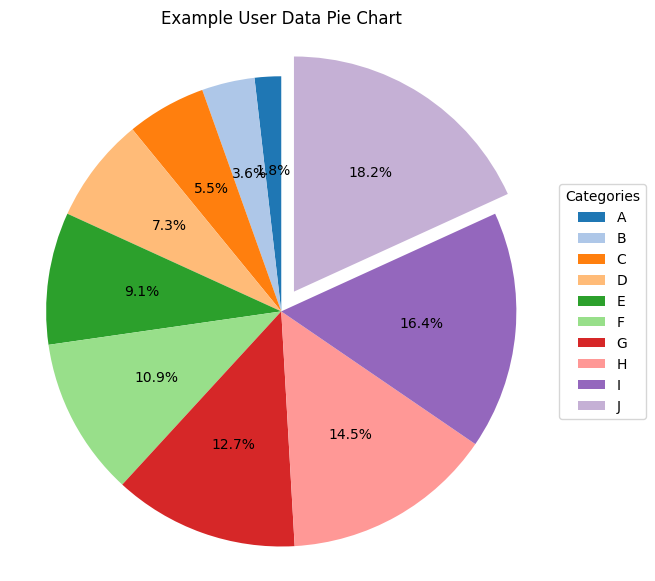
    user_prompt="Write me code to visualize this data in a pie chart. Here is the data: {'data': [1, 2, 3, 4, 5, 6, 7, 8, 9, 10], 'column': ['A', 'B', 'C', 'D', 'E', 'F', 'G', 'H', 'I', 'J']}")
The output generated is:

I then executed the code in the notebook, here is the output:
Conclusion
Congratulations for making it to the end! I hope you found this helpful and learnt on how to implement your own reflection agent. In the next article, we'll go over implementing another agent patter from scratch again in Python.
References
Other platforms where you can reach out to me:
Happy coding! And see you next time, the world keeps spinning.