
Agentic AI is not about letting LLMs "think more." It is about letting systems act — safely, deterministically, and within boundaries.
Over the last year, Agentic AI has become one of the most overused terms in Generative AI. Most articles stop at demos: planners, tool calls, and impressive traces — but very few address the hard part:
How do you run agentic systems in production without losing control?
This article explains what Agentic AI really is, why most implementations fail, and how to design production-grade multi-agent systems with guardrails.
1. What Agentic AI Actually Means (Not the Marketing Version)
Agentic AI does not mean:
- Longer prompts
- "Chain-of-thought everywhere"
- Giving the model more autonomy blindly
Agentic AI means:
A system where an LLM can plan, decide, act, observe outcomes, and adjust, using tools and memory — within explicitly defined constraints.
A true agent has:
- Goals
- Decision-making authority
- Access to actions (tools)
- Feedback loops
- Stopping conditions
If your system only calls tools sequentially in a fixed flow, it is not agentic — it is a workflow.
2. Agent vs Tool vs Workflow (Critical Mental Model)
Most confusion disappears once this distinction is clear.
🔹 Tool
- A deterministic function
- No decision-making
- Example:
search_docs(),send_email()
🔹 Workflow
- Predefined execution path
- Conditional logic, but static
- Example: traditional RAG pipeline
🔹 Agent
- Decides what to do next
- Can choose tools, re-plan, or stop
- Operates under constraints
Production Agentic AI = Agents + Tools + Controlled Workflows
Never deploy a free-roaming agent.
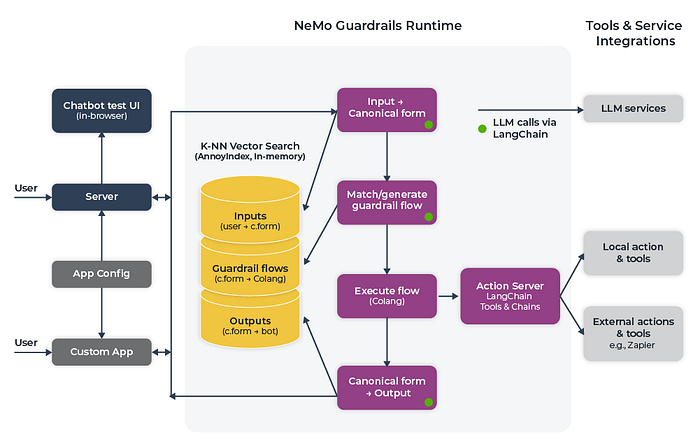
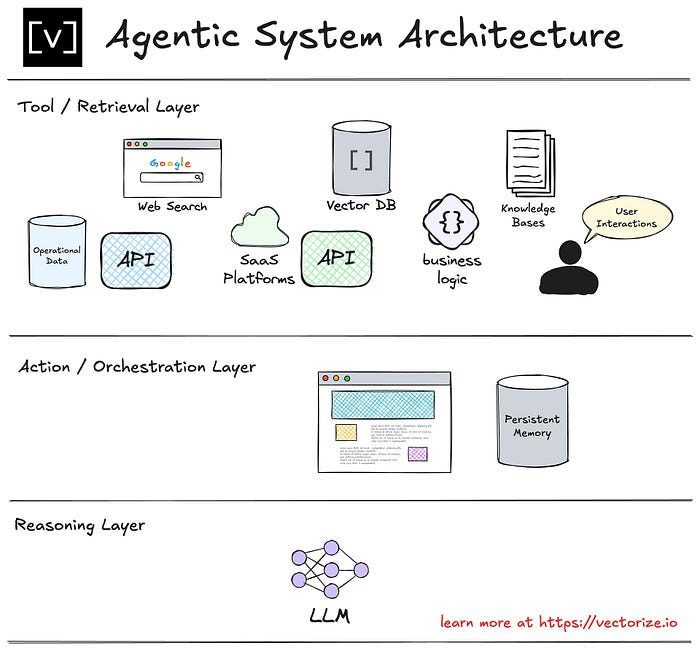
3. The Production Multi-Agent Architecture
A single agent does not scale well. Real systems use specialized agents with narrow responsibilities.

Recommended Core Agents
- Planner Agent
- Breaks the user goal into steps
- Decides which agent should act next
2. Executor Agent
- Performs tool calls
- No creative freedom
3. Critic / Validator Agent
- Reviews outputs
- Detects hallucinations or unsafe actions
4. Memory Agent
- Manages short-term + long-term memory
- Prevents context explosion
5. Supervisor (Optional but Powerful)
- Enforces budgets, step limits, and policies
- Can terminate execution
This separation is the single biggest factor between toy demos and production systems.
4. Why Most Agentic AI Systems Fail in Production
Let's be honest about failure modes.
❌ Infinite Reasoning Loops
Agents keep "thinking" because no stop condition exists.
Fix:
- Max steps
- Goal satisfaction checks
- Forced termination
❌ Tool Abuse
Agents call tools repeatedly or incorrectly.
Fix:
- Tool permission matrix
- Rate limits per tool
- Tool schemas with strict validation
❌ Non-Deterministic Behavior
Same input → different actions → unpredictable system.
Fix:
- Low temperature for planning
- Deterministic tool calls
- Separate reasoning from execution
❌ No Observability
You can't debug what you can't see.
Fix:
- Log every decision
- Trace every tool call
- Store intermediate plans
5. Guardrails: The Non-Negotiable Layer
Guardrails are not optional. They are the system.
Mandatory Guardrails for Agentic AI
1. Action Boundaries
Agents should only access explicitly allowed tools.
Planner Agent → allowed: reasoning only
Executor Agent → allowed: tools A, B
Critic Agent → allowed: validation only
2. Budget & Step Limits
- Max reasoning steps
- Max tool calls
- Max cost per request
If an agent exceeds limits → terminate safely.
3. Human-in-the-Loop (Selective)
Not everywhere — only where risk is high:
- Financial actions
- Data deletion
- External communication
4. Memory Guardrails
- What can be stored
- How long it lives
- Who can access it
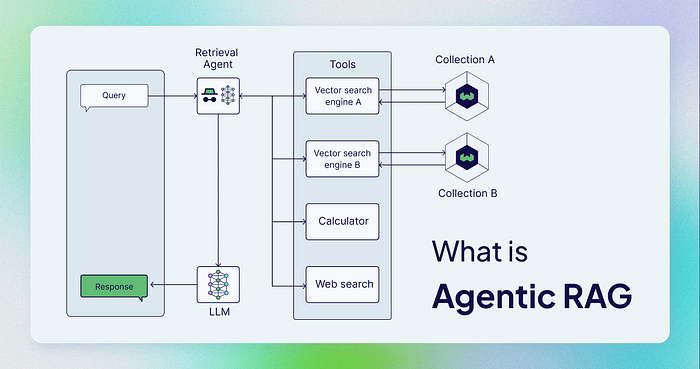
6. Agentic RAG: The Most Practical Use Case
The best real-world use of Agentic AI today is Agentic RAG.
Traditional RAG
- Always retrieves
- Always answers
Agentic RAG
- Decides when to retrieve
- Decides what to retrieve
- Decides when to stop
Flow:
User Query →
Intent Agent →
   ↳ Retrieve (if needed)
   ↳ Reason Only (if not)
   ↳ Tool Call (if required)
This:
- Reduces cost
- Improves accuracy
- Avoids unnecessary retrieval
7. Minimal Production-Safe Agent Loop (Pseudo-Code)
while steps < MAX_STEPS:
    plan = planner.decide(state)

    if plan.action == "STOP":
        break

    if not supervisor.is_allowed(plan):
        raise SafetyException

    result = executor.execute(plan)
    state.update(result)

    if critic.rejects(state):
        rollback()
        break
Notice:
- No free loops
- No unchecked tool calls
- Explicit stopping logic
8. When You Should NOT Use Agentic AI
Agentic AI is powerful — but dangerous when misused.
❌ Do NOT use agents when:
- The task is deterministic
- Latency must be ultra-low
- Regulatory compliance is strict
- A simple workflow works fine
Agentic AI should reduce human effort — not system reliability.
9. The Future: Controlled Autonomy, Not Full Autonomy
The industry is converging on a clear direction:
- Fewer "general agents"
- More specialized, constrained agents
- Strong supervision layers
- Observability-first design
The winners will not be the systems that think the most — but the ones that fail safely.
Final Takeaway
Production Agentic AI is a systems engineering problem, not a prompting problem.
If your design does not include:
- Clear agent roles
- Hard guardrails
- Deterministic execution paths
- Observability and rollback
You don't have an agentic system — you have a risk amplifier.
Example:
Agentic AI in Practice: Building a Production-Safe Multi-Agent System with LangGraph and CrewAI
Agentic AI becomes real only when agents can act — and stop — safely.
In the above section, we discussed why most agentic AI systems fail in production and how guardrails are non-negotiable. This follow-up goes one level deeper:
We will build a real, minimal, production-safe multi-agent system using LangGraph and CrewAI.
No toy demos. No infinite loops. No "let the agent decide everything" anti-patterns.
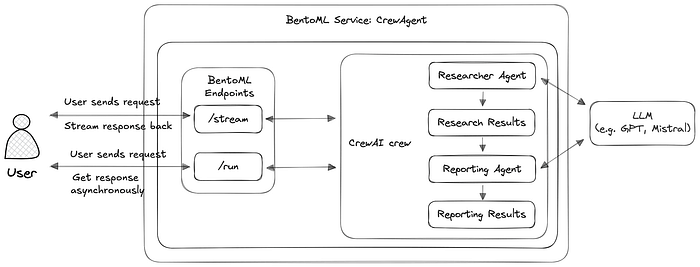
1. Target Architecture (What We're Actually Building)
Agents in Scope
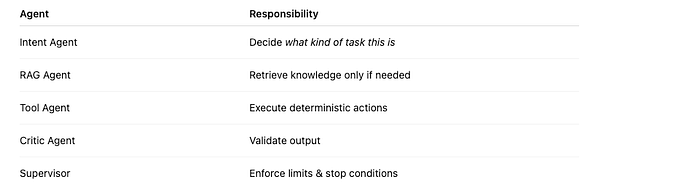
Key rule:
No agent can directly call another agent — all routing is explicit.
2. Why LangGraph + CrewAI Together?
LangGraph
- Deterministic control flow
- State machine for agents
- Explicit stop conditions
CrewAI
- Role-based agents
- Clear separation of responsibility
- Easy reasoning + tool abstraction
LangGraph controls flow. CrewAI controls thinking.
This separation is crucial in production.
3. Project Structure (Production-Friendly)
agentic_system/
├── graph.py
├── agents/
│   ├── intent_agent.py
│   ├── rag_agent.py
│   ├── tool_agent.py
│   ├── critic_agent.py
├── supervisor.py
├── tools.py
└── main.py
4. Step 1 — Define the Shared State (LangGraph)
from typing import TypedDict, Optional

class AgentState(TypedDict):
    user_input: str
    intent: Optional[str]
    context: Optional[str]
    output: Optional[str]
    steps: int
Why this matters
- Every agent sees the same state
- No hidden memory
- Easy debugging & tracing
5. Step 2 — Intent Agent (CrewAI)
from crewai import Agent

intent_agent = Agent(
    role="Intent Classifier",
    goal="Identify whether the user needs retrieval, tools, or reasoning",
    backstory="Expert at routing tasks safely",
    verbose=False
)

def run_intent_agent(state: AgentState):
    prompt = f"""
    Classify intent for the input:
    '{state["user_input"]}'
    Return one word: RAG | TOOL | REASON
    """
    intent = intent_agent.run(prompt).strip()
    state["intent"] = intent
    state["steps"] += 1
    return state
✅ No tool access ✅ Low temperature recommended ✅ Single responsibility
6. Step 3 — RAG Agent (Controlled Retrieval)
from crewai import Agent
rag_agent = Agent(
    role="Knowledge Retrieval Agent",
    goal="Retrieve only relevant information",
    backstory="Precision-focused research agent",
    verbose=False
)

def run_rag_agent(state: AgentState):
    if state["intent"] != "RAG":
        return state

    context = rag_agent.run(
        f"Retrieve concise context for: {state['user_input']}"
    )
    state["context"] = context
    state["steps"] += 1
    return state
⚠️ Retrieval happens only if intent says so ⚠️ This avoids unnecessary vector DB calls
7. Step 4 — Tool Agent (Zero Creativity)
from crewai import Agent
def calculator_tool(expression: str) -> str:
    return str(eval(expression))

tool_agent = Agent(
    role="Tool Executor",
    goal="Execute tools exactly as instructed",
    backstory="No creativity. Deterministic execution only.",
    tools=[calculator_tool],
    verbose=False
)

def run_tool_agent(state: AgentState):
    if state["intent"] != "TOOL":
        return state

    result = tool_agent.run(state["user_input"])
    state["output"] = result
    state["steps"] += 1
    return state
🚫 Tool agent never reasons 🚫 Tool schemas must be strict
8. Step 5 — Critic Agent (Hallucination Guard)
from crewai import Agent
critic_agent = Agent(
    role="Output Validator",
    goal="Validate correctness and safety",
    backstory="Extremely strict reviewer",
    verbose=False
)

def run_critic_agent(state: AgentState):
    review = critic_agent.run(
        f"Validate the output: {state.get('output')}"
    )
    if "invalid" in review.lower():
        state["output"] = "Unable to safely answer."
    state["steps"] += 1
    return state
This agent:
- Prevents hallucinated answers
- Enables rollback strategies
- Is mandatory in production
9. Step 6 — Supervisor (The Kill Switch)
MAX_STEPS = 6

def supervisor(state: AgentState):
    if state["steps"] >= MAX_STEPS:
        state["output"] = "Stopped due to step limit."
        return False
    return True
If you don't have a kill switch, you don't have an agentic system.
10. Step 7 — Wiring Everything with LangGraph
from langgraph.graph import StateGraph

graph = StateGraph(AgentState)

graph.add_node("intent", run_intent_agent)
graph.add_node("rag", run_rag_agent)
graph.add_node("tool", run_tool_agent)
graph.add_node("critic", run_critic_agent)

graph.set_entry_point("intent")

graph.add_edge("intent", "rag")
graph.add_edge("rag", "tool")
graph.add_edge("tool", "critic")

graph.set_conditional_edges(
    "critic",
    supervisor,
    {True: "intent", False: None}
)

agentic_app = graph.compile()
✅ Explicit transitions ✅ Deterministic flow ✅ Controlled looping
11. Final Execution
result = agentic_app.invoke({
    "user_input": "What is 25 * 42?",
    "steps": 0
})
print(result["output"])
12. Why This Design Works in Production
✔ No infinite loops ✔ No uncontrolled tools ✔ Clear observability ✔ Predictable cost ✔ Easy debugging
This is how real agentic systems should be built.
13. What Most Tutorials Get Wrong
❌ Single "super agent" ❌ Unlimited autonomy ❌ No validation agent ❌ No stop condition ❌ No state transparency
Autonomy without control is not intelligence — it's risk.
Final Takeaway
LangGraph gives you structure. CrewAI gives you reasoning. Guardrails give you safety.
Combine all three — or don't ship agentic AI at all.