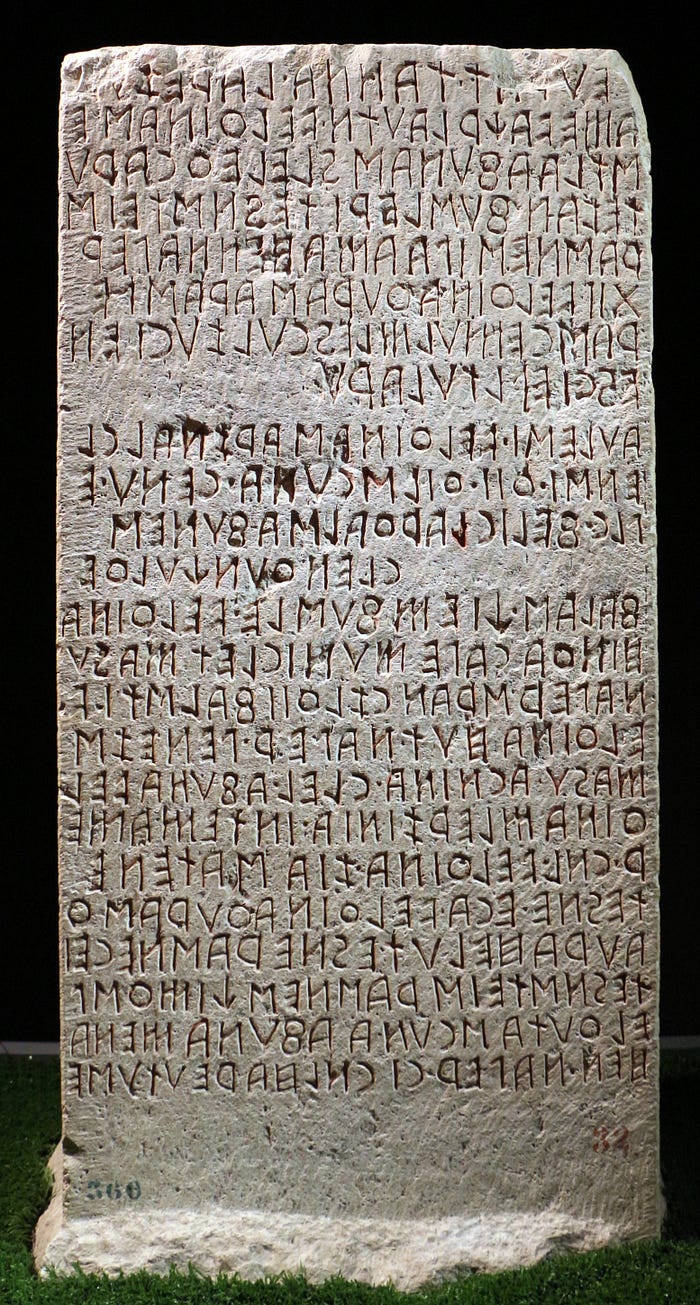
Alongside directly developing appropriate mathematical models to understand the phenomena in nature, nowadays we also rely on computers to collect a stack of data about them and create an abstract structure which helps us to model them. In other words, machine learning provides a fresh perspective alongside the scientific thinking process based on logic, observation, and cause-effect relationships, in our quest to comprehend nature. According to this perspective, with a sufficient amount of high-quality data, we can establish a robust theoretical foundation for the problem at hand. If Aristotle were to live in the era of machine learning, perhaps he would create a dataset about living beings instead of classifying them based on objective characteristics and leave the task of classification to a suitable machine learning algorithm.
The collection, processing and storage of data is a process that dates back much earlier than ancient Greek philosophers. Maybe we should consider the invention of writing as the beginning of the ETL (Extract, Transform, Load) process that we will discuss in this article. Considering this, at least as an analogy, our ancestors acquired knowledge, manipulated it, and made it accessible to others.
Extract, Transform, Load (ETL) is a fundamental concept in data engineering and it refers to the process of extracting data from various sources, transforming it into a desired format and storing it into a target system such as a data warehouse or a data lake.
In this article, you will find a mini project that explains the concepts of the ETL process. I would like to underline that in a real project, these stages are performed with the help of advanced tools such as Apache Beam, Google Dataflow etc. In short, we will:
- fetch articles from Wikipedia,
- process this data,
- and create an application to save the results in a suitable file format.
1. Extract
The Extract process refers to the process of retrieving data from one or more sources. A good example is when an industrial machine manufacturing company retrieves data from the machines over 4G. Since the data is being extracted from different types of machines, such as from tractors or excavators, the Extract process needs to fulfill multiple requirements, and this is not always an easy task. The raw data ingested from such a machine would contain various information per a certain interval of time, such as battery voltage, fuel consumption, speed, torque, and more. The main idea is to connect the machine and collect the data using a proper tool.
Here in this project, in order to demonstrate Extract process, we connect to Wikipedia's official API to get the content of a specific page in Wikipedia. The following Python function called wikipedia_page retrieves the raw text content of a Wikipedia page. It utilizes the requests library to interact with the Wikipedia API and returns the lowercased extract of the page if found. Otherwise, it returns the message "Page not found".
For example, let's fetch the article "France" from Wikipedia. To minimize space usage, I will only take the first 250 characters of the text.
which results
Here is the beginning of the text (limited to 250 caracters):

France (French: [fʁɑ̃s] ), officially the French Republic (French: République française [ʁepyblik fʁɑ̃sɛz]), is a country located primarily in Western Europe. It also includes overseas regions and territories in the Americas and the Atlantic, Pacific
2. Transform
From this data, for instance, we can extract the top 20 most frequently occurring words in an article.
First, let's convert uppercase letters to lowercase because there is no reason to differentiate between 'World' and 'world'. Then, let's remove irrelevant words (stopwords) from the text because the frequency of occurrence of words like 'the' or 'and' is not interesting. The following "word cloud" is excellent for visualizing the result. The more frequently a word appears, the larger it appears in the word cloud.
Define the list of words that we want to remove from the text:
Initiate a wordcloud:
Display the generated Word Cloud
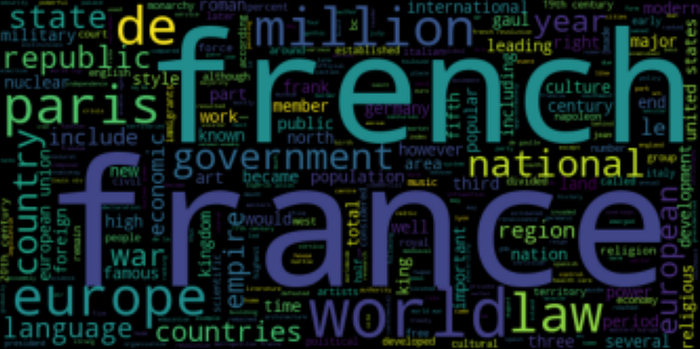
Now we will compute the frequency of each word and get the most common 20 words in the text:
Not a useful list. Let us do it again by removing the stopwords and punctuation:
which gives
3. Load
To store the data let us create an empty dataframe.
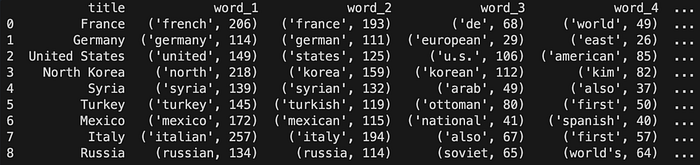
It will have 1 + 20 columns: - title = the title of the article - word_i = i_th most common words in the article
The dataframe df looks like:

Now it is time to fill in the dataframe with the data we have retrieved. The function ad-new adds a new row which contains the title of the article and its most common words. It takes two variables: the title of the article and the list of the common words respectively.
Add the wikipedia article "France":

Now we create a folder called data and save the dataframe as a csv file:
This will create a csv file in the folder data.
We can add new articles to our dataset. For instance, let us add "United States" article:
As you see, we followed the same procedure for "United States" article as we did it for "France". Apply add_new function to get:

and save it again:
4. Automatise this task
Instead of adding the data one by one we create a python application that process all we did above for a given article. The function defined in the application correspond respectively to the three operations Extract, Transform and Load.
Create a file app.py in the same directory of the folder data. Here is the content of the app.py:
To run this application, open a terminal and put
This says Python to run the application app.py with a parameter (actually we speak of a positional argument) "France". This will create a csv file countries.csv in the data folder.
5. Run a bash script to ingest multiple articles
We can do more with a bash script, and for a given list of wikipedia articles, ingest the data of each items in the list.
Create a file generator.sh with the content:
#!/bin/bash
# List of positional arguments
list_of_articles=("France" "Germany" "United States" "North Korea" "Syria" "Turkey" "Mexico" "Italy" "Russia")
# Loop through each argument
for art in "${list_of_articles[@]}"
do
# Run the Python command for each argument
echo "$art"
python app.py "$art"
doneIn the terminal, run the command:
This will add all articles in the list "France" "Germany" "United States" "North Korea" "Syria" "Turkey" "Mexico" "Italy" "Russia" to the file countries.csv
Concluding remarks
In this article, we demonstrated the fundamental concepts of data engineering. In real-life scenarios, instead of the pandas library we used here, SQL is commonly employed to perform such operations. As data volume increases, for instance, imagine dealing with datasets of 20 TB with 1000 columns, it becomes necessary to utilize modern tools suitable for such tasks. Nowadays, in most cases, these operations are performed on cloud systems. For operations such as merging, splitting, or transforming datasets, we require tools like Google's Dataflow.
You can access the files of this project from the following GitHub repository: https://github.com/yasarigno/intro_to_data_engineering_at_gsu/