
The percentage of use-case of Redis in Cluster mode is significantly lower than standalone. Most of the time, people use Redis the usual standalone way. But I will walk you through some other perspective of using Redis.
Overview
Redis offers three distinct deployment modes: standalone, Sentinel, and Cluster. Each serves different needs based on your use case.
- Redis Standalone: This is a single instance of Redis, perfect for simple deployments where high availability and failover are not critical. It's straightforward and easy to manage but lacks the redundancy and scalability features of other setups.
- Redis Sentinel: Sentinel provides high availability and monitoring for Redis when not using a cluster. It handles failover by promoting a replica to a master if the master fails, ensuring minimal downtime. Sentinel is ideal for environments where you need a higher level of reliability without the complexity of a full cluster.
- Redis Cluster: This option is for horizontal scaling and high availability. Data is automatically sharded across multiple nodes, allowing you to distribute the data and workload. Redis Cluster is designed for high throughput and resilience, automatically handling node failures and promoting replicas as needed.
I will walk you with preparing Redis for each of the use case on your workstation with the help of docker. And then use Python to access those and see how it is different on accessing and other point of view.
Before that, you can read some of my other Redis related Posts from here
How to run a single instance of Redis and how to access it?
Running a single Redis instance is pretty simple via docker compose
---

services:
  redis:
    image: redis:7.2-alpine
    container_name: redis
    ports:
      - "6379:6379"
    volumes:
      - redis-data:/data
    command: ["redis-server", "--appendonly", "yes"]
    restart: unless-stopped

volumes:
  redis-data:
How to run Redis in Sentinel mode and how to access it?
Here is a pseudo docker-compose to create a sentinel setup of redis.
---

networks:
  redisnet:

services:
  redis-master:
    image: redis:7.4.2-alpine3.21
    container_name: redis-master
    networks:
      - redisnet
    ports:
      - "6379:6379"
    volumes:
      - ./redis-data/master:/data
    command: ["redis-server", "--appendonly", "yes"]

  redis-replica:
    image: redis:7.4.2-alpine3.21
    container_name: redis-replica
    depends_on:
      - redis-master
    networks:
      - redisnet
    ports:
      - "6380:6379"
    volumes:
      - ./redis-data/replica:/data
    command: ["redis-server", "--replicaof", "redis-master", "6379"]

  sentinel1:
    image: redis:7.4.2-alpine3.21
    container_name: sentinel1
    depends_on:
      - redis-master
    networks:
      - redisnet
    ports:
      - "26379:26379"
    command: >
      sh -c "echo 'port 26379' > /sentinel.conf &&
               echo 'bind 0.0.0.0' >> /sentinel.conf &&
               echo 'sentinel resolve-hostnames yes' >> /sentinel.conf &&
               echo 'sentinel monitor mymaster redis-master 6379 2' >> /sentinel.conf &&
               echo 'sentinel down-after-milliseconds mymaster 5000' >> /sentinel.conf &&
               echo 'sentinel failover-timeout mymaster 10000' >> /sentinel.conf &&
               echo 'sentinel parallel-syncs mymaster 1' >> /sentinel.conf &&
               redis-server /sentinel.conf --sentinel"

  sentinel2:
    image: redis:7.4.2-alpine3.21
    container_name: sentinel2
    depends_on:
      - redis-master
    networks:
      - redisnet
    ports:
      - "26380:26379"
    command: >
      sh -c "echo 'port 26379' > /sentinel.conf &&
               echo 'bind 0.0.0.0' >> /sentinel.conf &&
               echo 'sentinel resolve-hostnames yes' >> /sentinel.conf &&
               echo 'sentinel monitor mymaster redis-master 6379 2' >> /sentinel.conf &&
               echo 'sentinel down-after-milliseconds mymaster 5000' >> /sentinel.conf &&
               echo 'sentinel failover-timeout mymaster 10000' >> /sentinel.conf &&
               echo 'sentinel parallel-syncs mymaster 1' >> /sentinel.conf &&
               redis-server /sentinel.conf --sentinel"

  sentinel3:
    image: redis:7.4.2-alpine3.21
    container_name: sentinel3
    depends_on:
      - redis-master
    networks:
      - redisnet
    ports:
      - "26381:26379"
    command: >
      sh -c "echo 'port 26379' > /sentinel.conf &&
               echo 'bind 0.0.0.0' >> /sentinel.conf &&
               echo 'sentinel resolve-hostnames yes' >> /sentinel.conf &&
               echo 'sentinel monitor mymaster redis-master 6379 2' >> /sentinel.conf &&
               echo 'sentinel down-after-milliseconds mymaster 5000' >> /sentinel.conf &&
               echo 'sentinel failover-timeout mymaster 10000' >> /sentinel.conf &&
               echo 'sentinel parallel-syncs mymaster 1' >> /sentinel.conf &&
               redis-server /sentinel.conf --sentinel"
This setup is simple but gives a glimpse of possible setup of Redis Sentinel for production or actual use case.
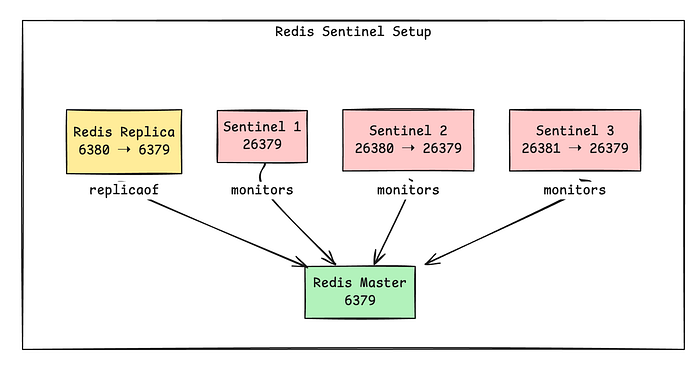
Brief of Sentinel Architecture
- Here we have two Redis Server, one is the master and other is the replica.
- Replica is only for read operations.
- Master is capable of both reading and writing.
- There are 3 more containers called Sentinel.
- They are the responsible services only to monitor, notify, and automatically failover Redis instances in case the master becomes unavailable.
What are the benefits of Redis Sentinel Setup?
- ✅ High Availability — Keeps your Redis system running during failures.
- 🔄 Automatic Failover — Promotes a replica to master without manual action.
- 🧭 Service Discovery — Clients can dynamically locate the current master.
- 🧠 Quorum-based Decisions — No single point of failure in failover logic.
- ⚙️ Lightweight & Easy to Deploy — Built into Redis, no extra tooling needed.
- 📈 Read Scalability — Enables read scaling via replicas.
- 🔐 Continuous Monitoring — Watches Redis nodes and alerts on issues.
How does we connect to Sentinel Setup using clients?
Every major Redis client has sentinel support. Sentinel setup depends on proper use of the client as heavy lifting done by the client. Here is a snippet of code in Python.
import random
import time
import redis
from redis.sentinel import Sentinel

SENTINELS = [("sentinel1", 26379), ("sentinel2", 26380), ("sentinel3", 26381)]
MASTER_NAME = "mymaster"

KEY_POOL = [f"key:{i}" for i in range(1, 11)]
OPERATIONS = ["SET", "GET", "INCR", "DEL"]

def connect():
    socket_timeout = 2.0
    print(f"Configuring Sentinel with the following nodes: {SENTINELS}")
    sentinel = Sentinel(
        SENTINELS,
        socket_timeout=socket_timeout,
        password=None,
        sentinel_kwargs={'socket_timeout': socket_timeout}
    )

    print(f"Attempting to connect to master node '{MASTER_NAME}'...")
    master = sentinel.master_for(
        MASTER_NAME,
        socket_timeout=socket_timeout,
        retry_on_timeout=True,
        retry_on_error=[redis.ConnectionError, redis.TimeoutError]
    )

    print(f"Attempting to connect to replica nodes for '{MASTER_NAME}'...")
    replica = sentinel.slave_for(
        MASTER_NAME,
        socket_timeout=socket_timeout,
        retry_on_timeout=True,
        retry_on_error=[redis.ConnectionError, redis.TimeoutError]
    )

    try:
        master.ping()
        replica.ping()
        print("Successfully connected to Redis master and replica!")
        master_host = master.connection_pool.get_connection('dummy').host
        master_port = master.connection_pool.get_connection('dummy').port
        replica_host = replica.connection_pool.get_connection('dummy').host
        replica_port = replica.connection_pool.get_connection('dummy').port
        print(f"Master node address: {master_host}:{master_port}")
        print(f"Replica node address: {replica_host}:{replica_port}")
    except Exception as e:
        print(f"Connection verification failed: {e}")
        raise

    return master, replica

def main():
    print("Connecting to Redis via Sentinel...")
    master, replica = connect()
    print("\nMaster and Replica connection established.")
    print("Master:", master)
    print("Replica:", replica)
    print("\nPerforming a sample operation on the master...")

    try:
        key = random.choice(KEY_POOL)
        value = random.randint(1, 100)
        print(f"Setting key '{key}' to value '{value}' on the master...")
        master.set(key, value)
        print(f"Successfully set key '{key}' to value '{value}'.")

        print(f"Fetching key '{key}' from the replica...")
        fetched_value = replica.get(key)
        print(f"Fetched value for key '{key}' from replica: {fetched_value.decode('utf-8')}")
    except Exception as e:
        print(f"Error during operations: {e}")

if __name__ == "__main__":
    main()
The result of it should give
loadgen  | Connecting to Redis via Sentinel...
loadgen  | Configuring Sentinel with the following nodes: [('sentinel1', 26379), ('sentinel2', 26380), ('sentinel3', 26381)]
loadgen  | Attempting to connect to master node 'mymaster'...
loadgen  | Attempting to connect to replica nodes for 'mymaster'...
loadgen  | Successfully connected to Redis master and replica!
loadgen  | Master node address: 172.20.0.2:6379
loadgen  | Replica node address: 172.20.0.4:6379
loadgen  |
loadgen  | Master and Replica connection established.
loadgen  | Master: <redis.client.Redis(<redis.sentinel.SentinelConnectionPool(service=mymaster(master))>)>
loadgen  | Replica: <redis.client.Redis(<redis.sentinel.SentinelConnectionPool(service=mymaster(slave))>)>
loadgen  |
loadgen  | Performing a sample operation on the master...
loadgen  | Setting key 'key:9' to value '93' on the master...
loadgen  | Successfully set key 'key:9' to value '93'.
loadgen  | Fetching key 'key:9' from the replica...
loadgen  | Fetched value for key 'key:9' from replica: 93
loadgen exited with code 0
Manual intervention with redis-master container, by stopping it, will generate
loadgen  | Connecting to Redis via Sentinel...
loadgen  | Configuring Sentinel with the following nodes: [('sentinel1', 26379), ('sentinel2', 26380), ('sentinel3', 26381)]
loadgen  | Attempting to connect to master node 'mymaster'...
loadgen  | Attempting to connect to replica nodes for 'mymaster'...
loadgen  | Successfully connected to Redis master and replica!
loadgen  | Master node address: 172.20.0.4:6379
loadgen  | Replica node address: 172.20.0.4:6379
loadgen  |
loadgen  | Master and Replica connection established.
loadgen  | Master: <redis.client.Redis(<redis.sentinel.SentinelConnectionPool(service=mymaster(master))>)>
loadgen  | Replica: <redis.client.Redis(<redis.sentinel.SentinelConnectionPool(service=mymaster(slave))>)>
loadgen  |
loadgen  | Performing a sample operation on the master...
loadgen  | Setting key 'key:5' to value '57' on the master...
loadgen  | Successfully set key 'key:5' to value '57'.
loadgen  | Fetching key 'key:5' from the replica...
loadgen  | Fetched value for key 'key:5' from replica: 57
loadgen exited with code 0
And if redis-master again starts up
loadgen  | Connecting to Redis via Sentinel...
loadgen  | Configuring Sentinel with the following nodes: [('sentinel1', 26379), ('sentinel2', 26380), ('sentinel3', 26381)]
loadgen  | Attempting to connect to master node 'mymaster'...
loadgen  | Attempting to connect to replica nodes for 'mymaster'...
loadgen  | Successfully connected to Redis master and replica!
loadgen  | Master node address: 172.20.0.4:6379
loadgen  | Replica node address: 172.20.0.2:6379
loadgen  |
loadgen  | Master and Replica connection established.
loadgen  | Master: <redis.client.Redis(<redis.sentinel.SentinelConnectionPool(service=mymaster(master))>)>
loadgen  | Replica: <redis.client.Redis(<redis.sentinel.SentinelConnectionPool(service=mymaster(slave))>)>
loadgen  |
loadgen  | Performing a sample operation on the master...
loadgen  | Setting key 'key:5' to value '71' on the master...
loadgen  | Successfully set key 'key:5' to value '71'.
loadgen  | Fetching key 'key:5' from the replica...
loadgen  | Fetched value for key 'key:5' from replica: 71
loadgen exited with code 0
So, what is sentinel doing?
sentinel1  | 1:X 18 Apr 2025 14:19:18.027 * oO0OoO0OoO0Oo Redis is starting oO0OoO0OoO0Oo
sentinel1  | 1:X 18 Apr 2025 14:19:18.027 * Redis version=7.4.2, bits=64, commit=00000000, modified=0, pid=1, just started
sentinel1  | 1:X 18 Apr 2025 14:19:18.027 * Configuration loaded
sentinel1  | 1:X 18 Apr 2025 14:19:18.028 * monotonic clock: POSIX clock_gettime
sentinel1  | 1:X 18 Apr 2025 14:19:18.028 * Running mode=sentinel, port=26379.
sentinel1  | 1:X 18 Apr 2025 14:19:18.034 * Sentinel new configuration saved on disk
sentinel1  | 1:X 18 Apr 2025 14:19:18.034 * Sentinel ID is f1f53f1216ffb09d18a6764906384bd635a48119
sentinel1  | 1:X 18 Apr 2025 14:19:18.034 # +monitor master mymaster 172.20.0.2 6379 quorum 2
sentinel1  | 1:X 18 Apr 2025 14:19:18.035 * +slave slave 172.20.0.4:6379 172.20.0.4 6379 @ mymaster 172.20.0.2 6379
sentinel1  | 1:X 18 Apr 2025 14:19:18.038 * Sentinel new configuration saved on disk
sentinel1  | 1:X 18 Apr 2025 14:19:20.070 * +sentinel sentinel aa8dd5eb2b8f0d668fc69d6071d68cae993187ad 172.20.0.3 26379 @ mymaster 172.20.0.2 6379
sentinel1  | 1:X 18 Apr 2025 14:19:20.076 * Sentinel new configuration saved on disk
sentinel1  | 1:X 18 Apr 2025 14:19:20.076 * +sentinel sentinel b161859b5584ce8ef8db0a214a908c4aa320ea09 172.20.0.6 26379 @ mymaster 172.20.0.2 6379
sentinel1  | 1:X 18 Apr 2025 14:19:20.079 * Sentinel new configuration saved on disk
sentinel1  | 1:X 18 Apr 2025 14:20:07.139 # Failed to resolve hostname 'redis-master'
sentinel1  | 1:X 18 Apr 2025 14:20:11.070 # +sdown master mymaster 172.20.0.2 6379
sentinel1  | 1:X 18 Apr 2025 14:20:11.184 * Sentinel new configuration saved on disk
sentinel1  | 1:X 18 Apr 2025 14:20:11.184 # +new-epoch 1
sentinel1  | 1:X 18 Apr 2025 14:20:11.191 * Sentinel new configuration saved on disk
sentinel1  | 1:X 18 Apr 2025 14:20:11.191 # +vote-for-leader b161859b5584ce8ef8db0a214a908c4aa320ea09 1
sentinel1  | 1:X 18 Apr 2025 14:20:12.193 # +odown master mymaster 172.20.0.2 6379 #quorum 3/2
sentinel1  | 1:X 18 Apr 2025 14:20:12.193 * Next failover delay: I will not start a failover before Fri Apr 18 14:20:32 2025
sentinel1  | 1:X 18 Apr 2025 14:20:12.280 # +config-update-from sentinel b161859b5584ce8ef8db0a214a908c4aa320ea09 172.20.0.6 26379 @ mymaster 172.20.0.2 6379
sentinel1  | 1:X 18 Apr 2025 14:20:12.280 # +switch-master mymaster 172.20.0.2 6379 172.20.0.4 6379
sentinel1  | 1:X 18 Apr 2025 14:20:12.287 # Failed to resolve hostname 'redis-master'
sentinel1  | 1:X 18 Apr 2025 14:20:12.287 * +slave slave :6379  6379 @ mymaster 172.20.0.4 6379
sentinel1  | 1:X 18 Apr 2025 14:20:12.289 * Sentinel new configuration saved on disk
sentinel1  | 1:X 18 Apr 2025 14:20:12.300 # Failed to resolve hostname 'redis-master'
sentinel1  | 1:X 18 Apr 2025 14:20:13.360 # Failed to resolve hostname 'redis-master'
sentinel1  | 1:X 18 Apr 2025 14:20:14.439 # Failed to resolve hostname 'redis-master'
sentinel1  | 1:X 18 Apr 2025 14:20:15.471 # Failed to resolve hostname 'redis-master'
sentinel1  | 1:X 18 Apr 2025 14:20:16.494 # Failed to resolve hostname 'redis-master'
sentinel1  | 1:X 18 Apr 2025 14:20:17.349 # +sdown slave :6379  6379 @ mymaster 172.20.0.4 6379
sentinel1  | 1:X 18 Apr 2025 14:20:17.539 # Failed to resolve hostname 'redis-master'
sentinel1  | 1:X 18 Apr 2025 14:20:18.684 # -sdown slave :6379 172.20.0.2 6379 @ mymaster 172.20.0.4 6379
sentinel1  | 1:X 18 Apr 2025 14:20:32.368 * +slave slave 172.20.0.2:6379 172.20.0.2 6379 @ mymaster 172.20.0.4 6379
sentinel1  | 1:X 18 Apr 2025 14:20:32.375 * Sentinel new configuration saved on disk
Explanation about Sentinel Log
This Redis Sentinel log shows the full lifecycle of Sentinel startup, master monitoring, failure detection, and failover. Let's walk through it step by step:
✅ Startup Phase
sentinel1  | ... Redis is starting ...
sentinel1  | ... version=7.4.2 ...
sentinel1 | ... Running mode=sentinel, port=26379.- Sentinel container is starting on port
26379. - It loads its configuration and identifies itself with an ID:
Sentinel ID is f1f53f1216ffb09d18a6764906384bd635a48119
📡 Monitoring Setup
# +monitor master mymaster 172.20.0.2 6379 quorum 2- Sentinel is now monitoring a Redis master called
mymasterat IP172.20.0.2:6379, requiring 2 Sentinels (quorum = 2) to confirm any failover.
# +slave slave 172.20.0.4:6379 ...- It detected a Redis replica (slave) at
172.20.0.4:6379.
# +sentinel sentinel ...- Sentinel discovers two more peer Sentinels (total of 3), forming a quorum.
❌ Master Failure Detected
# Failed to resolve hostname 'redis-master'- Sentinel is unable to resolve the DNS name
redis-master. This could be a Docker DNS issue or missing entry in/etc/hosts.
# +sdown master mymaster 172.20.0.2 6379- Sentinel marks the master as subjectively down (SDOWN) — i.e., this Sentinel thinks it's down.
# +new-epoch 1
# +vote-for-leader ...- A new election round (epoch 1) starts to select a leader Sentinel to handle failover.
# +odown master mymaster 172.20.0.2 6379 #quorum 3/2- The master is now marked as objectively down (ODOWN), meaning 2 of the 3 Sentinels agree it's down.
🔁 Failover Process
# +switch-master mymaster 172.20.0.2 6379 172.20.0.4 6379- Failover happens: Sentinel promotes the replica at
172.20.0.4:6379to be the new master.
* +slave slave 172.20.0.2:6379 ... @ mymaster 172.20.0.4 6379- The old master (now recovered) is reconfigured as a replica of the new master.
Finally
The when we ran the python script it is showing that The Replica node became a master and master became the new slave/replica.
The Code Snippet and Sentinel Magic
The connection code block is the one that does check with sentinel hosts and asking which is the master address and does do the operation using that.
SENTINELS = [("sentinel1", 26379), ("sentinel2", 26380), ("sentinel3", 26381)]
MASTER_NAME = "mymaster"

def connect():
    socket_timeout = 2.0
    print(f"Configuring Sentinel with the following nodes: {SENTINELS}")
    sentinel = Sentinel(
        SENTINELS,
        socket_timeout=socket_timeout,
        password=None,
        sentinel_kwargs={'socket_timeout': socket_timeout}
    )

    print(f"Attempting to connect to master node '{MASTER_NAME}'...")
    master = sentinel.master_for(
        MASTER_NAME,
        socket_timeout=socket_timeout,
        retry_on_timeout=True,
        retry_on_error=[redis.ConnectionError, redis.TimeoutError]
    )

    print(f"Attempting to connect to replica nodes for '{MASTER_NAME}'...")
    replica = sentinel.slave_for(
        MASTER_NAME,
        socket_timeout=socket_timeout,
        retry_on_timeout=True,
        retry_on_error=[redis.ConnectionError, redis.TimeoutError]
    )

    try:
        master.ping()
        replica.ping()
        print("Successfully connected to Redis master and replica!")
        master_host = master.connection_pool.get_connection('dummy').host
        master_port = master.connection_pool.get_connection('dummy').port
        replica_host = replica.connection_pool.get_connection('dummy').host
        replica_port = replica.connection_pool.get_connection('dummy').port
        print(f"Master node address: {master_host}:{master_port}")
        print(f"Replica node address: {replica_host}:{replica_port}")
    except Exception as e:
        print(f"Connection verification failed: {e}")
        raise

    return master, replica
Final Words about Redis Sentinel
- We need at least three Redis Sentinel instances for a reliable setup.
- Need to place each Sentinel on a separate machine or VM that is likely to fail independently — ideally across different physical servers or availability zones for high availability and reliability.
- Redis uses asynchronous replication, so even with Sentinel, some acknowledged writes may be lost during failures.
- We can reduce this risk by using safer deployment strategies, but no setup completely eliminates the possibility of data loss.
- Need to make sure that the Redis client supports Sentinel. Many popular clients do, but not all.
- Need to ensure testing high availability setup in development or even in production to catch misconfigurations before they cause issues.
- If we don't test or monitor properly, we might only find out something's wrong when a master crashes at 3am — when it's too late.
What I find it very interesting about Sentinel is about its Quorum feature. It ensures that all the sentinel agrees on something before giving any particular decision like making a replica a master node or similar.
So, after a failover triggered, in order to actually perform, quorum ensures all the sentinels or majority of them does agree on that to minimize any false positive or similar disaster in this scenario.
If we have 5 Sentinel instances, and the quorum is set to 2, a failover will be triggered as soon as 2 Sentinels believe that the master is not reachable, however one of the two Sentinels will be able to failover only if it gets authorization at least from 3 Sentinels.
If we have 5 sentinel and 5 is set as quorum, then 5 needed to agree the same thing to happen.
In my next article about Redis, will try to cover about
- How Redis Cluster is different than Redis Sentinel?
- How Redis Cluster can be used and setup?
- The use cases of Redis cluster or sentinel.
Thanks for reading.