

Implementing DFIR Techniques
Windows Endpoint Investigation | Windows Incident Surface
Navigating the incident surface of a compromised system can feel like traversing a maze laced with mines. The decision on where to start and where to focus is crucial — especially with a loaded toolkit and a breadth of expertise to probe into multiple sources of artifacts. The challenge lies in determining which steps to prioritize when the incident surface is both wide and complex.
Incident Response and Forensic Process
Incident response and forensics are akin to assembling a puzzle: each artifact represents a piece. Like any complex puzzle, it's easy to lose direction in the details. To avoid this, a clear schema should be derived early on, with emphasis on identifying the primary, "low-hanging fruit" artifacts. Focusing on these accessible pieces simplifies the narrative, allowing decision-makers to uncover vulnerabilities and detect malicious activities faster.
In this first part, we'll examine the Windows incident surface and discover these low-hanging fruits by conducting the essential checks on a compromised Windows host.
Acquisite, Investigate, Hunt, and Respond
When an incident unfolds, the primary guidance from forensics, threat hunting, and incident response domains points towards a hybrid approach. Given the sophistication of modern attacks, combining these domains is essential. However, selecting initial steps within such a broad attack surface can be overwhelming. Understanding this hybrid approach and focusing on low-hanging fruits enables responders to map a strategic roadmap for unraveling the incident.
Facts and Realities
Today's data volume is immense, making it challenging to collect meaningful forensic evidence efficiently. While imaging an entire system remains useful, it is time-consuming and may not be practical, given the average system's storage and memory capacities. Often, only around 5% of collected data proves relevant to an investigation, meaning a considerable amount of resources can go to waste. This is where a live approach is valuable, as it leverages "rescuing" Electronically Stored Information (ESI) in real time. It's not about "live vs. post-mortem" but rather selecting the approach that best fits the scenario.
The Low-Hanging Fruits
In cybersecurity, "low-hanging fruits" are quick wins: easily detectable vulnerabilities, such as unpatched software, weak access control, or system misconfigurations. While this term is often associated with offensive security, it's equally relevant for defensive tasks. Defenders can focus on detecting these familiar signs — leftover artifacts and exploited system resources like open ports, running services, and specific directories. However, the impact of hunting these fruits depends on both the system's maturity and the responder's expertise, so this approach is not a guaranteed win. Instead, responders must decide which areas are worth exploring first based on initial discoveries.
Approach: Translating Concepts into Action
Handling incidents and forensics requires a blend of technical competency and foundational understanding of incident response steps. Beyond just hunting for indicators of compromise, security professionals must be equipped to plan, coordinate, and apply policies effectively, both logistically and technically.
This approach emphasizes a quick exploration of the Windows incident surface. It assumes a solid knowledge of Windows OS fundamentals, the six phases of incident response, and the typical tools and techniques in the DFIR toolkit.
Translating DFIR Approaches to Technical Wins
The aim here is to convert DFIR methodologies into actionable outcomes, leveraging a hybrid approach where forensics and incident response intersect, much like purple teaming unites red and blue team tactics. Areas to examine include:
- System Information
- Accounts
- Sessions
- Startup Programs
- Scheduled Tasks
- Processes
- Services
- Network Connections
- Registry Entries
- Files
The list may be long, but don't worry — subsequent sections will guide you through each area for a comprehensive investigation.
Less Murphy Ventures Co.
Less Murphy Ventures Company (LMV Co.) is a non-profit initiative offering cybersecurity consultancy to public and low-budget institutions. It also runs a skill-building program for graduate students, providing them with hands-on experience and internship opportunities in cybersecurity.
LMV Co. brings together seasoned professionals, volunteers, and interns. Every task is managed as a separate project, handled meticulously, creating a flexible and dynamic approach that adapts to each unique case. This setup means each project is an adventure, with team compositions changing and client profiles that sometimes present unique challenges.
Case: Segmentation Spaghetti
LMV Co. reached out to help on a project for Team Alfred, a past client. Team Alfred is back after an infrastructure enhancement failure led to a significant cyber incident, including system compromise and potential data exposure.
Pseudo Notion The incident revealed flaws in the implementation of:
- Architecture and system design
- Host-level security measures and user group management
Pseudo-Attack Surface and Flow
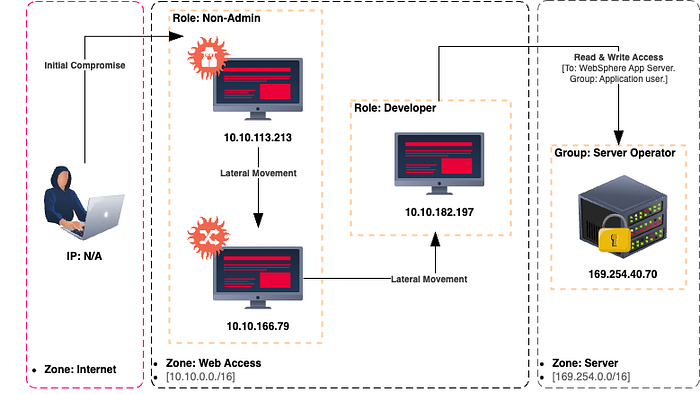
The shared system structure shows implementation issues, but our focus is to analyze our assigned scope and understand the situation. After completing our DFIR (Digital Forensics and Incident Response) tasks, we'll evaluate the broader context and recommend future actions.
Our assignment: Investigate the Windows host with IP 10.10.166.79 — the second compromised machine in the attack sequence. This device will receive a different IP in the live environment, but evidence relationships should match the initial mapping.
The first entry point isn't suitable for live DFIR, as the attacker has erased key evidence on that device. While another team member prepares that machine for analysis, we need to assess our assigned device and report back promptly.
Reliability of System Tools
The reliability of built-in system tools is essential in collecting evidence and making sound decisions in an investigation. Using compromised tools could lead to data loss, misinterpretation, and wasted time chasing false leads. Incorrect system status or executing trapped scripts or executables can send investigators down a rabbit hole, wasting resources and clouding the case.
To begin, we need a trusted command shell. Verifying file integrity in an offline or isolated environment may be intrusive and time-intensive, so launching a secure command shell from a trusted toolbox is critical. Running all tools and commands from this shell is a practical workaround to avoid executing potentially compromised instructions on the default shell. However, this approach alone won't fully protect against hijacked DLLs that system commands and executables might load.
Note: Some functions rely on default environment variables, relative paths, and specific files. Running the shell from a custom path may cause missing features and errors, which is expected. Additionally, as resources on the compromised host might already be strained, some commands may yield error messages due to insufficient resources.
We'll initiate the investigation by running a secure instance of the Windows Command Prompt (CMD-DFIR.exe) as an administrator. This approach avoids system recovery utilities (like sfc.exe), which can be intrusive and risk altering artifacts. This trusted shell executable can come from either a trusted system image or one prepared specifically for the investigation.
Note: The live approach prioritizes efficiency and speed over post-mortem analysis. Lightweight, goal-driven methods reduce risks from executing trapped instructions and help maintain control. Collecting artifacts using supported scripting languages minimizes background load and allows closer monitoring of system changes during the live investigation.
Starting with CMD-DFIR and PowerShell CLI
We'll start with CMD-DFIR.exe for initial checks, then move to PowerShell CLI, which offers advanced commands, pipelining, and filtering capabilities. PowerShell supports nearly all command prompt commands and adds valuable flexibility.
Beginning with CMD-DFIR, we'll launch PowerShell without a profile and examine environment variables to detect potential path interception (MITRE ATT&CK ID: T1574.007). By reviewing environment variables, we can assess whether we can rely on native system tools in this investigation. Execute the commands to read and screen the environment variables.
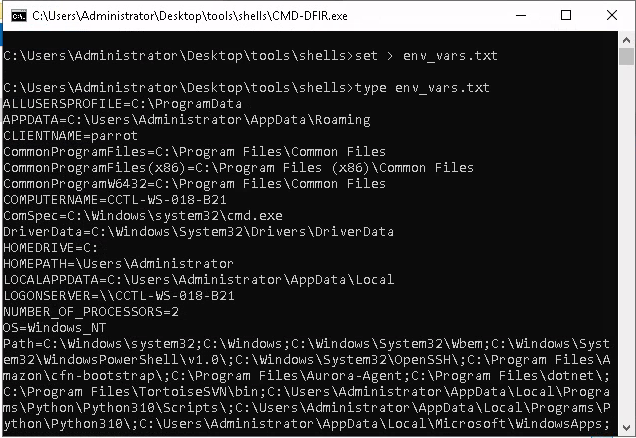
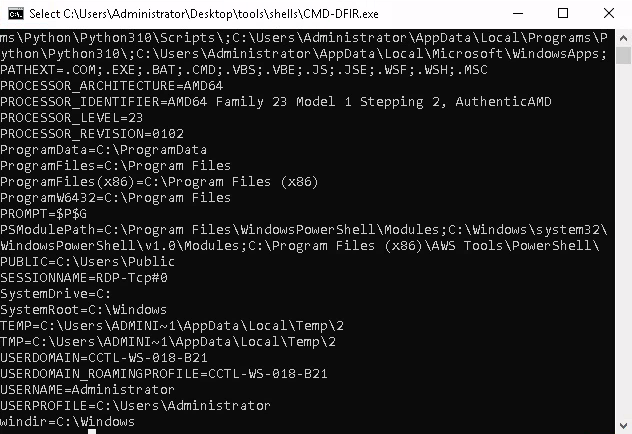
Frequently Hijacked Fields to Check:
- ComSpec: Windows command prompt executable (cmd.exe)
- Path: Environment path values
- PSModulePath: PowerShell module directories
- Public: Public folder
- TEMP and TMP: Temporary locations
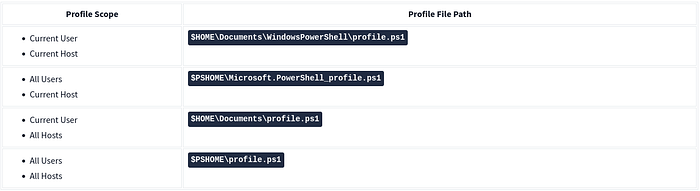
Upon examining PowerShell paths, if everything appears normal, we'll proceed to check profile directories. There are six profile types in PowerShell, but only four are used by the console and applications (PowerShell ISE uses two others). Below are the default profile file locations.
Examining Profile Files
First, let's identify which profile files exist. Since we're using a secure shell, it may not correctly interpret directory variables. We'll rely on absolute paths from environment variables instead. The USERPROFILE variable shows the absolute path to the $HOME directory.
And PSModulePath provides the path to $PSHOME and other related directories. If you're unsure which directory is $PSHOME, use the PowerShell executable's path as a reference. Profile files should reside in the same directory.
Now that we have the absolute paths for $HOME and $PSHOME, let's identify available profile files using an updated command structure. After checking all four paths, we discovered that the "All Users, All Hosts" profile file exists. We'll dump and read its contents as we did for environment variables. This step will help us determine if event-triggered execution (MITRE ATT&CK ID: 1546.013) is present in the system.
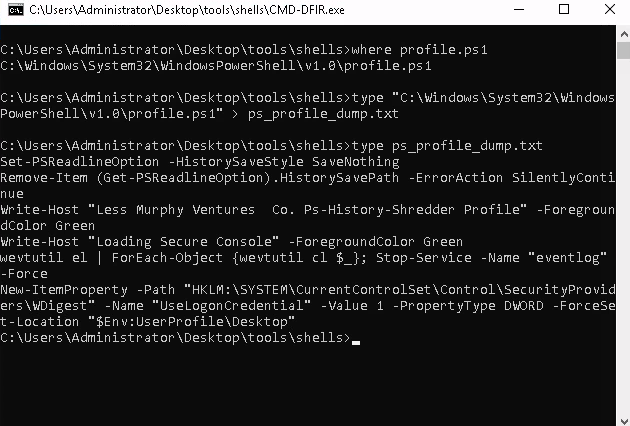
We discovered a custom PowerShell profile that clears and turns off terminal history. However, two additional lines appear highly suspicious. While removing terminal history (ATT&CK ID: T1070.003) could be a threat, system administrators confirmed this feature, so we don't consider it malicious.
In contrast, the rest of the profile raised red flags. The first suspicious line attempts to clear event logs (ATT&CK ID: T1070.001) and disable the logging service (ATT&CK ID: T1562.002). The second line includes commands to store credentials in the Registry (ATT&CK ID: T1552.002). These changes were not documented by the case manager or system admins, so we added them to our report for further evaluation.

This evidence underscores why we avoid relying solely on system resources and start with the Command Shell instead of PowerShell. Before switching to PowerShell, we'll disable the current profile file to prevent accidental execution of the suspicious commands. We'll convert the existing profile file into a backup (changing the extension from .ps1 to .bak) and replace it with our trusted profile file. By renaming our secure profile to the original name, we ensure PowerShell sessions use the safe profile, significantly lowering the risk of running malicious code. As expected, some commands will be unavailable, and error messages may appear — these can be ignored, as they don't affect the backup process.
With the secure profile file in place, we're ready to switch to PowerShell and start collecting evidence. We'll still use our trusted shell instance from the toolbox rather than the system's default. Launching PowerShell from the CMD-DFIR.exe session, we observed a different banner than in the compromised profile, confirming that our safe profile is in use.
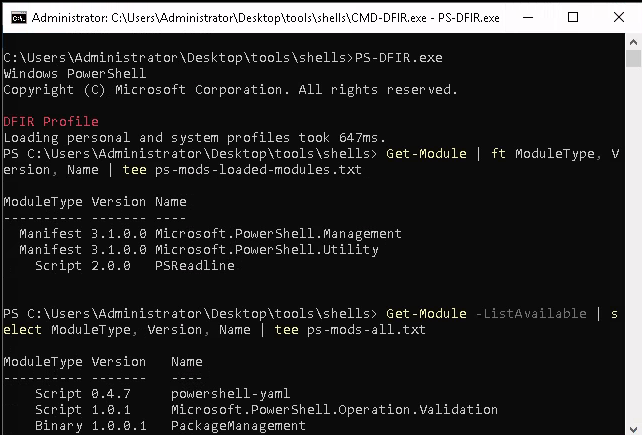
Before proceeding with host details, we'll perform two PowerShell checks: confirming the PowerShell version and recording both loaded modules and installed modules that aren't currently loaded. These lists will aid in spotting malicious or misused modules during event correlation and a deeper investigation.
Investigation Notes:
This phase focused on evaluating system tool reliability and emphasizing a well-prepared response toolkit for live investigations. Findings indicate that the host is compromised, with potential persistence and lateral movement techniques at play. Not all Indicators of Attack (IoAs) and Indicators of Compromise (IoCs) can be uncovered by initial checks, so we'll conduct additional tests in future steps.
Quick Wins from This Task
- Environment Variables: Identified and reviewed
- PowerShell Profile: Examined and secured with a safe profile file
Collected Low-Hanging Fruits
- Manipulated PowerShell Profile File
- Event Log Clear Attempt
- Logging Service Manipulation Attempt
- Registry Credential Modification Attempt
Action Points for Further Investigation
- Registry Analysis: Review for credential-stealing attempts
- Event Log Service: Verify any status modifications
- User Sessions: Track over time for credential-theft investigation
Known Changes
- The original PowerShell profile was replaced with the secure profile file
- Log modifications
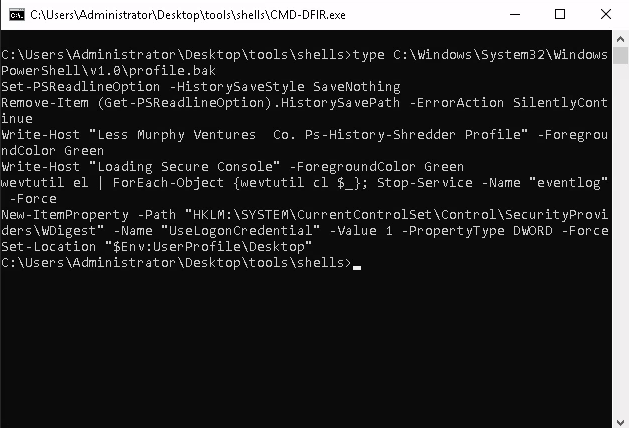
Finally, we can open our backup of profile.ps1 or profile.bak to review any adversary tools used, including log-clearing or registry modification commands.
Conclusion
In this phase, we assessed the reliability of system tools and secured the investigation environment to prevent further contamination. The indicators found confirmed a compromised host, with signs of persistence and attempts to cover tracks, including log clearing, service manipulation, and credential theft through the registry.
By using a trusted toolbox and securing the PowerShell environment, we minimized the risk of executing malicious code. The key findings — manipulated PowerShell profiles, event log clearing, and registry changes — provided critical insights into the attacker's tactics.
Next Steps:
We will now proceed to examine the System Profile, focusing on:
- System Details and Configuration to understand the system's state and identify any weaknesses.
- System Date and Time Information to detect any manipulation of timestamps that could conceal the attacker's activities.
- Policies to review security settings, user accounts, and audit configurations that may have contributed to or been bypassed during the attack.
#tryhackme #missrobot #msrobot #MSR0B0T #DFIR #IncidentResponse #WindowsForensics #PowerShell #MalwareAnalysis #EndpointForensics #ThreatHunting #DigitalForensics