
Far away from the comfort of public clouds and GitHub Actions pipelines — inside defense labs, on oil rigs, in banks with unforgiving auditors, in data centers that run only on private fiber, and sometimes deep in basements where Wi-Fi is considered a security threat — Kubernetes is powering AI systems that are never allowed to touch the outside world.
These environments are air-gapped.
- No public images.
- No curl to PyPI.
- No docker pull from a random registry.
- No telemetry sent to some SaaS dashboard.
Just isolated clusters, sealed networks, and strict controls where anything that moves in — or out — must be approved, scanned, and logged.
And yet, organizations in these settings increasingly want the same things everybody else wants:
- Machine learning inference at the edge
- On-prem LLM workloads
- GPU scheduling and sharing
- Scalable pipelines for computer vision
- Automated drift detection
- Secure MLOps workflows
Delivering AI inside an air-gapped Kubernetes environment is absolutely possible — but it is a different sport altogether.
Why Air-Gapped AI Is Such a Big Deal
Before diving into Kubernetes, let's talk about why AI behind air-gaps even matters.
Most industries still run workloads on-prem, not because they dislike the cloud, but because they're required to keep things inside:
- Defense & National Security: models trained on classified data
- Healthcare: data residency and strict privacy controls
- Banking/FinTech: regulatory boundaries and internal compliance
- Industrial IoT / Manufacturing: offline or partially connected sites
- Energy & Utilities: edge inference on remote or low-bandwidth locations
- Telecom: sovereign networks and private 5G/6G
These groups need AI — vision systems, anomaly detection, digital twins, predictive maintenance, fraud detection, and increasingly internal LLMs — but cannot depend on cloud services.
So they turn to Kubernetes clusters that live fully inside their own walls.
But simply dropping an ML model into an isolated environment is not enough. In real systems, you need:
- A way to move container images
- A secure internal registry
- GPU support without internet
- An offline package repository (pip, conda, npm, apt, yum…)
- CI/CD that works offline
- A model store
- Monitoring without cloud services
- A way to update models
- Drift detection without external telemetry
- RBAC and zero-trust boundaries
- Backup strategies for clusters that can't use cloud snapshots
This is where things start to get tricky.
Architecture Overview
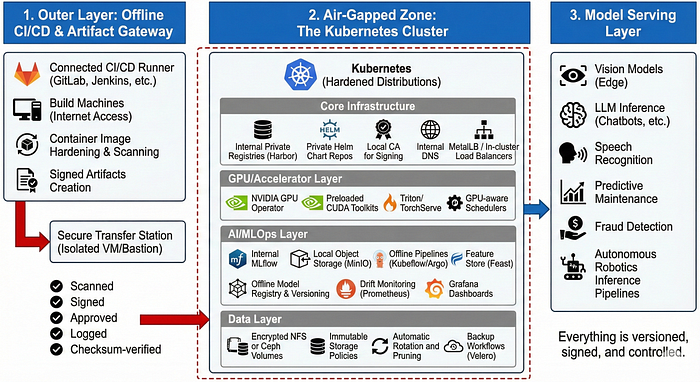
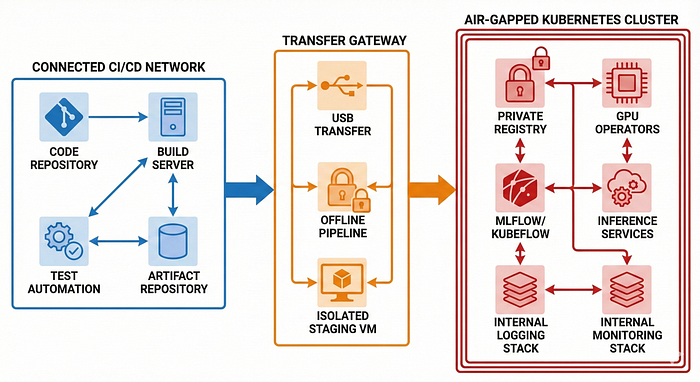
The system is usually split into three logical layers:
1. Outer Layer: Offline CI/CD & Artifact Gateway
This is the staging zone before anything enters the air-gapped environment.
It normally includes:
- A connected CI/CD runner (GitLab/Jenkins/Cloud Build/GitHub Enterprise)
- Build machines with internet access
- Container image hardening and scanning
- Signed artifacts creation
- A "transfer station" (usually an isolated VM or bastion)
- Secure USB or private fiber link
Think of it like airport customs for AI models and container images.
Everything must be:
- Scanned
- Signed
- Approved
- Logged
- Checksum-verified
Before crossing the boundary.
2. Air-Gapped Zone: The Kubernetes Cluster
Once inside, the core components typically look like this:
Core Infrastructure
- Kubernetes (often with hardened distributions such as RKE2, OpenShift, or K3s on edge sites)
- Internal private registries (Harbor is the most common)
- Private Helm chart repositories
- Local CA for signing
- Internal DNS
- MetalLB / In-cluster load balancers for private networks
GPU/Accelerator Layer
- NVIDIA GPU Operator (mirrored images)
- Preloaded CUDA toolkits
- Triton Inference Server or TorchServe
- GPU-aware schedulers
AI/MLOps Layer
- Internal MLflow installation
- Local object storage (MinIO instead of S3)
- Offline pipelines using Kubeflow or Argo
- Feature store options (Feast with local Redis/Postgres)
- Offline model registry and versioning
- Drift monitoring with Prometheus
- Grafana dashboards without cloud backends
Data Layer
- Encrypted NFS or Ceph volumes
- Immutable storage policies
- Automatic rotation and pruning
- Backup workflows using Velero with local storage targets
3. Model Serving Layer
Once the training and registry layers are inside, the actual AI workloads include:
- Vision models running at the edge
- LLM inference for chatbots, internal fuzzing, or summarization
- Speech recognition models for call centres
- Predictive maintenance for machines
- Fraud detection models
- Autonomous robotics inference pipelines
Everything is versioned, signed, and controlled.
Core Challenges
Getting Container Images Inside Is Painful
In a connected world, everything is easy:
docker pull pytorch/pytorch:2.1.0In air-gapped land? You pull manually, export, checksum, scan, sign, and transfer.
Typical workflow
docker pull pytorch/pytorch:2.1.0
docker save -o pytorch.tar pytorch/pytorch:2.1.0
sha256sum pytorch.tar > pytorch.tar.sha256
Move it through the gateway.
Then inside the cluster:
docker load -i pytorch.tar
docker tag pytorch:2.1.0 registry.internal/pytorch:2.1.0
docker push registry.internal/pytorch:2.1.0
Multiply this by:
- NVIDIA drivers
- GPU runtime
- CUDA base images
- Torch/TensorFlow images
- Inference servers
- Your application stack
You end up managing dozens of large, slow images.
Python Dependencies Issues
Pip packages want internet. Conda packages want internet. NPM packages really want internet.
In air-gapped setups you create:
- A private pip mirror (like pypi.org → local devpi/Artifactory)
- A local conda mirror
- A private npm registry
Then you pre-sync everything you need.
The problem? ML frameworks have dependency trees longer than family WhatsApp chats.
You end up mirroring:
- numpy
- scipy
- pandas
- tokenizers
- torch
- torchtext
- transformers
- sentencepiece
- triton
…and hundreds more.
This is why teams often freeze environments with a single blessed dependency set.
GPUs Don't Play Nice Offline
NVIDIA GPU Operator is excellent — but it downloads dozens of images.
In an air-gap:
- You must preload all driver images
- Pre-mirror the entire GPU operator catalog
- Build compatible CUDA toolkits
- Store them in your private registry
If anything mismatches — driver versions, host kernel versions, locked-down OS packages — GPUs simply refuse to cooperate.
This is why many teams choose:
- Red Hat OpenShift (because it's predictable), or
- Ubuntu LTS with fixed kernel versions, or
- SUSE for mission-critical setups
Predictability is oxygen in an air-gap.
Monitoring Without Sending Data Out
Prometheus works offline.
Grafana works offline.
But you have no cloud:
- No Datadog
- No CloudWatch
- No New Relic
- No Sentry
You must build your own stack:
- Prometheus → metrics
- Loki → logs
- Tempo → traces
- Grafana → dashboards
You also have to manage:
- Long-term retention
- Storage growth
- Log volume spikes
- Cluster bloat
Nothing can "ship logs to the cloud", so everything becomes your problem.
Updating Models Without Internet
This is the most interesting and engineering-heavy part.
Most teams build a workflow like this:
Model Training (Connected Zone)
Train → Evaluate → Sign → Version → Export Artifacts stored in MLflow.
Transfer Layer
Model packaged as:
model.tar.gz
model.signature
model.metadata
This bundle is carried through the air-gap gateway.
Air-Gapped Zone
Bundle is verified, scanned, and imported into the internal model registry.
Then deployments happen via:
- Argo CD (with offline Git repos)
- Helm charts
- Kustomize manifests
- Triton model repository sync
The end result: A deterministic, versioned, auditable model update pipeline.
Security Considerations Unique to Air-Gaps
Security is not just "tighter" — it is different.
Below are the patterns you see only in these environments.
1. Everything Must Be Signed
Clusters often enforce:
- Container signing
- Model artifact signing
- Policy-as-code enforcement
- Admission controller checks
Without signatures? Deployments are rejected.
2. Zero Trust Inside the Cluster
Even though the network is isolated from outside, internal movement must still be controlled.
Key approaches:
- NetworkPolicies blocking all east-west traffic
- mTLS for all services
- Strict RBAC roles
- Secret rotation policies
- Gatekeeper/OPA policies
The assumption is simple:
"The threat is not the internet. The threat is misconfiguration and insiders."
3. USB Transfers Are Audited
In many environments, moving files via USB requires:
- Formal ticket approval
- Hardware-level encryption
- Dual-person integrity checking
- Automatic scanning systems
- Tamper logs
The physical world becomes part of the deployment process.
Offline MLOps: The Framework That Makes All This Work
Modern MLOps tooling assumes internet connectivity.
In air-gapped Kubernetes you typically build an internal stack like this:
1. MLflow for Model Tracking
Works beautifully offline.
- Tracks experiments
- Stores artifacts
- Provides model registry
- Offers reproducibility
2. MinIO for Storage
S3-compatible, perfect for air-gaps.
Stores:
- Features
- Model artifacts
- Large datasets
- Logs
3. Kubeflow Pipelines / Prefect / Airflow
Depending on complexity, teams choose:
- Kubeflow when they need full-fledged pipelines with GPU orchestration
- Prefect when they want lightweight offline orchestration
- Airflow for traditional ETL-style workflows
All run inside Kubernetes, fully offline.
4. Triton Inference Server / TorchServe
These are the backbone of inference.
Triton allows:
- Multi-framework support
- Dynamic batching
- GPU sharing
- High throughput
TorchServe is simpler but great for PyTorch-only teams.
5. Argo CD with Offline Git
Teams maintain:
- A Git repository inside the air-gapped network
- Argo CD syncing against this repo
This brings GitOps to disconnected clusters.
Key Lessons
These are patterns you start recognizing only after real deployments.
1. You Need a "Golden Image Catalog"
Teams quickly learn to freeze:
- Base container images
- CUDA versions
- Python versions
- Torch/TensorFlow versions
- OS patches
- Kernel versions
Consistency reduces debugging by 90%.
2. Air-Gaps Are Not Actually Fully Isolated
There's always some controlled transfer mechanism.
But the rule is:
"Everything entering must be known, scanned, and signed."
That's the real boundary.
3. Observability Becomes the Heart of Reliability
Because you can't Google errors or send logs to an external system, you need:
- Comprehensive metrics
- Detailed logs
- Traces
- Node-level insight
- GPU-level metrics
The cluster must essentially explain itself.
4. Documentation Is a Survival Tool
Engineers maintain:
- Version maps
- Architecture docs
- "What's inside the cluster" catalogs
- "How to reproduce" guides
Air-gapped Kubernetes clusters age quickly if documentation is neglected.
A Look at Emerging Trends
Air-gapped environments are starting to adopt several interesting patterns.
1. On-Prem LLMs Are Becoming Normal
Teams run:
- LLaMA
- Mistral
- Gemma
- Falcon
- QLoRA fine-tuned models
These are compact, capable, and perfect for offline inference.
LLMs are being used for:
- Code analysis inside secure networks
- Log summarization
- Incident response
- Knowledge base Q&A
- Internal chatbots
2. Confidential AI
Hardware-backed protection like:
- Intel SGX
- AMD SEV
- NVIDIA Hopper Confidential Compute
…is becoming integrated into clusters.
3. Edge Kubernetes + AI
Lightweight clusters such as:
- K3s
- MicroK8s
- KubeEdge
…enable inference at remote sites with periodic synchronization back to the central system.
4. Hybrid Multi-Site Air-Gaps
Many orgs now run:
- Multiple disconnected Kubernetes clusters
- Occasional offline synchronization windows
- Multi-site model version propagation
This requires:
- Deterministic updates
- Version locking
- Cross-site attestation
If You're Starting Your First Air-Gapped AI Project
Here's a quick guide from real-world experience.
Start with These Tools
- Harbor → for internal registry
- MinIO → for artifact storage
- MLflow → for model lifecycle
- Argo CD → for offline GitOps
- Prometheus + Grafana + Loki → for monitoring logs/metrics
Freeze Your Toolchain Early
Lock versions for:
- Kubernetes
- CUDA
- Python
- Framework versions
- OS versions
This eliminates debug chaos.
Automate the Transfer Workflow
Build a tool or a script that:
- Packages artifacts
- Generates checksums
- Signs them
- Generates metadata
- Validates integrity on the receiving side
Prioritize Documentation
- Well-written documentation shortens on boarding time and helps new engineers ramp up faster.
- It preserves key architectural decisions and prevents knowledge from being lost over time.
- Strong documentation reduces repeated mistakes and keeps engineering velocity high as the team grows.
Test Disaster Recovery
You cannot rely on cloud backups.
Use:
- Velero with local storage
- Offline snapshot systems
- Immutable backups
Test restore procedures regularly.
Air-Gapped AI Use Cases
Scenario 1: Air-Gapped AI in a National Defense Research Lab
Background
A national defense research center was tasked with building an AI system to identify unusual patterns in telemetry collected from radar systems deployed across remote borders. The radar data was extremely sensitive — classified at a level where even metadata couldn't leave the secure facility. Internet connectivity was explicitly forbidden.
Yet the project required:
- GPU-heavy model training
- Continuous model updates
- Reliable inference pipelines
- Strict compliance and traceability
- Deterministic deployments that auditors could verify
How They Built the System
1. Connected Development Zone (Outer Layer)
Outside the air-gapped facility, engineers performed:
- Data simulation
- Model prototyping
- Experiment tracking using MLflow
- Code reviews via GitLab
- Container builds for PyTorch/TensorFlow
- Security scanning and signing of artifacts
Once a model version was approved, it was exported into a deployment capsule:
model_v9/
  model.pt
  metadata.yaml
  signature.json
  dependencies.lock
  performance_report.pdf
This capsule was encrypted, digitally signed, and moved via secure portable storage devices following a 4-step approval workflow.
2. Air-Gapped Kubernetes Cluster (Inner Layer)
Inside the isolated network, a hardened Kubernetes cluster ran:
- RKE2 with CIS Level 2 hardening
- Harbor registry
- NVIDIA GPU Operator with mirrored images
- Internal MLflow instance
- Triton Inference Server
- Loki + Prometheus + Grafana
When new models arrived, they were:
- Checksum-verified
- Virus-scanned
- Signature-verified
- Imported into internal MLflow
- Pushed into the inference pipeline
Outcome
- Real-time radar streams were processed on GPU nodes
- Unusual patterns were detected in milliseconds
- Operators received alerts with confidence scores
- Models were updated without breaking air-gap compliance
An Underlying Insight
The biggest challenge wasn't GPUs or Kubernetes — it was creating a robust, safe workflow for moving AI across the air-gap. Once that was solved, the cluster ran like a reliable internal cloud.
Scenario 2: Predictive Maintenance AI in a Large Manufacturing Plant
Background
A global manufacturing company ran a 24×7 plant producing specialized automotive components. Any unplanned machine downtime could cost millions per hour.
They wanted on-site AI capable of:
- Detecting anomalies in vibration and temperature
- Predicting failures hours in advance
- Triggering maintenance alerts
- Scaling to hundreds of sensors
The site was strictly offline due to intellectual property regulations, and software updates required rigorous validation.
How They Built the System
1. Edge Kubernetes Cluster
- 3 worker nodes with NVIDIA GPUs
- K3s distribution hardened for industrial environments
- Local MinIO storage
- Internal Harbor registry
- Argo CD connected to a private Git server
- Node-level failover for hardware resilience
2. Offline Data Processing & AI
Machines continuously produced:
- Vibration signatures (accelerometers)
- Heat maps (thermal sensors)
- Acoustic patterns (microphones)
A lightweight collector pushed this into the internal MinIO bucket. Models ran on Triton Inference Server:
- Converting sensor inputs into embeddings
- Running anomaly detection
- Pushing scores into Prometheus
3. Model Updates via "Maintenance Window Sync"
Every two months:
- Data scientists trained new models in a connected environment
- Offline pipeline packaged them into versioned bundles
- A technician hand-carried the bundle into the plant
- Argo CD detected changes in the internal Git repo
- Inference pods were updated with zero downtime
Impact
- Anomaly detection moved from reactive to predictive
- Maintenance teams received alerts 3–4 hours before failures
- Downtime dropped by 40%
- One major gearbox failure was prevented
- Engineers trusted the fully offline system
An Underlying Insight
Industrial sites require extremely stable versioning and deployment processes. A single untested package, driver, or kernel update could halt the entire plant. Success came from a frozen, controlled environment where Kubernetes versions, model runtimes, CUDA versions, and Python dependencies were locked.
Scenario 3: Computer Vision Model for a Manufacturing Plant
Background
A plant needed to detect small defects on a conveyor system in real-time. The site had no internet connectivity. The system required:
- 4 GPUs per node
- Handling 5 video streams
- Strict audit controls
- High availability
How They Built the System
1. Training Happens Outside (Connected Development Zone)
Data engineers had access to:
- CV libraries
- Pretrained models
- GPUs for training
- Experiment tracking tools via MLflow
The best model was registered as model_v13, frozen, exported, and digitally signed.
2. Package and Move the Model
Deployment bundle:
model_v13/
  weights.pt
  config.json
  labels.txt
  signature.json
  requirements.lock
It was scanned for vulnerabilities, signed, and transferred via the offline gateway.
3. Sync Inside the Air-Gapped Cluster
Operators ran:
mlflow models import -m ./model_v13 -r internal-mlflowmodel_v13 appeared in the air-gapped MLflow registry.
4. Deploying the Model
An offline Argo CD pipeline watched the internal Git repository. A commit like:
Update inference-service to model_v13triggered deployment of:
- Triton inference server pod
- CV processing application
- Custom scaling configuration
All images were pulled from the internal Harbor registry.
5. Monitoring & Drift Insight
- Prometheus: FPS per camera, GPU utilization, model latency, failure rates
- Loki: log collection
- Grafana: visualization
When defect patterns shifted over time, drift alerts were raised offline.
Outcome
- Real-time defect detection was reliable and auditable
- All video streams processed simultaneously
- Operators could confidently roll out new models without downtime
An Underlying Insight
Success required a frozen, controlled environment: fixed Kubernetes versions, locked container runtimes, and stable Python/CUDA dependencies, ensuring deterministic deployments and full auditability.
Scenario 4: AI-Driven License Management in a Software Enterprise
Background
A software company wanted to deploy an AI system to monitor and optimize license usage across its enterprise software products. The system needed to:
- Detect underused or overused licenses
- Predict license demand for upcoming periods
- Automate compliance reporting
- Operate fully offline due to strict IP and corporate security policies
The environment had strict constraints:
- No internet connectivity for cloud access
- Multiple license servers with GPU nodes for model inference
- High availability required to avoid disrupting user access
- Full audit trails for compliance
How They Built the System
1. Connected Development Zone (Outer Layer)
Data scientists and engineers trained models on a connected cluster using:
- Historical license usage data
- ML frameworks like PyTorch and XGBoost
- MLflow for experiment tracking
- Simulated future usage scenarios
Once a model passed validation, it was frozen, signed, and exported as a deployment bundle:
license_ai_model_v2/
  weights.pt
  config.json
  metadata.yaml
  signature.json
  requirements.lock
  performance_report.pdf
2. Secure Transfer to Air-Gapped Cluster
- The deployment bundle was encrypted, scanned for vulnerabilities, and physically transported via a secure workflow with multi-step approvals.
3. Air-Gapped Kubernetes Cluster (Inner Layer)
The isolated cluster included:
- RKE2 with CIS Level 2 hardening
- Internal Harbor registry
- NVIDIA GPU Operator for inference acceleration
- Internal MLflow for model versioning
- Triton Inference Server for license prediction workloads
- Prometheus, Loki, Grafana for monitoring
Models were:
- Checksum verified
- Signature verified
- Imported into internal MLflow
- Deployed to inference pods
4. Deployment & Monitoring
- Argo CD monitored an internal Git repository for model updates
- Triton pods processed license server logs continuously
- Prometheus tracked GPU usage, inference latency, and license prediction accuracy
- Grafana visualized usage patterns
- Drift alerts notified administrators if license usage patterns changed
Outcome
- License under utilization and over utilization were detected in real-time
- Compliance reports were generated automatically
- AI predictions helped optimize license allocations, saving significant costs
- Fully auditable workflows ensured enterprise security and IP compliance
An Underlying Insight
The key success factor was creating a deterministic, fully controlled deployment environment. Even in a complex enterprise setting, frozen environments, secure transfer protocols, and auditable pipelines ensured AI models could run reliably without external connectivity.
Conclusion
Running AI in air-gapped Kubernetes environments isn't glamorous. It's gritty. It's slow. It's full of edge cases and manual steps and version mismatches and debugging sessions where you sometimes question your life choices.
But it's also some of the most rewarding engineering work you can do.
These environments power:
- National security systems
- Critical manufacturing lines
- Financial systems dealing with billions
- Healthcare systems protecting people's lives
- Remote infrastructure that keeps countries running
When you finally see an AI workload running flawlessly — entirely offline, entirely self-contained, scaling across isolated nodes with GPUs humming in perfect synchronization — it's a thing of beauty.
It feels like building a spaceship with no access to Earth.
and somehow, it works.