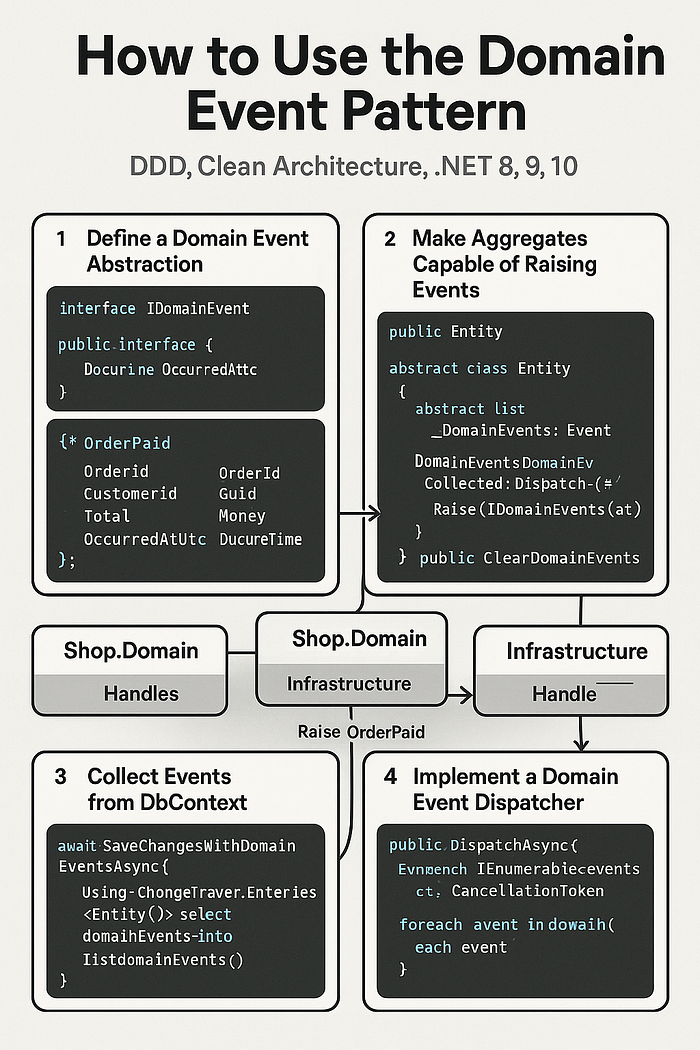

Instead of "controller calls service calls repository calls DbContext", you start saying things like:
"When an order is paid, the system notices and reacts."
That "notices and reacts" part? That's the Domain Event Pattern.
Let's walk through how to use domain events in DDD + Clean Architecture in .NET (8, 9, 10 — same idea), with clear layers, copy-pasteable code, and a safe outbox so you don't lose events.
1. What Is a Domain Event?
A domain event is:
Something important that has happened in your domain model that other parts of the domain might care about.
Examples:
OrderPaidUserRegisteredStockDepletedInvoiceOverdue
Key bits:
- It's past tense: "OrderPaid", not "PayOrder".
- It expresses business meaning, not technical details.
- It's raised inside your domain model (usually an aggregate).
Different from other events
- Domain Event
Internal to your domain model. Expressed in ubiquitous language.
Example:
OrderPaid. - Integration Event
What you publish to other systems (message bus, other services).
Example:
OrderPaidIntegrationEvent. - Application/EventBus events
Internal plumbing, usually technical:
UserCacheInvalidated.
We're focusing on domain events — and how they flow through Clean Architecture.
2. Where Domain Events Live in Clean Architecture
Let's assume this structure:
src/
  Shop.Domain/          # Entities, VOs, Aggregates, Domain events
  Shop.Application/     # Use cases (CQRS), DTOs, ports (interfaces)
  Shop.Infrastructure/  # EF Core, Repos, Outbox, Message bus, Email, etc.
  Shop.Api/             # Controllers / Minimal APIs
Domain events:
- Types live in Shop.Domain
- Raised from aggregates/entities in Domain
- Collected and dispatched from Infrastructure (close to DbContext)
- Handlers live in:
- Application when they're pure domain logic / orchestration
- Infrastructure when they talk to external systems (email, message bus, etc.)
3. Step 1 — Define a Domain Event Abstraction
In Domain project:
// Shop.Domain/Primitives/IDomainEvent.cs
namespace Shop.Domain.Primitives;
public interface IDomainEvent
{
    DateTime OccurredAtUtc { get; }
}
Example event:
// Shop.Domain/Orders/Events/OrderPaid.cs
using Shop.Domain.Primitives;
using Shop.Domain.ValueObjects;
using Shop.Domain.Orders;
namespace Shop.Domain.Orders.Events;
public sealed record OrderPaid(
    OrderId OrderId,
    Guid CustomerId,
    Money Total,
    DateTime OccurredAtUtc
) : IDomainEvent;
Event is:
- Immutable
- Describes what happened
- Contains identities, not entire graphs (i.e., don't stuff the whole
Orderobject in there).
4. Step 2 — Make Aggregates Capable of Raising Events
Common pattern: base class for entities/aggregates that can hold domain events.
// Shop.Domain/Primitives/Entity.cs
namespace Shop.Domain.Primitives;
public abstract class Entity
{
    private readonly List<IDomainEvent> _domainEvents = new();
    public IReadOnlyCollection<IDomainEvent> DomainEvents => _domainEvents;
    protected void Raise(IDomainEvent @event) => _domainEvents.Add(@event);
    public void ClearDomainEvents() => _domainEvents.Clear();
}
Now your aggregate root can inherit from Entity.
Example Order aggregate:
// Shop.Domain/Orders/Order.cs
using Shop.Domain.Primitives;
using Shop.Domain.Orders.Events;
using Shop.Domain.ValueObjects;
namespace Shop.Domain.Orders;
public sealed class Order : Entity
{
    // Fields/properties omitted for brevity…
    public OrderId Id { get; private set; } = OrderId.New();
    public Guid CustomerId { get; private set; }
    public Money Total { get; private set; } = Money.Zero("USD");
    public OrderStatus Status { get; private set; } = OrderStatus.Pending;
    public DateTime CreatedAtUtc { get; private set; } = DateTime.UtcNow;
    // For EF
    private Order() { }
    private Order(Guid customerId, string currency)
    {
        if (customerId == Guid.Empty)
            throw new ArgumentException("CustomerId required");
        CustomerId = customerId;
        Total = Money.Zero(currency);
        Status = OrderStatus.Pending;
    }
    public static Order Create(Guid customerId, string currency) =>
        new(customerId, currency);
    public void MarkAsPaid()
    {
        if (Status != OrderStatus.Pending)
            throw new InvalidOperationException("Only pending orders can be paid.");
        if (Total.Amount <= 0)
            throw new InvalidOperationException("Cannot pay zero or negative total.");
        Status = OrderStatus.Paid;
        Raise(new OrderPaid(
            OrderId: Id,
            CustomerId: CustomerId,
            Total: Total,
            OccurredAtUtc: DateTime.UtcNow));
    }
    // other behavior: AddLine, RecalculateTotal, etc.
}
Now:
- The domain model decides when to raise
OrderPaid. - Nothing else has to remember to "publish an event" after paying an order.
5. Step 3 — Collect Events from EF Core's DbContext
When you call SaveChangesAsync, your DbContext is tracking updated entities.
We want to:
- Find all entities that have domain events.
- Pull out those events.
- Dispatch them (synchronously or via outbox).
- Clear them from the entities.
In Infrastructure project:
// Shop.Infrastructure/Persistence/AppDbContext.cs
using Microsoft.EntityFrameworkCore;
using Shop.Domain.Primitives;
using Shop.Domain.Orders;
namespace Shop.Infrastructure.Persistence;
public sealed class AppDbContext(DbContextOptions<AppDbContext> options)
    : DbContext(options)
{
    public DbSet<Order> Orders => Set<Order>();
    public async Task<int> SaveChangesWithDomainEventsAsync(
        IDomainEventDispatcher dispatcher,
        CancellationToken ct = default)
    {
        // 1. Gather domain events from tracked entities BEFORE saving
        var domainEvents = ChangeTracker.Entries<Entity>()
            .Select(e => e.Entity)
            .SelectMany(e => e.DomainEvents)
            .ToList();
        // 2. Save changes (commit transaction)
        var result = await base.SaveChangesAsync(ct);
        // 3. Dispatch events
        if (domainEvents.Count > 0)
        {
            await dispatcher.DispatchAsync(domainEvents, ct);
        }
        // 4. Clear events
        foreach (var entry in ChangeTracker.Entries<Entity>())
            entry.Entity.ClearDomainEvents();
        return result;
    }
    // If you sometimes call base.SaveChangesAsync directly, override it too:
    public override async Task<int> SaveChangesAsync(CancellationToken ct = default)
        => await SaveChangesWithDomainEventsAsync(NullDomainEventDispatcher.Instance, ct);
}
Here we've introduced IDomainEventDispatcher – an abstraction for dispatching domain events.
6. Step 4 — Implement a Domain Event Dispatcher
Two main variants:
- In-process, synchronous dispatcher (simple, great inside a single app).
- Outbox-based dispatcher for reliability and cross-service messaging.
6.1 Simple In-Process Dispatcher (using MediatR)
Option A: Reuse MediatR's pub/sub model.
Define the dispatcher:
// Shop.Application/Abstractions/IDomainEventDispatcher.cs
using Shop.Domain.Primitives;
namespace Shop.Application.Abstractions;
public interface IDomainEventDispatcher
{
    Task DispatchAsync(IEnumerable<IDomainEvent> events, CancellationToken ct = default);
}
Implementation in Infrastructure:
// Shop.Infrastructure/Events/MediatRDomainEventDispatcher.cs
using MediatR;
using Shop.Application.Abstractions;
using Shop.Domain.Primitives;
namespace Shop.Infrastructure.Events;
public sealed class MediatRDomainEventDispatcher(IMediator mediator)
    : IDomainEventDispatcher
{
    public async Task DispatchAsync(IEnumerable<IDomainEvent> events, CancellationToken ct = default)
    {
        foreach (var domainEvent in events)
        {
            // Wrap domain event as INotification
            await mediator.Publish(new DomainEventNotification(domainEvent), ct);
        }
    }
}
public sealed class DomainEventNotification : INotification
{
    public IDomainEvent DomainEvent { get; }
    public DomainEventNotification(IDomainEvent domainEvent)
        => DomainEvent = domainEvent;
}
Then you write handlers for your events using MediatR's INotificationHandler<T>.
Example: handle OrderPaid to update a read model or send an internal notification:
// Shop.Application/Orders/Handlers/OrderPaidHandler.cs
using MediatR;
using Shop.Domain.Orders.Events;
namespace Shop.Application.Orders.Handlers;
public sealed class OrderPaidHandler : INotificationHandler<DomainEventNotification>
{
    private readonly ILogger<OrderPaidHandler> _log;
    public OrderPaidHandler(ILogger<OrderPaidHandler> log)
        => _log = log;
    public Task Handle(DomainEventNotification notification, CancellationToken ct)
    {
        if (notification.DomainEvent is not OrderPaid e)
            return Task.CompletedTask;
        _log.LogInformation("Order {OrderId} was paid by customer {CustomerId} for {Amount}{Currency}",
            e.OrderId.Value, e.CustomerId, e.Total.Amount, e.Total.Currency);
        // Do domain-level reactions here: update projections, etc.
        return Task.CompletedTask;
    }
}
You can also make the notification generic (DomainEventNotification<T>) if you like stronger typing.
💡 In-process dispatch is great for pure domain reactions (read models, internal stats). Once you touch external systems (email, bus), you'll want an outbox.
7. Step 5 — Reliable Delivery via Outbox Pattern
In the simple dispatcher above, if your app crashes after saving the DB but before publishing an event (or while sending an email), you will lose the event or cause inconsistency.
The Outbox pattern solves this:
Save domain events into an "outbox" table in the same transaction as your aggregate. Then a background worker reads the outbox and publishes events reliably.
7.1 Outbox Entity
In Infrastructure:
// Shop.Infrastructure/Outbox/OutboxMessage.cs
namespace Shop.Infrastructure.Outbox;
public sealed class OutboxMessage
{
    public Guid Id { get; init; } = Guid.NewGuid();
    public DateTime OccurredAtUtc { get; init; }
    public string Type { get; init; } = default!;      // full type name of domain event
    public string Payload { get; init; } = default!;   // JSON payload
    public DateTime? ProcessedAtUtc { get; set; }
    public string? Error { get; set; }
}
Add DbSet<OutboxMessage> to AppDbContext.
public DbSet<OutboxMessage> OutboxMessages => Set<OutboxMessage>();7.2 Save Events to Outbox on SaveChanges
Instead of directly dispatching events in SaveChangesWithDomainEventsAsync, store them:
public async Task<int> SaveChangesWithDomainEventsAsync(
    CancellationToken ct = default)
{
    var domainEvents = ChangeTracker.Entries<Entity>()
        .Select(e => e.Entity)
        .SelectMany(e => e.DomainEvents)
        .ToList();
foreach (var domainEvent in domainEvents)
    {
        OutboxMessages.Add(new OutboxMessage
        {
            OccurredAtUtc = domainEvent.OccurredAtUtc,
            Type = domainEvent.GetType().FullName!,
            Payload = JsonSerializer.Serialize(domainEvent, domainEvent.GetType())
        });
    }
    // Now saving both aggregates and outbox messages in one transaction
    var result = await base.SaveChangesAsync(ct);
    foreach (var entry in ChangeTracker.Entries<Entity>())
        entry.Entity.ClearDomainEvents();
    return result;
}
7.3 Background Worker to Process Outbox
In Infrastructure:
// Shop.Infrastructure/Outbox/OutboxProcessor.cs
using Microsoft.EntityFrameworkCore;
using Microsoft.Extensions.DependencyInjection;
using Microsoft.Extensions.Hosting;
using Microsoft.Extensions.Logging;
using Shop.Domain.Primitives;
using Shop.Infrastructure.Persistence;
using System.Text.Json;
namespace Shop.Infrastructure.Outbox;
public sealed class OutboxProcessor(
    IServiceProvider sp,
    ILogger<OutboxProcessor> log) : BackgroundService
{
    protected override async Task ExecuteAsync(CancellationToken ct)
    {
        while (!ct.IsCancellationRequested)
        {
            try
            {
                using var scope = sp.CreateScope();
                var db = scope.ServiceProvider.GetRequiredService<AppDbContext>();
                var batch = await db.OutboxMessages
                    .Where(m => m.ProcessedAtUtc == null)
                    .OrderBy(m => m.OccurredAtUtc)
                    .Take(100)
                    .ToListAsync(ct);
                if (batch.Count == 0)
                {
                    await Task.Delay(500, ct);
                    continue;
                }
                foreach (var msg in batch)
                {
                    try
                    {
                        var domainEvent = DeserializeDomainEvent(msg);
                        await DispatchAsync(domainEvent, scope.ServiceProvider, ct);
                        msg.ProcessedAtUtc = DateTime.UtcNow;
                        msg.Error = null;
                    }
                    catch (Exception ex)
                    {
                        log.LogError(ex, "Failed to process outbox message {Id}", msg.Id);
                        msg.Error = ex.Message;
                    }
                }
                await db.SaveChangesAsync(ct);
            }
            catch (OperationCanceledException) when (ct.IsCancellationRequested)
            {
                // shutting down
            }
            catch (Exception ex)
            {
                log.LogError(ex, "Outbox processor loop failed");
                await Task.Delay(2000, ct); // simple backoff
            }
        }
    }
    private static IDomainEvent DeserializeDomainEvent(OutboxMessage msg)
    {
        var type = Type.GetType(msg.Type)
            ?? throw new InvalidOperationException($"Unknown event type: {msg.Type}");
        var ev = (IDomainEvent?)JsonSerializer.Deserialize(msg.Payload, type);
        return ev ?? throw new InvalidOperationException("Deserialized null domain event");
    }
    private static async Task DispatchAsync(IDomainEvent domainEvent,
        IServiceProvider sp,
        CancellationToken ct)
    {
        // You can either:
        // - Use MediatR (publish); or
        // - Map to integration events (RabbitMQ, Kafka, etc.)
        var mediator = sp.GetRequiredService<IMediator>();
        await mediator.Publish(domainEvent, ct); // if domain events implement INotification too
    }
}
You can adapt this to:
- Directly publish integration events (e.g.,
OrderPaidIntegrationEvent) to a message bus. - Or first map domain events → integration events.
Key point: no event is lost, even if the process crashes mid-flight.
8. Wiring Everything Up in DI
In your Api/host project:
// Program.cs
using MediatR;
using Microsoft.EntityFrameworkCore;
using Shop.Application.Abstractions;
using Shop.Infrastructure.Events;
using Shop.Infrastructure.Outbox;
using Shop.Infrastructure.Persistence;
var builder = WebApplication.CreateBuilder(args);
builder.Services.AddDbContext<AppDbContext>(opt =>
{
    opt.UseSqlServer(builder.Configuration.GetConnectionString("Default"));
});
builder.Services.AddMediatR(cfg =>
{
    // Register Application handlers and domain event handlers
    cfg.RegisterServicesFromAssembly(typeof(SomeApplicationType).Assembly);
});
builder.Services.AddScoped<IDomainEventDispatcher, MediatRDomainEventDispatcher>();
builder.Services.AddHostedService<OutboxProcessor>(); // if using outbox
var app = builder.Build();
// ...
app.Run();
Then anywhere you were doing:
await db.SaveChangesAsync(ct);…switch to:
await db.SaveChangesWithDomainEventsAsync(ct);or, if using the outbox-only variant, just SaveChangesAsync since it writes to Outbox inside it.
9. Domain Events vs Application Events vs Integration Events (Clear Boundaries)
Quick mental model:
- Domain Event — inside the domain model
- Lives in Domain project
- Raised by aggregates
- Talks in business language:
OrderPaid,CustomerRegistered - Application Event — inside the application boundary
- Could be the same type as domain event (reused)
- Or separate, more technical event types
- Integration Event — leaving the boundary
- Published on message bus, external subscribers see it
- Might hide internal details and use a "contract-friendly" payload
Often:
- Aggregate raises
OrderPaid(Domain Event). - Outbox stores
OrderPaid. - Outbox worker maps
OrderPaid→OrderPaidIntegrationEventand publishes to message bus.
This keeps your domain model decoupled from other services.
10. Common Pitfalls (and How to Avoid Them)
❌ Doing remote calls inside the transaction
If your domain event handler sends email or calls another service inside the SaveChanges transaction, you risk:
- Long-running transactions
- Deadlocks
- "Sent twice" vs "never saved" scenarios
✅ Better:
- Use the outbox worker to do external communication after commit.
- Keep in-transaction handlers fast and side-effect-free (update read models, internal counters, etc.)
❌ Stuffing everything into a single God event
public sealed record DataChanged(object Everything);Not helpful.
✅ Use specific, meaningful events per business outcome:
OrderPaidOrderCancelledStockLevelChangedCustomerUpgradedToPremium
❌ Leaking Infrastructure concerns into Domain events
Domain event should not say: EmailSent or WebhookQueued.
Those are technical. Domain is about business.
✅ Domain event: InvoiceOverdue.
Infrastructure decides to send email/webhook/etc. in reaction.
❌ Not making handlers idempotent
Outbox + retries can cause handlers to run more than once.
✅ Design handlers so they can handle duplicates:
- Check if work was already done (e.g., integration event already published, email already sent).
- Use unique keys / deduplication tables when needed.
11. Quick Checklist (Pin This Somewhere)
- Domain events (
IDomainEvent) live in Domain project. - Aggregates/entities inherit from a base
EntitywithDomainEventscollection. - Aggregates raise events in behavior methods (e.g.,
MarkAsPaid). - EF Core
DbContextcollects domain events from tracked entities. - Domain events get:
- Dispatched in-process via dispatcher (MediatR or custom), and/or
- Stored in an Outbox table in the same transaction.
- Background worker reads Outbox:
- Deserializes events
- Publishes them (via MediatR and/or message bus)
- Marks messages as processed, handles errors
- External side-effects (email, message bus, HTTP calls) happen after commit, not in the main transaction.
- Handlers are idempotent and fast.
- Domain events use business language (past tense, meaningful).
Final Thoughts
The Domain Event pattern is how you teach your system to react instead of just execute commands:
- Your aggregates raise events when something meaningful happens.
- Your application and infrastructure react in a decoupled way.
- Your consistency story improves with the outbox.
- Your architecture quietly becomes more modular and scalable.
And best of all: it's just C# classes and a bit of plumbing. Works the same in .NET 8, 9, and the future .NET 10.