

In the world of Java development, choosing the right collection implementation can dramatically impact your application's performance and behavior, especially in multi-threaded environments. Today, we'll explore two interesting approaches to concurrent collections: Copy-On-Write and the theoretical Copy-On-Read patterns, with a focus on ArrayList implementations.
Thread Safety in Java Collections: Why It Matters
Thread safety is critical in concurrent programming. When multiple threads access and modify a collection simultaneously, several issues can arise:
- Race conditions: Two threads modifying the same element at the same time, resulting in unpredictable final states
- Data corruption: Inconsistent internal state due to interrupted operations
- Visibility problems: Changes made by one thread not being visible to others
The Java Collections Framework provides several thread-safe alternatives like Vector and synchronization wrappers, but they often come with significant performance costs due to their locking mechanisms. This is where specialized concurrent collections like CopyOnWriteArrayList come into play.
ArrayList:
ArrayList is one of the most commonly used collections in Java. It implements a dynamically resizing array, offering:
- O(1) random access time
- Efficient iteration
- Fast add operations (amortized O(1) for appends)
However, ArrayList is not thread-safe. Its implementation does not provide any synchronization, making it unsafe for concurrent access. Consider this scenario:
// Thread 1
list.add("A");

// Thread 2 (simultaneously)
list.add("B");

// Thread 3 (simultaneously)
int size = list.size();
This can lead to inconsistent states where size might not reflect all additions, or worse, the internal array might become corrupted.
Understanding CopyOnWriteArrayList
CopyOnWriteArrayList is a thread-safe variant of ArrayList that implements a unique concurrency control strategy.
The Copy-On-Write Mechanism
The core idea behind CopyOnWriteArrayList is elegantly simple yet powerful:
- Every mutative operation (add, set, remove) creates a fresh copy of the underlying array
- The operation is performed on the new copy
- The internal array reference is atomically switched to point to the new array
- Read operations never block and operate on the current version of the array
This approach provides thread safety without using locks during read operations, making it particularly useful for collections that are read frequently but modified infrequently.
Code Example: Basic Usage
Here's how you can use CopyOnWriteArrayList:
import java.util.concurrent.CopyOnWriteArrayList;
import java.util.List;

public class CopyOnWriteExample {
    public static void main(String[] args) {
        // Create a thread-safe ArrayList
        List<String> list = new CopyOnWriteArrayList<>();

        // Add elements
        list.add("Java");
        list.add("Python");
        list.add("Kotlin");

        // Iterate safely even if another thread modifies the list
        for (String language : list) {
            System.out.println(language);

            // This modification won't affect our current iteration
            // as we're iterating over the snapshot at the time the iterator was created
            list.add("Ruby");
        }

        System.out.println("Final size: " + list.size());
    }
}
Benefits of CopyOnWriteArrayList
- Thread Safety Without Explicit Synchronization: All operations are thread-safe without requiring explicit locks in your code
- No ConcurrentModificationException: Iterators have access to the state of the list at the time they were created
- High Concurrency for Reads: Multiple threads can read simultaneously without blocking
- Predictable Iterator Behavior: Iterators never throw ConcurrentModificationException and reflect a snapshot of the list
Trade-offs and Limitations
- Memory Overhead: Each modification creates a new copy of the array, which can be memory-intensive
- Expensive Modifications: Write operations (add, remove, set) are significantly more expensive than in regular ArrayLists
- Not Suitable for Frequently Modified Collections: Due to the copying overhead
- Stale Iterators: Iterators reflect the state of the list at the time they were created, not current state
Ideal Use Cases
CopyOnWriteArrayList shines in these scenarios:
- Event listener lists where listeners are rarely added/removed but frequently iterated
- Collections that are mostly read-only with occasional modifications
- Observer patterns where you need to notify multiple observers
- Thread-safe read-heavy caching solutions
Introducing CopyOnReadArrayList: A Theoretical Alternative
Let's explore a hypothetical alternative to CopyOnWriteArrayList: a CopyOnReadArrayList. While this collection doesn't exist in the standard Java libraries, exploring its concept can help us understand different approaches to concurrency.
The Copy-On-Read Mechanism
A theoretical CopyOnReadArrayList would work as follows:
- Write operations happen directly on the shared array but are synchronized
- Read operations create a copy of the current array before reading
- Each reader works with its own isolated copy
Potential Implementation
public class CopyOnReadArrayList<E> implements List<E> {
    private volatile Object[] array;
    private final ReentrantLock lock = new ReentrantLock();

    public CopyOnReadArrayList() {
        array = new Object[0];
    }

    @Override
    public boolean add(E e) {
        lock.lock();
        try {
            Object[] newArray = Arrays.copyOf(array, array.length + 1);
            newArray[array.length] = e;
            array = newArray;
            return true;
        } finally {
            lock.unlock();
        }
    }

    @Override
    public Iterator<E> iterator() {
        // Create a snapshot for iteration
        Object[] snapshot = Arrays.copyOf(array, array.length);
        return new ArrayIterator<>(snapshot);
    }

    @Override
    public E get(int index) {
        // Create a copy for reading
        Object[] snapshot = array;
        return (E) snapshot[index];
    }

    // Other methods omitted for brevity
}
Potential Benefits
- Lower Write Overhead: Write operations could be more efficient as they don't always need to copy the entire array
- Fresh Read Data: Readers always get a consistent, up-to-date view of the data
- Predictable Write Performance: Unlike
CopyOnWriteArrayList, write performance doesn't degrade as the list grows
Challenges and Drawbacks
- Read Overhead: Every read operation creates a copy, which could be expensive for read-heavy workloads
- Memory Pressure: Multiple concurrent readers would create multiple copies of the array
- Implementation Complexity: Ensuring proper synchronization without deadlocks would be challenging
Potential Use Cases
A CopyOnReadArrayList might be useful in:
- Write-heavy, read-occasional workloads
- Scenarios where readers absolutely need the most up-to-date data
- Collections that are frequently modified but iterated infrequently
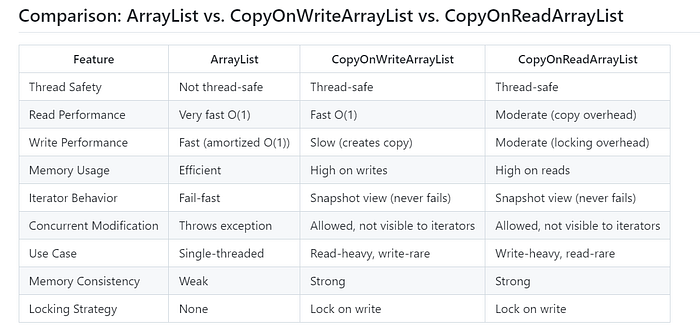
Advanced CopyOnWriteArrayList Example: Event Listener System
Let's see a more realistic example where CopyOnWriteArrayList excels - an event notification system:
import java.util.concurrent.*;

public class EventSystem {
    // Using CopyOnWriteArrayList for thread-safe listener management
    private final List<EventListener> listeners = new CopyOnWriteArrayList<>();

    public void addEventListener(EventListener listener) {
        listeners.add(listener);
    }

    public void removeEventListener(EventListener listener) {
        listeners.remove(listener);
    }

    public void fireEvent(String eventData) {
        // Safe iteration even if listeners are added/removed during notification
        for (EventListener listener : listeners) {
            listener.onEvent(eventData);
        }
    }

    public static void main(String[] args) {
        EventSystem system = new EventSystem();

        // Add initial listeners
        system.addEventListener(data -> System.out.println("Listener 1: " + data));
        system.addEventListener(data -> System.out.println("Listener 2: " + data));

        // Create threads that add/remove listeners while firing events
        ExecutorService executor = Executors.newFixedThreadPool(3);

        // Thread that fires events
        executor.submit(() -> {
            for (int i = 0; i < 10; i++) {
                system.fireEvent("Event " + i);
                try { Thread.sleep(100); } catch (InterruptedException e) {}
            }
        });

        // Thread that adds listeners
        executor.submit(() -> {
            for (int i = 3; i < 6; i++) {
                final int id = i;
                system.addEventListener(data -> System.out.println("Listener " + id + ": " + data));
                try { Thread.sleep(230); } catch (InterruptedException e) {}
            }
        });

        // Thread that removes listeners
        executor.submit(() -> {
            try { Thread.sleep(500); } catch (InterruptedException e) {}
            system.removeEventListener(system.listeners.get(0));
        });

        executor.shutdown();
        try {
            executor.awaitTermination(5, TimeUnit.SECONDS);
        } catch (InterruptedException e) {
            Thread.currentThread().interrupt();
        }
    }

    interface EventListener {
        void onEvent(String eventData);
    }
}
This event system demonstrates the power of CopyOnWriteArrayList in a real-world scenario where thread safety is critical.
Performance Considerations
To help you make informed decisions, here's a simplified benchmark comparing operations on different list implementations:
import java.util.*;
import java.util.concurrent.*;

public class ListPerformanceBenchmark {
    private static final int READ_COUNT = 10000;
    private static final int WRITE_COUNT = 100;
    private static final int INITIAL_SIZE = 1000;
    public static void main(String[] args) {
        // Initialize lists
        List<Integer> arrayList = new ArrayList<>();
        List<Integer> synchronizedList = Collections.synchronizedList(new ArrayList<>());
        List<Integer> copyOnWriteList = new CopyOnWriteArrayList<>();

        // Populate with initial data
        for (int i = 0; i < INITIAL_SIZE; i++) {
            arrayList.add(i);
            synchronizedList.add(i);
            copyOnWriteList.add(i);
        }

        // Benchmark read performance
        benchmarkRead("ArrayList", arrayList);
        benchmarkRead("SynchronizedList", synchronizedList);
        benchmarkRead("CopyOnWriteArrayList", copyOnWriteList);

        // Benchmark write performance
        benchmarkWrite("ArrayList", arrayList);
        benchmarkWrite("SynchronizedList", synchronizedList);
        benchmarkWrite("CopyOnWriteArrayList", copyOnWriteList);

        // Benchmark iteration
        benchmarkIteration("ArrayList", arrayList);
        benchmarkIteration("SynchronizedList", synchronizedList);
        benchmarkIteration("CopyOnWriteArrayList", copyOnWriteList);
    }

    private static void benchmarkRead(String name, List<Integer> list) {
        long start = System.nanoTime();
        for (int i = 0; i < READ_COUNT; i++) {
            int index = i % list.size();
            Integer value = list.get(index);
        }
        long end = System.nanoTime();
        System.out.printf("%s read time: %.3f ms%n", name, (end - start) / 1_000_000.0);
    }

    private static void benchmarkWrite(String name, List<Integer> list) {
        long start = System.nanoTime();
        for (int i = 0; i < WRITE_COUNT; i++) {
            list.add(i);
        }
        long end = System.nanoTime();
        System.out.printf("%s write time: %.3f ms%n", name, (end - start) / 1_000_000.0);
    }

    private static void benchmarkIteration(String name, List<Integer> list) {
        long start = System.nanoTime();
        for (int i = 0; i < 100; i++) {
            int sum = 0;
            for (Integer value : list) {
                sum += value;
            }
        }
        long end = System.nanoTime();
        System.out.printf("%s iteration time: %.3f ms%n", name, (end - start) / 1_000_000.0);
    }
}
Conclusion: Choosing the Right Collection for Your Needs
When deciding between ArrayList variants, consider:
- Read-to-Write Ratio:
CopyOnWriteArrayListis excellent for read-heavy workloads, while a traditional synchronizedArrayListmight be better for write-heavy scenarios - Collection Size: The overhead of copying increases with collection size, making
CopyOnWriteArrayListless efficient for large collections - Iteration Requirements: If you need safe iteration without locking,
CopyOnWriteArrayListis hard to beat - Memory Constraints: Consider whether your application can afford the additional memory overhead of copies
The hypothetical CopyOnReadArrayList reminds us that there's no one-size-fits-all solution in concurrent programming. Different concurrency patterns make different trade-offs to solve different problems.
Understanding these underlying mechanisms empowers you to make informed decisions about which collection to use in your multi-threaded Java applications, ultimately leading to more efficient, correct, and maintainable code.
Have you used CopyOnWriteArrayList in your projects? What other concurrency patterns do you find useful in Java collections? Share your experiences in the comments below!
If you found this article helpful, consider following me for more deep dives into Java concurrency and collection frameworks.