

In today's fast ivolving work environments, project management tools like worklenz serve as the backbone of organized workflows. However, their effectiveness depends heavily on user interface (UI) and user experience (UX) design. An intuitive and user-friendly interface not only boosts productivity but also fosters user satisfaction.
Below, I've outlined key best practices for enhancing UI/UX in worklenz, infused with my personal insights, lessons learned from my own experiences and from my seniors.
1. Keep Interfaces Minimal, Focused, and Customizable
A minimal and focused interface ensures that users can work for extended periods without feeling overwhelmed or tired. It's essential to avoid complex UIs that can cause discomfort during long-term use.
A simple UI design ensures clarity, and a predefined color system helps highlight high-priority tasks. For example, in worklenz uses a distinct color scheme to draw attention to high prioritized tasks while keeping the interface easy on the eyes. Additionally, providing customizable themes such as light and dark modes with suitable colors, borders, outlines, shadows and other UI attributes empowers users to choose what works best for them. These enhancements boost user satisfaction and engagement by allowing them to personalize their experience according to their preferences.
2. Enhance Visual Hierarchy and Accessibility
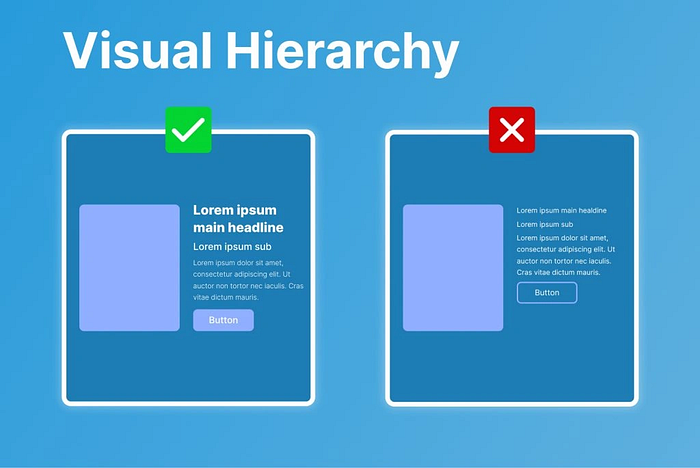
Leverage typography, spacing, and layout elements to establish a clear visual hierarchy. Highly prioritized tasks and information should be immediately visible and easily accessible.
Using different font sizes and weights, distinct buttons, dividers, and strategic whitespace enhances the overall visual appeal and usability. In worklenz, tasks assigned to a user are prominently displayed on their dashboard homepage. Users can quickly access their assigned tasks, to-do lists, and favorite projects without navigating deep into the system. This design ensures a faster and more efficient user journey.
3. Optimize for Speed and Performance

A smooth, responsive application is key to retaining users. Developers must prioritize performance optimization to eliminate unnecessary delays and crashes.
To achieve a seamless user experience, worklenz minimizes unnecessary re-renders and ensure to use performance optimization techniques such as useMemo and useCallback hooks which are predifiened hooks in react library. Lazy loading and virtualization are used to enhance speed when dealing with large datasets. These approaches ensure that worklenz remains responsive, even under heavy workloads. Users appreciate the reliability and smooth interactions, which directly enhance satisfaction and retention.
Considering all this, Improving the UI/UX of a project management tool like worklenz is an ongoing journey. By adhering to user-centered design principles, simplifying interfaces, maintaining consistency, and you can create a tool that truly resonates with your audience. From my experiences, the most valuable lesson is
"always listen to your users. Their feedback shapes the foundation of outstanding design."
Happy coding! 👨🏻💻🎉
Discover worklenz Today Ready to transform your workflows? click here to explore Worklenz and see how it can help your team achieve more.