
So far, we've explored: ✅ Medallion Architecture (Bronze, Silver, Gold) ✅ dbt Sources & Freshness Checks ✅ Building a Bronze Table (Raw Data Ingestion)
Today, we're moving to the Silver layer by creating a de-duplicated and standardized Account Dimension table in dbt.
By the end of this post, you'll understand: ✔ What the Account Dimension is and why it's important ✔ How to clean, standardize, and de-duplicate account data in dbt ✔ How to build and test a Silver model
Let's dive in! 🎯
1️⃣ What is the Account Dimension?
An Account Dimension is a core reference table that contains a single, clean version of each customer account. It is used for:
🔹 Consistent reporting — Ensures every department refers to the same account details 🔹 Data quality — Removes duplicates and standardizes formats 🔹 Efficient joins — Optimizes queries by providing a structured dataset
In our case, the raw accounts table (Bronze layer) might contain:
❌ Duplicate accounts (same email, different IDs)
❌ Inconsistent formatting (e.g., IBM, I.B.M, ibm)
❌ Null or missing values
In the Silver layer, we will clean this up!
2️⃣ Our Raw Data (Bronze Layer)
📂 Bronze Table (stg_accounts.sql)
SELECT
    id AS account_id,
    name,
    email,
    created_at
FROM {{ source('raw', 'accounts') }}
This contains raw, unclean data from our ingestion layer.
Example raw data:
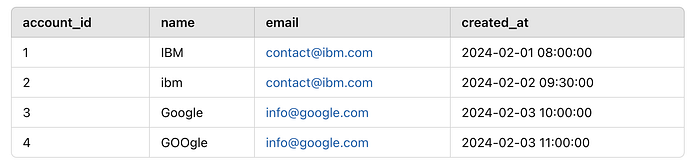
We need to:
✔ Remove duplicates (same email, different names)
✔ Standardize names (convert to uppercase)
✔ Keep the latest record (by created_at)
📂 Silver Table (dim_accounts.sql)
WITH base AS (
    SELECT
        account_id,
        UPPER(TRIM(name)) AS account_name,  -- Standardizing name format
        email,
        created_at,
        ROW_NUMBER() OVER (PARTITION BY email ORDER BY created_at DESC) AS row_num
    FROM {{ ref('stg_accounts') }}
)
SELECT
    account_id,
    account_name,
    email,
    created_at
FROM base
WHERE row_num = 1  -- Deduplicating by keeping the latest record
What's Happening Here?
✅ UPPER(TRIM(name)) — Converts names to uppercase for consistency ✅ ROW_NUMBER() OVER (PARTITION BY email ORDER BY created_at DESC) — Identifies duplicate accounts by email and keeps the latest record ✅ WHERE row_num = 1 — Filters out duplicates, keeping only the most recent entry
Final Clean Data (Silver Layer)

🚀 Our data is now clean and de-duplicated!
4️⃣ Adding dbt Tests for Data Quality
Since this is a critical dimension table, we need to enforce data quality using dbt tests.
📂 Add tests in dim_accounts.yml
version: 2
models:
  - name: dim_accounts
    description: "Standardized and de-duplicated account dimension"
    columns:
      - name: account_id
        tests:
          - unique
          - not_null
      - name: email
        tests:
          - unique
          - not_null
What These Tests Do:
✅ Unique account_id – Ensures no duplicate accounts exist
✅ Not Null account_id – Ensures every account has an ID
✅ Unique email – Ensures each email appears only once
Run dbt tests:
dbt test --select dim_accounts🎯 This ensures our Silver model maintains high data quality.
5️⃣ Wrapping Up
Key Takeaways
✅ The Account Dimension helps maintain clean, standardized, and de-duplicated accounts ✅ Silver models improve data quality by removing duplicates and formatting inconsistencies ✅ dbt tests ensure data integrity in critical business tables
Tomorrow in Day 11, we'll move to the Gold layer by creating a Business Revenue Model! Stay tuned! 🚀
💬 How do you handle de-duplication in your data pipelines? Any dbt best practices? Let's discuss! 👇