

The other day I came across a cool HTML attribute I had never heard of before: capture. So I decided to make a video and blog post about it.
Here's a video format if you prefer that:
You can put the capture attribute on inputs with the type of file, and you can give it a value of "user" or "environment".
The interesting thing about the capture attribute is for users coming to your website on a mobile device. If they interact with that input, instead of opening up the default file picker, it will actually open up one of their cameras. It could be the front-facing camera or the back-facing camera, depending on the value.
If you set the value to "user," it will use the user-facing or front-facing camera and or microphone. And if you set it to "environment," it will use the outer facing or back facing camera and or microphone.
To test it out myself, I created an index.html file that looked like this:
The only relevant part of the HTML is the two inputs. They both have a capture attribute, and they both have an accept attribute. One is set to capture the "environment" with any type of video. The other is set to capture the "user" with any type of image.
The capture attribute doesn't do anything interesting on a desktop. When I click the inputs, it opens up the file picker.
But here's the interesting part…
If I bring up that page on my phone and click the first input, my camera opens in video recording mode. When I click the second input, my phone opens up the camera in image capture mode (for some reason, my phone doesn't differentiate between front- or back-facing cameras, though).
When you snap a photo or video, that file is sent to the HTML input.
How cool is that?!
Now, anytime we talk about new web APIs or features, we have to discuss the compatibility, and if we look at the support on caniuse.com, it doesn't look great…
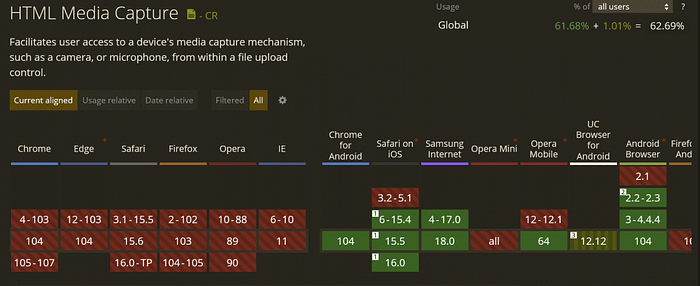
But it makes sense because all of those unsupported browsers are desktop browsers where there isn't a front- or back-facing camera. So it makes sense only to open up the file picker.
But all the supported browsers are mobile browsers. So that feature is good to go.
The other cool thing is that even if a user comes to your application with an unsupported browser, it will fall back to the default file picker UI.
Progressive enhancement FTW!!!
So, that's the HTML capture attribute. It's a pretty cool way to add a nicer user experience if you know that your mobile users will be taking a picture, a video, or a voice recording at the time of upload.
Want to Connect?
Thank you so much for reading. If you liked this article, please share it. It's one of the best ways to support me.
You can also sign up for my newsletter or follow me on Twitter if you want to know when new articles are published.
Originally published on austingil.com.