
"Arguing that you don't care about the right to privacy because you have nothing to hide is no different than saying you don't care about free speech because you have nothing to say." — Edward Snowden
1. Apps Tech E
This curated list of links is a goldmine, split into must-see items and additional content from the past week. It's a great mix of news, disclosures, and blog posts. If you're short on time, focus on the top section for the most crucial updates.
2. Reddit
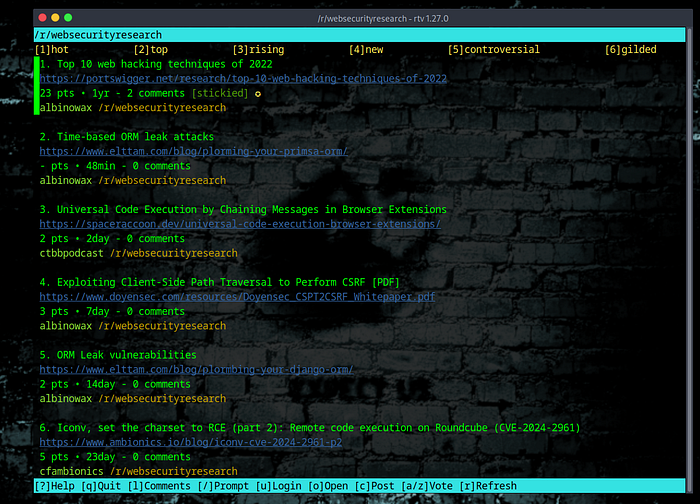
While lurking on Reddit, check out subreddits like /websecurityresearch for interesting articles, blog posts, and white papers. Another great subreddit is /netsec, which offers high-quality, technical links.
3. Annual Reports
The Stack Overflow Developer Survey and Verizon Data Breach Investigation Report (DBIR) are invaluable for a high-level view of trends. These resources provide insights into emerging technologies and common vulnerabilities.
4. Hacker One Reports
The Hacker One annual report dives into top vulnerabilities, AI trends, and bug bounty insights across various industries. It's essential reading for understanding common security issues in internet-facing systems.
5. General Cybersecurity News
For non-technical cybersecurity news, TLDR Sec offers a comprehensive newsletter. It categorizes news into sections like AppSec, Blue Team, Cloud, and AI, with descriptive excerpts for each link. Additionally, /netsec on Reddit is an excellent resource for technical security updates.
6. Podcasts and Live Streams
The "Critical Thinking Bug Bounty" podcast and Simply Cyber live streams on YouTube are excellent for broader technology and cybersecurity coverage. They provide updates and insights from the cybersecurity world.
Staying updated on these resources will help you keep tabs on the latest trends and developments in AppSec and cybersecurity.
How to Install and Use Apps Tech E on Your Linux Computer
Apps Tech E is a curated list of links and resources focusing on application security (AppSec), cybersecurity, and other tech-related news. While there isn't a specific software called "Apps Tech E," you can use several tools and methods to stay updated with similar resources on your Linux system. Here's a simple guide to set up and use relevant resources:
Step 1: Installing News Aggregation Tools
Snap Store:
- Install Snap:
sudo apt update
sudo apt install snapd
Install Relevant Apps: Use the Snap Store to install apps that provide curated lists and news. For example:
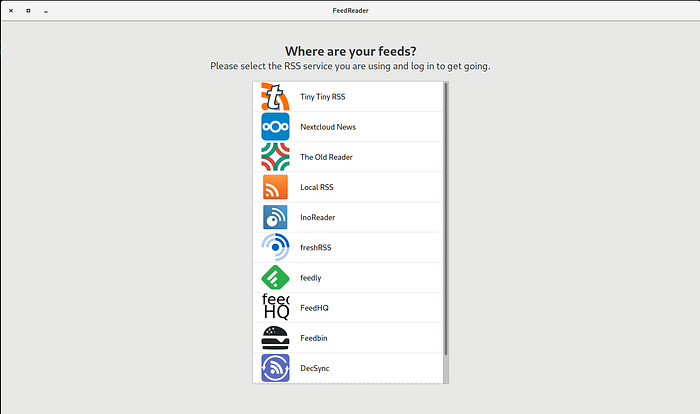
sudo snap install feedreaderFeedreader is a great tool for aggregating news feeds, blog posts, and other updates.
Step 2: Setting Up RSS Feeds
Feedreader Configuration:
- Add Feeds: Open Feedreader and add the RSS feeds from websites like TLDR Sec, HackerOne reports, and other cybersecurity blogs.
- Organize Feeds: These feeds are categorized into AppSec, General Cybersecurity News, and Industry Reports.
Step 3: Using Subreddits and Forums
Reddit:
- Install Reddit CLI: For terminal access to Reddit, you can use tools like
rtv:
sudo apt install rtv- Browse Subreddits: Use
rtvto access subreddits like/r/websecurityresearchand/r/netsecfor updates and discussions.
Step 4: Mailing Lists and Newsletters
Subscribing to Mailing Lists:
- Reasonable AppSec: Subscribe to newsletters like Chris Romeo's "Reasonable AppSec" for weekly updates on top security topics.
- TLDR Sec: Another good mailing list is TLDR Sec, which provides regular updates on various cybersecurity topics.
Step 5: Keeping Up with Annual Reports
Key Reports:
- Stack Overflow Developer Survey: Visit the Stack Overflow website to view the annual developer surveys and stay updated on technology trends.
- Verizon Data Breach Investigations Report: Regularly check the Verizon DBIR for insights into common vulnerabilities and security trends.
Example Terminal Commands
Using Reddit from Terminal:
rtv -s websecurityresearchSetting up these tools and resources lets you stay updated with the latest in AppSec and cybersecurity directly from your Linux terminal.
Find the RSS Feed URL Through the Page Source
Right-click on the website's page and choose Page Source. In the new window that appears, use the "find" feature (Ctrl + F on a PC or Command + F on a Mac) and type in RSS. You'll find the feed's URL between the quotes after href=
Exploring nom - A Lightweight Data Processing Library
nom is a lightweight, efficient library designed for data processing and manipulation. Developed by Guy F. Edwards, this library focuses on simplicity and performance, making it ideal for handling large datasets. It provides various functions to streamline data parsing, transformation, and analysis. With its easy-to-use API, nom is an excellent choice for developers looking to incorporate powerful data processing capabilities into their applications.
- Local sync and offline reading
- Backend connections (miniflux, freshrss supported)
- Vim style keybindings for navigation
- Plenty more features such as mark read/unread, filtering and feed naming
For more details and to access the library, visit the nom GitHub repository.
"There are two types of companies: those that have been hacked, and those who don't know they have been hacked." — John Chambers
HackingPassion.com Feed: https://hackingpassion.com/index.xml
Explore More and Elevate Your Skills!
Ready to advance your knowledge? See HackingPassion.com for great articles, videos, and resources on ethical hacking, programming, and Linux.
But wait, there's more! Check out my GitHub for scripts and tools to boost your productivity and security. Dive in, explore, and let's make your tech journey exciting and rewarding!