Hello everyone, and welcome back! In today's blog, we'll dive into the concept of SOQL Injection in Salesforce. We'll explore what SOQL Injection is, its potential impact, and effective mitigation strategies. Additionally, we'll look at a real-world example of SOQL Injection to better understand this vulnerability.
Let's get started!
What is SOQL Injection ?
SOQL Injection is a security vulnerability that arises when an attacker manipulates user input to alter the structure of a Salesforce Object Query Language (SOQL) query. This can result in unauthorized access to data, data leaks, or even data corruption.
While SOQL Injection is conceptually similar to SQL Injection in traditional databases, there are key differences:
- SOQL is a simplified and more restricted query language compared to SQL.
- The risks associated with SOQL Injection are lower than those of SQL Injection, but the attack patterns are nearly identical.
In Salesforce, SOQL Injection occurs when user input is not properly sanitized or validated before being incorporated into dynamic SOQL queries.
Impact of SOQL Injection
SOQL Injection can have severe consequences, including:
- Unauthorized Access: Attackers can gain access to sensitive data that they are not authorized to view.
- Data Leaks: Confidential customer or business information can be exposed, leading to compliance violations.
- Data Corruption or Deletion: Malicious queries can modify or delete critical data, disrupting business operations.
- Loss of Trust: Security breaches can damage the organization's reputation and erode customer trust.
Mitigation Strategies
To prevent SOQL Injection, follow these best practices:
- Use Bind Variables: Always use bind variables in dynamic SOQL queries to ensure user input is treated as data, not code. For example:
String query = 'SELECT Id, Name FROM Account WHERE Name = :userInput';2. Validate User Input: Ensure input meets expected criteria (e.g., length, format) before using it in queries.
3. Use Static Queries: Whenever possible, use static SOQL queries instead of dynamic ones.
4. Escape Special Characters: If dynamic queries are necessary, escape special characters in user input.
5. Use Security Tools: Leverage Salesforce security tools like the Security Scanner to identify vulnerabilities.
A Real-World Example
While testing a web application, I encountered a website that was utilizing Salesforce CMS. Upon intercepting a request in Burp Suite, I noticed that the request contained a SQL-like query.
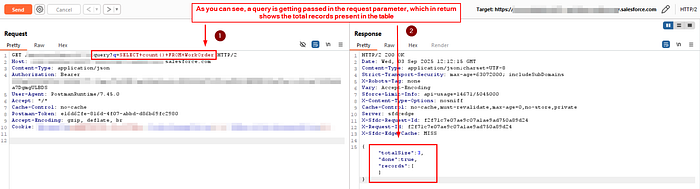
After further investigation, I realized that the query was actually SOQL (Salesforce Object Query Language). Tools like SQLmap and other SQL injection testing tools did not produce any true positive results, which confirmed my suspicion. A quick search revealed that SOQL operates differently from traditional SQL, as it does not interact with a database in the conventional sense. Instead, it uses specialized SELECT queries to fetch data directly from Salesforce's backend.
The first step I took was to identify the list of default tables available in SOQL. After some investigation, I compiled the following list of tables.
- Account: Stores information about companies or organizations.
- Contact: Stores information about individuals associated with accounts.
- Opportunity: Tracks sales deals and their progress.
- Lead: Represents potential customers or prospects.
- Case: Tracks customer issues or support requests.
- User: Stores information about Salesforce users.
- Task: Represents activities or to-do items.
- Event: Represents calendar events.
- Campaign: Tracks marketing campaigns.
- Product: Represents products your company sells.
- Pricebook: Stores pricing information for products.
- Order: Represents customer orders.
- Asset: Tracks assets owned by customers.
- WorkOrder: Represents work orders for customer service.
- Solution: Stores solutions to common customer issues.
- Report: Represents reports created in Salesforce.
- Dashboard: Represents dashboards created in Salesforce.
While exploring the Salesforce schema, I came across some interesting tables, specifically the User table and the Account table. A quick search revealed the default columns available in each of these tables. Based on this information, I crafted a few queries that successfully fetched details from these tables.
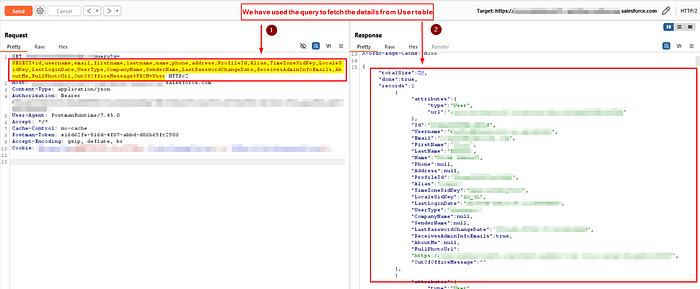
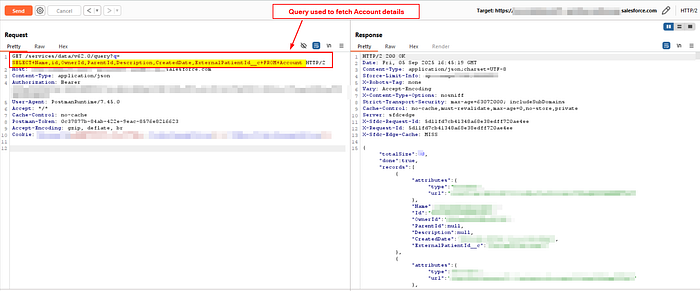
Few Example of Queries to get the Table Schema \ Metdata
This query will return all field names (QualifiedApiName) and their data types (DataType) for the WorkOrder object.
For WorkOrder Table
SELECT QualifiedApiName, DataType FROM FieldDefinition WHERE EntityDefinition.QualifiedApiName = 'WorkOrder'
This query will return all field names (QualifiedApiName) and their data types (DataType) for the WorkOrder object.
Similarly For Account and User Table, You can use the below queries.
SELECT QualifiedApiName, DataType FROM FieldDefinition WHERE EntityDefinition.QualifiedApiName = 'Account'
SELECT QualifiedApiName, DataType FROM FieldDefinition WHERE EntityDefinition.QualifiedApiName = 'User'
If you want to list all available objects/tables in your Salesforce instance, you can use the following SOQL query:
SELECT QualifiedApiName FROM EntityDefinitionConclusion
SOQL Injection is a critical security concern that can lead to unauthorized access, data leaks, and other serious consequences. By following best practices such as using bind variables, validating user input, and leveraging security tools, you can effectively mitigate the risks associated with SOQL Injection.
Remember, secure coding practices are essential to protecting your Salesforce applications and maintaining the trust of your users and customers.