
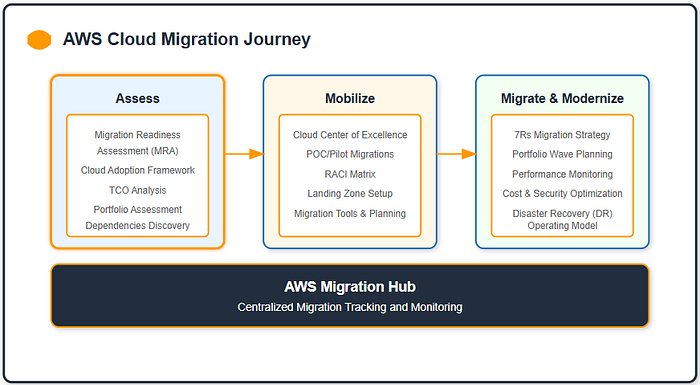
In today's rapidly evolving IT landscape, migrating from on-premises infrastructure to the cloud is a strategic necessity for organizations looking to achieve scalability, flexibility, and cost-efficiency. AWS stands out as a leading cloud provider, offering a comprehensive suite of tools to simplify and accelerate the migration process.
AWS recommends a three-phase approach for successful cloud migration:
- Assess: Analyze the on-premises environment to understand workloads and dependencies.
- Mobilize: Build the foundation and address any readiness gaps.
- Migrate and Modernize: Execute the migration plan and optimize workloads in the cloud.
This post is part of a blog series that guides you through the journey of migrating an on-premises web server and database server to AWS. In this post, we'll explore the Assess phase, focusing on how AWS Discovery Service and Migration Readiness Assessment (MRA) help analyze workloads, identify dependencies, and plan for a seamless migration. Let's dive in.
📊 Existing vs. Target Architecture
Source Environment
In this exercise, I aimed to demonstrate a migration scenario by replicating an on-premises environment within AWS. This approach simplifies the setup while closely resembling real-world migration challenges. The source environment was deployed in a segregated Amazon VPC named SourceVPC within my AWS account.
Within this simulated source environment, we have the following workloads:
- Web Server (Source-Webserver): Hosting the front-end of an e-commerce application, written in PHP 7.x (WordPress and WooCommerce), and running on Linux.
- Database Server (Source-DBServer): Acting as a relational data persistence layer using self-managed MySQL 5.7.x, hosted on Linux.

This simulated environment mimics the challenges and dependencies commonly encountered in on-premises setups, making it an ideal test case for understanding the migration process. Traditional on-premises infrastructures often struggle with limited scalability, high maintenance overhead, and the inability to adapt dynamically to fluctuating traffic demands.
Both servers are hosted on a traditional on-premises infrastructure, with limited scalability and manual management processes.
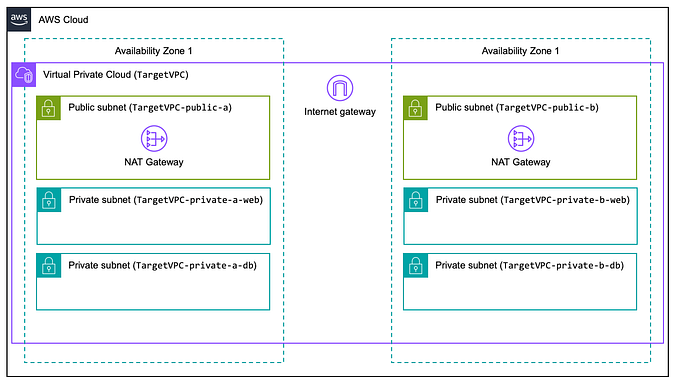
Target Environment
The migrations aim to move workload components from the source to the target environment. In a real migration, the target environment would be built according to the Landing Zone reference architecture. To keep this demonstration simple, I created a target environment within AWS using a standard Amazon VPC topology. This is an Amazon VPC named TargetVPC, provisioned in the same AWS account and region as the source environment, spanning two Availability Zones for high availability.
⚙️ The Importance of the Assess Phase
Before initiating the migration, it's essential to understand the on-premises environment thoroughly. The Assess phase is a foundational step in the migration journey, enabling organizations to build a clear understanding of their existing environment and readiness for cloud adoption. This phase helps you:
- Identify all servers, applications, and dependencies.
- Assess resource utilization to right-size instances in the cloud.
- Uncover application dependencies to ensure seamless transitions.
- Plan and estimate costs for running workloads on AWS.
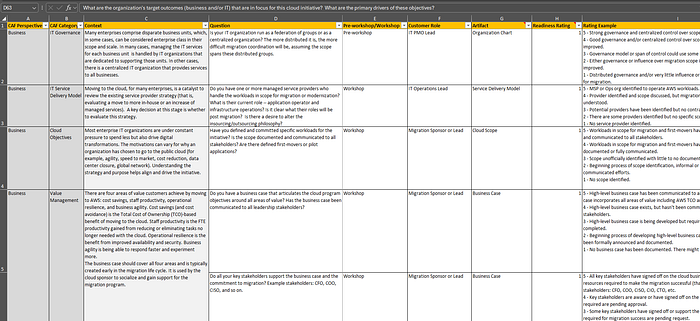
AWS Discovery Service and the Migration Readiness Assessment (MRA) artifact, based on the AWS Cloud Adoption Framework, play pivotal roles during the Assess phase. AWS Discovery Service automates data collection and analysis, providing detailed insights into your environment, including server utilization, dependencies, and resource requirements. Meanwhile, the MRA evaluates key dimensions such as business, people, process, platform, operations, and security to identify gaps and help organizations develop a structured, actionable migration plan. Together, these tools enable organizations to gain a comprehensive understanding of their readiness for migration and address any potential challenges effectively.
🔧 Step 1: Preparing for Discovery
To ensure a smooth discovery process, you'll need:
- AWS Credentials: Properly configured IAM roles with permissions for AWS Discovery Service and Migration Hub.
- Source Environment Access: Administrator access to the web and database servers within the Source VPC for installing the AWS Discovery Agent manually. In real-world on-premises environments, this would involve access to physical or virtualized servers.
- Network Configuration: Ensure that necessary ports are open and connectivity to AWS endpoints is established. For real on-premises environments, this might involve configuring firewalls and ensuring acceptable network latency. For high-performance and secure connections, you can also leverage AWS Direct Connect, which provides a dedicated network link between your on-premises data center and AWS.
These steps provide the foundation for accurate and comprehensive discovery.
🛠️ Step 2: Deploying the AWS Discovery Agent
Agent-Based Discovery
For this workshop, I deployed the AWS Discovery Agent manually on the two servers (web and database) to capture detailed metrics, including application-level dependencies. While manual installation works well for a small number of servers, tools like Ansible can automate this process for environments with dozens or hundreds of servers, significantly reducing setup time and effort.
Deployment Process:
- Download and Install the Discovery Agent: Connect to the web server and database server via SSH or your preferred method. Install the Discovery Agent using the following commands:
# Download the Discovery Agent
curl -o ./aws-discovery-agent.tar.gz https://s3-us-west-2.amazonaws.com/aws-discovery-agent.us-west-2/linux/latest/aws-discovery-agent.tar.gz

# Extract the downloaded package
tar -xzf aws-discovery-agent.tar.gz

# Install the agent with your AWS credentials
sudo bash install -r <region-name> -k <AWS_ACCESS_KEY_ID> -s <AWS_SECRET_ACCESS_KEY>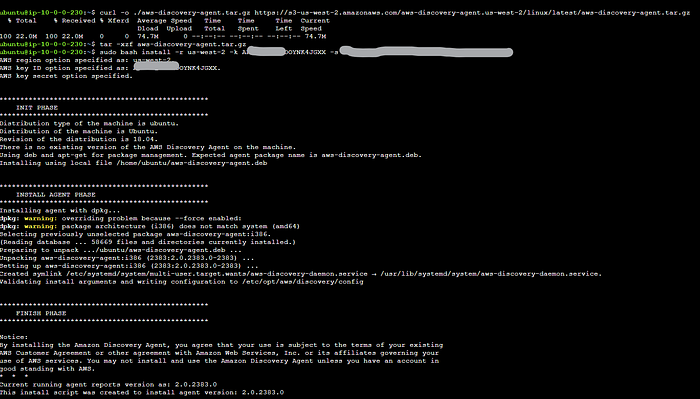
2. Verify the Agent's Status: Use the following command to check that the agent process is active (running). Once installed, the agent communicates with AWS Migration Hub, sending inventory data and ensuring that the servers appear in the Migration Hub dashboard for further analysis.
sudo systemctl status aws-discovery-daemon.service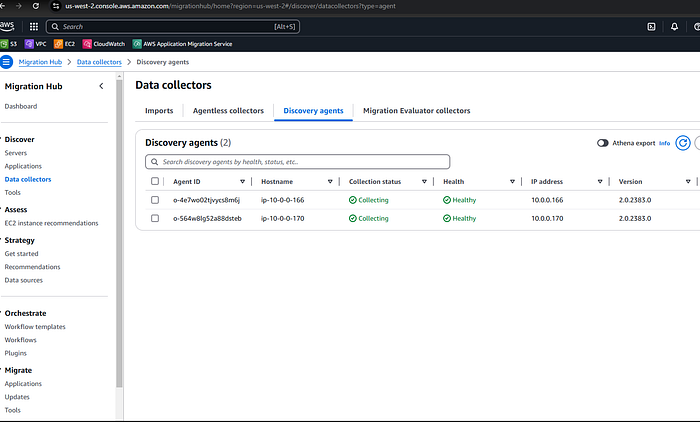
Pro Tip: For automated installations, integrate the agent deployment into a configuration management tool like Ansible, Chef, or Puppet to streamline deployment across larger infrastructures.
🔎 Step 3: Analyzing Discovered Data
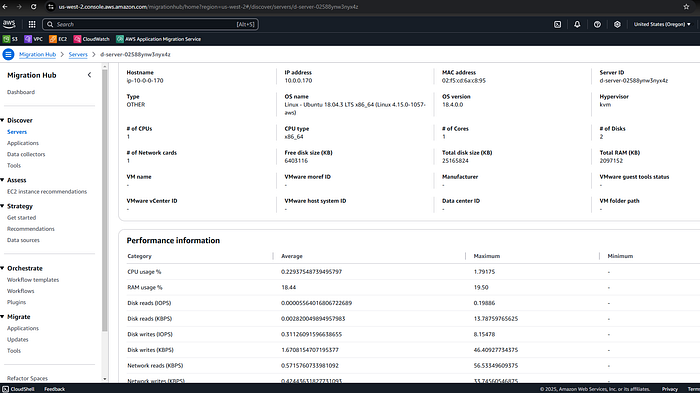
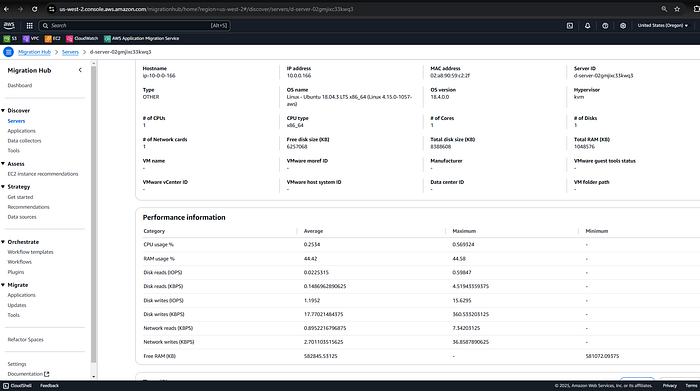
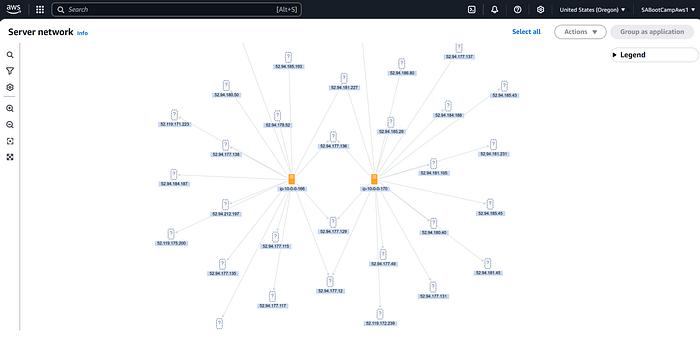
After deploying the agent, AWS Discovery Service provides valuable insights into your infrastructure. For actual production migration, it is recommended that the Discovery Agent server data be collected for two to six weeks before you can use the network diagram to view established connection patterns. Key steps include:
- Accessing AWS Migration Hub: Navigate to the Migration Hub in the AWS Management Console to view the collected data.
- Inventory and Dependency Analysis:
- Review server details, such as operating systems, CPU, memory, and storage.
- Analyze application dependencies to identify any connections that need special attention during migration.
3. Generate Migration Reports: Use the data to create migration reports that provide cost estimates, resource utilization insights, and dependency maps.

📊 Key Insights from the Assess Phase
During this phase, I:
- Discovered a critical dependency between the web server and database, highlighting the importance of analyzing application connections during the Assess phase.
- Used the Migration Readiness Assessment (MRA) to evaluate key areas such as business, process, and platform readiness, addressing gaps identified in the analysis.
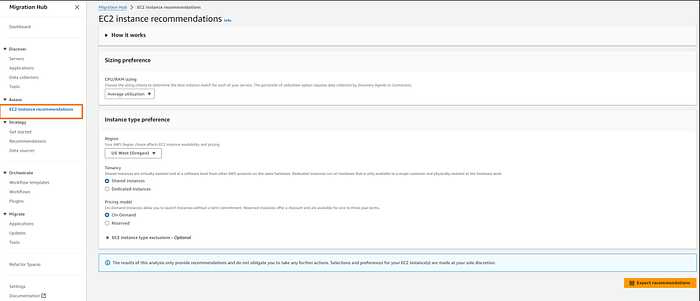
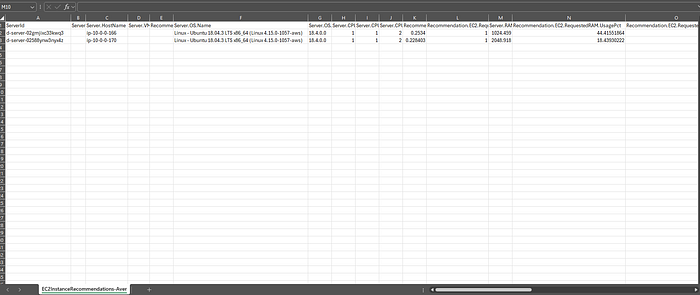
- Generated estimated costs for running the servers in the cloud using AWS TCO and Cost Calculator, informed by EC2 instance recommendations from AWS Migration Hub.
- Leveraged AWS Discovery Service to map application dependencies and resource utilization, forming the basis for a structured migration plan.
📌 Conclusion
The Assess phase forms the foundation of a successful migration journey. By utilizing AWS Discovery Service and the Migration Readiness Assessment (MRA), I was able to gain detailed insights into workload dependencies, resource utilization, and readiness gaps. These insights are instrumental in creating a structured plan for a seamless migration to the cloud.
In the next post, we'll transition into the Mobilize phase of AWS's migration framework. This phase focuses on building the migration foundation and executing the lift-and-shift migration process using AWS Application Migration Service (MGN). Stay tuned as we dive into the practical steps to replicate and migrate workloads to AWS EC2 instances.
Have insights or experiences about your own migration journey? Share them in the comments!