
Kops (Kubernetes Operation) is a life savior when it comes to creating production grade kubernetes cluster. It is very helpful in managing the lifecycle of cluster.
Terraform is an open source tool which supports multiple providers and helps managing infrastructure as code .
In this post we are focusing on AWS, Kops supports generating terraform and Cloud Formation model as well. It can create cluster based various modes.
In upcoming article, we will use this kubernetes-cluser and RDS instance to perform CI/CD using gitlab and deploy sample PHP application.
To start with I'll be creating a HA kubernetes cluster using kops to generate terraform configuration. Once the configuration is created it will be used with RDS module.
This will result in creating terraform based HA kubernetes cluster with RDS access from kubernetes nodes.
Prerequisites
- Go through the setup steps for creating required user and group with mentioned IAM Roles.
- Add
AmazonRDSFullAccesstokopsgroup as shown below
$ aws iam attach-group-policy --policy-arn arn:aws:iam::aws:policy/AmazonRDSFullAccess --group-name kopsWe are ready to create a gossip based cluster i.e cluster name end with .k8s.local
Clone this repository which contain configs to integrate it RDS.
.
├── README.md
├── helm-data
│   ├── gitlab-ce.yaml
│   └── gitlab-runner.yaml
├── main.tf
├── terraform.tfvars
└── variables.tf
Lets begin with creating kubernetes cluster terraform config.
# kops create cluster --zones eu-west-1a,eu-west-1b \
--node-size m4.large --node-count 2 \
--name demo.k8s.local \
--target=terraform --out=modules/kubernetes
This will generate the necessary configurations under modules/kubernetes .
.
├── README.md
├── helm-data
│   ├── gitlab-ce.yaml
│   └── gitlab-runner.yaml
├── main.tf
├── modules
│   └── kubernetes
│       ├── data
│       │   ├── aws_iam_role_masters.demo.k8s.local_policy
│       │   ├── aws_iam_role_nodes.demo.k8s.local_policy
│       │   ├── aws_iam_role_policy_masters.demo.k8s.local_policy
│       │   ├── aws_iam_role_policy_nodes.demo.k8s.local_policy
│       │   ├── aws_key_pair_kubernetes.demo.k8s.local-15e90ba726254b5f4f0f5c1e166053d4_public_key
│       │   ├── aws_launch_configuration_master-eu-west-1a.masters.demo.k8s.local_user_data
│       │   └── aws_launch_configuration_nodes.demo.k8s.local_user_data
│       └── kubernetes.tf
├── terraform.tfvars
└── variables.tf
Now we need enable RDS access for kubenetes worker nodes. Although it can be enabled for master node as well but hosted applications will run only on worker nodes.
Terraform Configs
For this to work in terraform way, we need to do the following:
Config file : main.tf
provider "aws" {
  region = "eu-west-1"
}
module "kubernetes" {
  source = "./modules/kubernetes"
  rds-security-group = "${module.rds.db_access_sg_id}"
}
module "rds" {
  source = "github.com/shashanksinha89/terraform-ecs-efs-rds/rds"
  environment       = "production"
  allocated_storage = "20"
  database_name     = "${var.production_database_name}"
  database_username = "${var.production_database_username}"
  database_password = "${var.production_database_password}"
  subnet_ids        = "${module.kubernetes.node_subnet_ids}"
  vpc_id            = "${module.kubernetes.vpc_id}"
  instance_class    = "db.t2.micro"
}- Declare
rds-security-groupvariable inmodules/kubernetes/kubernetes.tf - Enable
rds-security-groupvariable inaws_launch_configurationresource for worker nodes.
Below I have highlighted the changes for modules/kubernetes/kubernetes.tf config file.
variable rds-security-group {}
resource "aws_launch_configuration" "nodes-demo-k8s-local" {
  name_prefix                 = "nodes.demo.k8s.local-"
  image_id                    = "ami-9084cbe9"
  instance_type               = "m4.large"
  key_name                    = "${aws_key_pair.kubernetes-demo-k8s-local-15e90ba726254b5f4f0f5c1e166053d4.id}"
  iam_instance_profile        = "${aws_iam_instance_profile.nodes-demo-k8s-local.id}"
  security_groups             = ["${aws_security_group.nodes-demo-k8s-local.id}", "${var.rds-security-group}"]
  associate_public_ip_address = true
  user_data                   = "${file("${path.module}/data/aws_launch_configuration_nodes.demo.k8s.local_user_data")}"
root_block_device = {
    volume_type           = "gp2"
    volume_size           = 128
    delete_on_termination = true
  }
lifecycle = {
    create_before_destroy = true
  }
enable_monitoring = false
}
Now we have everything in place lets bring terraform in play. Since we are using rds as module mentioned in main.tf . We need to import it as well.
$ terraform init
Downloading modules...
Get: file:///Users/shashank/demo/terraform-kops-gitlab/modules/kubernetes
Get: git::https://github.com/shashanksinha89/terraform-ecs-efs-rds.git
Initializing provider plugins...
- Checking for available provider plugins on https://releases.hashicorp.com...
- Downloading plugin for provider "aws" (1.21.0)...
The following providers do not have any version constraints in configuration,
so the latest version was installed.
To prevent automatic upgrades to new major versions that may contain breaking
changes, it is recommended to add version = "..." constraints to the
corresponding provider blocks in configuration, with the constraint strings
suggested below.
* provider.aws: version = "~> 1.21"
Terraform has been successfully initialized!
Now lets generate the terraform plan and apply it.
$ terraform plan -out config
**OUTPUT OMITTED**
Plan: 46 to add, 0 to change, 0 to destroy.
------------------------------------------------------------------------
This plan was saved to: config
To perform exactly these actions, run the following command to apply:
    terraform apply "config"
Now that our configuration is ready . Lets apply the config, it should approx take 4 mins to create everything.
$ terraform apply config
***OUTPUT OMITTED***
Apply complete! Resources: 46 added, 0 changed, 0 destroyed.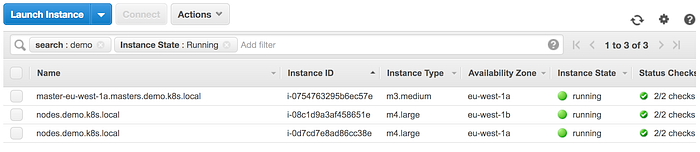
It shows HA kubernetes cluster hosted in eu-west-1a and eu-west-1b zone.
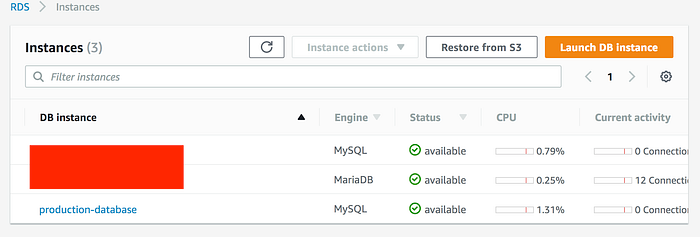
MySQL RDS instance is created in same subnet. Security group is only enabled to have access from worker nodes to RDS.
Since we are using gossip-based cluster, currently kops is unable to validate the cluster. This is a known issue and below is the workaround mentioned to fix this issue
$ kops update cluster demo.k8s.local --target=terraform --out=modules/kubernetes/
I0603 19:54:05.790127   13413 apply_cluster.go:456] Gossip DNS: skipping DNS validation
I0603 19:54:07.877006   13413 executor.go:91] Tasks: 0 done / 79 total; 30 can run
***OUTPUT OMITTED***
Terraform output has been placed into modules/kubernetes/
Changes may require instances to restart: kops rolling-update cluster
We have to force the rolling update. This may take upto 15 mins.
$ kops rolling-update cluster --cloudonly --force --yes
Using cluster from kubectl context: demo.k8s.local
NAME   STATUS NEEDUPDATE READY MIN MAX
master-eu-west-1a Ready 0  1 1 1
nodes   Ready 0  2 2 2
W0603 19:58:35.015793   13455 instancegroups.go:152] Not draining cluster nodes as 'cloudonly' flag is set.
I0603 19:58:35.015815   13455 instancegroups.go:275] Stopping instance "i-0754763295b6ec57e", in group "master-eu-west-1a.masters.demo.k8s.local".
***OUTPUT OMITTED***
completed for cluster "demo.k8s.local"!
Lets validate and check the kubernetes cluster endpoint.
$ kops validate cluster
Using cluster from kubectl context: demo.k8s.local
Validating cluster demo.k8s.local
INSTANCE GROUPS
NAME   ROLE MACHINETYPE MIN MAX SUBNETS
master-eu-west-1a Master m3.medium 1 1 eu-west-1a
nodes   Node m4.large 2 2 eu-west-1a,eu-west-1b
NODE STATUS
NAME      ROLE READY
ip-172-20-48-80.eu-west-1.compute.internal master True
ip-172-20-56-107.eu-west-1.compute.internal node True
ip-172-20-88-248.eu-west-1.compute.internal node True
Your cluster demo.k8s.local is ready
$ kubectl cluster-info
Kubernetes master is running at <URL>
KubeDNS is running at <URL>/api/v1/proxy/namespaces/kube-system/services/kube-dns
To further debug and diagnose cluster problems, use 'kubectl cluster-info dump'.
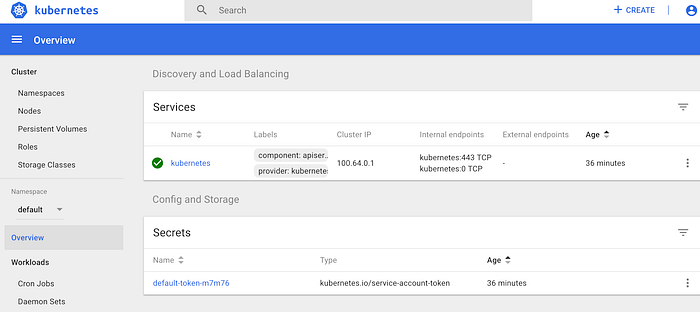
Before hitting the endpoint, kubernetes dashboard needs to be installed.
$ kubectl apply -f \
  https://raw.githubusercontent.com/kubernetes/dashboard/master/src/deploy/recommended/kubernetes-dashboard.yaml
secret "kubernetes-dashboard-certs" created
serviceaccount "kubernetes-dashboard" created
role "kubernetes-dashboard-minimal" created
rolebinding "kubernetes-dashboard-minimal" created
deployment "kubernetes-dashboard" created
service "kubernetes-dashboard" created- secret token will be required to login to dashboard
$ kops get secrets kube --type secret -oplaintext
Using cluster from kubectl context: demo.k8s.local
<TOKEN>
Dashboard : <URL>/ui
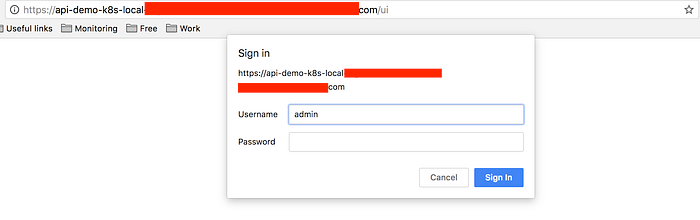
Once authenticated, provide secret token for admin user or upload the kubectl config to login.
$ kops get secrets admin --type secret -oplaintext
Using cluster from kubectl context: demo.k8s.local
<TOKEN>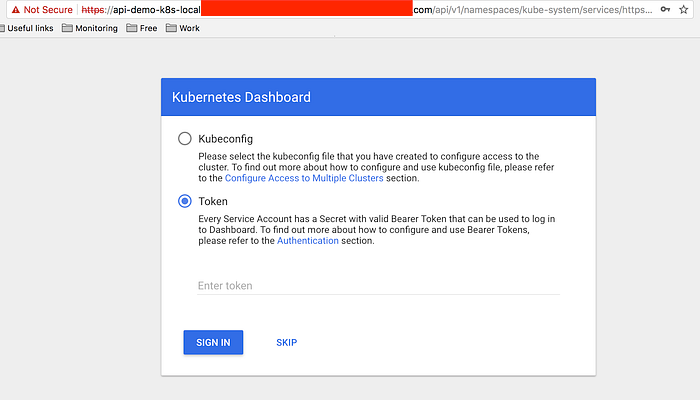
Before tearing down the complete infrastructue, comment out rds-security-group in main.tf as kops update cluster removes it from kubernetes.tf .
$ terraform destroy
$ kops delete cluster demo.k8s.local --yes