If you've built a system using Retrieval-Augmented Generation (RAG) in the last year, you've likely felt two distinct emotions: a flash of magic, followed by a slow, creeping disappointment.
The magic comes when you first connect a Large Language Model to your own data. Suddenly, the AI isn't just a clever conversationalist; it knows your business. But then comes the disappointment. You realize that your "smart" system is actually quite rigid. It follows a simple, brittle script: it finds a document, reads it, and gives an answer.
But what happens when the first document it finds is just plain wrong? Or when a user's question is vague? Or when the real answer is scattered across three different data sources? The system breaks. It gives a weak answer, or worse, no answer at all. That's because traditional RAG isn't a thinking system; it's a linear checklist.
This is the wall that most teams hit. And it's why the conversation is shifting to a far more dynamic and powerful approach: Agentic RAG.
This isn't just another buzzword. It's a fundamental shift from building simple information retrievers to orchestrating intelligent problem-solvers. An agentic system doesn't just follow a path; it chooses one. It can weigh its options, evaluate the information it finds, and even decide to reformulate your question and try again.
For any business that wants to build an AI that feels less like a fragile chatbot and more like a reliable, autonomous teammate, you need to understand how this works. In this article, we'll dive deep into what Agentic RAG is and then walk through a complete, step-by-step tutorial using the powerful LangGraph framework to build an agent that can reason, self-correct, and deliver truly intelligent answers.
From Checklist Follower to Seasoned Analyst
So what's the difference, really? Let's ground it in an analogy.
Traditional RAG is like giving a task to a brand-new junior analyst. You ask them for a financial report, and they'll dutifully march over to the single filing cabinet they were trained on, pull the first folder with a matching title, and place it on your desk. The job is done, but was it the right folder? Is there crucial context in another cabinet they don't know about? They can't tell you.
Agentic RAG, on the other hand, is like giving the same task to your sharpest senior analyst. She doesn't just run off. She pauses and thinks: "Hmm, a financial report. Is he asking for the high-level summary from our public filings, the detailed sales data from the internal SQL database, or the projections discussed in last week's meeting notes?" She might even ask a clarifying question. Then, she'll retrieve information from multiple sources, cross-reference them, and notice if a key piece of data seems off. Before giving you an answer, she's already assessed the quality of her own research.
That's the leap we're talking about: from blind execution to intelligent, multi-step reasoning.
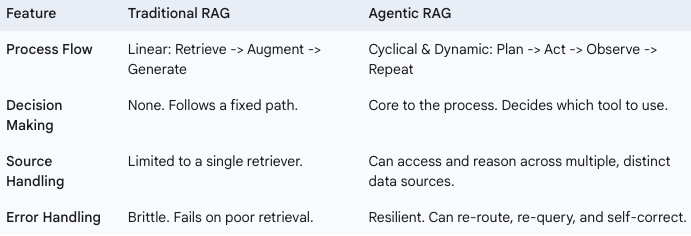
Here's how the two approaches stack up:
This Isn't Just a Tech Upgrade — It's a Business Strategy
Moving to an agentic model isn't just for cleaner code; it drives real business value by solving the most frustrating problems with enterprise AI.
- Build an AI That Won't Lie to You. The biggest risk in enterprise AI isn't just a wrong answer; it's a confidently wrong answer — a "hallucination." An agentic system dramatically reduces this risk because it can self-assess. By grading the relevance of the information it finds, it knows the difference between a solid lead and a dead end. Instead of guessing, it can decide to try another tool or inform the user that it can't find the right information. This is how you build trust.
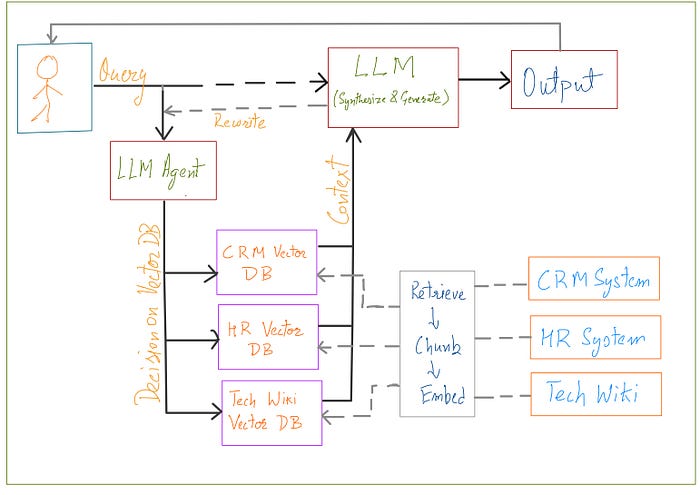
- Finally, Break Down Your Data Silos. Every company says they want to break down silos, but most AI tools can only look at one at a time. An agentic AI can be given a toolkit with access to all of them: the technical wiki, the CRM, the document archive, the HR database. It can then intelligently decide where to look based on the user's query, acting as a single, unified intelligence layer over your entire fragmented data landscape.
- Liberate Your Best People from Digital Grunt Work. Think about the complex, repetitive research your skilled employees do every day — the support agent checking three different systems to resolve one ticket, or the analyst pulling data from five sources to build one report. An agent can replicate this human-like workflow, handling the multi-step information gathering so your team can focus on the high-level strategy and human connection that they were hired for.
- Create an AI That Can Evolve with Your Business. Your business isn't static, so why should your AI be? Because an agentic system is built from modular tools, it's designed to adapt. When you add a new product line with a new knowledge base, you don't have to rebuild the system; you just give your agent a new tool. This creates a flexible, future-proof AI strategy that grows as you do.
Hands-On: Building an Intelligent Tech Analyst with LangGraph
To make this real, we're going to build an Agentic RAG system that acts as a specialized tech analyst. This agent's job is to answer questions about two different, but related, Python frameworks: LangChain and LangGraph.
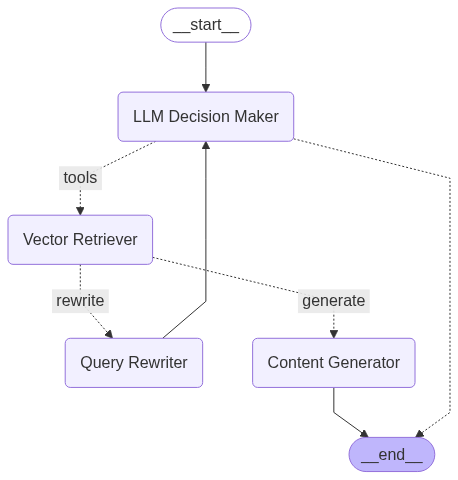
Our agent will be smart. When a user asks a question, it will first decide: "Is this question about LangChain or LangGraph?" Based on that decision, it will choose the correct knowledge base to search. Then, it will go a step further: it will grade the relevance of the document it finds. If the document is relevant, it will generate an answer. If not, it will assume the original question was poorly phrased, rewrite it for clarity, and try the whole process again.
This "rewrite and retry" loop is a hallmark of an advanced agent, and LangGraph makes building it surprisingly intuitive. Let's get started.
Step-by-Step Code Walkthrough
Here is the complete, step-by-step guide to building our agent, based directly on the provided notebook.
Step 1: Setup and API Keys
First, we set up our environment. We use dotenv to securely manage our API keys. For this project, we're using Groq for fast LLM inference and OpenAI for its high-quality text embeddings.
Libraries used:
langchain
langgraph
langchain-core
langchain-community
faiss-cpu (Required by the FAISS vector store)
pydantic
ipykernel (Required by IPython.display for notebook execution)
python-dotenv
langchain-groq
langchain-openai
numpy<2.0.0 (A dependency for faiss-cpu)
Setup environment variables:
from dotenv import load_dotenv
load_dotenv()
import os
os.environ['GROQ_API_KEY'] = os.getenv("GROQ_API_KEY")
os.environ['OPENAI_API_KEY'] = os.getenv("OPENAI_API_KEY")
Next, we import the core libraries we'll be using from the LangChain ecosystem.
from langchain_community.document_loaders import WebBaseLoader
from langchain_community.vectorstores import FAISS
from langchain_openai import OpenAIEmbeddings
from langchain_text_splitters import RecursiveCharacterTextSplitter
Step 2: Creating Our Knowledge Silos (The Vector DBs)
An agent is only as good as its tools. Our agent needs to access two distinct knowledge bases. We create these by loading documentation directly from the web and storing it in two separate vector stores.
First, we build the LangGraph knowledge base:
We specify the URLs for the LangGraph documentation we want our agent to learn from.
urls=[
"https://langchain-ai.github.io/langgraph/tutorials/introduction/",
"https://langchain-ai.github.io/langgraph/tutorials/workflows/",
"https://langchain-ai.github.io/langgraph/how-tos/map-reduce/"
]

docs = [WebBaseLoader(url).load() for url in urls]
The documents are then split into smaller, more manageable chunks. This is critical for accurate retrieval.
# Flatten the list of lists and split documents
doc_list = [doc for sublist in docs for doc in sublist]
text_splitter = RecursiveCharacterTextSplitter(chunk_size=1000, chunk_overlap=100)
doc_splits = text_splitter.split_documents(doc_list)
Finally, we use OpenAI's model to create numerical embeddings of these chunks and store them in a FAISS vector store. This creates a searchable library of information exclusively about LangGraph.
# Add to vector store
vector_store_langgraph = FAISS.from_documents(doc_splits, OpenAIEmbeddings())

# Create the retriever
retriever_langgraph = vector_store_langgraph.as_retriever()
Turning the retriever into a tool:
This is a key step. We wrap our retriever in a create_retriever_tool. The name and description fields are crucial—the agent will use this text to decide when to use this tool.
from langchain.tools.retriever import create_retriever_tool
langgraph_retriever_tool = create_retriever_tool(retriever=retriever_langgraph,
                                      name="retriever_vectordb_langgraph",
                                      description="Useful for retrieving information about LangGraph from the LangGraph documentation.")
Next, we repeat the exact same process for LangChain:
We are building a second, independent knowledge base for our agent to use.
langchain_urls=[
"https://python.langchain.com/docs/tutorials/",
"https://python.langchain.com/docs/tutorials/chatbot/",
"https://python.langchain.com/docs/tutorials/qa_chat_history/"
]

docs = [WebBaseLoader(url).load() for url in langchain_urls]

doc_list = [doc for sublist in docs for doc in sublist]
text_splitter = RecursiveCharacterTextSplitter(chunk_size=1000, chunk_overlap=100)
doc_splits = text_splitter.split_documents(doc_list)

vector_store_langchain = FAISS.from_documents(doc_splits, OpenAIEmbeddings())

retriever_langchain = vector_store_langchain.as_retriever()

langchain_retriever_tool = create_retriever_tool(retriever=retriever_langchain,
                                      name="retriever_vectordb_langchain",
                                      description="Useful for retrieving information about Langchain from the Langchain documentation.")
Step 3: Assembling the Agent's Toolkit
Now we consolidate all our tools into a single list. This is the arsenal of capabilities our agent can choose from. For now, it has two tools: the LangGraph retriever and the LangChain retriever.
tools = [langgraph_retriever_tool, langchain_retriever_tool]
tools
Step 4: Designing the Agent's Brain with LangGraph
This is where we define the agent's decision-making process. We'll build a "state graph," which is like a flowchart for our AI.
First, we import the necessary components from LangGraph and define the LLM we'll use as the agent's reasoning engine.
# Workflow with Langgraph
from langgraph.graph import StateGraph, START, MessagesState
from langgraph.prebuilt import ToolNode, tools_condition
from langchain_groq import ChatGroq

# We'll use a fast model from Groq for the agent's brain
llm = ChatGroq(model_name = "qwen-qwq-32b", temperature=0)
Now, we define the "nodes" of our graph. Each node is a function that represents a specific action or thinking step.
Node 1: agent (The Decision Maker)
This is the central node. It takes the conversation history and decides what to do next. The .bind_tools(tools) method is critical — it's how the LLM becomes aware of the tools it can use (our two retrievers).
def agent(state: MessagesState):
    """
    Invokes the agent model to generate a response based on the current state.
    Given the question, it will decide whether to use the tools or end the conversation.
    """
    print("---CALL AGENT---")
    messages = state['messages']
    model = ChatGroq(model_name = "qwen-qwq-32b")
    model = model.bind_tools(tools)
    response = model.invoke(messages)
    return {'messages': [response]}
Custom grading function: grade_documents(The Quality Checker)
This is a perfect example of agentic behavior. After retrieving a document, this function asks an LLM a simple question: "Is this document relevant to the user's question?" It uses with_structured_output to force the LLM to respond with a simple "yes" or "no", which we can use for routing.
from typing import Literal
from langchain_core.prompts import PromptTemplate
from langchain_core.output_parsers import StrOutputParser
from pydantic import BaseModel, Field

def grade_documents(state: MessagesState) -> Literal['generate','rewrite']:
    """
    Grades the documents based on the user's question.
    """
    print("---CALL GRADE DOCUMENTS---")

    class grade(BaseModel):
        """Binary score for relevance check."""
        binary_score: str = Field(description="Score for relevance 'yes' or 'no'")

    llm = ChatGroq(model_name = "qwen-qwq-32b")
    llm_with_val = llm.with_structured_output(grade)

    prompt = PromptTemplate(
        input_variables=["context", "question"],
        template="""You are a grader assessing relevance of a retrieved document to a user question. \n
        Here is the retrieved document: \n\n {context} \n\n
        Here is the user question: {question} \n
        If the document contains keyword(s) or semantic meaning related to the user question, grade it as relevant. \n
        Give a binary score 'yes' or 'no' score to indicate whether the document is relevant to the question."""
    )

    chain = prompt | llm_with_val
    messages = state['messages']
    question = messages[0].content
    context = messages[-1].content

    scored_result = chain.invoke({"context":context, "question": question})
    score = scored_result.binary_score
    print(score)

    if score == 'yes':
        print("Document is relevant, generate new content.")
        return 'generate'
    else:
        print("Document is not relevant, rewrite existing content.")
        return 'rewrite'
Node 2: generate (The Content Generator)
If the grade_documents node returns 'yes', the workflow moves to this node. It takes the relevant documents and the original question and synthesizes a final answer for the user.
from langchain import hub

def generate(state: MessagesState) -> dict:
    """
    Generates a response based on the user's question and the retrieved documents.
    """
    print("---CALL GENERATE---")

    messages = state['messages']
    question = messages[0].content
    docs = messages[-1].content

    prompt = hub.pull("rlm/rag-prompt")
    llm = ChatGroq(model_name = "qwen-qwq-32b")

    def format_docs(docs):
        return "\n\n".join(doc.page_content for doc in docs)

    rag_chain = prompt | llm | StrOutputParser()
    response = rag_chain.invoke({"context":docs, "question": question})

    return {'messages': [response]}
Node 3: rewrite (The Self-Corrector)
If the grade_documents node returns 'no', the workflow moves here. This is our agent's self-correction mechanism. It tells the LLM to rephrase the original question to better capture the user's intent. The output of this node will be fed back to the main agent node to try the search again.
def rewrite(state: MessagesState) -> dict:
    """
    Rewrites the existing content based on the user's question.
    """
    print("---CALL REWRITE---")

    messages = state['messages']
    question = messages[0].content

    msg = [
        HumanMessage(content=f""" \n
          Look at the input and try to reason about the underlying semantic intent / meaning. \n
          Here is the initial question:
         \n ----- \n
         {question}
         \n ---\n
         Formulate an improved question: """)
    ]

    model = ChatGroq(model="qwen-qwq-32b")
    response = model.invoke(msg)
    return {"messages": [response ]}
Step 5: Constructing and Visualizing the Graph
Now, we wire everything together. We define the nodes and, crucially, the edges that dictate the flow of logic.
from langgraph.graph import StateGraph, START, END
from langgraph.prebuilt import ToolNode, tools_condition

# Build the state graph
workflow = StateGraph(MessagesState)

# Add nodes
workflow.add_node('LLM Decision Maker', agent)
# The ToolNode is a pre-built node that executes our retriever tools
retrieve = ToolNode([langgraph_retriever_tool, langchain_retriever_tool])
workflow.add_node('Vector Retriever', retrieve)
workflow.add_node('Query Rewriter', rewrite)
workflow.add_node('Content Generator', generate)

# Add edges
# The graph starts at the decision maker
workflow.add_edge(START, 'LLM Decision Maker')

# This is the first conditional branch: Does the agent decide to use a tool?
workflow.add_conditional_edges(
    'LLM Decision Maker',
    tools_condition, # A pre-built function that checks if a tool was called
    {"tools":"Vector Retriever", # If yes, go to the retriever
    END:END} # If no, end the process
)

# This is our second, custom conditional branch: Is the retrieved doc relevant?
workflow.add_conditional_edges(
    'Vector Retriever',
    grade_documents, # Our custom grading function
    {
        'generate': 'Content Generator', # If relevant, generate the answer
        'rewrite': 'Query Rewriter' # If not, rewrite the query
    }
)

# The final paths
workflow.add_edge('Content Generator', END) # After generating, we are done
# The self-correction loop!
workflow.add_edge('Query Rewriter', 'LLM Decision Maker')

# Compile the graph into a runnable object
graph = workflow.compile()

# Display the visual flowchart of our agent's brain
from IPython.display import display, Image
display(Image(graph.get_graph().draw_mermaid_png()))
This visualization is the power of LangGraph. It gives you a clear, auditable map of your agent's reasoning process.
Step 6: Running the Agent
With the graph compiled, we can now invoke it with a question and see our agent in action.
import re

initial_input = {"messages": "What is LangGraph?"}

think_pattern = re.compile(r"<think>.*?</think>", re.DOTALL)


# # Run graph until first interruption
for event in graph.stream(initial_input, stream_mode="values"):
    last_msg = event['messages'][-1].content

    # Clean the content by removing the think block
    clean_content = re.sub(think_pattern, '', last_msg).strip()

    # Now you can use the clean content
    print("================================ Cleaned Message =================================")
    print(clean_content)
When you run this, you will see the print statements from our nodes firing in sequence: — -CALL AGENT — — -> — -CALL GRADE DOCUMENTS — — -> — -CALL GENERATE — . The agent correctly chooses the retriever_vectordb_langgraph tool, grades the results as relevant, and generates a comprehensive answer based on the provided documentation.
If you were to ask a trickier question that resulted in poor retrieval, you would see the — -CALL REWRITE — — node trigger, followed by another call to the agent, demonstrating the powerful self-correction loop we built.
Final Thoughts
We have moved beyond a simple Q&A bot. We have built an autonomous system that can reason about which data source to use, assess the quality of information, and adapt its strategy when it fails. This is the future of AI in the enterprise. By leveraging frameworks like LangGraph, organizations can now move from building simple chatbots to orchestrating intelligent, resilient, and auditable digital workers that create real business value.
References
- Research Paper: Agentic RAG (https://arxiv.org/abs/2501.09136)
- Original RAG Paper (2020): Retrieval-Augmented Generation for Knowledge-Intensive NLP Tasks (https://arxiv.org/abs/2005.11401)
- Krish Naik's YouTube Channel (http://www.youtube.com/user/krishnaik06) and in-depth courses available at Krish Naik Academy (https://learn.krishnaikacademy.com/)
- LangGraph Official Documentation (https://langchain-ai.github.io/langgraph/)
- FAISS Official Website (Meta AI) (https://faiss.ai/)
- Groq API Documentation (https://console.groq.com/docs)
- LangChain Blog: How and when to build multi-agent systems (https://blog.langchain.com/how-and-when-to-build-multi-agent-systems/)