

Concurrency has always been a tricky yet essential part of app development. With the introduction of Swift Concurrency in Swift 5.5 and iOS 15, Apple provided a structured and safer way to write asynchronous code. In this article, we'll dive deep into:
async/awaitTaskand Task Groupsactorand how it handles data races@MainActorand UI thread safety- Why actors replaced locks, semaphores, and barriers
Why Swift Concurrency?
Prior to Swift Concurrency, we've used GCD (Grand Central Dispatch) and Operation Queues, which were powerful but error-prone and hard to reason about, especially with complex dependency chains. Swift Concurrency aims to make asynchronous code look and behave like synchronous code while maintaining safety and performance.
async and await: The Core of Asynchronous Programming
The async keyword marks a function that performs asynchronous work and can be suspended. The await keyword is used to call these functions and wait for their results. Task creates an asynchronous execution context.
func fetchData() async throws -> ParsedData {
    let data = try await fetchDataFromAPI()
    return try await parseData(data)
}

Task {
    do {
        let parsed = try await fetchData()
        updateUI(parsed)
    } catch {
        showError(error)
    }
}

func fetchUser() async throws -> User {
    let data = try await API.fetch()
    return try decodeUser(data)
}

func onButtonTap() {
    Task {
        let user = try await fetchUser()
        updateUI(user)
    }
}

var userName: String {
    get async {
        return try await fetchName()
    }
}

for try await message in chatStream {
    print("Received: \(message)")
}
How it works:
fetchData()is an asynchronous function. We cannot call anasyncfunction from a regular synchronous function. We must wrap the call inside aTask. Only read-only computed properties can beasyn.awaitalso works inside loops that conform toAsyncSequenc.Task {}creates a new concurrent task to run async code.await fetchData()suspends the task untilfetchData()returns.- Use
async throwswhen an async function can throw errors.
Task: Creating and Managing Concurrent Work
A Task represents a unit of asynchronous work. It helps us manage concurrency in structured or unstructured ways.
Structured Concurrency
Use Task to run async code in a detached context. Use TaskGroup for structured concurrency and parallel execution.
func downloadImages() async {
    async let image1 = loadImage(from: "url1")
    async let image2 = loadImage(from: "url2")

    let (first, second) = await (image1, image2)
    print("Images downloaded: \(first), \(second)"

// use withTaskGroup for parallel processing:

await withTaskGroup(of: Image?.self) { group in
    for url in urls {
        group.addTask {
            await downloadImage(from: url)
        }
    }
}

async let data1 = fetchData()
async let data2 = fetchData2()
let results = await (try data1, try data2)
Here, both loadImage calls run concurrently and we await both at once.
Unstructured Concurrency
Use DetachedTask for unstructured concurrency. Runs independently without inheriting priority or task context.
func performBackgroundTask() {
    Task {
        let result = await heavyComputation()
        print(result)
    }
}

let handle = Task.detached {
return await fetchData()
}
let result = await handle.value
This creates a detached task, independent of the current context.
Task Priorities We can initialize the priority of tasks like background, userInitiated, high, low, medium, utility.
Task(priority: .background) {
    await backgroundJob()
}
Task Cancellation
Handled with Task.cancel() and checking Task.isCancelled.
Actor: Solving the Data Race Problem
Data Race: Concurrent access to shared data without synchronization Race Condition: Logical flaw caused by unexpected order of execution
Before Swift Concurrency, we handled data races using:
DispatchSemaphoreNSLockSerial DispatchQueueDispatchBarrier
These required manual handling, which was prone to:
- Deadlocks
- Priority inversion
- Performance bottlenecks
Actors are reference types that ensures exclusive access to its mutable state using data isolation. Actors don't use locks or barriers internally — they use a queue-based isolation model to ensure serial access.
actor Counter {
    private var value = 0

    func increment() {
        value += 1
    }

    func getValue() -> Int {
        return value
    }
}

// Accessing an actor:

let counter = Counter()

Task {
    await counter.increment()
    let currentValue = await counter.getValue()
    print(currentValue)
}
Actors make concurrent code easier to reason about by ensuring that only one task can access their mutable state at a time.
External code cannot directly access or modify the actor's properties; it must go through the actor's methods or computed properties.
Actors can conform to protocols. Actors can be generic. Actors automatically conform to the Actor protocol. They do not provide inheritance like classes.
Actor Isolation:
var: mutable state, isolatedlet: constant, isolatednonisolated: opt-out of isolation
actor Counter {
    var value = 0

    nonisolated var description: String {
        "Counter actor"
    }
}@MainActor: Safe UI Updates on Main Thread
@MainActor is a global actor that ensures code runs on the main thread, making it safe for UI updates, just like DispatchQueue.main.async.
@MainActor
class ViewModel: ObservableObject {
    @Published var name: String = ""

    func fetchName() async {
        let result = await fetchUserName()
        name = result
    }
}
Since the entire class is marked with @MainActor, all methods and properties run on the main thread by default.
MainActor in Functions
We can also mark individual functions:
@MainActor
func updateUI() {
    // Safe to update UI here
}
This is particularly helpful in SwiftUI or UIKit when updating views after async work.
What is Reentrancy?
Reentrancy happens when an actor pauses with await, and another task sneaks in and changes the data.
Common Pitfalls and Best Practices
- Avoid
awaitin tight loops
for item in items {
    await process(item) // Slow, runs sequentially
}- Better:
await withTaskGroup(of: Void.self) { group in
    for item in items {
        group.addTask {
            await process(item)
        }
    }
}
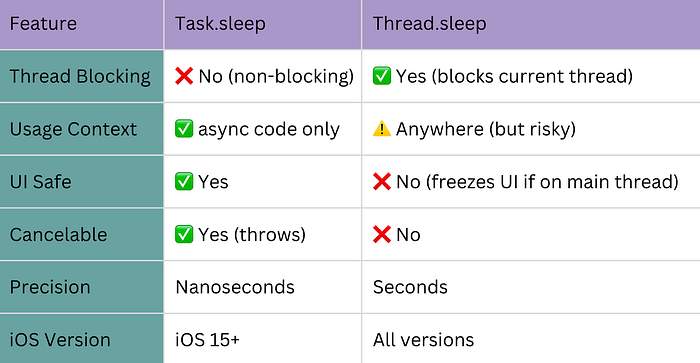
Don't block async code with synchronous APIs Avoid calling blocking operations inside async contexts — they can hang app's thread pool.
Wrapping Up
Swift Concurrency simplifies asynchronous programming with a structured, safer model using async/await, Task, actor, and @MainActor. It improves readability, maintainability, and performance of modern Swift apps.
Key Points to Remember
async/await: Write cleaner asynchronous code.Task: Create concurrent operations safely.actor: Swift-native way to avoid data races.@MainActor: Ensure main thread execution for UI.- Actors don't use locks — they use structured isolation.
- Race conditions ≠ data races, but both are solved by actors.
If you have recommendations, whether it's resources, best practices, or any tips, feel free to share.
Enjoy coding, devs!!!