

Data Manipulation
In this tutorial, I illustrate some tricks to manipulate a Python Pandas Dataframe, using SQL queries. In details, I cover the following topic:
- Missing Values (removal and replacement)
- Dataframe Ordering
- Dropping Duplicates
- Merge two Dataframe (Union and Intersection)
In order to query a Pandas Dataframe through SQL queries, I exploit the sqldf Python library, which can be installed through the following command: pip install sqldf.
Load Dataset
I import the pandas library and I read a simple dataset, which contains for each country, its capital and a generic field, called Value.
import pandas as pd
df = pd.read_csv('../../Datasets/capitals1.csv')
df.head()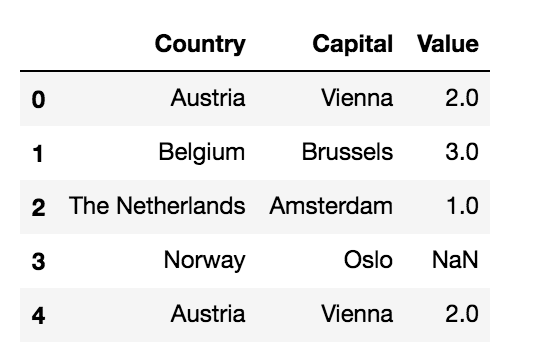
Now I import the sqldf library.
import sqldfMissing Values
Missing values are values not availabale in the dataset. For example, a missing value could be indicated as NULL, None or NaN. Different strategies could be adopted to deal with missing values. In this tutorial, I illustrate two techniques:
- drop missing values
- replace missing values.
Drop Missing Values
Dropping missing values involves removing all the rows with a missing value for a certain column. In our sample dataset, row with index 3 has a missing value.
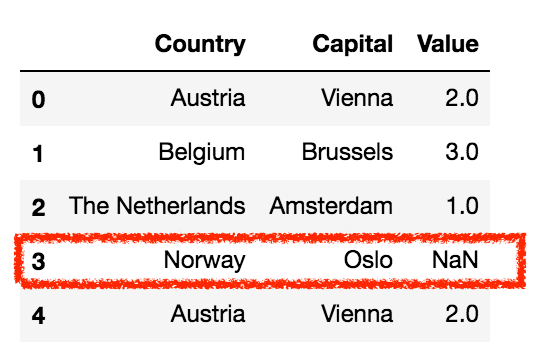
I define a query which selects only the rows where the Value column is not null:
query = """
SELECT *
FROM df
WHERE Value IS NOT NULL;
"""
Now I can run the query through the run() function.
The run() function returns a new dataframe if the query contains a SELECT statement. Instead, if the query contains an UPDATE statement, the original dataframe is updated.
sqldf.run(query)
Replace Missing Values
Another strategy to deal with missing values involves replacing them with a fixed value. For example, the fixed value could be the average value. To the best of my knowledge, the sqldf library does not support nested queries, thus I must run two separate queries, one to retrieve the average value and the other to replace missing values.
Firstly, I calculate the average value of the column Value:
query = """
SELECT AVG(Value) as AVG
FROM df
"""
avg = sqldf.run(query)['AVG'][0]
And then I update the dataset:
query = """
UPDATE df
SET Value = {}
WHERE Value IS NULL;
"""
sqldf.run(query.format(avg))
df.head()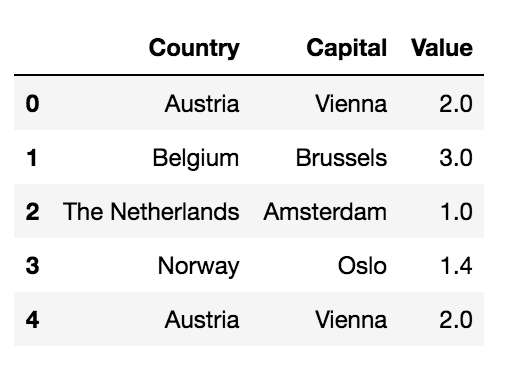
Order Dataframe
It may happen that to build a final visualisation, a dataframe must be ordered. Thus, I can exploit the ORDER BY statement, provided by SQL:
query = """
SELECT *
FROM df
ORDER BY Value DESC;
"""
sqldf.run(query)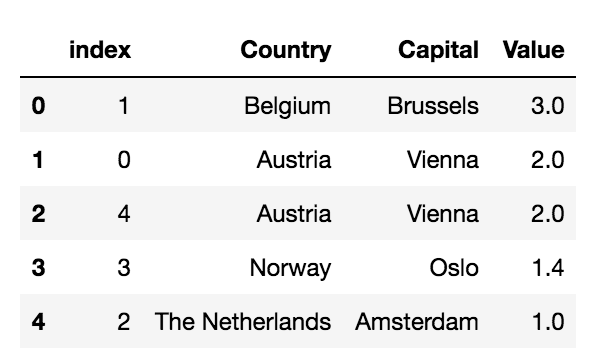
Drop Duplicates
The power of SQL could be also used to drop duplicates. This can be achieved by building a query, which selects distinct columns:
query = """
SELECT DISTINCT Country, Capital, Value
FROM df;
"""
sqldf.run(query)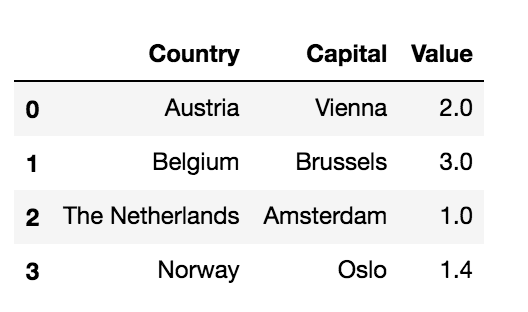
Merge two Dataframes
Dataset Merging involves combining two dataframes. SQL is a very powerful method to merge datasets without difficulties.
Union
The result of a union operation between two dataframes contains all the rows of both datasets. In order to perform union, I load an additional dataframe, df2, called capitals2., which is similar to the previous one. The additional dataframe df2 contains only one overlapping row with df.
df2 = pd.read_csv('../../Datasets/capitals2.csv')
df2.head(len(df2))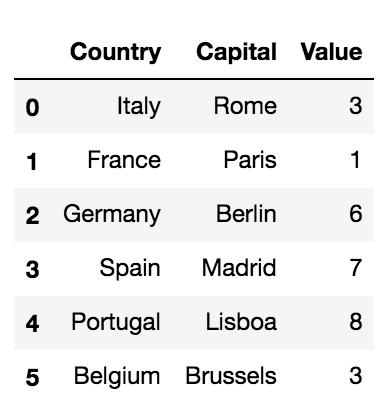
The union of the two dataframes can be achieved through the following query:
query = """
SELECT Country, Capital, Value
FROM df
UNION
SELECT Country, Capital, Value
FROM df2
ORDER BY Value DESC
"""
sqldf.run(query)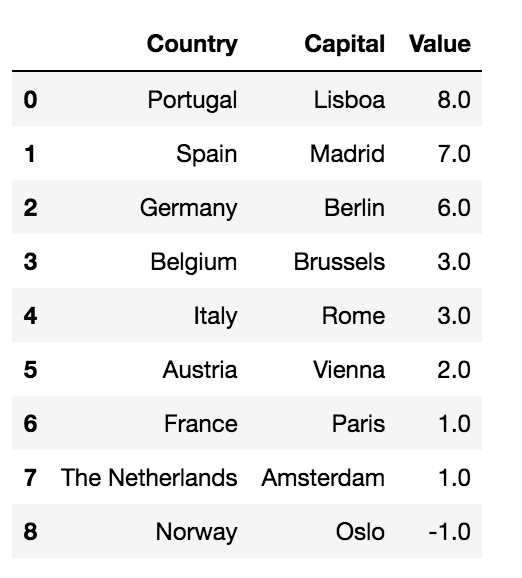
Note that duplicates have been removed by the union operation.
Intersection
Intersection of two dataframes takes only rows contained in both dataframes. In SQL, intersection can be performed through the INNER JOIN operation:
query = """
SELECT *
FROM df
INNER JOIN df2
  ON df.Country = df2.Country AND df.Capital = df2.Capital;
"""
sqldf.run(query)
Summary
In this tutorial, I have illustrated some tricks to run SQL queries on a Pandas Dataframe. I have described only some examples of queries, but your fantasy will be truly much more creative than mine!
The full code of this tutorial can be downloaded from my Github repository.
If you wanted to be updated on my research and other activities, you can follow me on Twitter, Youtube and Github.