
Introduction
Managing dependencies is a crucial part of Python development. Dependencies are the libraries or packages your Python project needs to work correctly. For new developers, managing these dependencies might feel overwhelming, but tools like Pip, Poetry, and UV can make it easier. In this article, we'll break down these tools with simple explanations and examples so you can decide which one to use.
Understanding the Basics with Examples
Pip
Description: Pip is Python's built-in package manager, used to install libraries from the Python Package Index (PyPI).
How It Works:
- To install a library, use:
pip install library-name. For example:
pip install requestsThis installs the requests library for making HTTP requests.
2. To save the libraries you've installed, create a requirements.txt file:
pip freeze > requirements.txt3. To install libraries from requirements.txt, use:
pip install -r requirements.txtDrawbacks:
- Doesn't automatically resolve conflicts between libraries.
- Doesn't create a locked list of exact versions for reproducibility.
Poetry
Description: Poetry is a modern tool that simplifies dependency management and project setup.
How It Works:
- Initialize a new project:
poetry initFollow the prompts to create a pyproject.toml file.
2. Add dependencies:
poetry add requestsThis installs the requests library and updates the pyproject.toml file.
3. Create a virtual environment and install dependencies:
poetry install4. Lock dependencies for consistent installations: Poetry automatically creates a poetry.lock file.
Example Use Case: Suppose you're building a Python package to upload to PyPI. Poetry handles the entire process, from creating the package structure to publishing.
Drawbacks:
- Slightly steeper learning curve for beginners.
- Slower with complex dependency trees.
UV
Description: UV (Unified Virtualenv) is a lightweight tool for managing dependencies inside isolated environments.
How It Works:
- Create a new virtual environment:
uv create myenv2. Activate the environment:
uv activate myenv3. Install libraries inside the environment:
pip install requests4. Reproduce the environment with a lock file generated by UV.
Drawbacks:
- Smaller community and fewer features compared to Pip and Poetry.
- May not support advanced workflows out of the box.
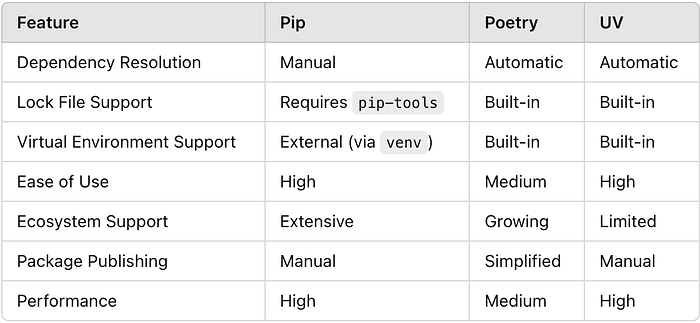
Feature Comparison with Examples
Speed Comparison
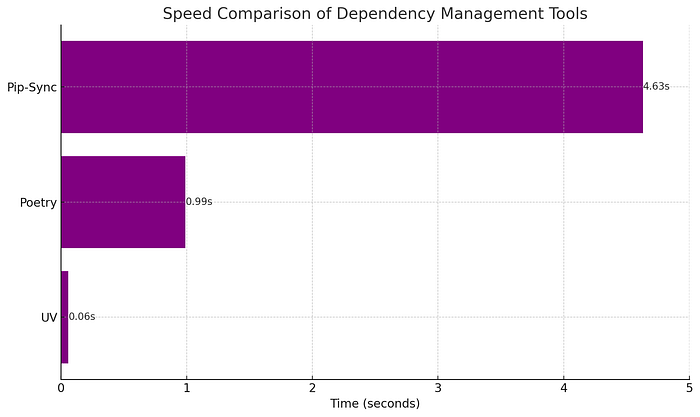
The above chart illustrates the time taken by each tool for common tasks. UV is the fastest, followed by Poetry while Pip-Sync is the slowest.
When to Use Each Tool
Use Pip If:
- You're working on a small project or quick script.
- Example: Writing a script to scrape data from a website using the
beautifulsoup4library.
pip install beautifulsoup4Use Poetry If:
- You're developing a larger project or a package to share.
- Example: Building a Flask web application with specific library versions.
poetry add flask- This ensures everyone working on the project uses the same versions.
Use UV If:
- You prefer a minimalistic tool for quick project setups.
- Example: Creating isolated environments for testing different library versions.
uv create test_envConclusion
Choosing the right dependency management tool depends on your project's needs and your familiarity with Python tools:
- Pip: Best for simple projects and beginners.
- Poetry: Ideal for modern, reproducible, and shareable projects.
- UV: Great for minimal setups and isolated environments.
Start by experimenting with these tools on small projects. Over time, you'll find the one that fits your workflow best.
What's Your Experience?
Which tool do you prefer for managing Python dependencies? Share your thoughts and tips below!