
Backstage is an open-source framework for building developer portals. Powered by a centralized software catalog, Backstage restores order to your microservices and infrastructure, enabling your product teams to ship high-quality code quickly without compromising autonomy. It unifies all your infrastructure tooling, services, and documentation to create a streamlined development environment from end to end.
In this guide, we'll learn how to register an entity from GitLab in Backstage.
Step 1: Configure the app-config.yaml
Add the following configuration to your app-config.yaml:
integrations:
  gitlab:
    - host: gitlab.com
      baseUrl: http://gitlab.com
      apiBaseUrl: http://gitlab.com/api/v4
      # If the repo is private, add a token as well
      token: <gitlab-access-token>
Step 2: Add to the catalog.locations
Include the following under catalog.locations:
    - type: url
      # address of your catalog-info.yaml file
      target: https://gitlab.com/backstage3915628/backstage-doc/-/blob/main/catalog-info.yaml?ref_type=heads
      rules:
        - allow: [Component, Group, User, Resource, Location, Template, Domain]
Something like this
catalog:
  import:
    entityFilename: catalog-info.yaml
    pullRequestBranchName: backstage-integration
  rules:
    - allow: [Component, API, System, Domain, Resource, Location, User, Group]
  locations:
    # Add your GitLab location here
    - type: url
      target: https://gitlab.com/backstage3915628/backstage-doc/-/blob/main/catalog-info.yaml?ref_type=heads
      rules:
        - allow: [Component, Group, User, Resource, Location, Template, Domain]
Step 3: Restart Your App
Restart your Backstage app and navigate to the dashboard at http://localhost:3000/create. Click on "Register Existing Component."
Step 4: Register the Entity
Follow these steps to register an entity:
- Enter the URL to your
catalog-info.yamlfile in the repository, like this:
https://gitlab.com/backstage3915628/backstage-doc/-/blob/main/catalog-info.yaml?ref_type=heads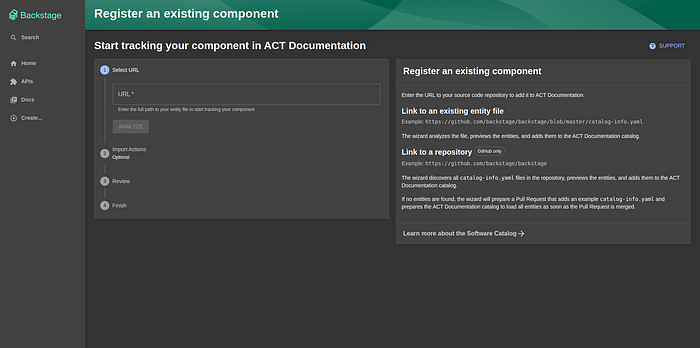
2. Click on "Analyze" and then "Import."
By following these steps, you can easily register an entity from GitLab in Backstage. This setup helps maintain a unified and organized developer environment, streamlining your development processes.