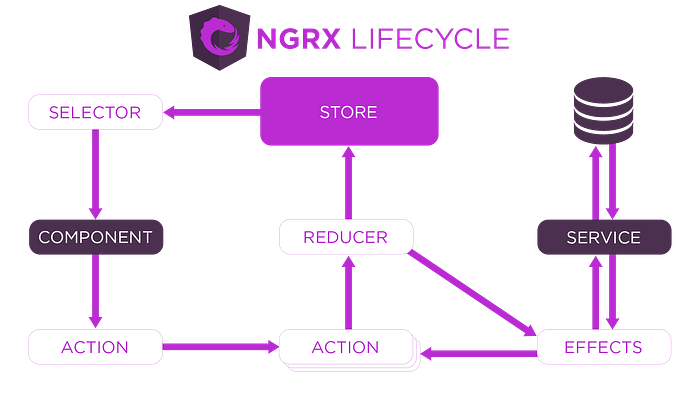


We will implement state management for a `Product` entity, covering: - GET all products - POST a new product - DELETE a product
Not a Member? Read for FREE here.
The structure is as follows:
Folder Structure
We'll follow a scalable folder structure:

Step-by-Step Explanation
1. Model (`product.model.ts`)
First, let's define the `Product` model. This is a TypeScript interface that represents the structure of a product.
export interface Product {
  id: string;
  name: string;
  description: string;
  price: number;
  inStock: boolean;
}
2. Actions (`product.actions.ts`)
Actions define the intent to change the state. We will create actions for: - Loading all products (GET) - Adding a new product (POST) - Deleting a product (DELETE)
import { createAction, props } from '@ngrx/store';
import { Product } from '../models/product.model';

// Load products (GET)
export const loadProducts = createAction('[Product] Load Products');
export const loadProductsSuccess = createAction(
  '[Product] Load Products Success',
  props<{ products: Product[] }>()
);
export const loadProductsFailure = createAction(
  '[Product] Load Products Failure',
  props<{ error: string }>()
);

// Add a new product (POST)
export const addProduct = createAction(
  '[Product] Add Product',
  props<{ product: Product }>()
);
export const addProductSuccess = createAction(
  '[Product] Add Product Success',
  props<{ product: Product }>()
);
export const addProductFailure = createAction(
  '[Product] Add Product Failure',
  props<{ error: string }>()
);

// Delete a product (DELETE)
export const deleteProduct = createAction(
  '[Product] Delete Product',
  props<{ id: string }>()
);
export const deleteProductSuccess = createAction(
  '[Product] Delete Product Success',
  props<{ id: string }>()
);
export const deleteProductFailure = createAction(
  '[Product] Delete Product Failure',
  props<{ error: string }>()
);
3. Reducer (`product.reducer.ts`)
Reducers specify how the state changes in response to actions. The reducer will handle actions like loading, adding, and deleting products.
import { createReducer, on } from '@ngrx/store';
import * as ProductActions from '../actions/product.actions';
import { Product } from '../models/product.model';

export interface ProductState {
  products: Product[];
  error: string | null;
}

export const initialState: ProductState = {
  products: [],
  error: null,
};

export const productReducer = createReducer(
  initialState,

  // Load products
  on(ProductActions.loadProductsSuccess, (state, { products }) => ({
    ...state,
    products,
    error: null,
  })),
  on(ProductActions.loadProductsFailure, (state, { error }) => ({
    ...state,
    error,
  })),

  // Add a product
  on(ProductActions.addProductSuccess, (state, { product }) => ({
    ...state,
    products: [...state.products, product],
    error: null,
  })),
  on(ProductActions.addProductFailure, (state, { error }) => ({
    ...state,
    error,
  })),

  // Delete a product
  on(ProductActions.deleteProductSuccess, (state, { id }) => ({
    ...state,
    products: state.products.filter((product) => product.id !== id),
    error: null,
  })),
  on(ProductActions.deleteProductFailure, (state, { error }) => ({
    ...state,
    error,
  }))
);
4. Selectors (`product.selectors.ts`)
Selectors are used to query slices of the state. Here we create selectors for products and errors.
import { createFeatureSelector, createSelector } from '@ngrx/store';
import { ProductState } from '../reducers/product.reducer';

// Select the product feature state
export const selectProductState = createFeatureSelector<ProductState>('product');

// Select all products
export const selectAllProducts = createSelector(
  selectProductState,
  (state: ProductState) => state.products
);

// Select error
export const selectProductError = createSelector(
  selectProductState,
  (state: ProductState) => state.error
);
5. Effects (`product.effects.ts`)
Effects handle asynchronous operations like API calls. We'll define effects for loading, adding, and deleting products.
import { Injectable } from '@angular/core';
import { Actions, createEffect, ofType } from '@ngrx/effects';
import { catchError, map, mergeMap } from 'rxjs/operators';
import { of } from 'rxjs';
import * as ProductActions from '../actions/product.actions';
import { ProductService } from '../../services/product.service';

@Injectable()
export class ProductEffects {
  constructor(private actions$: Actions, private productService: ProductService) {}

  // Effect to load products
  loadProducts$ = createEffect(() =>
    this.actions$.pipe(
      ofType(ProductActions.loadProducts),
      mergeMap(() =>
        this.productService.getProducts().pipe(
          map((products) => ProductActions.loadProductsSuccess({ products })),
          catchError((error) => of(ProductActions.loadProductsFailure({ error })))
        )
      )
    )
  );

  // Effect to add a new product
  addProduct$ = createEffect(() =>
    this.actions$.pipe(
      ofType(ProductActions.addProduct),
      mergeMap(({ product }) =>
        this.productService.addProduct(product).pipe(
          map((newProduct) => ProductActions.addProductSuccess({ product: newProduct })),
          catchError((error) => of(ProductActions.addProductFailure({ error })))
        )
      )
    )
  );

  // Effect to delete a product
  deleteProduct$ = createEffect(() =>
    this.actions$.pipe(
      ofType(ProductActions.deleteProduct),
      mergeMap(({ id }) =>
        this.productService.deleteProduct(id).pipe(
          map(() => ProductActions.deleteProductSuccess({ id })),
          catchError((error) => of(ProductActions.deleteProductFailure({ error })))
        )
      )
    )
  );
}
6. Service (`product.service.ts`)
Service is where the actual API interaction happens. This service contains methods to interact with the backend for products.
import { Injectable } from '@angular/core';
import { HttpClient } from '@angular/common/http';
import { Observable } from 'rxjs';
import { Product } from '../models/product.model';

@Injectable({
  providedIn: 'root',
})
export class ProductService {
  private apiUrl = 'https://api.example.com/products';

  constructor(private http: HttpClient) {}

  // GET all products
  getProducts(): Observable<Product[]> {
    return this.http.get<Product[]>(this.apiUrl);
  }

  // POST new product
  addProduct(product: Product): Observable<Product> {
    return this.http.post<Product>(this.apiUrl, product);
  }

  // DELETE a product by ID
  deleteProduct(id: string): Observable<void> {
    return this.http.delete<void>(`${this.apiUrl}/${id}`);
  }
}
Connecting Everything in the App
Register Reducers and Effects in the `AppModule`:
import { NgModule } from '@angular/core';
import { BrowserModule } from '@angular/platform-browser';
import { StoreModule } from '@ngrx/store';
import { EffectsModule } from '@ngrx/effects';

import { AppComponent } from './app.component';
import { productReducer } from './store/reducers/product.reducer';
import { ProductEffects } from './store/effects/product.effects';

@NgModule({
  declarations: [AppComponent],
  imports: [
    BrowserModule,
    StoreModule.forRoot({ product: productReducer }),
    EffectsModule.forRoot([ProductEffects]),
  ],
  providers: [],
  bootstrap: [AppComponent],
})
export class AppModule {}
Dispatching Actions and Using Selectors in Components
Finally, we use the actions and selectors in the components to interact with the store and display data.
import { Component, OnInit } from '@angular/core';
import { Store } from '@ngrx/store';
import { Observable } from 'rxjs';
import { Product } from '../store/models/product.model';
import { loadProducts, addProduct, deleteProduct } from '../store/actions/product.actions';
import { selectAllProducts, selectProductError } from '../store/selectors/product.selectors';

@Component({
  selector: 'app-product-list',
  templateUrl: './product-list.component.html',
})
export class ProductListComponent implements OnInit {
  products$: Observable<Product[]>;
  error$: Observable<string | null>;

  constructor(private store: Store) {}

  ngOnInit(): void {
    // Dispatch the action to load products
    this.store.dispatch(loadProducts());

    // Select products and error from the store
    this.products$ = this.store.select(selectAllProducts);
    this.error$ = this.store.select(selectProductError);
  }

  // Add a new product
  addNewProduct(product: Product) {
    this.store.dispatch(addProduct({ product }));
  }

  // Delete a product by ID
  deleteProduct(id: string) {
    this.store.dispatch(deleteProduct({ id }));
  }
}
Summary
This detailed example provides a comprehensive setup for using NgRx state management with multiple API calls (GET, POST, DELETE). By creating actions, reducers, effects, and selectors, and utilizing them in services and components, you can easily handle complex state management in a scalable and maintainable way.
This approach ensures that the logic is well-structured, making it easier to maintain and expand your application.
Connect with Me
If you enjoyed this post and would like to stay updated with more content like this, feel free to connect with me on social media:
- Twitter : Follow me on Twitter for quick tips and updates.
- LinkedIn : Connect with me on LinkedIn
- YouTube : Subscribe to my YouTube Channel for video tutorials and live coding sessions.
- Dev.to : Follow me on Dev.to where I share more technical articles and insights.
- WhatsApp : Join my WhatsApp group to get instant notifications and chat about the latest in tech
Email: Email me on dipaksahirav@gmail.com for any questions, collaborations, or just to say hi!
I appreciate your support and look forward to connecting with you!
In Plain English 🚀
Thank you for being a part of the In Plain English community! Before you go:
- Be sure to clap and follow the writer ️👏️️
- Follow us: X | LinkedIn | YouTube | Discord | Newsletter | Podcast
- Create a free AI-powered blog on Differ.
- More content at PlainEnglish.io