
- Without access to external functions, even the most advanced foundation model is just a pattern prediction engine.
- A foundation model on its own can do many things well — but it can only generate content based on the data it was previously trained on.
- Limited to its request context — context refers to all the background information and situational details provided to an AI model to help it understand the request, personalize its response, and perform tasks accurately.
- Most modern foundation models now can call external functions — or Tools.
- Think of tools as an AI agents eyes or hands — allowing it to perceive or act on the world.
- An AI Agent uses a foundation model's reasoning capability to interact with users and achieve specific goals — external tools give the agent the capacity.
- The Model Context Protocol was developed as a way to streamline the process of integrating tools and models.
Tools and Tool Calling
What is meant by tool?
- In modern AI, a tool is a function or program an LLM-based application can use to accomplish a task outside of the model's capabilities.
- Two broad categories for tools: tools that allow the model to know something and tools that allow the model to do something.
The whitepaper has an excellent example of a tool use. The agent is asked to get the weather information for a users location in preferred units. The model does not know this because that information is not in the model's training data. To return the correct data the model must find out where the user is, what the weather is in the user's location, and then make any needed conversions. The model will call the get_weather, get_location, and convert_temperature_units tools.
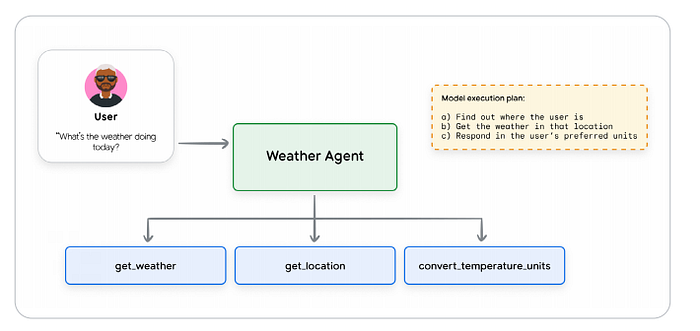
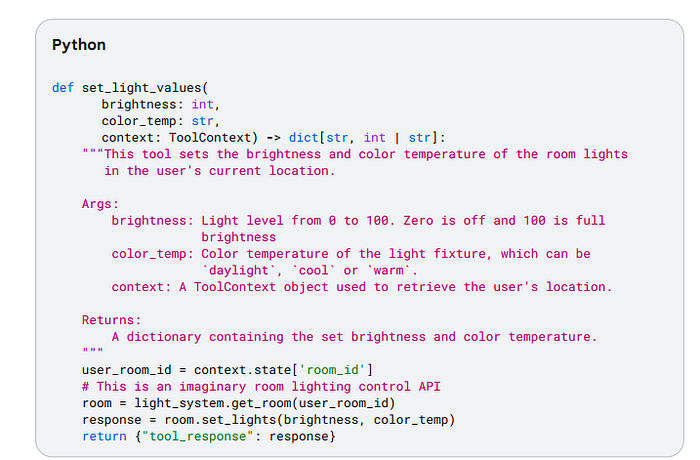
Types of tools -> defining a tool: a tool is defined just like a function in a non-AI program. A contract between the model and the tool. Includes a clear name, parameters, and a natural language description that explains the tools purpose and how it should be used.
Function Tools -> All models that support function calling allow the developer to define external functions that the model can call as needed. The tool's definition should provide basic details about how the model should use the tool; this is provided to the model as part of the request context.
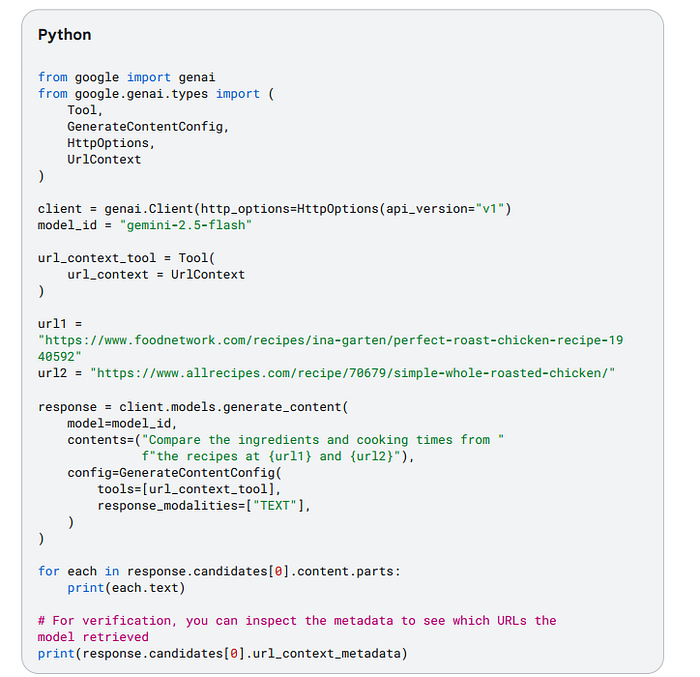
Built-In Tools -> Some foundation models offer the ability to leverage built in tools, where the tool definition is given to the model implicitly, or behind the scenes of the model service.
Agent Tools -> An agent can also be invoked as a tool. This prevents a full handoff of the user conversation, allowing the primary agent to maintain control over the interaction and process the sub-agent's input and output as needed.

Taxonomy of Agent Tools:
One way of categorizing is by primary function or interactions they facilitate.
Common Types:
Information Retrieval -> Allow agents to fetch data from various sources — websearches, databases, unstructured documents.
Action/Execution -> Allow agents to perform real world operations — send emails, posting messages, controlling devices.
System/API Integration -> Allow agents to connect with existing software systems and APIs, integrate workflows, interact with third-party services.
Human-in-the-loop -> Facilitate the collaboration with human users: ask for clarification, seek approval for critical actions, hand off tasks for human judgement.

Best Practices
There are several guidelines that are common to AI Agent tool use:
Documentation is important -> The documentation gets passed into the model as part of the request context. Important things to add the documentation is a clear descriptive name: this should be human readable and specific to help the model decide which tool to use; describe all input and output parameters: all inputs should be clearly described; simplify parameter lists: long parameter lists can confuse the model; clarify tool descriptions: provide a clear, detailed description of the input and output parameters, the purpose of the tool, and any other details needs to call the tool effectively; add targeted examples: this helps address ambiguities, and shows how to handle tricky requests; provide default values: provide defaults for key parameters.
Good Tool Documentation:
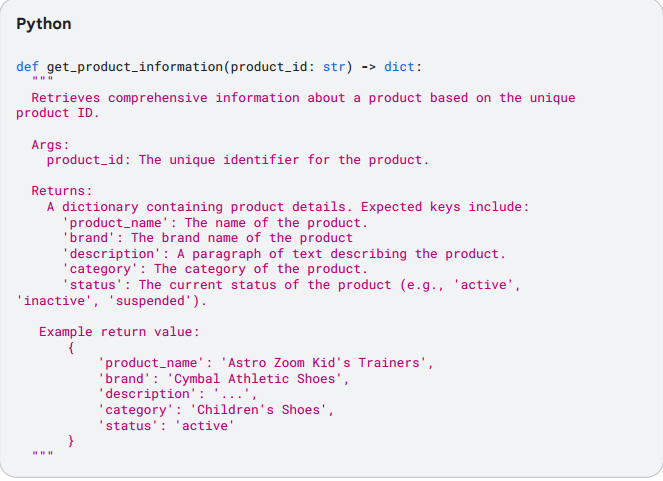
Bad Tool Documentation:
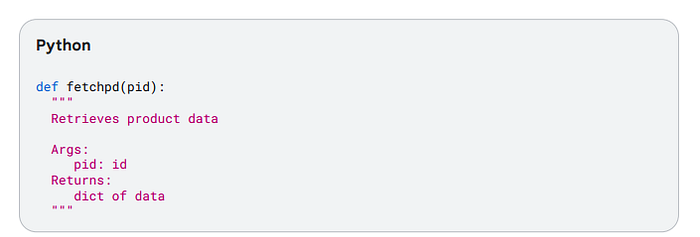
Describe Actions, not Implementations
Assuming the tool is well documented, the model's instructions should describe actions, not specific tools. This is important to eliminate any possibility of conflict between instructions on how to use the tool.
You should describe what, not how: explain what the model needs to do, not how to do it.
Don't duplicate instructions: Don't repeat or re-state the tool instructions or documentation.
Don't dictate workflows: Describe the objective, and allow scope for the model to use tools autonomously.
DO explain tool interactions: If a tool has a side-effect that may affect a different tool, document this.
Publish tasks, not API Calls
Tools should encapsulate a task the agent needs to perform. Do no write tools that are just thin wrappers over an existing API service. Define tools that clearly capture specific actions the agent might take on behalf of the user.
Make Tools as Granular as Possible
Keeping functions concise and limited to a single function is a standard coding best practice; use it when defining tools too! Define clear responsibilities: make sure each tool has a clear, well-documented purpose; Don't create multi-tools: in general, do not create tools that take make steps in turn or encapsulate a long workflow;
Design for Concise Output
Poorly designed tools can sometimes return large volumes of data, which can adversely affect performance. Don't return large responses: this can quickly swamp the output context of an LLM. Use external Systems: make use of external systems for data storage and access.
Use Validation Effectively
Most tool calling frameworks include an optional schema validation for tool inputs and outputs. Use this whenever possible.
Provide Descriptive Error Messages
An overlooked opportunity for refining and documenting tool capabilities. The tool's error message should give instructions to the LLM about what to do to address a specific error.
Understanding the Model Context Protocol
The "N x M" integration Problem and the need for Standardization
Tools provide the essential link between an AI agent or an LLM and the external world. The ecosystem is fragmented and complex. Connecting a tool or LLM to the outside world leads to an explosion in development effort due to the need for custom-built one-off connectors, often called the 'NxM' integration problem, where custom connections grow exponentially. The Model Context Protocol was introduced in 2024 as a standard to begin address this situation — a unified plug-and-play protocol.
Core Architectural Components: Hosts, Clients, and Servers
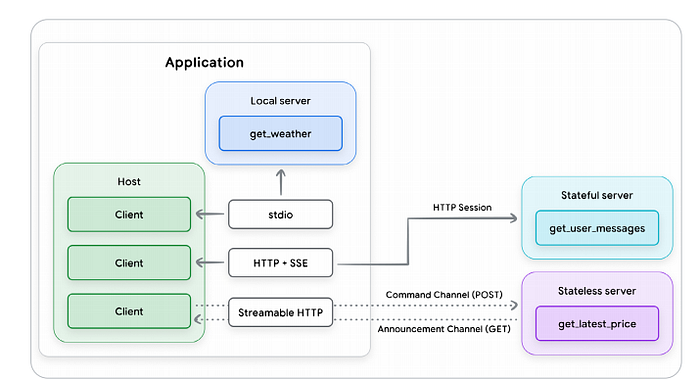
The Model Context Protocol implements a client-server model. It separates the AI application from the tool integrations and allows a more modular and extensible approach to tool development. The core components are the Host, the Client, and the Server.
The MCP Host is the application responsible for creating and managing individual MCP clients. Responsibilities include managing user experience, orchestrating the use of tools, enforcing security policies and guardrails.
The MCP Client is a software component embedded within the Host that maintains the connection to the Server. The responsibilities include issuing commands, receiving responses, and managing the lifecycle of the communication session.
The MCP Server is a program that provides a set of capabilities that the server developer wants to make available to AI applications, often functioning as an adapter or proxy for an external tool, data source, or API. responsibilities include tool discovery, receiving and executing commands, and returning results.

The Communication Layer: JSON-RPC, Transports, and Message Types
All communication between the MCP clients and servers is built on a standardized foundation for consistency and interoperability.
Base protocol: MCP uses JSON-RPC 2.0 as is base message format; this is a lightweight, text-based, and language-agnostic structure. It allows four fundamental message types: Requests, Results, Errors, and Notifications. The transport mechanism is also important as the MCP needs a standard protocol for communication between the client and server. MCP supports two: stdio (standard input/output) -> used for fast and direct communication, and Streamable HTTP → the recommended remote client-server protocol.
Key Primitives: Tools and others
On top of the basic communication framework, MCP defines several key concepts or entity types to enhance the capabilities of LLM-based applications for interacting with external systems. They are:
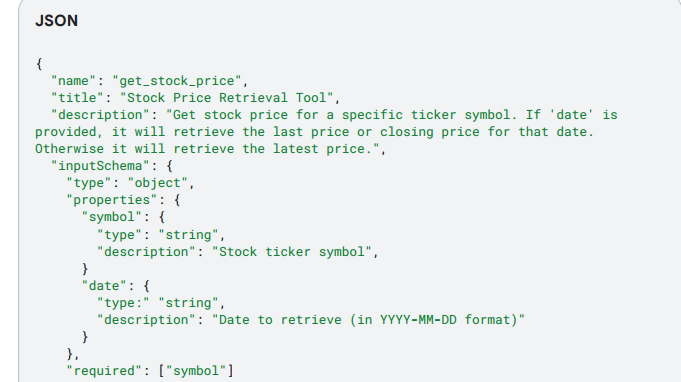
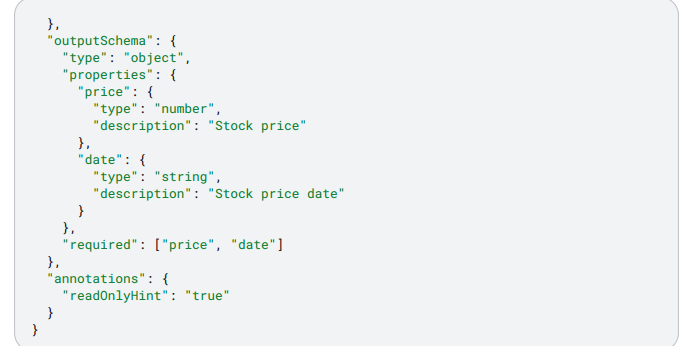
Tools -> the tool entity in MCP is a standardized way for a server to describe a function it makes available to clients. Examples include read_file, get_weather, execute_sql, and create_ticket. Tool definitions must conform to a JSON schema. MCP tools can return results in a number of ways including structured and unstructured content.
Other Capabilities
In addition to tools, MCP specs define five other capabilities that servers and clients can provide. Though only a small number of MCP implementations support these capabilities.
Resources: A server-side capability intended to provide contextual data that can be accessed and used by the Host application.
Prompts: In MCP, prompts are another server-side capability that allows the server to provide reusable prompt examples or templates related to its Tools and Resources. These prompts are intended to be retrieved and used by the client to interact directly with the LLM. Should be used rarely as they do increase security risks.
Sampling: Sampling is a client-side capability that allows an MCP server to request an LLM completion from the client.
Elicitation: Another client-side capability, similar to Sampling, is allows an MCP server to request additional user information from the client. A formal mechanism to pause an operation and interact with a human user via the client's UI, allowing the client to maintain control of the user interaction and data sharing, while giving the server a way to get user input.
Roots: A client-side capability that defines the boundaries of where servers can operate within the filesystem.
Model Context Protocol: For and Against
MCP adds several significant new capabilities to the AI developer's toolbox; there are also some limitations and drawbacks as well.
Capabilities and Strategic Advantages
Accelerating Development and Fostering a Reusable Ecosystem -> The most immediate benefit of MCP is in simplifying the integration process. This is done through what can be described as a plug-and-play ecosystem. Tools become reusable and shareable assets.
Dynamically Enhancing Agent Capabilities and Autonomy -> Enhanced agent calling in several important ways: Dynamic tool discovery: MCP-enabled applications can discover available tools at runtime. Standardizing and structuring tool descriptions: a standard framework for tool descriptions and definitions. Expanding LLM Capabilities: By enabling growth of an ecosystem of tool providers, this expands capabilities and information available to LLMs.
Architectural Flexibility and Future-Proofing -> The MCP standardizes the agent-tool interface. This decouples the agent's architecture from the implementation of its capabilities. Logic, memory and tools are treated as independent, interchangeable components -> this makes systems easier to debug, upgrade, and scale.
Foundations for Governance and Control -> The MCP's native security features are limited, but the architecture does provide the necessary hooks for implementing more robust governance. The protocol specification itself establishes a philosophical foundation for responsible AI by explicitly recommending user consent and control.
Critical Risks and Challenges
A key focus for enterprise developers adopting MCP is the need to layer in support for enterprise-level security requirements — authentication, authorization, user isolation, etc.
Performance and Scalability Bottlenecks -> Managing Context and State are key bottlenecks. Context Window Bloat: For an LLM to know which tools are available, definitions and parameter schemas for every tool from every connected MCP server must be included in the model's context window. This can consume a lot of available tokens-> this results in increased cost and latency. Degraded Reasoning Quality -> Overloaded context window can also degrade the quality of the AI's reasoning. Stateful Protocol Challenges -> Using stateful, persistent connections for remote servers can lead to more complex architectures that are harder to develop and maintain.
The issue of context window bloat represents an emerging architectural challenge — the current preloaded method does not scale. One potential future architecture might involve a RAG-like approach for tool discovery. An agent, when faced with a task, would first perform a tool retrieval step against a massive, indexed library of all possible tools. Upon finding the tools it wants to use, it would load the definitions from that smaller subset into its context window. This would be a dynamic, intelligent, and scalable search method. This does open another potential security weakness, as a bad actor could inject a malicious tool schema into the index.
Enterprise Readiness Gaps -> MCP is being rapidly adopted, but several critical enterprise-grade features are still evolving. They include Authenication and Authorization -> The initial MCP specification did not include a robust, enterprise-ready standard for authentication and authorization; Identity Management Ambiguity -> The protocol does not yet have a clear, standardized way to manage and propagate identity; Lack of Native Observability -> The base protocol does not define standards for observability primitives like logging, tracing, and metrics.
Security in MCP
New Threat Landscape -> Along with new capabilities the MCP offers by connecting Agents to tools and resources comes new security challenges. As new APIs surface, the base MCP protocol does not inherentlyinclude many of the security features and controls implemented in traditional API endpoints. As a standard agent protocol, MCP is being used for a broad range of applications. This broad applicability increases the likelihood of security issues. Securing MCP requires a proactive, evolving, and multi-layered approach.
Risks and Mitigations
Dynamic Capability Injection -> MCP servers may dynamically change a set of tools, resources, or prompts without explicit client notification or approval. This can potentially allow the agent to inherit dangerous capabilities. Mitigations include an explicit allowlist of MCP tools, Mandatory Change Notification, Tool and Package Pinning, Secure API/Agent Gateway, and Hosting MCP servers in a controlled Environment.
Tool Shadowing -> Tool descriptions can specify arbitrary triggers. This can lead to security issues. Mitigations include Preventing Naming Collisions, Mutual TLS (mTLS), Deterministic Policy Enforcement, Require Human in the Loop (HIL), Restrict Access to Unauthorized MCP servers.
Malicious Tool Definitions and Consumed Contents -> Tool descriptor fields can manipulate agent planners into executing rogue actions. Mitigations include Input Validation, Output Sanitization, Separate System Prompts, Strict Allowlist Validation and Sanitization of MCP resources, Sanitize Tool Descriptions.
Sensitive Information Leaks -> MCP tools may unintentionally receive sensitive information, leading to data exfiltration. Mitigations include MCP tools using structured outputs and annotations on input/output fields and taint sources/ sinks.
No Support for Limiting the Scope of Access -> The MCP protocol only supports coarse-grained client-server authorization. Mitigations include Tool Invocation Using Audience and Scoped Credentials, Using Principle of Least Privilege, and Secrets and Credentials being kept out of the agent context.
Conclusion:
Foundation models, when isolated, are limited to pattern prediction based on their training data; they cannot perceive the world or act on new data. But modern foundation models have the ability to use tools to solve complex tasks. Think of the LLM as the head or brain, and the tools as the hands. The model context protocol (MCP) was introduced as an open standard to manage tool interaction. This creates a reusable ecosystem, but there are drawbacks too. The MCP does create more security risks than a normal LLM, and there are enterprise issues too, as it is not a one-size-fits-all solution. Governance and Control are important subjects that must be considered, as are the additional security concerns.
Link to the whitepaper:
If you would like to donate to help me continue my work, my cashapp is $pwmcclung79
Thank you!!!