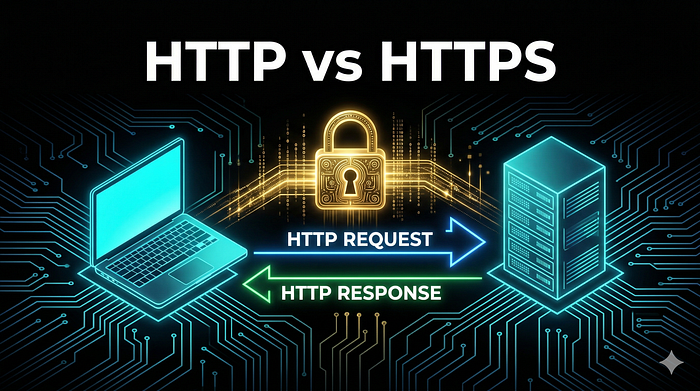

Aaj Kya Seekhenge?
- ✅ Internet actually kaise kaam karta hai — bilkul basics se
- ✅ HTTP kya hota hai — simple example ke saath
- ✅ Request kya hoti hai, Response kya hota hai
- ✅ HTTPS kya hai aur HTTP se kaise alag hai
- ✅ Status Codes — 200, 404, 403, 500 ka matlab
- ✅ Bug bounty mein yeh sab kaise kaam aata hai
💡 Kyun zaroori hai yeh article? Dost, agar tumhe HTTP/HTTPS nahi patatoh tum bugs dhundh nahi sakte। Yeh bug bounty ka backbone hai। Har vulnerability XSS, SQLi, SSRF, IDOR sab HTTP pe hi kaam karta hai!
Pehle Ek Simple Example Se Samjho
Socho tum ek restaurant mein gaye ho
👤 Tum (Customer) = Browser / Client
🧾 Waiter = HTTP Protocol
👨🍳 Kitchen = Web Server
🍕 Pizza = Web Page / DataTumne waiter ko bola → "Ek pizza do" = REQUEST
Kitchen ne pizza banaya → waiter ne laya = RESPONSE
Bas yahi hai Internet ka kaam karna! 🎉
Tum browser mein google.com type karte ho →
Browser ek REQUEST bhejta hai Google ke server ko →
Google ka server RESPONSE bhejta hai wapas →
Tumhare screen pe Google ka homepage dikhta hai!
Internet Ka Poora Journey Step By Step
Jab tum https://google.com type karte ho — actually 7 steps hote hain:
Step 1️⃣ — URL Type Karo
Tum type karte ho: https://google.com
          ↓
Step 2️⃣ — DNS Lookup (Phone Book)
Browser poochta hai: "google.com ka address kya hai?"
DNS Server jawab deta hai: "142.250.195.46"
          ↓
Step 3️⃣ — Connection Establish
Browser Google ke server se connect hota hai
Port 443 (HTTPS) pe
          ↓
Step 4️⃣ — HTTP Request Bhejta Hai
Browser likhta hai:
GET / HTTP/1.1
Host: google.com
          ↓
Step 5️⃣ — Server Request Process Karta Hai
Google ka server request padta hai
Sochta hai — "yeh Google ka homepage maang raha hai"
          ↓
Step 6️⃣ — HTTP Response Aata Hai
Server bhejta hai:
HTTP/1.1 200 OK
Content: [Google ka HTML page]
          ↓
Step 7️⃣ — Browser Page Render Karta Hai
Tumhe Google dikhta hai! ✅
HTTP Kya Hai? Bilkul Simple
HTTP = HyperText Transfer Protocol
Isko English mein todke samjho:
- HyperText = Web pages, links, images
- Transfer = Bhejne ka kaam
- Protocol = Rules ka set jaise traffic rules
Simple bhasha mein:
HTTP woh language hai jisme Browser aur Server ek doosre se baat karte hain
Jaise tum Hindi mein baat karte ho to dono samjhte hain — waise hi Browser aur Server HTTP mein baat karte hain।
HTTP Request Andar Se Kya Dikhta Hai?
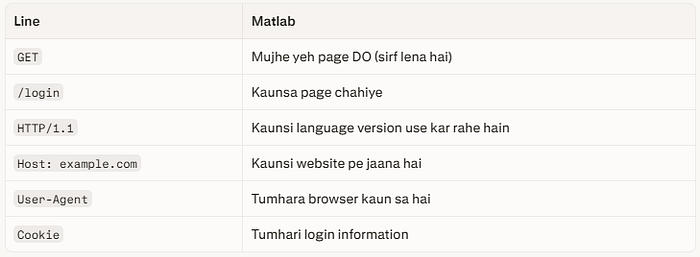
Jab bhi tum koi website open karte ho ek Request jaati hai। Yeh request kuch aise dikhti hai:
GET /login HTTP/1.1
Host: example.com
User-Agent: Mozilla/5.0 (Windows NT 10.0)
Accept: text/html
Cookie: session=abc123xyz
Connection: keep-alive
Isko line by line samjhte hain bilkul easily:
HTTP Response Server Kya Bhejta Hai Wapas?
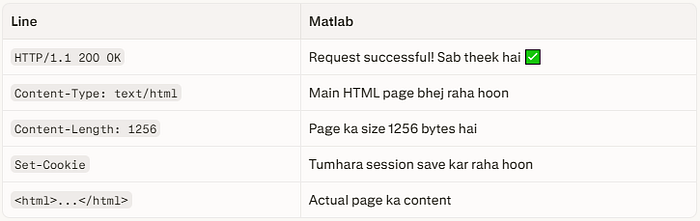
Server ne request padhi ab jawab bhejta hai:
HTTP/1.1 200 OK
Content-Type: text/html
Content-Length: 1256
Set-Cookie: session=newtoken456

<html>
  <body>
    <h1>Welcome to Login Page!</h1>
  </body>
</html>
Isko bhi samjhte hain:
HTTP Methods Waiter Ko Order Dene Ke Tarike
HTTP mein alag-alag methods hoti hain har ek ka alag kaam:
📖 GET     → Sirf data maangna (page dekhna)
           Example: google.com open karna

📝 POST    → Data bhejnا (form submit karna)
           Example: Login form submit karna
✏️ PUT     → Poora data update karna
           Example: Profile completely update karna
🔧 PATCH   → Thoda data update karna
           Example: Sirf naam change karna
🗑️ DELETE  → Data delete karna
           Example: Account delete karna
👀 HEAD    → Sirf headers maangna, body nahi
           Example: File exist karti hai ya nahi check karna
⚙️ OPTIONS → Server se poochna - tu kya kya support karta hai?
Bug Bounty Mein Kaise Kaam Aata Hai?
💡 Real Example: Mujhe ek target mein mila ki
/delete-accountendpoint sirf POST accept karta tha — lekin maine GET request bheja toh bhi kaam kar gaya! Yeh tha ek HTTP Method Bypass vulnerability! Bounty mili! 🎉
Status Codes Server Kya Bol Raha Hai?
Status codes woh 3-digit numbers hain jo server bhejta hai — inhe samjhna bahut zaroori hai:
2xx Success! Sab Theek!
200 OK          → Request successful, page mil gaya ✅
201 Created     → Naya data create ho gaya ✅
204 No Content  → Request hui, kuch wapas nahi aaya ✅
3xx Redirect! Aur Aage Jao!
301 Moved Permanently → Page permanently aur jagah chala gaya
302 Found (Redirect)  → Temporarily doosri jagah bhej raha hoon
304 Not Modified      → Page change nahi hua, cache use karo
4xx Tumhari Galti! Client Error!
400 Bad Request    → Tumne galat request bheji
401 Unauthorized   → Pehle login karo
403 Forbidden      → Permission nahi hai tumhe ❌
404 Not Found      → Yeh page exist nahi karta
405 Method Not Allowed → Yeh method allowed nahi hai
429 Too Many Requests  → Bahut zyada requests bheji, slow down!
5xx Server Ki Galti! Server Error!
500 Internal Server Error → Server crash ho gaya 💥
502 Bad Gateway           → Server ka doosra server kaam nahi kar raha
503 Service Unavailable   → Server busy hai ya down hai
Bug Bounty Mein Status Codes Kaise Kaam Aate Hain?
🎯 403 mile?  → WAF bypass try karo — shayad file exist karti hai!
🎯 500 mile?  → Server crash hua — SQL injection possible!
🎯 200 mile unexpected jagah? → Sensitive file exposed ho sakti hai!
🎯 302 mile?  → Open Redirect check karo!
HTTPS Kya Hai? HTTP Ka Secure Bhai
HTTPS = HTTP + Security (SSL/TLS Encryption)
Ek story se samjho:
HTTP Postcard Ki Tarah (Dangerous!)
Socho tum apne dost ko postcard bhejte ho "Mera password: abc123" likhke
Tum ✉️ ————————————————————> 📬 Dost
          Postcard open hai!
          Beech mein koi bhi
          padh sakta hai! 👀❌
HTTP mein bhi yahi hota hai sab data plain text mein jaata hai। Koi bhi hacker beech mein "sniff" kar sakta hai!
HTTPS Band Lifafe Ki Tarah (Safe!)
Tum 🔒✉️ ————————————————————> 📬 Dost
          Letter band lifafe mein!
          Sirf recipient hi
          khol sakta hai! ✅
HTTPS mein data encrypt hota hai — beech mein koi bhi hacker padh nahi sakta!
HTTPS Kaise Kaam Karta Hai? SSL Handshake
Yeh process 3 seconds mein hoti hai jab bhi tum https:// wali site kholta ho:
Step 1: 👋 Browser → Server
        "Hello! Main HTTPS connection chahta hoon"

Step 2: 🔑 Server → Browser
        "Lo mera Public Key (Certificate)"
Step 3: 🔐 Browser → Server
        "Theek hai, main Session Key banata hoon
         aur tere Public Key se encrypt karke bhejta hoon"
Step 4: 🤝 Dono ek hi Session Key use karne lagte hain
        Ab saara communication ENCRYPTED hai! ✅
Step 5: 🔒 Secure Communication Shuru!
        Har ek message encrypted hota hai
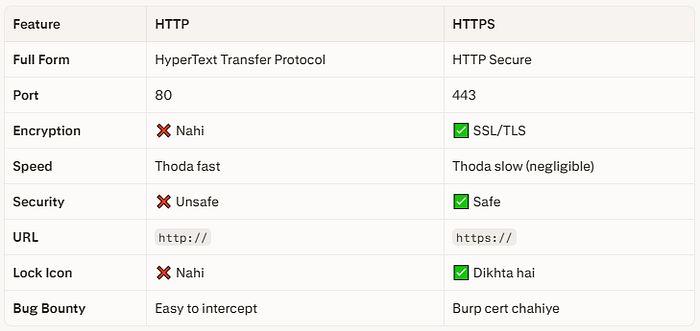
HTTP vs HTTPS Side By Side
Real HTTP Request Burp Suite Mein Kaisi Dikhti Hai?
Yahi wo cheez hai jo tum Burp Suite mein dekhte ho jab intercept karte ho:
POST /api/login HTTP/1.1
Host: target.com
Content-Type: application/json
Content-Length: 45
Cookie: PHPSESSID=xvz123abc
{
  "username": "admin",
  "password": "password123"
}
Bug hunter ki nazar se yeh request dekho:
🎯 POST /api/login   → Login endpoint hai!
🎯 Content-Type: JSON → API hai — test karna chahiye
🎯 username/password  → Brute force? Default credentials?
🎯 PHPSESSID Cookie   → Session hijacking possible?
🎯 HTTP nahi HTTPS?   → Credentials plain text mein ja rahe!
Bas ek request mein 5 potential vulnerabilities! 🔥
HTTP Headers Chhupe Hue Khazane
Headers woh extra information hain jo request/response mein hoti hain bug hunters ke liye goldmine!
Interesting Request Headers:
Host: target.com           → Virtual host attacks!
X-Forwarded-For: 127.0.0.1 → IP spoofing bypass!
Referer: https://evil.com  → CSRF token bypass!
Authorization: Bearer xxx  → JWT token attacks!
Content-Type: text/xml     → XXE injection!
Interesting Response Headers:
Server: Apache/2.4.1       → Version info leak! 🎯
X-Powered-By: PHP/7.2      → Old version = vulnerabilities!
Access-Control-Allow-Origin: * → CORS misconfiguration!
Set-Cookie: session=abc    → HttpOnly flag hai? Secure flag?
X-Frame-Options: missing   → Clickjacking possible!
Practical Burp Suite Mein HTTP Dekho
Chalo ab Kali Linux kholo aur actual HTTP request dekho!
Step 1: Burp Suite Open Karo
# Terminal mein:
burpsuite &
Step 2: Target Setup Free Practice Site
https://httpbin.org
# Yeh website specifically HTTP testing ke liye hai — legal hai!
Step 3: GET Request Dekho
1. Burp Suite → Proxy → Intercept ON karo
2. Firefox mein jaao: https://httpbin.org/get
3. Burp Suite mein request capture hogi
4. Dhyan se padho — har line samjho!
Step 4: POST Request Test Karo
1. Firefox → https://httpbin.org/post
2. Burp Suite mein request capture karo
3. Right click → "Send to Repeater"
4. Repeater mein request edit karo aur dobara bhejo!
Bug Bounty Mein HTTP Knowledge Kaise Use Hoti Hai?
Har ek vulnerability HTTP pe based hai dekho:
🔴 XSS          → HTTP Response mein script inject karna
🔴 SQL Injection → HTTP Request mein SQL code dena
🔴 SSRF          → Server ko HTTP Request karwana
🔴 IDOR          → HTTP Request mein ID change karna
🔴 CSRF          → Victim ke browser se HTTP Request karwana
🔴 Open Redirect → HTTP Response ke Location header pe attack
🔴 CORS Issues   → HTTP Headers galat configure hona
Matlab HTTP samjho toh sab kuch samjho! 💡
YouTube Resources — In Se Aur Seekho
Internet kaise kaam karta hai — Animation
youtube.com/shorts/rLcgjNUC9fA
HTTP Request & Response Methods Hindi
youtube.com/watch?v=sFt1584SLKY
HTTP Protocol Cyber Kaksha
youtube.com/watch?v=91ZPVXpeLaI
Intro to Web & HTTP Hindi
youtube.com/watch?v=OeqAhIozg8A
Aaj Ka Homework!
1️⃣ Burp Suite open karo
2️⃣ https://httpbin.org/get kholo
3️⃣ Request intercept karo
4️⃣ Har ek header ka naam note karo
5️⃣ Response mein Status Code dekho
6️⃣ Ek POST request bhejo https://httpbin.org/post pe
7️⃣ GET aur POST request compare karo
Ek bonus challenge:
https://httpbin.org/status/404visit karo — kaunsa status code aayega? Aur kya message? Comment mein batao! 👇
🧠 Quick Revision Article Ka Summary
🌐 Internet = Browser (Client) + Server communicate karte hain
📨 HTTP     = Communication ki language
📤 Request  = Browser ne server se kuch manga
📥 Response = Server ne wapas bheja
🔒 HTTPS    = HTTP + Encryption (SSL/TLS)
🔢 Status Codes:
   2xx = Success ✅
   3xx = Redirect 🔄
   4xx = Client Error ❌
   5xx = Server Error 💥
🎯 Bug Bounty = HTTP samjho → Bugs dhundho!
💬 Meri Baat…
Dost, jab maine pehli baar Burp Suite open ki thi — requests dekh ke mera dimaag ghoom gaya tha।
"Yeh sab kya hai? GET, POST, 200, 403… kuch samaj nahi aata!"
Lekin jab ek ek cheez samji — tab realize hua ki har ek line mein ek bug chhupa ho sakta hai।
Agle article mein hum jaayenge directly HackerOne aur Bugcrowd pe — account kaise banate hain, pehla program kaise choose karte hain, aur pehla bug kahan dhundhen! 🔥
HackerMD Bug Bounty Hunter | Cybersecurity Researcher GitHub: BotGJ16 | Medium: @HackerMD
Previous: Article #2 Hacker Lab Setup Next: Article #4 HackerOne aur Bugcrowd: Pehla Program Choose Karo
#HTTP #HTTPS #BugBounty #EthicalHacking #Hinglish #CyberSecurity #WebSecurity #BurpSuite #HackerMD