

You try one model. It gives a decent answer. You try another. It contradicts the first. Now you're stuck comparing tools instead of solving your actual problem.
XerpaAI fixes that. We bring the most popular AI models into one workspace, so you can focus on outcomes instead of hopping or guessing which model is "best."
This article will show you how beginners can use XerpaAI smoothly to solve all kinds of problems, from quick questions to multi-step tasks.
In this guide, you'll learn:
- How to use XerpaAI to get reliable answers
- What is Agent Explore, and when to use it
- How to write clear prompt
Part 1 — How to Use XerpaAI to Get Reliable Answers
If you're new to AI tools, the most confusing part is usually which model to use, and how to trust the answer.
That's exactly why XerpaAI exists: instead of forcing you to jump across different platforms, XerpaAI puts multiple top models in one workspace, so you can compare outputs, cross-check logic, and get a more reliable answer without extra effort.
Below is the simplest workflow to get strong results, even if you're a total beginners
Step 1 :Open the workspace Go to the main page of XerpaAI and click workplace to start a new conversation (or open an existing thread if you want to continue the same topic).
Why this matters: good answers depend on context. If you keep the conversation in the same chat, XerpaAI can remember what you already told it — meaning fewer repeated explanations and faster results.
Step 2: Choose the model Choose the model(s) you want to use In the model selector, you'll see multiple model options (for example: gpt-5.2, gemini-3-pro, claude-sonnet-4.5, grok-4).
XerpaAI allows you to select up to four models at the same time. Beginner recommendation: start with 1–2 models, not all four.
Why not select all models every time? - More models = more outputs = more reading and comparing - It's great for important decisions, but unnecessary for simple tasks - If you're just trying to move fast, one strong model is enough
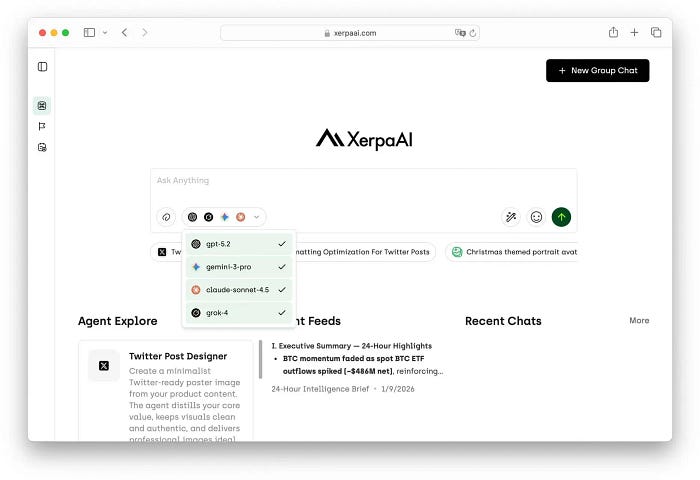
Step 3: Send your request Write your prompt and press the send button and you will get the answer!

Part 2- What is Agent Explore (and when should you use it)?
What is Agent Explore? Agent Explore is a library of ready-to-use "mini assistants" inside XerpaAI.
Each Agent is built for a specific task — like writing X posts, summarizing notes, or making a plan. So instead of staring at a blank chat and wondering "what should I type?", you just pick an Agent and follow the steps. If you're a beginner, Agent Explore is the easiest way to get good results because:
- You don't need to write a perfect prompt
- You don't need to build templates from scratch
- The output is already structured and consistent
In short: Normal chat = you figure out the workflow Agent Explore = the workflow is already prepared for you
Where can you find Agent Explore?
You can access Agent Explore in two quick ways:
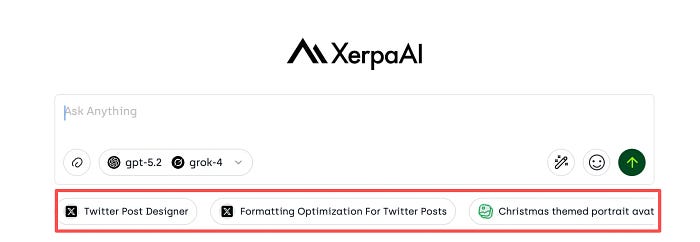
Below the chat box Look under your conversation — Agent Explore is one of the buttons there.
From Recent Chats Open Recent Chats, then click Agent Explore on the right side to browse Agents and read the instructions.

Part3 — How to write clear prompt The #1 rule: Tell AI what you want, for who, with what limits Most "bad AI answers" happen because the prompt is missing one of these:
- Goal (what outcome you want)
- Context (background the AI can't guess)
- Constraints (time, tone, format, tools, audience)
- Output format (what the final answer should look like)
The 4-line prompt template (copy & paste)
Goal: Context: Constraints: Output format:
Examples (same template, different tasks)
Writing (X post)
Goal: Write 5 X posts about our new feature Agent Explore. Context: XerpaAI is an all-in-one workspace with multiple AI models + agents. Constraints: Beginner-friendly, energetic, 1–2 lines each, include a CTA. Output format: 5 drafts + 3 hook options.
Final Thoughts: Start Simple, Then Go Further
You don't need to understand every AI model to use XerpaAI well. You don't need perfect prompts. You don't need to know "which model is the best."
All you need is a simple workflow:
- Ask a clear question
- Pick 1–2 models
- Use Agent Explore when you want structure
- Turn answers into actions
XerpaAI is designed to help you stop guessing and start solving.
Whether you're writing, planning, researching, or making decisions, the goal is always the same: get reliable answers you can actually use.
What's Next?
In future guides, we'll cover:
- How to choose the right model for different tasks
- How to build your own Agents and workflows
- Real use cases: writing, research, planning, and analysis
👉 Try XerpaAI now and see how much simpler AI can be when everything is in one place.