

Introduction
BERT is a widely used NLP model at Google. 2019 is considered to be the year of BERT, having replaced majority production systems. BERT uses self-attention based approaches, the model itself consist of transformer blocks, which are series of self-attention layers. BERT demonstrates use of self-attention lead to far more superior performance compared to RNN based sequence to sequence based models, particularly on the Stanford question answering dataeset(SQUAD). We have skipped all the theoretical details e.g. RNN, LSTM model, self-attention, as they well course in the course from Andrew Ng course and blog posts here and here (by Jay Alammar). Another great post provides over of major BERT based models. Do note that attention mechanisms were initially applied to improve performance of the RNN based, sequence to sequence models. A generic overview of attention mechanism is also published by Lilian Weng, where she explains the transformer architecture. In-particular the Key, Value and Query concepts, where key and value are equivalent to encoder outputs, i.e. memory, and query is decoder output, however, as original paper they are bit abstract, and work on all word. The reason why they are more effective and efficient is explained by Łukasz Kaiser
From an implementation point of view, BERT is a large model with 110 million or more parameters and training from ground up is quite challenging as highlighted in Google'g blog. It requires effective computing power and the model structure has to be carefully programmed to avoid bugs. Therefore to make the BERT model readily usable, Google open sourced it implementation, which can be fine tuned to various tasks in ~ 30 mins. An example is the sentiment analysis task, as explained here. Research efforts to limit the number of parameters are on-going. However, fine tuning BERT is also widely used approach.
Goal
The goal of this post is to deploy a trained BERT model to perform sentiment analysis on streaming tweets, as a microservice. This simple example provides exposition to key challenges of developing a microservice's for ML. The goal is to cover key concepts which highlight need of advanced tooling to train and deploy ML models. The keys tasks covered in this posts are
- Data preprocessing for streaming data (tweets): Real world systems are far more complex in terms of ETL
- Inferences using a trained (fine tuned) BERT model
Training the model is would required additional consideration for review and retaining. These would be discussed in another post.
Our architecture is as follows
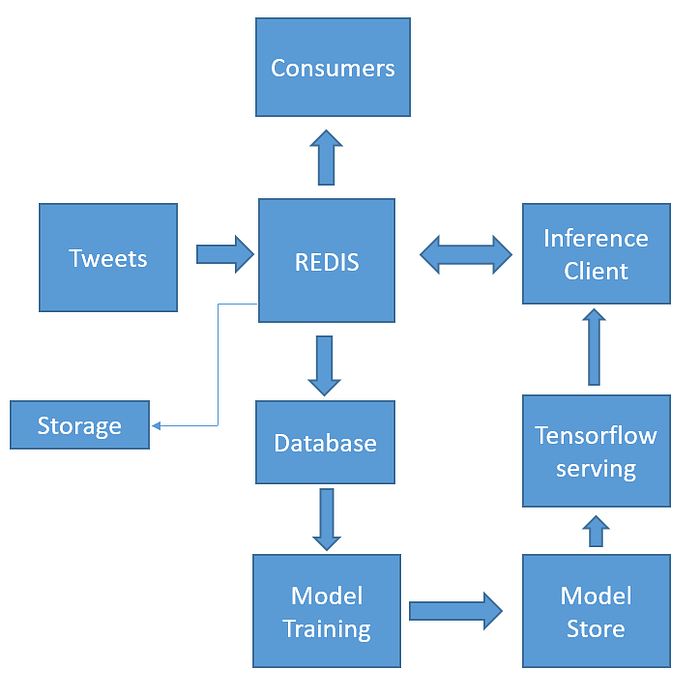
The technologies employed are (via relevant python API's)
- BERT, Tensorflow, Tensorflow-serving, Redis,
- Containers: Docker container and kubernetes for orchestration
Background information on Docker and kubernetes
We would develop microservices and deploy them using containers, and use K8S to manage these containers. Briefly, containers are an abstraction at the that package code and dependencies together to be run independently. If you are not familiar with containers please see the docker website for more information and tutorials. Kubernetes (K8S) was developed by Google to manage multiple containers, it can operate either on premise compute clusters or cloud. All major cloud providers support Kubernetes. The main Kubernetes concepts required for this post are as follows
- Basic kubernetes components and it architecture. Video here
- Pods and deployments
- Persistence Volume and Persistence Volume claim
- Kubenetes Services
- Kubectl: the command employed to create resources. We create various resources via means of a yaml files
#Create deployment/pods
kubectl create -f tensorflowServing.yaml
#Delete deployment/pods
kubectl delete -f tensorflowServing.yaml
#Check pods and service
kubectl get pods
kubectl get svc
#Check persistance volume and persistance volume cliam
kubectl get pv
kubectl get pvc
A very quick overview of these concepts is available here and here, while the youtube playlist provides a more detail exposition of the concepts available. Microsoft also have also developed good resources to get started with K8S. The resources provided by google are extensive and can be bit overwhelming initially. Once you have idea about K8S concepts, and do try "Hello world" here. It covers the process, We need to follow the same process, a few times !!!
The process as mentioned on the documentation is as follows
- Package your app into a Docker image
- Run the container locally on your machine (optional)
- Upload the image to a registry
- Create a container cluster
- Deploy your app to the cluster
- Expose your app to the outside the cluster via a service
- Scale up your deployment
Back to our mircoservices
- Our first microservice runs BERT using tensorflow-serving and the trained saved model, allows us to perform the inference using client
- The second microservice performs the sentiment analysis via "requests" to BERT using gRPC client and published it to a Redis pub/sub channel
If you are using GCP we assume you have gcloud, kubectl installed on your machine and are connected to project called "kubernetes", see here for more information see here. For other set-ups we assume there is equivalence.
We start by creating and connecting to kubernetes cluster on GCP via command line
CREATE
gcloud beta container — project "kubernetes" clusters create "standard-cluster-1" — zone "us-central1-a" — no-enable-basic-auth — cluster-version "1.13.11-gke.14" — machine-type "n1-standard-1" — image-type "COS" — disk-type "pd-standard" — disk-size "100" — scopes "https://www.googleapis.com/auth/devstorage.read_only","https://www.googleapis.com/auth/logging.write","https://www.googleapis.com/auth/monitoring","https://www.googleapis.com/auth/servicecontrol","https://www.googleapis.com/auth/service.management.readonly","https://www.googleapis.com/auth/trace.append" — num-nodes "3" — enable-cloud-logging — enable-cloud-monitoring — enable-ip-alias — network "projects/kubernetes/global/networks/default" — subnetwork "projects/kubernetes/regions/us-central1/subnetworks/default" — default-max-pods-per-node "110" — addons HorizontalPodAutoscaling,HttpLoadBalancing — enable-autoupgrade — enable-autorepairCONNECT
gcloud container clusters get-credentials standard-cluster-1 — zone us-central1-a — project kubernetesFor Data Storage we use google cloud disk, Model is storage in a separate location
gcloud beta compute disks create redis-disk-gce — project=kubernetes — type=pd-standard — size=100GB — zone=us-central1-a — physical-block-size=4096REDIS
We employ redis in this set up to communicate between microservices . Redis is employed as pub/sub messaging. It is necessary to have robust redis microservice running on the cluster. One of the issue we may face is in case if redis crashes. Kubernetes is able to detect crashes and creates a new container i.e instance of redis to maintain service. However the new container may have a different states when the container is recreated. Thus to avoid this we make use of persistence disk (a dedicate storage disk), which link this storage to our Redis container via the use of a persistence volume claim. This is very simple set up, at an enterprise level to achieve scale we need to employ stateful sets. A detail discussion of which can be found available here, while an example redis configuration is available here.
In our setup, have a single redis instance and we use google cloud disk to create a persistence volume and persistence volume claim via the yaml files. We use these in make use storage via the means of persistence volume claim in the redis container as outline in the ymal files. We also expose redis to external world via a kubernetes service.
Serving tensorflow models
Serving a tensorflow model in kubernetes is very straight forward, via the use of tensorflow serving API. The steps are as follows
- Collecting the list of input ("sinputs") and output ("soutput") variables from the tensorflow graph
- Creating a prediction signature before saving the model
- Save the model using the save model format
We copy our trained model to tensorflow serving docker image, create new docker image with our model and upload it to container registry, using the process outlined here. Our docker images is gcr.io/kubernetes-258108/bert. We deploy this image via kubenetes deployment. We also create a kubernetes service.
Note: Use the service IP address obtained using "kubectl" for client side outside our cluster to make request. To avoid the use IP address employ the kube-dns discovery service, this is well documented and a python example is available here . Since we have already configured the service for bert inference client and just can use the name of the service "bertservice:8500" 8500 is the port, since are making request within our cluster.
The key code component to make requests in client are as follows, these are based on the google client example.
Full example of inference client is available is as follows. It consist of Tweepy streaming listener to subscribe to topics for tweets and redis sub/pub messaging service
Bert inference client which using gRPC request client
We package this client in a docker container using a dockerfile and deploy on our kubernetes cluster
Now we can start observing streaming tweets with sentiments either via kubectl by connecting to redis pods or using a python subscriber
kubectl exec -it redis-pod-name redis-cli
127.0.0.1:6379> SUBSCRIBE STREAM
Note: we don't use GPU for inference, and as result a gRPC request on a standard N1 compute resource, takes about 12 seconds (for a batch size of 20)
Closing thoughts
We are to able deploy this set-up on a GCP cluster for 3 days without any incident. This demonstrates the power of containers and simple application for ML and could be deployed very quickly. However, in real world scenarios are quite different. For example, ETL can be quite a complex task, and may require advanced technologies such as rabbit-MQ, Kafka or Apache beam to integrate data from other sources. We may need re-train and re-deploy ML models. These are cover in another blog post. In-combination these should provide an introduction to developing micro-services and highlighting need for other technologies such, Kubeflow, Apache Airflow, Seldon, helm charts for developing ML applications using kubernetes infrastructure. We have not discussed how to scale our microservices using Kubernetes. One approach would be to make use of replicaSets, but there may be some considerations depend on task and scale we require. For example, OpenAI in a recent blog post document there challenges to scale kubernetes to 2500 nodes.
git repo: for this work can be found here