
To load data from local storage to HDFS (Hadoop Distributed File System), Ubuntu Os terminal is used with command-line interface (CLI). Here's a step-by-step guide:
Step 1: Ensure HDFS is Installed and Running in the background First, make sure the Hadoop services are up and running.
Start Hadoop with the following command in the terminal:
start-all.sh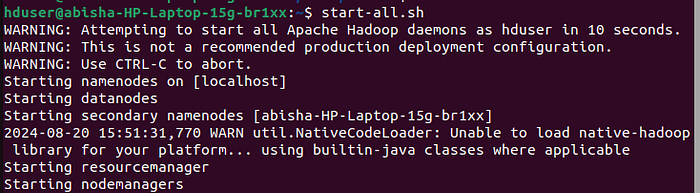
Check if all the required nodes have started using the command jps.
jps
Step 2: Prepare the Data Make sure the data is available on the local file system.
Check if the file is present using:
ls /path/to/local/directory
We are going to move Data.csv to the HDFS.
Step 3: Create a Directory in HDFS (Optional) To store the data in a specific directory in HDFS, create that directory using:
hdfs dfs -mkdir /path/to/hdfs/directory
Step 4: Upload Data to HDFS Use the `hdfs dfs -put` command to load the data from local storage to HDFS:
hdfs dfs -put /path/to/local/file /path/to/hdfs/directory
Step 5: Verify the Upload Check if the file has been successfully uploaded to HDFS using the `hdfs dfs -ls` command:
hdfs dfs -ls /path/to/hdfs/directoryThis will list all the files in the specified HDFS directory.

To view the data in web browser use the following link in any browser.
http://localhost:9870/explorer.html#/Data
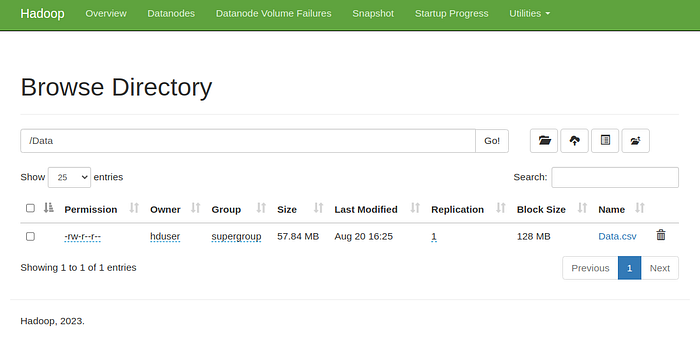
Step 6: Accessing or Processing the Data Now that the data is stored in HDFS, it can be accessed or processed using Hadoop tools like MapReduce, Hive, or Spark.
Example: Here's a full example that combines above commands:
# Start Hadoop services (if not already running)
start-all.sh
# Check if all the services are running
jps
# Check if the file exists locally
ls /home/abisha/Documents/AGRI/
# Create a directory in HDFS
hdfs dfs -mkdir /Data
# Upload the file to HDFS
hdfs dfs -put /home/abisha/Documents/AGRI/Data.csv /Data
# Verify the upload
hdfs dfs -ls /Data/
The above shows the basic commands to move data from local storage to HDFS.