

This article will provide some tips to increase your productivity as a c++ programmer. So without further ado, let's get started.
1. Do not re-invent the wheel
Use built-in functions of c++ and its STL library extensively.
Like, use pow and __gcd, instead of creating your own functions for calculating power and gcd of two numbers.
Note: There is a catch in using the built-in pow function to calculate xraised to some power y.
use int(pow(x, y) + 0.5)instead of pow(x, y).
Start using C++ STL extensively, it has two benefits, first you don't have to rewrite the same data structures and algorithms again and again, secondly it makes code more readable.
As for example, you may want to use prefix sum. Will you write the code from scratch, NO, you will use partial_sum build in c++STL library.
If you want to learn more about C++ STL then check out this article.
2. Add a single header file
You must be including a lot of header files like iostream, cstdlib, cmath, vector, stack, algorithm, etc. But you can include only one header file to get your work done. This header file is super useful for competitive programmers. This header file is
#include<bits/stdc++.h>
Note- If you are pushing your executable file to production than it will increase your executable file size, so it is not advisable to include this header file in this particular case as you will be including a lot of unnecessary files which you won't be using. Quick Tip: Use "\n" instead of endl in competitive programming.
3. Start using macros
Macros come very handily, especially in short coding contests. These are the macros that I use.
the macro watch comes very handily in debugging as we can use it to see the value of variables along with their variable name..
now you should use sort(all(container))instead of sort(container.begin(), container.end())
you must be fed of writing for(auto it = container.begin(); it != container.end(); it++), now start writing tr(container, it).
rep stands for repeat.
rep(i, a, n) iterates from 'a' until 'n' excluding 'n'. rep0(i, n) iterates based on 0-indexing. rep1(i, n) iterates based on 1-indexing.
You can include a single line of fastio to make cin and cout work as fast as scanf and printf. For large input files, this boosts the performance of your program by a significant amount.
4. Make a utilities file
You can include this file in every program to see values in various containers.
5. Read and Write multiple variables in single line
Just include these two functions in your program and by doing so you can read multiple inputs from console and write multiple outputs to console. Here is how you can do this :
int x, y, z;
read(x, y, z);
write(x, y, z);
Note : Some compilers may flag a warning in using these functions, but you need to ignore them.
6. Use a better text editor/IDE
Stop using Turbo C++, Dev C++, Codeblocks and use a better text editor/IDE like Visual Studio, Visual Studio Code, Clion, CodeLite.
They have better intellisense, and auto code completion.
Quick Note — Use Visual Studio(IDE) only if you are running a really high end machine as it is quiet heavy.
My personal favorite is Visual Studio Code. It is much lighter than Visual Studio and packs a ton of features. I use it for everything, literally "everything". You can read more about vscode features here.
7. Customize your text editor/IDE
This point is specifically for users of vscode. You can search similar things for editor of your choice.
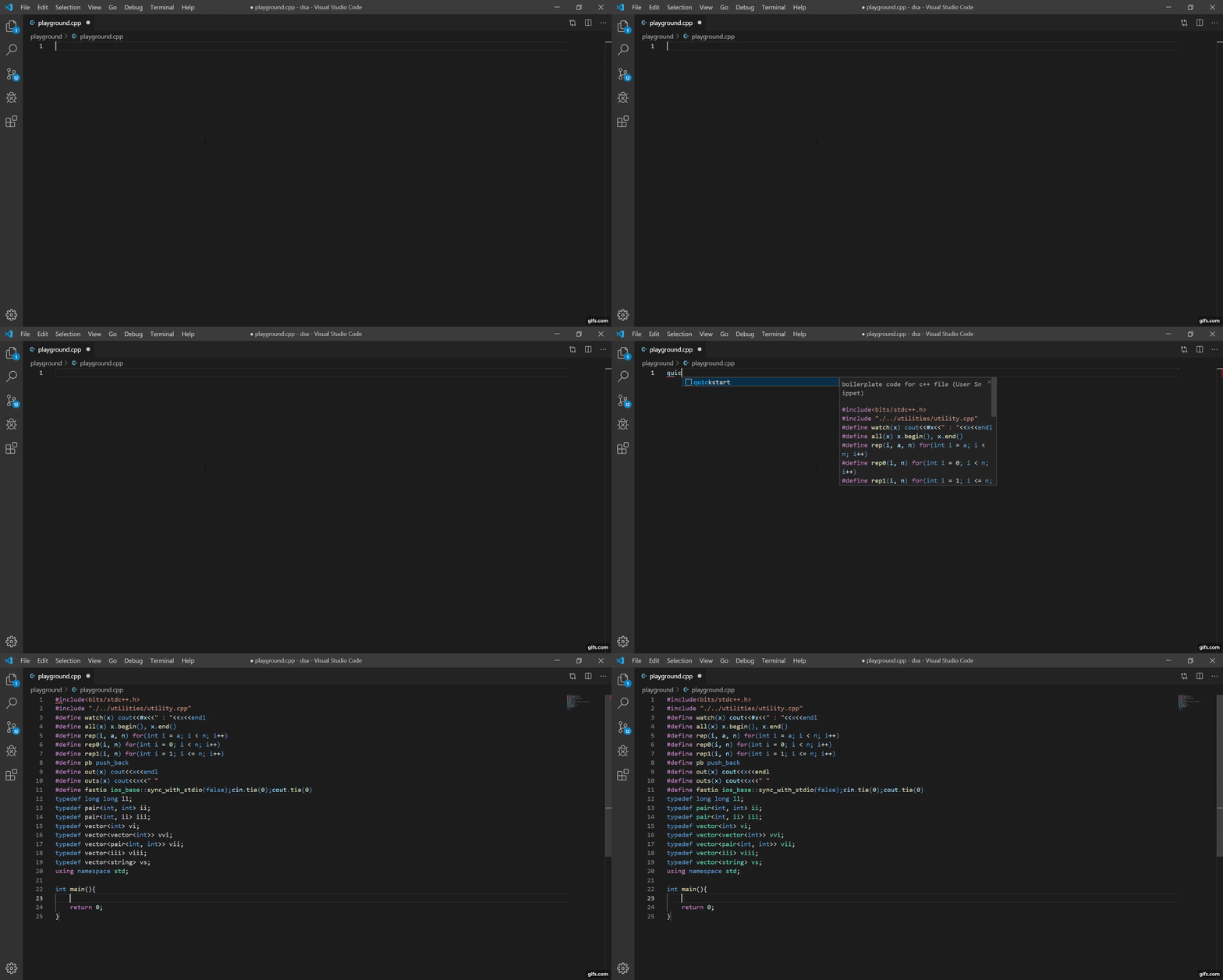
I have set up a default template for c++ in vscode as quickstart. You can also do this as follows:
Navigate to File -> Preferences -> User Snippets. It will open a command pallet. Then create a snippet for c++ file. Something like this :
Sample Program
Below is a sample program which incorporates all the above points :)
Note : Notice that I have placed using namespace std;after line 12 before all typedef's . If I have placed it after any typedef then some online compilers like that of hackerrank, may flag an error.
Please clap if you like it.
Please comment if you found any discrepancy in this article or if you want me to add something in this article or if you have any question related to this article.
Subscribe to my YouTube Channel 🔔
Follow me on Github ✌
Connect me on LinkedIn 🤝